MagicMirror Forum
    • Recent
    • Tags
    • Unsolved
    • Solved
    • MagicMirror² Repository
    • Documentation
    • 3rd-Party-Modules
    • Donate
    • Discord
    • Register
    • Login
    A New Chapter for MagicMirror: The Community Takes the Lead
    Read the statement by Michael Teeuw here.

    MMM-Spotify

    Scheduled Pinned Locked Moved Entertainment
    249 Posts 51 Posters 276.1k Views 54 Watching
    Loading More Posts
    • Oldest to Newest
    • Newest to Oldest
    • Most Votes
    Reply
    • Reply as topic
    Log in to reply
    This topic has been deleted. Only users with topic management privileges can see it.
    • ? Offline
      A Former User @kwaeksler
      last edited by

      @kwaeksler I think I can add device limitation to display or control. I’ll consider it on updates.

      K 1 Reply Last reply Reply Quote 0
      • K Offline
        kwaeksler @Guest
        last edited by

        @Sean That sounds great :-) Thank you!

        1 Reply Last reply Reply Quote 0
        • ejay-ibmE Offline
          ejay-ibm Project Sponsor Module Developer
          last edited by

          some more testing . With Spotify Familly. You can have 1 device set per email account .

          ejay

          1 Reply Last reply Reply Quote 0
          • ? Offline
            A Former User
            last edited by

            updated

            1.1.0 (2019-03-25)

            • Added: touch(click) interface
            • Device Limitation : Now you can allow or limit devices to display its playing on MM.
            • Some CSS structure is changed.
            • Now this module can emit SPOTIFY_* notifications for other module.

            K 1 Reply Last reply Reply Quote 1
            • thymonT Offline
              thymon
              last edited by

              Need the same for DEEZER :disappointed_face: :loudly_crying_face:

              Cr4z33C 1 Reply Last reply Reply Quote 0
              • Cr4z33C Offline
                Cr4z33 @thymon
                last edited by

                @thymon said in MMM-Spotify:

                Need the same for DEEZER :disappointed_face: :loudly_crying_face:

                Never got it working, but here it is.

                1 Reply Last reply Reply Quote 0
                • Cr4z33C Offline
                  Cr4z33
                  last edited by

                  @Sean @ejay-ibm I’ve got a Spotify Premium account now so I was giving MMM-Spotify another shot, but I am stuck at instructions step #4.

                  I am logged in however I get INVALID_CLIENT: Invalid redirect URI in the webpage once I click the generated URL. :confused_face:

                  Any thoughts?

                  ? 1 Reply Last reply Reply Quote 0
                  • ? Offline
                    A Former User @Cr4z33
                    last edited by

                    @Cr4z33
                    Your two values of “REDIRCT_URI” should be the same; Your spotify App setup and your spotify.config.json. Check again.

                    Cr4z33C 1 Reply Last reply Reply Quote 0
                    • Cr4z33C Offline
                      Cr4z33 @Guest
                      last edited by

                      @Sean sorry where shoud I look for that? :smiling_face_with_open_mouth_cold_sweat:

                      In the generated link or?

                      ? 1 Reply Last reply Reply Quote 0
                      • Cr4z33C Offline
                        Cr4z33
                        last edited by

                        There’s more now I notice a following error message in the terminal

                        [SPOTIFY_AUTH] Error: null { error: 'invalid_request',
                          error_description: 'code must be supplied' }
                        
                        1 Reply Last reply Reply Quote 0
                        • ? Offline
                          A Former User @Cr4z33
                          last edited by A Former User

                          @Cr4z33
                          Go to https://developer.spotify.com/dashboard/applications (login)
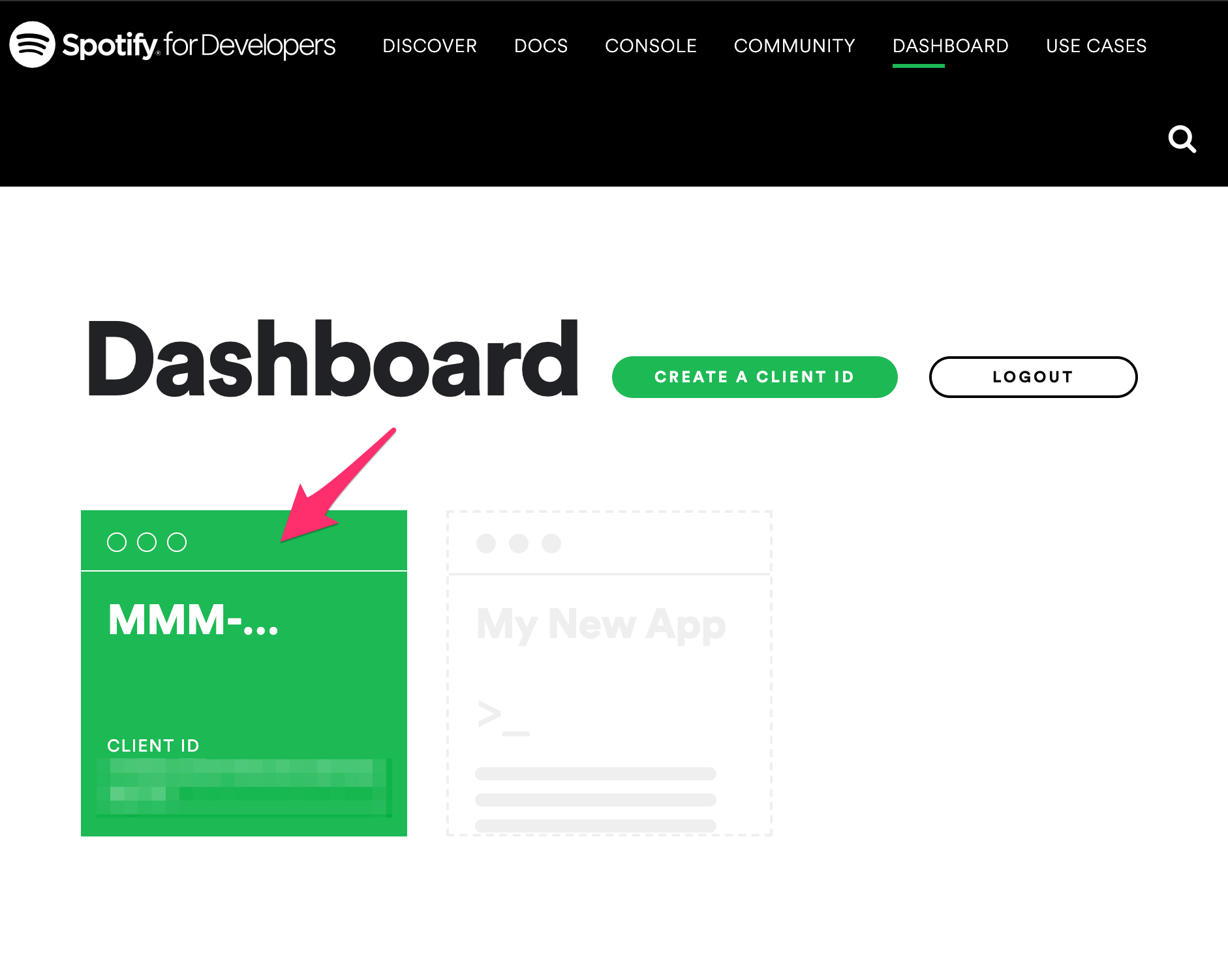
                          0_1553527417193_t1.png

                          Then select your spotify app for this module. (You might have created one if you followed instruction)
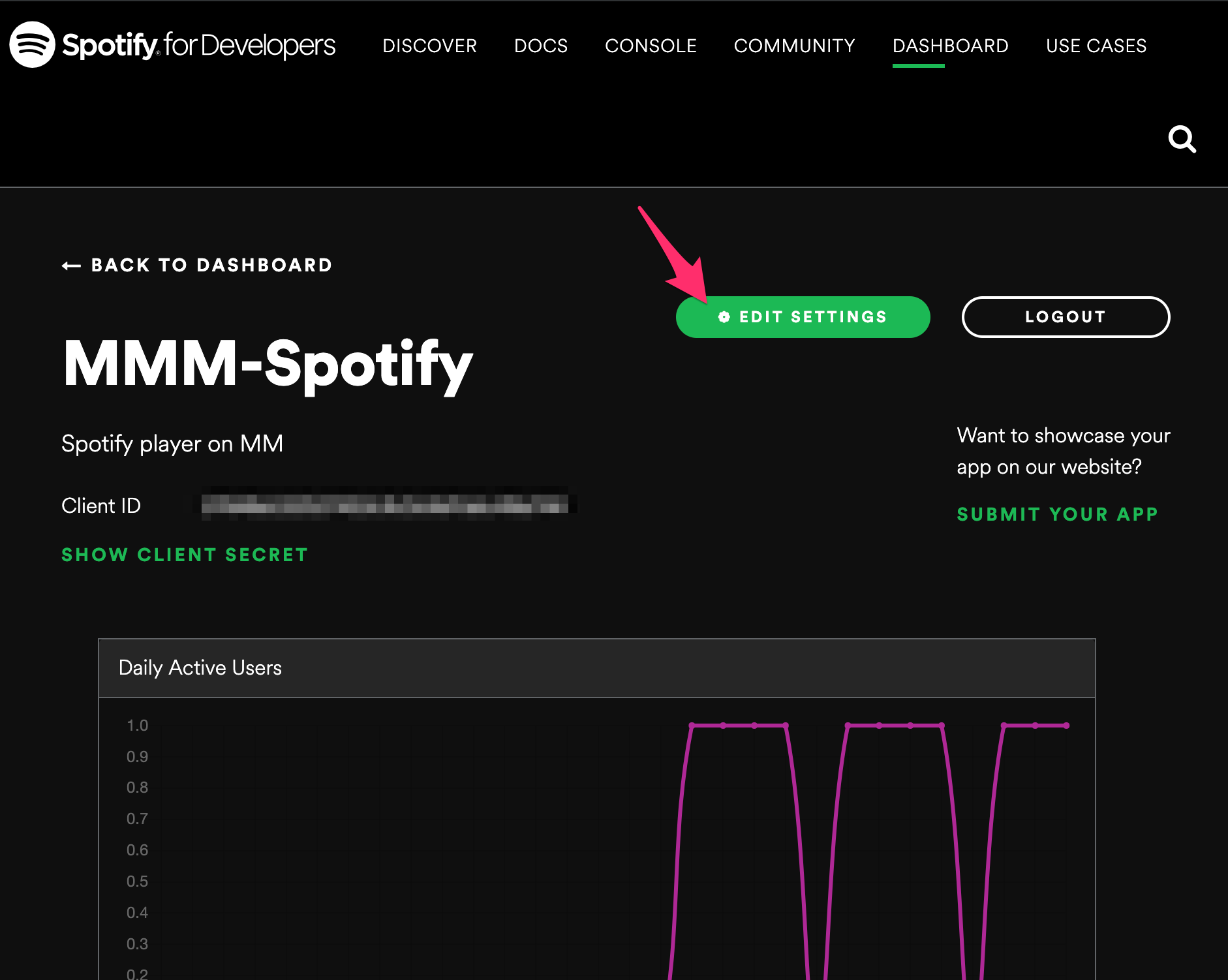
                          0_1553527430540_t2.png

                          Then check your redirect_uri with your spotify.config.json.
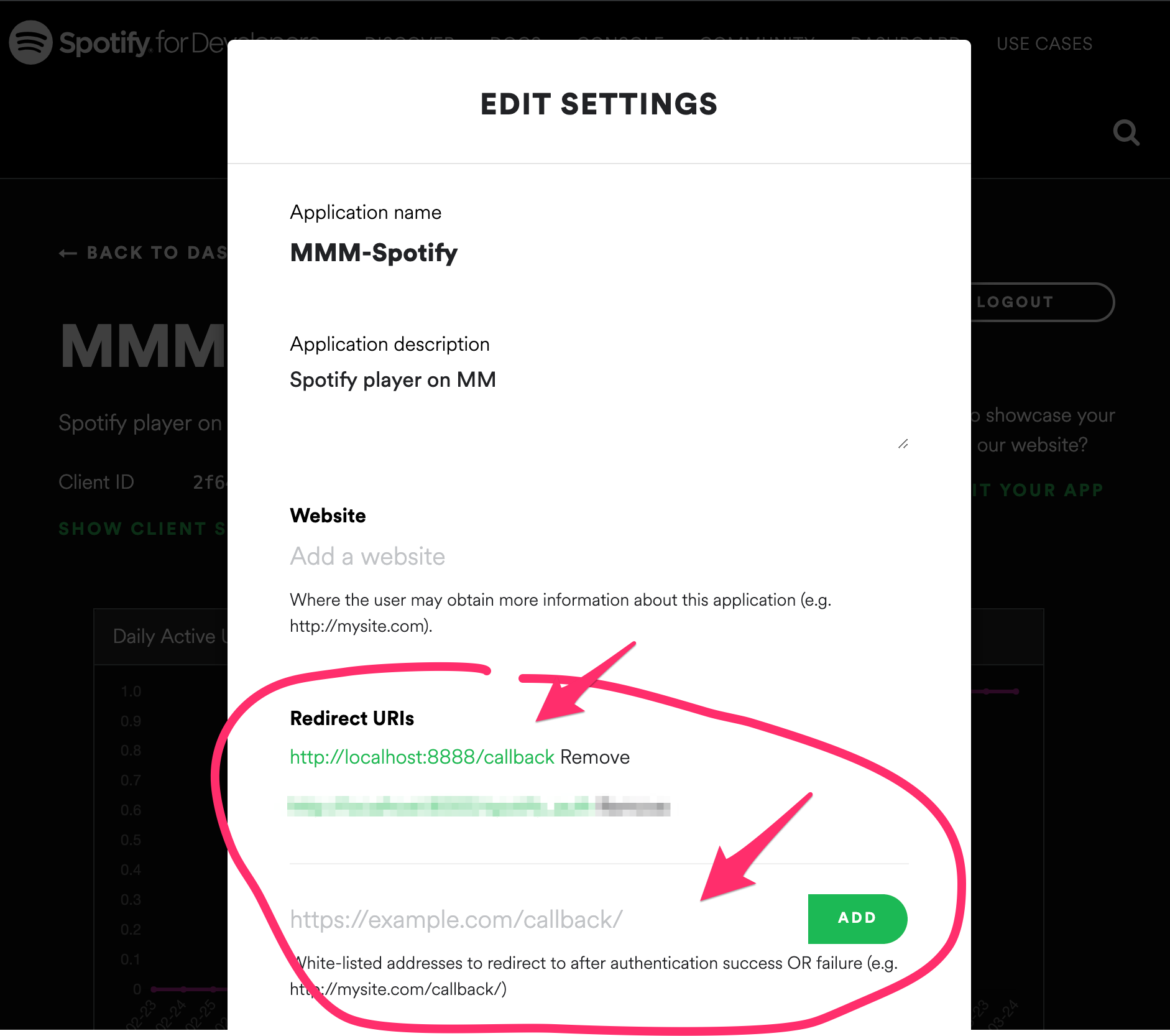
                          0_1553527504339_t3.png

                          Cr4z33C 1 Reply Last reply Reply Quote 0
                          • Cr4z33C Offline
                            Cr4z33 @Guest
                            last edited by

                            @Sean that was the solution. :D
                            The redirect URI for some reason was empty.

                            As soon as I added it manually re-running step #4 worked like a charm. :thumbs_up_medium_skin_tone:

                            1 Reply Last reply Reply Quote 0
                            • Cr4z33C Offline
                              Cr4z33
                              last edited by

                              @Sean OK now a different issue.

                              I added the MMM-AssistantMk2 needed lines, but when I say ie. Michael Jackson on Spotify nothing happens…

                              Isn’t it supposed to play then straight on MagicMirror? :thinking_face:

                              ? 1 Reply Last reply Reply Quote 0
                              • ? Offline
                                A Former User @Cr4z33
                                last edited by

                                @Cr4z33
                                If you didn’t make a proper command about it (with transciptionHook or gAction - I recommend gAction because spotify would be a reserved feature of real Google Assistant but not supported on this SDK level.), you can’t.

                                Cr4z33C 1 Reply Last reply Reply Quote 0
                                • Cr4z33C Offline
                                  Cr4z33 @Guest
                                  last edited by

                                  @Sean well I followed your instructions so… :grimacing_face:

                                  gAction you say?
                                  Ouch that’s all new to me and I guess it will take a while then… OK… :confounded_face:

                                  1 Reply Last reply Reply Quote 0
                                  • Cr4z33C Offline
                                    Cr4z33
                                    last edited by

                                    @Sean OK maybe it is my fault, but it was my understanding that this Spotify module can be also a stand-alone player?

                                    For some reason a second try at Michael Jackson on Spotify made start the web player I was previously running on my computer…

                                    Does this mean that if I have Raspotify (how to set it up then?) I can actually run everything from the Pi?

                                    ? 1 Reply Last reply Reply Quote 0
                                    • ? Offline
                                      A Former User @Cr4z33
                                      last edited by

                                      @Cr4z33
                                      This is not a standalone player. you need “RASPOTIFY” to play songs directly on MM.
                                      There is some API about standalone player, but unfortunately, RPI doesn’t support that feature.
                                      Your trial was not about this module on RPI. It was an original features of Google Assistant.

                                      Cr4z33C 1 Reply Last reply Reply Quote 0
                                      • Cr4z33C Offline
                                        Cr4z33 @Guest
                                        last edited by

                                        @Sean I want them both. ;)
                                        Voice commands to play Spotify songs STRAIGHT in MM.

                                        Thanks for confirming I am going to have some Raspotify reading now.

                                        1 Reply Last reply Reply Quote 0
                                        • ejay-ibmE Offline
                                          ejay-ibm Project Sponsor Module Developer
                                          last edited by

                                          @Cr4z33 if you don’t want to use gaction like me .
                                          I’ll share my transcription hook and command i’m using with this module and others.
                                          It works perfectly. with raspotify. raspotify is pretty easy to install and run.

                                          transcriptionHook: {
                                          
                                                  HIDE_ALL_MODULES: {
                                                      pattern: "standby mode",
                                                      command: "HIDEMODULES"
                                                    },
                                                    SHOW_ALL_MODULES: {
                                                      pattern: "show modules",
                                                      command: "SHOWMODULES"
                                                    },
                                                    SCREEN_ON: {
                                                      pattern: "turn on screen",
                                                      command: "SCREENON"
                                                    },
                                                    SCREEN_OFF: {
                                                      pattern: "turn off screen",
                                                      command: "SCREENOFF"
                                                    },
                                                    REBOOT: {
                                                      pattern: "reboot the mirror",
                                                      command: "REBOOT"
                                                    },
                                                    SHUTDOWN: {
                                                      pattern: "extinction totale",
                                                      command: "SHUTDOWN"
                                                    },
                                                    STOP_PLAY: {
                                                      pattern: "stop the video", // this is for youtube but it is preferable to have youtubeAutoplay: false, when running spotify so you don't get interaction with youtube player. 
                                                      command: "STOP_VID"
                                                    },
                                                   // STOP_PLAY2: {
                                                   //   pattern: "arrête la musique",
                                                   //   command: "STOP_VID"
                                                   // },
                                          
                                          	 SPOTIFY_PREVIOUS: {
                                                  pattern: "previous song",
                                                  command: "SPOTIFY_PREVIOUS"
                                                  },
                                                  SPOTIFY_PAUSE: {
                                                  pattern : "stop the musique",
                                                  command: "SPOTIFY_PAUSE"
                                                  },
                                                  SPOTIFY_PLAY: {
                                                  pattern : "music please",
                                                  command: "SPOTIFY_PLAY"
                                                  },
                                                  SPOTIFY_NEXT: {
                                                  pattern: "next song",
                                                  command: "SPOTIFY_NEXT"
                                                  },
                                                  SPOTIFY_VOLUME: {
                                                  pattern: "set music volume to ([0-9]{1,2}[0]?|100)",
                                                  command: "SPOTIFY_VOLUME"
                                                  },
                                                  SPOTIFY_SEARCH: {
                                                  pattern: "play (.*) on Spotify",
                                                  command: "SPOTIFY_SEARCH"
                                                  },
                                          	SPOTIFY_SEARCH_PLAYLIST: {
                                                  pattern: "playlist (.*) on Spotify",
                                                  command: "SPOTIFY_SEARCH_PLAYLIST"
                                                  },
                                          	SPOTIFY_MA_PLAYLIST: {
                                          	pattern: "(.*) my playlist",   // (.*)  is an action  eg: play my playlist / run my playlist etc... 
                                          	command: "SPOTIFY_MA_PLAYLIST"
                                          	},
                                          	SPOTIFY_TRANSFER: {
                                          	pattern: "play the music on (.*)", // (.*)  is the name of your device
                                          	command: "SPOTIFY_TRANSFER"
                                          	},
                                                    VOLUME_UP: {
                                                      pattern: "volume up",
                                                      command: "CMD_VOLUME_UP"
                                                    },
                                                    VOLUME_DOWN: {
                                                      pattern: "volume down",
                                                      command: "CMD_VOLUME_DOWN"
                                                    },
                                                    SET_VOLUME: {
                                                      pattern: "set master volume to ([0-9]{1,2}[0]?|100)",
                                                      command: "CMD_VOLUME_SET"
                                                    }
                                          
                                                  },
                                                  command: {
                                          
                                                    STOP_VID: {
                                                      moduleExec: {
                                                        module: ["MMM-AssistantMk2"],
                                                        exec: (module, params, key) => {
                                                          module.assistant.subdom.youtube.innerHTML = ""; 
                                                          module.assistant.subdom.youtube.style.display = "none";
                                                          module.youtubePlaying = false;
                                                        }
                                                      }
                                                    },
                                          	   SPOTIFY_TRANSFER: {
                                          	    notificationExec: {
                                                        notification: "SPOTIFY_TRANSFER",
                                          	         payload: (params) => {
                                                           console.log("SPOTIFY_TRANSFER @",params)
                                                          return params[1];
                                                                  }
                                              
                                          	}
                                                    },
                                                     SPOTIFY_PAUSE: {
                                                      notificationExec: {
                                                        notification: "SPOTIFY_PAUSE"
                                                      }
                                                    },
                                          
                                                  SPOTIFY_PLAY: {
                                                      notificationExec: {
                                                          notification: "SPOTIFY_PLAY"
                                                          }
                                                  },
                                          	
                                          	SPOTIFY_MA_PLAYLIST: {
                                          	    notificationExec:  {
                                          		notification: "SPOTIFY_PLAY",
                                          		payload: (params) => {
                                          		console.log("SPOTIFY_MA_PLAYLIST")
                                          		return {
                                          			context_uri:"spotify:playlist:0bdByehKVfdsfdsfdsOhF5t",   // Uri of a personnal playlist or album
                                          				}
                                          			},
                                          		notification: "SPOTIFY_SHUFFLE",  // added this to toogle shuffle
                                          		notification: "SPOTIFY_NEXT" // added this to not always have the same song starting first 
                                          		}
                                          	},		
                                                  
                                          	SPOTIFY_NEXT: {
                                                   notificationExec: {
                                                      notification: "SPOTIFY_NEXT"
                                                          }
                                                  },
                                          
                                                  SPOTIFY_PREVIOUS: {
                                                   notificationExec: {
                                                      notification: "SPOTIFY_PREVIOUS"
                                                          }
                                                  },
                                                  SPOTIFY_VOLUME: {
                                                   notificationExec: {
                                                     notification: "SPOTIFY_VOLUME",
                                                     payload: (params) => {
                                                           console.log("SPOTIFY_VOLUME @",params)
                                                          return params[1];
                                                                  }
                                                          }
                                                  },
                                          	SPOTIFY_SEARCH: {
                                                   notificationExec: {
                                                     notification: "SPOTIFY_SEARCH",
                                          
                                                  payload: (params) => {
                                                          console.log("SPOTIFY_SEARCH @",params)
                                                          return {
                                                                  type: "artist,track,album,playlist",
                                                                  query: params[1],
                                                                  random:false,
                                                                  }
                                                               }
                                                          }
                                                  },
                                          	 SPOTIFY_SEARCH_PLAYLIST: {
                                                   notificationExec: {
                                                     notification: "SPOTIFY_SEARCH",
                                          
                                                  payload: (params) => {
                                                          console.log("SPOTIFY_SEARCH_PLAYLIST @",params)
                                                          return {
                                                                  type: "playlist",
                                                                  query: params[1],
                                                                  random:true,
                                                                  }
                                                               }
                                                          }
                                                  },
                                          
                                          
                                                    CMD_VOLUME_UP: {
                                                      notificationExec: {
                                                        notification: "VOLUME_UP"
                                                      }
                                                    },
                                                    CMD_VOLUME_DOWN: {
                                                      notificationExec: {
                                                        notification: "VOLUME_DOWN"
                                                      }
                                                    },
                                                    CMD_VOLUME_SET: {
                                                      notificationExec: {
                                                        notification: "VOLUME_SET",
                                                        payload: (params, key) => {
                                                          console.log("@", params);
                                                          return params[1];
                                                        }
                                                      }
                                                    }
                                                  },
                                          

                                          hope this will help.

                                          @Sean let me know if you want me to update the wiki.

                                          Ejay

                                          ? Cr4z33C 2 Replies Last reply Reply Quote 1
                                          • ? Offline
                                            A Former User @ejay-ibm
                                            last edited by

                                            @ejay-ibm thanks. As your wish, my colleague.

                                            1 Reply Last reply Reply Quote 0

                                            Hello! It looks like you're interested in this conversation, but you don't have an account yet.

                                            Getting fed up of having to scroll through the same posts each visit? When you register for an account, you'll always come back to exactly where you were before, and choose to be notified of new replies (either via email, or push notification). You'll also be able to save bookmarks and upvote posts to show your appreciation to other community members.

                                            With your input, this post could be even better 💗

                                            Register Login

                                            • 1
                                            • 2
                                            • 3
                                            • 4
                                            • 5
                                            • 12
                                            • 13
                                            • 2 / 13
                                            • First post
                                              Last post
                                            Enjoying MagicMirror? Please consider a donation!
                                            MagicMirror created by Michael Teeuw.
                                            Forum managed by Sam, technical setup by Karsten.
                                            This forum is using NodeBB as its core | Contributors
                                            Contact | Privacy Policy