MagicMirror Forum
    • Recent
    • Tags
    • Unsolved
    • Solved
    • MagicMirror² Repository
    • Documentation
    • 3rd-Party-Modules
    • Donate
    • Discord
    • Register
    • Login
    A New Chapter for MagicMirror: The Community Takes the Lead
    Read the statement by Michael Teeuw here.

    MYMIRROR - From Modena

    Scheduled Pinned Locked Moved Show your Mirror
    28 Posts 6 Posters 21.1k Views 7 Watching
    Loading More Posts
    • Oldest to Newest
    • Newest to Oldest
    • Most Votes
    Reply
    • Reply as topic
    Log in to reply
    This topic has been deleted. Only users with topic management privileges can see it.
    • S Offline
      s.monti.74
      last edited by s.monti.74

      This post is deleted!
      1 Reply Last reply Reply Quote 0
      • S Offline
        s.monti.74
        last edited by

        This post is deleted!
        1 Reply Last reply Reply Quote 0
        • S Offline
          s.monti.74
          last edited by

          I have done in this way.

          I Have installed Arduino IDE on RPI and to run on Arduino the program to send via serial communication ten information of the RFID it’s reading
          This in the programo uploaded on Arduino
          I use two RFID tags (TAG1 and TAG2)

          richland007R 1 Reply Last reply Reply Quote 0
          • S Offline
            s.monti.74
            last edited by

            This post is deleted!
            1 Reply Last reply Reply Quote 0
            • S Offline
              s.monti.74
              last edited by

              ----------------------------------------------------
              #include <SPI.h>
              #include <RFID.h>
              
              #define SDA_DIO 10  // 53 per Mega
              #define RESET_DIO 9
              #define delayRead 1000 // Time of delay 
              #define delayLed 2000 
              #define ledVerde 3
              #define ledRosso 4
              RFID RC522(SDA_DIO, RESET_DIO); 
               
              String TAG1= "975318736";
              String TAG2= "976A15D37";
               
              void setup()
              { 
                Serial.begin(9600);
                /* Abilita SPI*/
                SPI.begin(); 
                /* Viene inizilizzato RFID reader */
                RC522.init();
                /*Serial.println("Setup");*/
                pinMode(ledVerde,OUTPUT);
                pinMode(ledRosso,OUTPUT);
              }
               
              void loop()
              {
                /* Temporary loop counter */
                byte i;
                // Se viene letta una tessera
                if (RC522.isCard())
                {
                  RC522.readCardSerial();
                  String codiceLetto ="";
                  for(i = 0; i <= 4; i++)
                  {
                    codiceLetto+= String (RC522.serNum[i],HEX);
                    codiceLetto.toUpperCase();
                  }
                   if (codiceLetto.equals(TAG1)){
                    Serial.println("S");
                    accendiLed(ledVerde);
                  }
                  if (codiceLetto.equals(TAG2)){
                    Serial.println("G");
                    accendiLed(ledVerde)
                  delay(delayRead);  
                }
               }
              
              boolean verificaCodice(String codiceLetto){
                if(codiceLetto.equals(codiceAutorizzato)){
                  return true;
                }else{
                  return false;
                }  
              }    
              void accendiLed(int ledPin){
                digitalWrite(ledPin,HIGH);
                delay(delayLed);
                digitalWrite(ledPin,LOW);
              }
              ----------------------------------------------------
              
              richland007R 1 Reply Last reply Reply Quote 0
              • S Offline
                s.monti.74
                last edited by

                this program sends via serial communication the value “S” if i use TAG1 and “G” if I usa TAG2
                Then you have to use, on magic mirror, the module MMM-Serial-Notifications to read the value:

                {
                    module: 'MMM-Serial-Notifications',
                    config: {
                      devices: {
                        '/dev/ttyACM0': {
                          messages: {
                            'S': [
                              {
                		notification: 'CURRENT_PROFILE', 										
                		payload:  'S',
                              },
                            ],
                          'A': [
                              {
                		notification: 'CURRENT_PROFILE', 										
                		payload:  'G',
                              }
                
                            ]
                          }
                        }
                      }
                    }
                  },


                and the module MMM-ProfileSwitcher to manage all other modules:

                {
                        		module: 'MMM-ProfileSwitcher',
                			classes: 'default',
                			header: "Profile",
                        		config: {
                		
                				enterMessages: {
                					"G": "Ciao, G",
                					"S": "Ciao, S" 
                				},
                				leaveMessages: {
                					"G": "Ciao G, ci vediamo alla prossima", 
                					"S": "Ciao S, ci vediamo alla prossima",
                				},
                
                				timers: {
                    				"S": {
                        			time: 10 * 1000
                    				},
                    				"G": {
                        			time: 10 * 1000
                    				}
                			}


                  		      }
                    		},
                

                BYE
                Stefano

                1 Reply Last reply Reply Quote 1
                • richland007R Offline
                  richland007 @s.monti.74
                  last edited by

                  @s-monti-74 So do you use an Arduino Uno or not??
                  Why do you download the Arduino IDE on the Rpi?? Is it just for programming the UNO (i use the IDE on my Windows machine) or to read the serial commands??
                  How do you connect the RFID board RC522 to the Rpi or to the UNO?? … the board has 7 used pins and 1 unused, assuming we are talking about the RFID-RC522 board

                  Gracie
                  Denis

                  1 Reply Last reply Reply Quote 0
                  • richland007R Offline
                    richland007
                    last edited by

                    @s-monti-74 Stefano One more question if you use the Arduino Uno how do you connected it to the Rpi??

                    S 1 Reply Last reply Reply Quote 0
                    • S Offline
                      s.monti.74
                      last edited by

                      I have bought this on Amazon:
                      AZDelivery ⭐⭐⭐⭐⭐ Kit RFID RC522 13,56MHz con Reader, Chip e Scheda per Arduino e Raspberry Pi con eBook Gratuito!
                      7€

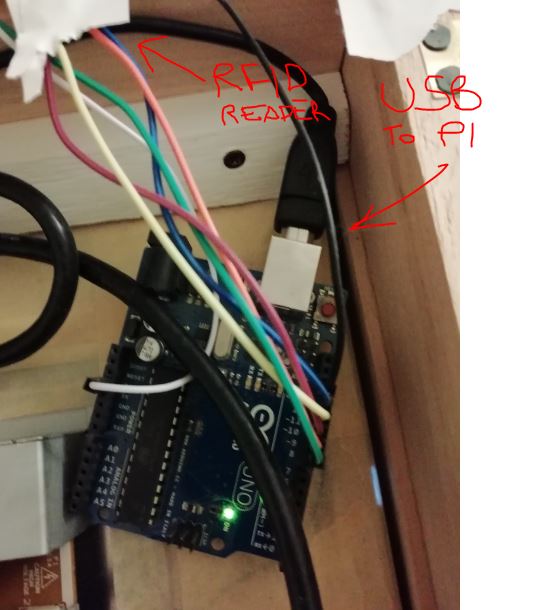
                      I have connected Arduino with PI via USb cable
                      with this connection I upload sketch to Aruino (this is why I use Arduino IDE on PI) and with the same connection datas (RFID tags) are tranfered from Arduino to PI (and the module of magic Mirror does the rest of the job)

                      1 Reply Last reply Reply Quote 0
                      • richland007R Offline
                        richland007 @s.monti.74
                        last edited by

                        @s-monti-74
                        Is the Arduino code you copied on the above post the complete one?? It makes no sense to me …also what wiring scheme are you using for the RFID board to the Uno??

                        Always thank you for the response

                        Another thing can you please check for errors the MMM-Serial-Notifications module entry code on the config… that you posted on the above post… it mentions an S and A instead of G and no TAG1 or TAG2

                        As always
                        Thank you again
                        Denis

                        S 1 Reply Last reply Reply Quote 0
                        • S Offline
                          sdetweil @richland007
                          last edited by

                          @richland007 the uno is connected to the pi serial port from the uno serial port.

                          So the uno code writes to it’s port, and the data causes an serial event on the pi with the data.

                          Sam

                          How to add modules

                          learning how to use browser developers window for css changes

                          richland007R 1 Reply Last reply Reply Quote 0
                          • richland007R Offline
                            richland007 @sdetweil
                            last edited by

                            @sdetweil Yes Sam but is the UNO to Rpi connection using Dupont wires and the TX RX pinouts or through the usb connection which is also used to upload the sketch to the UNO… i thought it was through the usb??

                            S 1 Reply Last reply Reply Quote 0
                            • S Offline
                              sdetweil @richland007
                              last edited by

                              @richland007 i believe he uses both… usb for sketch and serial for data

                              Sam

                              How to add modules

                              learning how to use browser developers window for css changes

                              1 Reply Last reply Reply Quote 0
                              • S Offline
                                s.monti.74 @richland007
                                last edited by

                                @richland007 I have modified the code before update it, to make it simpler and probably something is wrong.
                                I use 2 tags, the first to recognize me (S) and the second to recognize my wife (G)
                                for serial communication, later I send you a photo

                                1 Reply Last reply Reply Quote 0
                                • S Offline
                                  s.monti.74
                                  last edited by

                                  0_1571941656870_Cattura.JPG

                                  richland007R 1 Reply Last reply Reply Quote 0
                                  • richland007R Offline
                                    richland007 @s.monti.74
                                    last edited by

                                    @s-monti-74 Great i got the schematics now :)

                                    Can you please post again the complete Arduino code

                                    Thank you very very much
                                    Denis

                                    S 1 Reply Last reply Reply Quote 0
                                    • S Offline
                                      s.monti.74 @richland007
                                      last edited by

                                      @richland007 I can’t upload in the editor the full code because the editor blocks it (probably it converts the “;” char as the end of the code) I also can’t upload a txt file witch the code, i can upload only images

                                      richland007R Cr4z33C 2 Replies Last reply Reply Quote 0
                                      • richland007R Offline
                                        richland007 @s.monti.74
                                        last edited by

                                        @s-monti-74 Can you e-mail the Arduino sketch as txt file to me please at grabocka (@) sbcglobal.net
                                        oh the config.js entries also please so i can change my names into it :)

                                        Grazie mille
                                        Denis

                                        1 Reply Last reply Reply Quote 0
                                        • Cr4z33C Offline
                                          Cr4z33 @s.monti.74
                                          last edited by

                                          @s-monti-74 said in MYMIRROR - From Modena:

                                          @richland007 I can’t upload in the editor the full code because the editor blocks it (probably it converts the “;” char as the end of the code) I also can’t upload a txt file witch the code, i can upload only images

                                          You can easily copy&paste everything to pastebin.com then share here the link for others. ;)

                                          S 1 Reply Last reply Reply Quote 1
                                          • S Offline
                                            s.monti.74 @Cr4z33
                                            last edited by

                                            @Cr4z33
                                            this is my “paste”…
                                            https://pastebin.com/wY8yVtpv

                                            richland007R 1 Reply Last reply Reply Quote 1

                                            Hello! It looks like you're interested in this conversation, but you don't have an account yet.

                                            Getting fed up of having to scroll through the same posts each visit? When you register for an account, you'll always come back to exactly where you were before, and choose to be notified of new replies (either via email, or push notification). You'll also be able to save bookmarks and upvote posts to show your appreciation to other community members.

                                            With your input, this post could be even better 💗

                                            Register Login

                                            • 1
                                            • 2
                                            • 1 / 2
                                            • First post
                                              Last post
                                            Enjoying MagicMirror? Please consider a donation!
                                            MagicMirror created by Michael Teeuw.
                                            Forum managed by Sam, technical setup by Karsten.
                                            This forum is using NodeBB as its core | Contributors
                                            Contact | Privacy Policy