Read the statement by Michael Teeuw here.
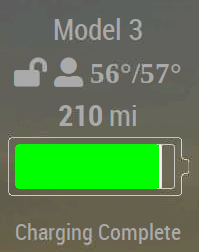
Anyone successfully using MMM-Tesla module?
-
I have coded the following but only get message “Loading …” in the assigned area. Any tips or tricks to getting this to work?
{ module: "MMM-Tesla", position: "bottom_left", config: { email: "REDACTED", password: "REDACTED", client_id: "81527cff06843c8634fdc09e8ac0abefb46...", clent_secret: "c7257eb71a564034f9419ee651c7d0e5...", vehicle_id: "REDACTED", google_api_key: "REDACTED", refreshInterval: 1000 * 60 * 10 } } -
I’m in the same boat, with the same “Loading…” message. Did you ever get it working?
-
@jpiatt open the developers window with
Ctrl-shift-i
Or start mm in dev mode
npm start dev
Select the console tab, and scroll up to find any errors, red rext
-
I did, finally. Maybe this will help:
I used the teslams command line program to get my vehicle_ID. There are two IDs that it presents: one is vehicle ID and was 10 characters. The one you want is just called “ID” and is 17 characters. Worked instantly after I changed that.
See if that gets you there.
-
@CDT It’s obviously been a long time since I checked this post. This tip was very helpful. I was using the wrong vehicle_ID and have changed it. I’m still getting the “Loading…” message. Based on your experience though, I feel like I must have a problem in my config and I’m going to play with it some more today and see if I can straighten it out.
The first error message I see in the console log (actually it’s written to stdout) is an UnhandledPromiseRejectionWarning with a Response Error: 404 Not Found. I’m considering just reinstalling the module in case I’ve edited something trying to troubleshoot and left out a comma or introduced bad line-ending with a funky editor or something.
I will post here if I resolve the issue.
-
@jpiatt said in Anyone successfully using MMM-Tesla module?:
Response Error: 404 Not Found
That means the url of the API didn’t work. So something is missing in the setup, or the API has changed
-
@sdetweil Thanks, sam. That’s what I figured. I’ll post here when I figure out what I screwed up.
-
One more tip. Your car’s ID seems to change monthly. So you have to run teslams to get it working.
I am working on my own version which is a bit more feature rich (not a lot more, because I have no training as a programmer). I think I have all the bugs worked out but want to see if I can address this ID update in an automated fashion.
-
-
I have started work on a fork from MMM-Tesla, since I could not get this working either.
It is located at https://github.com/martinburheimtingstad/MMM-Tesla2/
Hello! It looks like you're interested in this conversation, but you don't have an account yet.
Getting fed up of having to scroll through the same posts each visit? When you register for an account, you'll always come back to exactly where you were before, and choose to be notified of new replies (either via email, or push notification). You'll also be able to save bookmarks and upvote posts to show your appreciation to other community members.
With your input, this post could be even better 💗
Register Login