Read the statement by Michael Teeuw here.
Changing the icon for only one calendar
-
Hello,
I am using the default calendar module which comes with the Magic Mirror.
Thus far I am pretty happy with how it works.I have manged to get several ics files sync’d in and colour coded.
However, I would like to change the icon for on of the calendars to one not available on http://fontawesome.io/icons/
Ideally, it would be a file I could store locally on the RaspberryPi
This is what the config.js file looks like currently for the calendar:{ module: "calendar", header: "Gavin's Calendars", position: "top_left", config: { colored: true, coloredSymbolOnly: true, calendars: [ { symbol: "calendar-check", dateFormat: "Do MMM", color: "#E51B00", url: "calendarlink01.ics"}, { symbol: "calendar-alt", dateFormat: "Do MMM", color: "#1073BC", url: "calendarlink02.ics"}, { symbol: "calendar-plus", dateFormat: "Do MMM", color: "#27A86C", url: "calendarlink03.ics"} ] } },If I understand correctly, this will require some kind of custom CSS, would appreciate any guidance provided.
-
@Vengeance u can specify the symbolClass in the calendar entry too
symbolClass:“foobar”,then in the css
.calendar .foobar { ????? whatever u need } -
Thanks @sdetweil
I actually managed to just store the icons in the root dir for the module and change the .js for the module to look for the new file name.Now the issue I have is that .mov doesnt seem to work for icons. ( I tested with other file types to confirm the “change” worked, do now I know its just a file type issue)
-
-
Hi,
I’m new on the forum and new on MM dev.
I have a little question : could we have different colors in the calendar (I use default module, with a google calendar) like in the web version ?Because I made a custom CSS
 body {

 }

/*
 * CALENDAR SPECIFIC
 */

.fa.fa-calendar-check {
  color: #2B60DE; /* Dodger Blue */
}

div.CALEXT .tableStyle .eventTime {
    display:block;

}
And all my pictures are blue but I would like to have this picture at the same color like my web version like this example
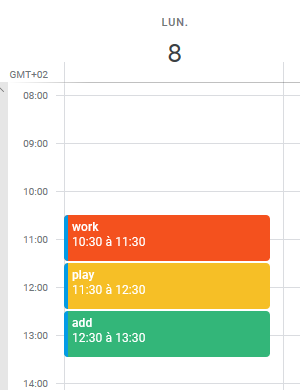
Is it possible ?Thank you and congrats for your work
-
@gubastide sure… did u read the config for the calendar in the link from the readme?
-
@sdetweil Yes but I don’t understand how to make this …
And English is difficult to me (I’m French) …
Is there any solution for my problem ?
Thank you

Hello! It looks like you're interested in this conversation, but you don't have an account yet.
Getting fed up of having to scroll through the same posts each visit? When you register for an account, you'll always come back to exactly where you were before, and choose to be notified of new replies (either via email, or push notification). You'll also be able to save bookmarks and upvote posts to show your appreciation to other community members.
With your input, this post could be even better 💗
Register Login