Read the statement by Michael Teeuw here.
custom.css not executed on return from GoogleAssistant. MMM-GoogleAssistant
-
@gelaw very interesting… @Bugsounet what do you think? is iframe causing this?
-
@Bugsounet Thanks! When I navigate to the location that you posted it do not see an entry for custom.css. Perhaps I have it in the wrong location? Or I missed a setting to activate this in GoogleAssistant or Assistant2Display?
my custom.css file is simply:
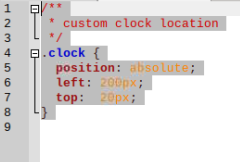
and it it located at /home/pi/MagicMirror/css
-
This post is deleted! -
@hango said in custom.css not executed on return from GoogleAssistant. MMM-GoogleAssistant:
maybe help this:
position: absolute !important;YES! That fixed my issue. Thanks!
-
@gelaw said in custom.css not executed on return from GoogleAssistant. MMM-GoogleAssistant:
@hango said in custom.css not executed on return from GoogleAssistant. MMM-GoogleAssistant:
maybe help this:
position: absolute !important;YES! That fixed my issue. Thanks!
@Bugsounet This made my display work, but it really is a brute force method. There must be a better solution. I still wonder what I missed in my original approach.
-
It’s not a brut force … it’s because i use iframe
but Really, I don’t know who can have some problem like that
-
@Bugsounet ok. Thanks!
-
@gelaw : if you want, give me a copy of your custom css … I want to inspect for fix GA (in private)
-
@Bugsounet tiny custom.css back a few posts. only for clock
-
@gelaw said in custom.css not executed on return from GoogleAssistant. MMM-GoogleAssistant:
@Bugsounet Thanks! When I navigate to the location that you posted it do not see an entry for custom.css. Perhaps I have it in the wrong location? Or I missed a setting to activate this in GoogleAssistant or Assistant2Display?
my custom.css file is simply:

and it it located at /home/pi/MagicMirror/css
this ?
-
@Bugsounet yes
-
@Bugsounet
Here is the custom.css file I use:/** * custom clock location */ .clock { position: absolute !important; left: 200px; top: 20px; }
Hello! It looks like you're interested in this conversation, but you don't have an account yet.
Getting fed up of having to scroll through the same posts each visit? When you register for an account, you'll always come back to exactly where you were before, and choose to be notified of new replies (either via email, or push notification). You'll also be able to save bookmarks and upvote posts to show your appreciation to other community members.
With your input, this post could be even better 💗
Register Login
