MagicMirror Forum
    • Recent
    • Tags
    • Unsolved
    • Solved
    • MagicMirror² Repository
    • Documentation
    • 3rd-Party-Modules
    • Donate
    • Discord
    • Register
    • Login
    A New Chapter for MagicMirror: The Community Takes the Lead
    Read the statement by Michael Teeuw here.

    What is wrong with my url?

    Scheduled Pinned Locked Moved Troubleshooting
    16 Posts 2 Posters 5.2k Views 2 Watching
    Loading More Posts
    • Oldest to Newest
    • Newest to Oldest
    • Most Votes
    Reply
    • Reply as topic
    Log in to reply
    This topic has been deleted. Only users with topic management privileges can see it.
    • E Offline
      EllyJ
      last edited by

      The url scraped from a music player always produces a broken image icon (middle of pic).
      If I input the url in manually and then run the module it will display the image (see comment at the top of the pic).
      If I don’t put in a url I get an outline with no broken image icon.
      I can output the url as a string on the screen (middle of pic and code)
      I can check the url from the music players web interface (bottom of pic).
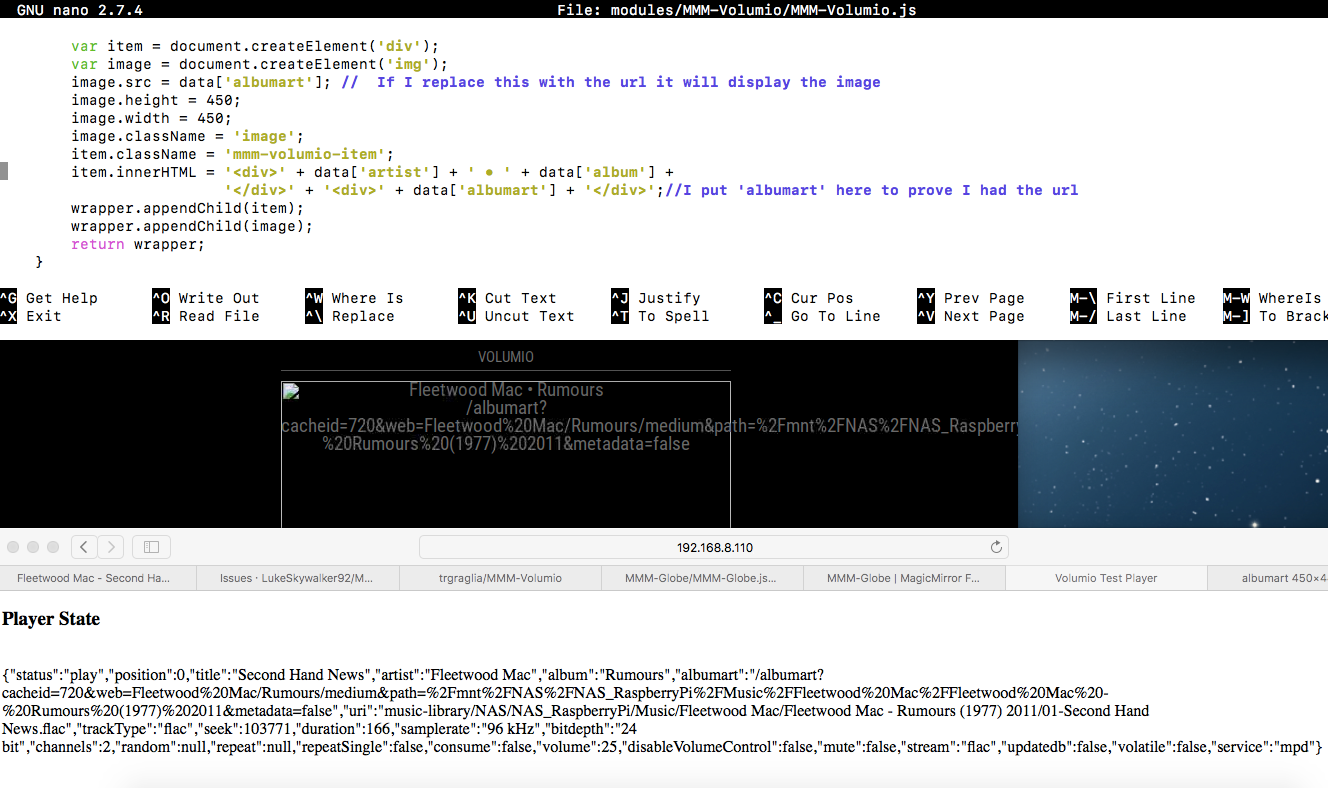
      Problem.png
      Could someone please tell me how to the url into image.src from data[‘albumart’]. This has been bugging me for 2 full days now.

              var data = this.volumioData;
              var item = document.createElement('div');
              var image = document.createElement('img');
              image.src = data['albumart']; //  If I replace this with the url it will display the image
              image.height = 450;
              image.width = 450;
              image.className = 'image';
              item.className = 'mmm-volumio-item';
              item.innerHTML = '<div>' + data['artist'] + ' • ' + data['album'] +
                               '</div>' + '<div>' + data['albumart'] + '</div>';//I put 'albumart' here to prove I had the url
              wrapper.appendChild(item);
              wrapper.appendChild(image);
              return wrapper;
          }
      });
      

      I am modifying MMM-Volumio to show the Album Covers what is playing. I can’t program in Java but have done a tiny bit in C++,Pascal,Visual Basic and Python. I am sorry if my code is really bad (all 4 lines of it that took me 2 days), it is working except for the url problem. I will also do a better layout when it is working.

      S 1 Reply Last reply Reply Quote 0
      • S Do not disturb
        sdetweil @EllyJ
        last edited by sdetweil

        @EllyJ what format is the this.volumioData? string, json, object?

        Sam

        How to add modules

        learning how to use browser developers window for css changes

        E 1 Reply Last reply Reply Quote 0
        • E Offline
          EllyJ @sdetweil
          last edited by

          @sdetweil it json I believe. I’m on a RaspberryPi and the file extension is .js.

          E S 2 Replies Last reply Reply Quote 0
          • E Offline
            EllyJ @EllyJ
            last edited by

            @EllyJ sorry I don’t know about Volumio. At the bottom of the picture is the live data. I just found this but don’t understand what it is getting at.

            If albumart value starts with http, then no further operation is needed and the resulting url will show an albumart
            Otherwise, prepend the string formed by: http:// + IP ADDRESS of Volumio device. Example: http://192.168.1.22/albumart?

            1 Reply Last reply Reply Quote 0
            • S Do not disturb
              sdetweil @EllyJ
              last edited by sdetweil

              @EllyJ ok, you need to use
              let data=JSON.parse(this.volumioData)
              to get into object form, then your
              data[‘albumart’] might work

              on my phone

              Sam

              How to add modules

              learning how to use browser developers window for css changes

              E 1 Reply Last reply Reply Quote 0
              • E Offline
                EllyJ @sdetweil
                last edited by

                @sdetweil I think I have to add my IP address for the Volumio. When I was looking to see if Volumio is json I stumbled on this on their website. Can I += strings?

                S 2 Replies Last reply Reply Quote 0
                • S Do not disturb
                  sdetweil @EllyJ
                  last edited by

                  @EllyJ I’m not sure

                  Sam

                  How to add modules

                  learning how to use browser developers window for css changes

                  1 Reply Last reply Reply Quote 0
                  • S Do not disturb
                    sdetweil @EllyJ
                    last edited by

                    @EllyJ this.volumioData should be the response from the server

                    Sam

                    How to add modules

                    learning how to use browser developers window for css changes

                    E 1 Reply Last reply Reply Quote 0
                    • E Offline
                      EllyJ @sdetweil
                      last edited by

                      @sdetweil it is. If you look at the url it gives to the album art it does not start with http://192.168… so I just need to add that I believe. I stumbled on that info by mistake thanks to you. I will try and get that working now.

                      S 1 Reply Last reply Reply Quote 0
                      • E Offline
                        EllyJ
                        last edited by

                        Ok it works :grinning_face_with_smiling_eyes: The problem was I needed to add the Raspberry Pi’ address before the album art url. Thank you very much @sdetweil for asking me a question that led to that info.working.png

                        As you can see it needs to be shifted about a little to look good.

                                var data = this.volumioData;
                                var item = document.createElement('div');
                                var amendUrl = "";
                                var image = document.createElement('img');
                                if (data['service'] == "mpd") {
                                    amendUrl = this.config.volumioUrl + data['albumart'];} // if local playback use volumio url +  albumart url 
                                else{
                                    amendUrl = data['albumart'];}                   // else if web radio just albumart url
                                image.src = amendUrl;                               // set url to the image
                                image.height = 600;
                                image.className = 'image';
                                item.className = 'mmm-volumio-item';
                                item.innerHTML = '<div>' + data['artist'] + ' • ' + data['album'] +
                                                 '</div>' + '<div>' + data['album'] + '</div>';//I put 'albumart' here to prove I had the url
                                wrapper.appendChild(item);                          // display artist, album and title info
                                wrapper.appendChild(image);                         // display album artwork
                                return wrapper;
                            }
                        });
                        

                        Here is my messy code, I don’t really do any coding so I was winging it.

                        1 Reply Last reply Reply Quote 0
                        • S Do not disturb
                          sdetweil @EllyJ
                          last edited by

                          @EllyJ did u download the image to the mm server?

                          Sam

                          How to add modules

                          learning how to use browser developers window for css changes

                          1 Reply Last reply Reply Quote 0
                          • E Offline
                            EllyJ
                            last edited by

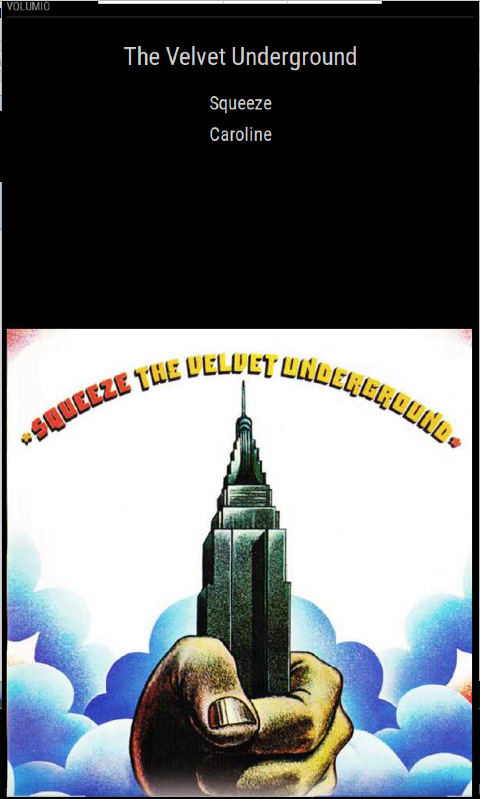
                            Sam it was from the NAS that has all my music. I have three Pi’s, a NAS, a Volumio music player and now a Magic Mirror. The Mirror Pi got the image url from Volumio Pi and then got the image from the NAS Pi. Lots of Pi! I have fiddled with the layout and it is presentable but not finished. Almost.png
                            1 Reply Last reply Reply Quote 0
                            • E Offline
                              EllyJ
                              last edited by

                              I have finished this now and tidied the code up (I hope it is up to standard). Below is a screenshot of the layout I went with, the changes I made to the .js file and the whole CSS file. I would like to give a lot of credit to @trgraglia who created MMM-Volumio and those who modified it before me. I hope there is enough info here for anyone who wants to create there own Volumio viewer. The position in the MagicMirror config file was top_bar.
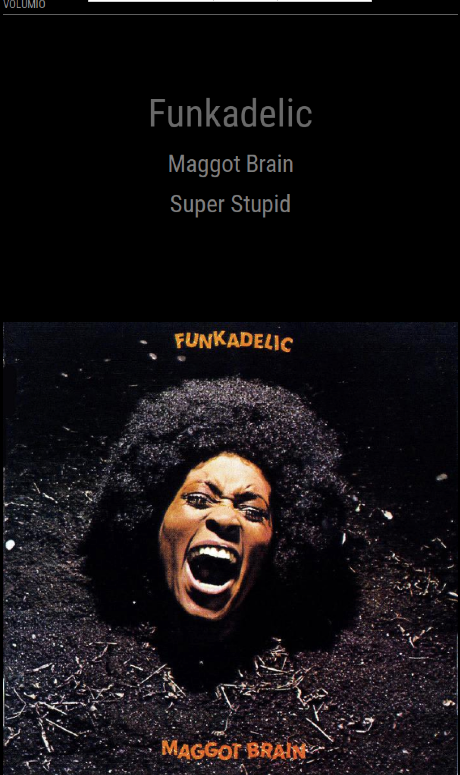
                              Finished.png

                              File: modules/MMM-Volumio/MMM-Volumio.js (the bit I changed at the end)

                                      var data = this.volumioData;
                                      var amendUrl = "";
                                      var item = document.createElement('div');
                                      var image = document.createElement('img');
                                      var artists = document.createElement('div');
                              
                                      if (data['service'] == "mpd") {
                                          amendUrl = this.config.volumioUrl + data['albumart'];} // if local playback put volumio url +  albumart url 
                                      else{
                                          amendUrl = data['albumart'];}                   // else if web radio just albumart url
                              
                                      artists.className = 'text';
                                      artists.innerHTML = '<div>' + '<br />' + data['artist'] + '<br />';
                                      wrapper.appendChild(artists);
                              
                                      item.className = 'smalltext' //'mmm-volumio-item';
                                      item.innerHTML = '<div>' + data['album'] + '<div>' + '</div>' + data['title'] + '</div>';//I put 'albumart' here to prove I had the url
                                      wrapper.appendChild(item);                          // display artist, album and title info
                              
                                      image.src = amendUrl;                               // set url to the image
                                      image.className = 'image';
                                      wrapper.appendChild(image);                         // display album artwork
                                      return wrapper;
                                  }
                              });
                              

                              File: modules/MMM-Volumio/MMM-Volumio.css

                              .region.fullscreen.below {
                                  position: absolute;
                                  height:   100%
                                  width:    100%
                              }
                              
                              .mmm-volumio-item {
                                  text-align:  center;
                                  line-height: 40pt;
                                  font-size:   95%;
                                  color:       LightGrey;
                                  position: absolute;
                                  height:   100%;
                                  width:    100%;
                                  border-right:  24px;
                              }
                              .image 
                              {
                                  position:    Fixed;
                                  bottom:      0px;
                                  left:        0px;
                                  width:   100%;
                              }
                              
                              .text
                              {   
                                  text-align:  center;
                                  line-height: 60pt;
                                  font-size:   160%;
                                  color:       DimGrey;
                              }
                              
                              .smalltext
                              {
                                  text-align:  center;
                                  line-height: 40pt;
                                  font-size:   100%;
                                  color:       Grey;
                              }
                              
                              
                              S 1 Reply Last reply Reply Quote 0
                              • S Do not disturb
                                sdetweil @EllyJ
                                last edited by

                                @EllyJ did u make a fork of the original and upload your changes back , so others can get your version?

                                fork original
                                download your forked copy
                                make changes
                                git add/commit/push your chnages back to your fork…

                                Sam

                                How to add modules

                                learning how to use browser developers window for css changes

                                1 Reply Last reply Reply Quote 0
                                • E Offline
                                  EllyJ
                                  last edited by

                                  @sdetweil I did not. I do not know how to or what a fork is. I am not sure if it is good enough, it looks like it is commercial quality and it works but I just kind of forced it to do what I wanted. I don’t know JavaScript or CSS, I just googled, copied, tried and guessed until it worked. Perhaps someone could try it out and then fork it if it works for them.

                                  S 1 Reply Last reply Reply Quote 0
                                  • S Do not disturb
                                    sdetweil @EllyJ
                                    last edited by sdetweil

                                    @EllyJ go to github on the original project
                                    push the fork button top right. now u have a copy, and ‘could’ submit changes back to the author as ‘pull request’, pull from your repo back to his.

                                    now, rename your current module folder
                                    and then git clone your fork, and do npm install if the original asked for it

                                    now, copy the changed files from the renamed folder to the new one.

                                    if all is good
                                    then we can work on getting the changes pushed up to your fork

                                    Sam

                                    How to add modules

                                    learning how to use browser developers window for css changes

                                    1 Reply Last reply Reply Quote 0

                                    Hello! It looks like you're interested in this conversation, but you don't have an account yet.

                                    Getting fed up of having to scroll through the same posts each visit? When you register for an account, you'll always come back to exactly where you were before, and choose to be notified of new replies (either via email, or push notification). You'll also be able to save bookmarks and upvote posts to show your appreciation to other community members.

                                    With your input, this post could be even better 💗

                                    Register Login

                                    • 1 / 1
                                    • First post
                                      Last post
                                    Enjoying MagicMirror? Please consider a donation!
                                    MagicMirror created by Michael Teeuw.
                                    Forum managed by Sam, technical setup by Karsten.
                                    This forum is using NodeBB as its core | Contributors
                                    Contact | Privacy Policy