Read the statement by Michael Teeuw here.
Make a remove header space or overlap two modules
-
Hi.
I have been searching a lot in the forum, and i know this already have been discused several times, the thing is that i am able to hidde a module header, but i’m can not get this space to be removed. So is there a way for this space to be removed, or at least be overlaped by other module?
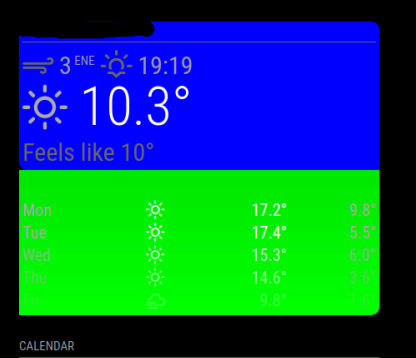 .
.
This is the actual custom css i’m using. All the code was found in the found forum, my knowledge about coding is 0 (i can understand it, but no idea of actual coding).weatherforecast .module-header { visibility: hidden; } .currentweather { background-color:rgba(0,0,0,0.1); border-radius:10px 10px 0px; padding:4px; margin-bottom:0px; } .weatherforecast { background-image: linear-gradient(rgba(0,0,0,0.1),rgba(0,0,0,0)); border-radius:0px 0px 10px; padding:4px; } .currentweather { background-color:rgba(0, 0, 255, 1); opacity: 0.6; } .weatherforecast { background-color:rgba(0, 255, 0, 1); opacity: 0.6; }i have tried display: none; instead of: visibility: hidden; but didn’t work out.
-
@halacabullas can u identify the element in the developers window? ctrl-shift-i, elements tab,
then use the pointer as I suggested on discord.then edit it’s styles.
-
@sdetweil i can identify that there is a script for every module, but seems to me,that i can not access to a single module to edit it, they are all clump together (could be mistaken im pretty noob)
screenshots here -
@halacabullas edit the main.css and comment our cursor:none; in body , like this
html {
  /*cursor: none; */
  overflow: hidden;
  background: #000;
  user-select: none;
}
then u can se the mouse over the mm page content
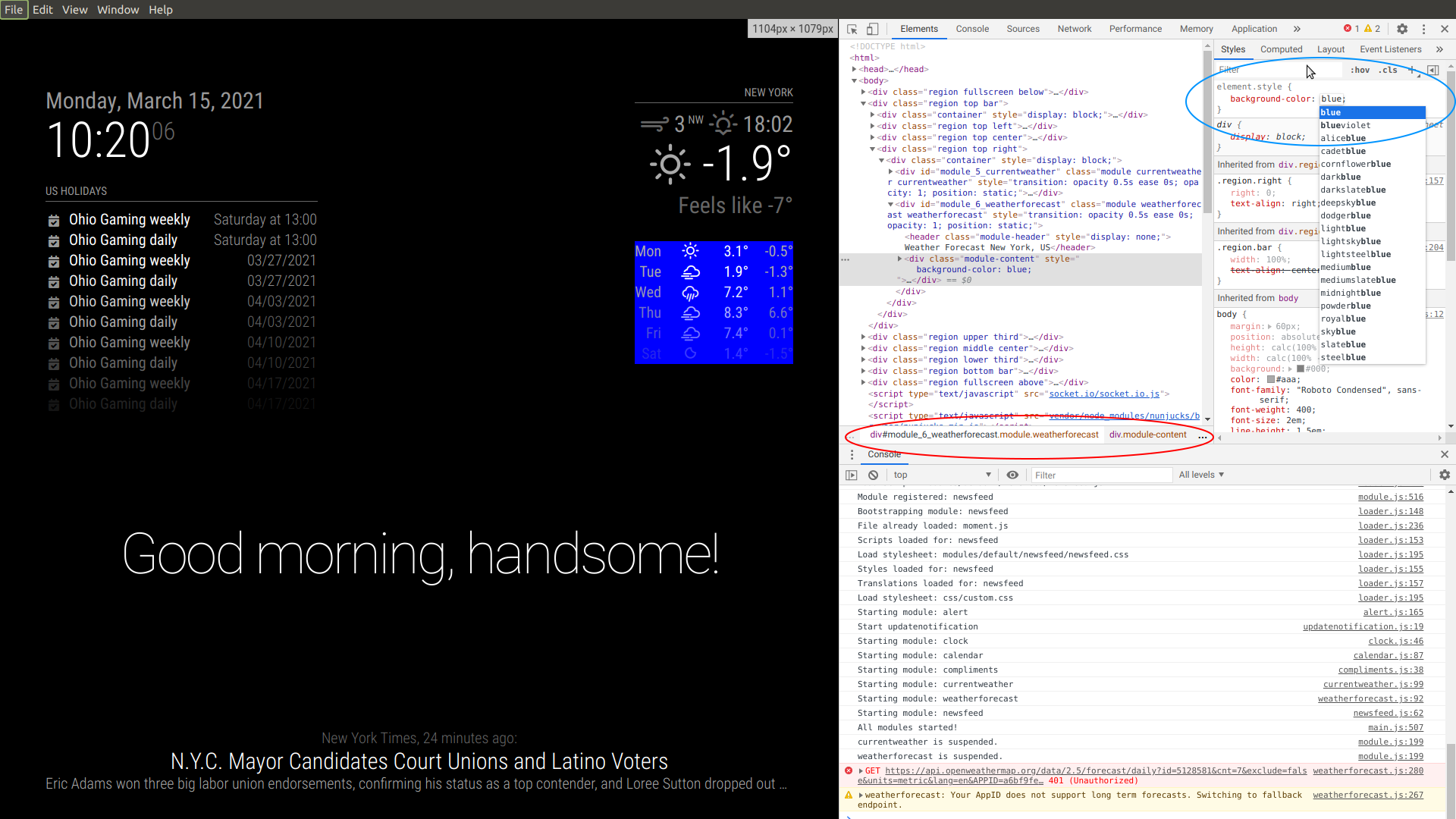
then ctrl-shift-i, and select the elements tab
expand the left nav to the region, top, right (in my case), expand, find modules,
expand, select module, see element tree to right
add background-color:blue;
if header still displayed, add change display:block the display :none
(top right, blue circle)
(just click in the element ares to edit, add, delete styles)middle, red circle is the class tree of the element… rightmost is closest to custom.css
-
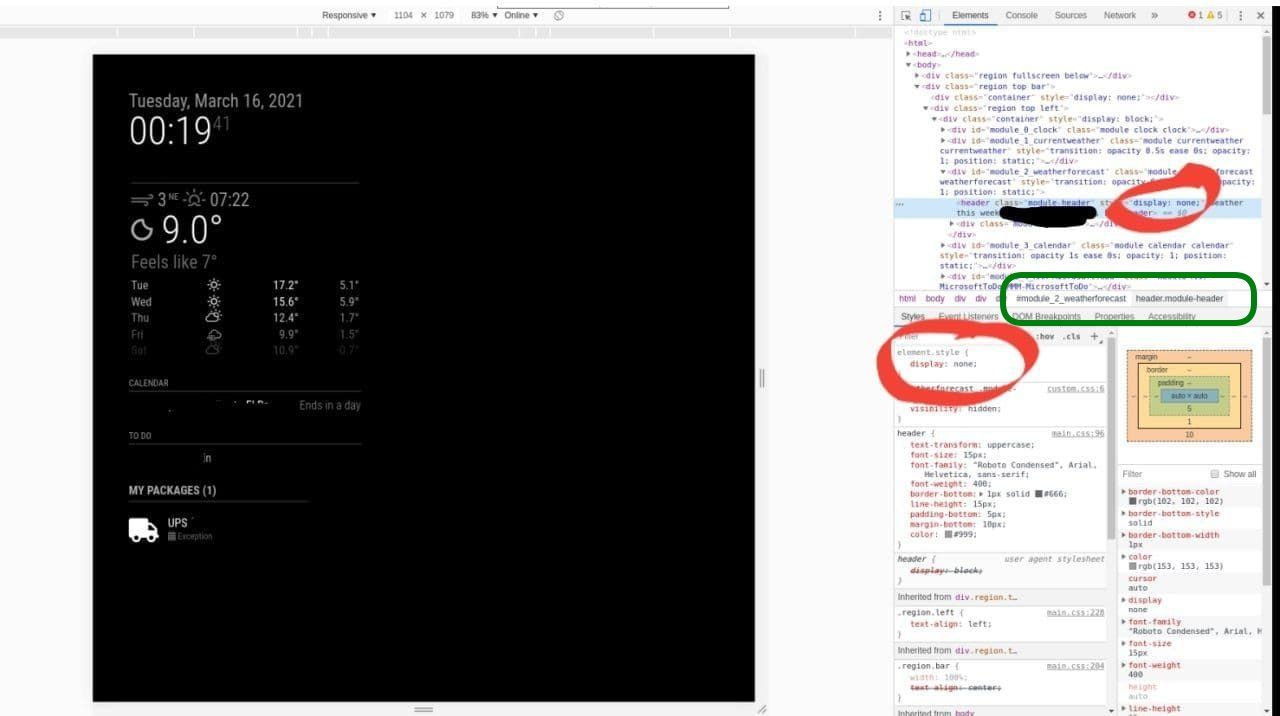
@sdetweil If i change the display from block to none. that works. And put everything just where i want it. (I know i have like 0 knowlege about it) but is there a way to save the modified html code? seems like if i close and reopen the mm it’s back to normal.
Also the edit generates like this kind of code, that i tried to add to the custom css, i tried like this, changing to .module header, and other similar stuff but nothing works
-
@halacabullas well, all good except u missed my one step , finding the info for custom.css
u need the module name and the element class name
see in the editor view, the stuff circled in green (take off the module_number_, and the ‘module’ prefixes )
.weatherforecast .module-header {
display: none !important;
}sometimes u need the force the priority of the style, with !important
-
@sdetweil THAT WAS IT. THANK YOU SO MUCH <3333

Hello! It looks like you're interested in this conversation, but you don't have an account yet.
Getting fed up of having to scroll through the same posts each visit? When you register for an account, you'll always come back to exactly where you were before, and choose to be notified of new replies (either via email, or push notification). You'll also be able to save bookmarks and upvote posts to show your appreciation to other community members.
With your input, this post could be even better 💗
Register Login