Read the statement by Michael Teeuw here.
I don't know how to use node_helper.js.
-
I tried to use python-shell. So I successfully finished the npm install python-shell.
But I saw it said that to use python-shell, you must use node_helper.js.
So I tried to execute a simple Python code. The notification I_DID in node_helper.js was well communicated and executed. However, the console in node_helper.js is not output, nor is python-shell working.
What is the problem?var Testpythons; Module.register("MMM-Testpython", { defaults: {}, start: function (){ Testpythons = this; }, getDom: function() { var element = document.createElement("div") element.className = "myContent" element.id="divid" element.innerHTML = "Hello, World!!! " + this.config.foo var subElement = document.createElement("p") subElement.innerHTML = "Click" subElement.id = "clickid" element.appendChild(subElement) return element }, notificationReceived: function(notification, payload, sender) { switch(notification) { case "DOM_OBJECTS_CREATED": var elem = document.getElementById("clickid") elem.addEventListener("click", () => { Testpythons.sendSocketNotification("TESTPYTHON") console.log("hello~hello~hello~hello~hello~hello~hello~hello~hello~hello~") elem.innerHTML = "click success" }) break } }, socketNotificationReceived: function(notification, payload) { switch(notification) { case "I_DID": console.log("success") var elemk = document.getElementById("divid") elemk.innerHTML = "I_DID" break } }, })node_helper.js
var NodeHelper = require("node_helper"); var PythonShell = require('python-shell'); module.exports = NodeHelper.create({ start: function() { console.log("Starting module: " + this.name); }, socketNotificationReceived: function(notification, payload) { switch(notification) { case "TESTPYTHON": console.log("notification : " + notification) this.sendSocketNotification("I_DID") PythonShell.runString('print("Hello Python")', null, function (err, result) { if (err) throw err; console.log(result); }); break } }, }) -
but your should have been ok… do you see the message
console.log("Starting module: " + this.name);in the terminal window?
-
This post is deleted! -
var NodeHelper = require("node_helper");
var {PythonShell} = require('python-shell');

module.exports = NodeHelper.create({
  start: function() {
    console.log("Starting module: " + this.name);
  },

  socketNotificationReceived: function(notification, payload) {
    console.log("Starting module: " + this.name);
    switch(notification) {
      case "TESTPYTHON":
        console.log("notification : " + notification)
        this.sendSocketNotification("I_DID")
        PythonShell.runString('print("Hello Python")', null, function (err, result) {
            if (err) throw err;
            console.log(result);
            });
        break
    }
  },
})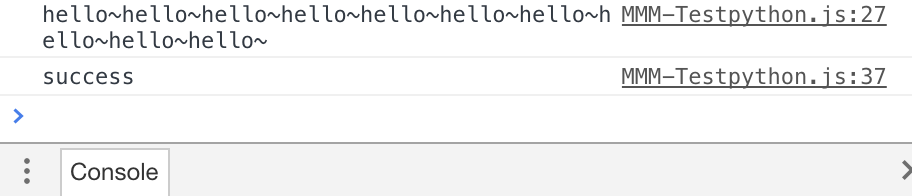
console doesnt show Starting module…
-
@emrhssla ok, there are two different output areas…
the developers window, which u posted is from the module.js side…
the node helper content comes out in the terminal window.start you mirror app,
then start it withnpm start &(note the & at the end)
now you should be able to see any messages in the terminal window from the node_helper -
@sdetweil oh!!!

thank you very very very much :)
Hello! It looks like you're interested in this conversation, but you don't have an account yet.
Getting fed up of having to scroll through the same posts each visit? When you register for an account, you'll always come back to exactly where you were before, and choose to be notified of new replies (either via email, or push notification). You'll also be able to save bookmarks and upvote posts to show your appreciation to other community members.
With your input, this post could be even better 💗
Register Login