Read the statement by Michael Teeuw here.
MMM-Spotify.....Hide blurred background?
-
Greetings@Bugsounet, thanks again for the help yesterday.
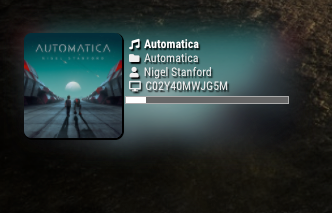
I was wondering if there is a way to hide the blurred background album art when the music is playing. Also, the shadow frame for the album art as well. Is that something in a CSS I can manipulate? Many thanks!
-
wait i will try (before talking nonsense)in the css file locate:
#SPOTIFY_BACKGROUNDadd this inside the section:
display: none;Result : no background ;)
-
@Bugsounet said in MMM-Spotify.....Hide blurred background?:
wait i will try (before talking nonsense)
Appreciated. :P
I did find this:
#SPOTIFY_BACKGROUND {
  background-size: cover;
  background-position: center center;
  filter: blur(16px) opacity(90%) grayscale(33%);
  position:absolute;
  top:0;
  left:0;
  width:100%;
  height:100%;
  z-index:0;
}
and…
#SPOTIFY_COVER_IMAGE { width:100%; height:100%; border-radius:10px; box-shadow:black 1px 1px 1px 1px; } -
#SPOTIFY_BACKGROUND { background-size: cover; background-position: center center; filter: blur(16px) opacity(90%) grayscale(33%); position:absolute; top:0; left:0; width:100%; height:100%; z-index:0; display: none; } -
@Bugsounet said in MMM-Spotify.....Hide blurred background?:
wait i will try (before talking nonsense)in the css file locate:
#SPOTIFY_BACKGROUNDadd this inside the section:
display: none;Result : no background ;)
Many thanks sir!
Can I also modify the #SPOTIFY_COVER_IMAGE with the following or should I just comment it out?
box-shadow:black 0px 0px 0px 0px; -
as you want ;) it’s a css code, you can personalize it.
-
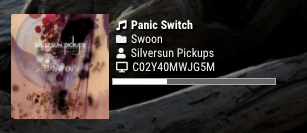
@Bugsounet. I’m learning as I go. Totally logical due to good programming. Many thanks! I dialed it in the way I wanted it. :clinking_beer_mugs: :thumbs_up:
[edit] I will add that anyone tinkering with the .css to backup the original first!!! That is just good practice.
-
@spoonek these settings should go in custom.css, right? backup is still a good practice
-
@sdetweil said in MMM-Spotify.....Hide blurred background?:
@spoonek these settings should go in custom.css, right? backup is still a good practice
That is good advice. Thanks!
-
I made a few more edits. Removed the border from the cover art, removed the radius from the cover art, removed the drop shadow from the text and icons, changed the album fa-icon to a CD and lastly radiused the progress bar.
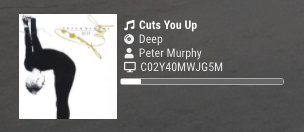
I also edited the Spotify logo on startup to a lower opacity.

Total n00b at this. This was fun. :P
Hello! It looks like you're interested in this conversation, but you don't have an account yet.
Getting fed up of having to scroll through the same posts each visit? When you register for an account, you'll always come back to exactly where you were before, and choose to be notified of new replies (either via email, or push notification). You'll also be able to save bookmarks and upvote posts to show your appreciation to other community members.
With your input, this post could be even better 💗
Register Login