MagicMirror Forum
    • Recent
    • Tags
    • Unsolved
    • Solved
    • MagicMirror² Repository
    • Documentation
    • 3rd-Party-Modules
    • Donate
    • Discord
    • Register
    • Login
    A New Chapter for MagicMirror: The Community Takes the Lead
    Read the statement by Michael Teeuw here.

    MMM-Calendar always shows 23:59 if showEndTime: True

    Scheduled Pinned Locked Moved Bug Hunt
    51 Posts 4 Posters 19.0k Views 3 Watching
    Loading More Posts
    • Oldest to Newest
    • Newest to Oldest
    • Most Votes
    Reply
    • Reply as topic
    Log in to reply
    This topic has been deleted. Only users with topic management privileges can see it.
    • S Offline
      SwissChemist @sdetweil
      last edited by SwissChemist

      @sdetweil
      I am currently not sure how this will look like after changing from DST(UTC+2) to STD time(UTC+1).
      For sure this will happen on sunday, 25th of October. That’s why whole day events starting on 26th look differently.
      But how should it look like today? Oct 26th 01:00 - Oct 27th 00:59???

      S 1 Reply Last reply Reply Quote 0
      • S Offline
        sdetweil @SwissChemist
        last edited by sdetweil

        @SwissChemist install 2.13
        and replace the ~/MagicMirror/modules/default/calendar/calendarfetcher.js
        with this
        https://www.dropbox.com/s/t7m1f49kvv3x2b1/calendarfetcher.js?dl=0

        save the old one

        it should correct dst/std time changes

        Sam

        How to add modules

        learning how to use browser developers window for css changes

        S 1 Reply Last reply Reply Quote 0
        • S Offline
          SwissChemist @sdetweil
          last edited by

          @sdetweil
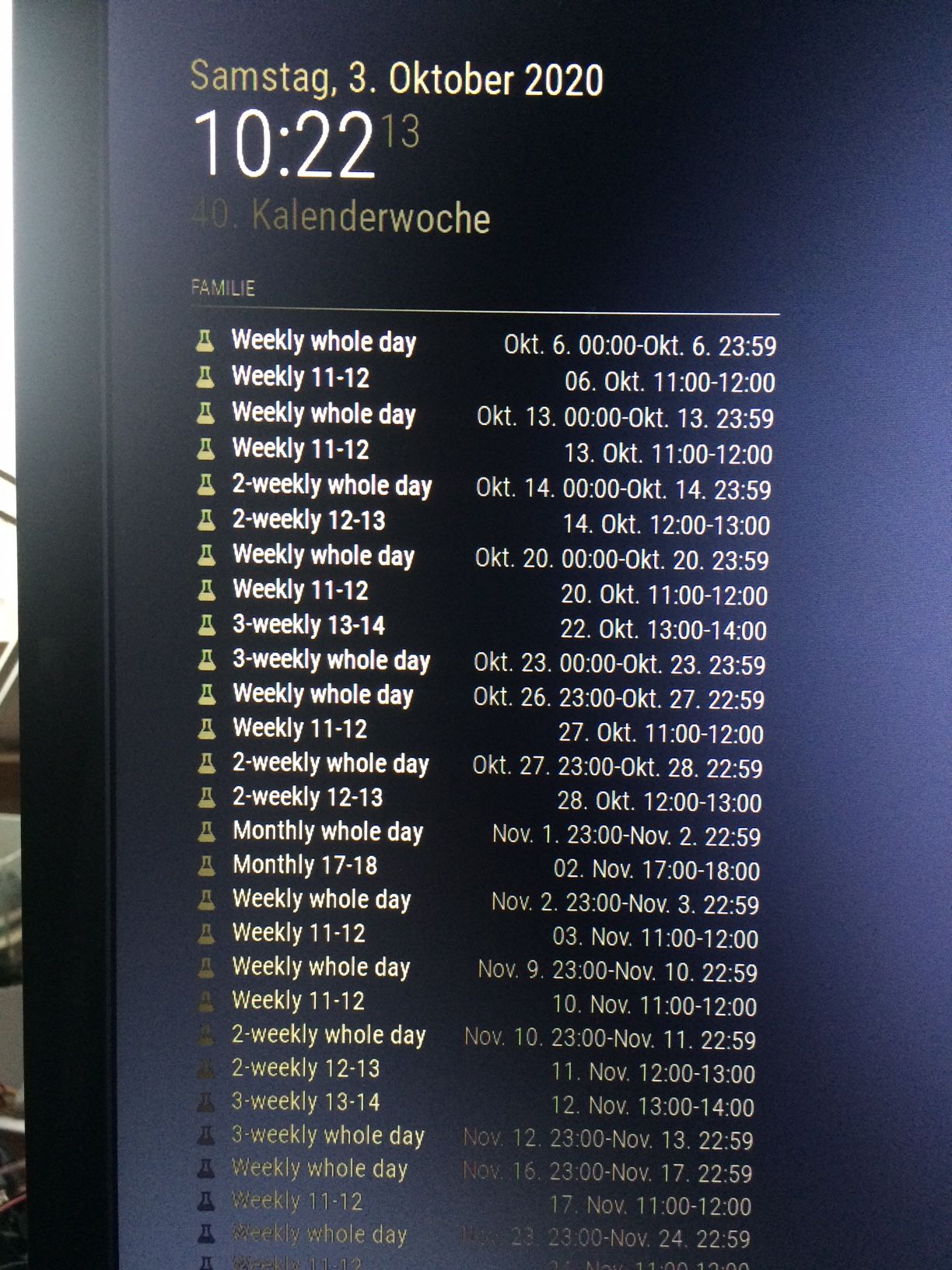
          3-weekly whole day now shows Okt 23, but it should be Okt 22

          As I have seen in the calendar file, switching from DST to STD time is correctly defined for last Sunday in October, that is 25th of October. So this should not influence an event on 22nd of October…

          Regarding events after switching from DST to STD time, I don’t have a clue, as I am not a dev, just a little experienced in testing…
          I tried to understand the calendar file. As far as I have seen, you have only the date for whole day events (without any time):

          BEGIN:VEVENT
          CREATED:20201001T205859Z
          DTEND;VALUE=DATE:20201023
          DTSTAMP:20201001T205900Z
          DTSTART;VALUE=DATE:20201022
          LAST-MODIFIED:20201001T205859Z
          RRULE:FREQ=WEEKLY;INTERVAL=3;BYDAY=TH
          SEQUENCE:1
          SUMMARY:3-weekly whole day
          UID:D718FE41-FF1B-43F6-9442-E9E43A41CCF0
          URL;VALUE=URI:
          END:VEVENT

          In this case DTSTART is 20201022 and DTEND is 20201023.

          For whole day events, can’t you simply set:
          ‘Begin’ to value of DTSTART 00:00 and
          ‘End’ to value of DTEND - 1day 23:59? (just as ical most probably uses 24:00 and that’s one day later)

          Maybe it’s not as simple as I assume, otherwise you would have tried that already…

          As we currently have TZOFFSET+0200 and switch to TZOFFSET+0100, I would rather expect that we see current events (planned after 25th Oct) on the monitor 1 hour too late.
          So that’s why I currently would rather expect:
          Oct 27th 01:00 - Oct 28th 00:59 for weekly whole day after switching to STD time instead of
          Oct 26th 23:00 - Oct 27th 22:59

          But as I mentioned before, maybe everything is much more complicated than I ever can imagine…
          MagicMirror_201003.JPG

          S 1 Reply Last reply Reply Quote 0
          • S Offline
            sdetweil @SwissChemist
            last edited by sdetweil

            @SwissChemist your whole day event starts on one day, and ends on another

            DTEND;VALUE=DATE:20201023
            DTSTAMP:20201001T205900Z
            DTSTART;VALUE=DATE:20201022

            make up your mind…lol

            I changed all the whole day DTEND to the same date as the DTSTART

            Sam

            How to add modules

            learning how to use browser developers window for css changes

            S 1 Reply Last reply Reply Quote 0
            • S Offline
              sdetweil @sdetweil
              last edited by sdetweil

              @SwissChemist if it were easy!!!

              the rule processor has a bug w timezones
              and apparently with multiple whole day events, and with dst/std adjustment

              and the calendar parser is not ours, and the rule processor is not ours,

              and we are split into get dates to show and show dates… show dates(calendar.js) doesn’t know anything about the cal entry. it’s just gets a list of start and end times, in utc time

              Sam

              How to add modules

              learning how to use browser developers window for css changes

              1 Reply Last reply Reply Quote 0
              • S Offline
                sdetweil
                last edited by

                I just uploaded another calendarfetcher.js to dropbox which corrects the timezone adjustment for daylight/std switch

                I was using the local system time instead of the calendar event start time to compare offsets with the rule created time

                Sam

                How to add modules

                learning how to use browser developers window for css changes

                1 Reply Last reply Reply Quote 0
                • S Offline
                  sdetweil
                  last edited by

                  I like how it behaves now… we are both currently on DST, you switch the daylight 1st (Oct 25), and the events when system is on my timezone, change, and then we change later to daylight (Nov 1), and then we are back on the same adjustment again and the event times adjust again correctly…

                  Sam

                  How to add modules

                  learning how to use browser developers window for css changes

                  1 Reply Last reply Reply Quote 0
                  • S Offline
                    SwissChemist
                    last edited by SwissChemist

                    @sdetweil
                    Wow, that looks great! Thanks very much for your endurance!

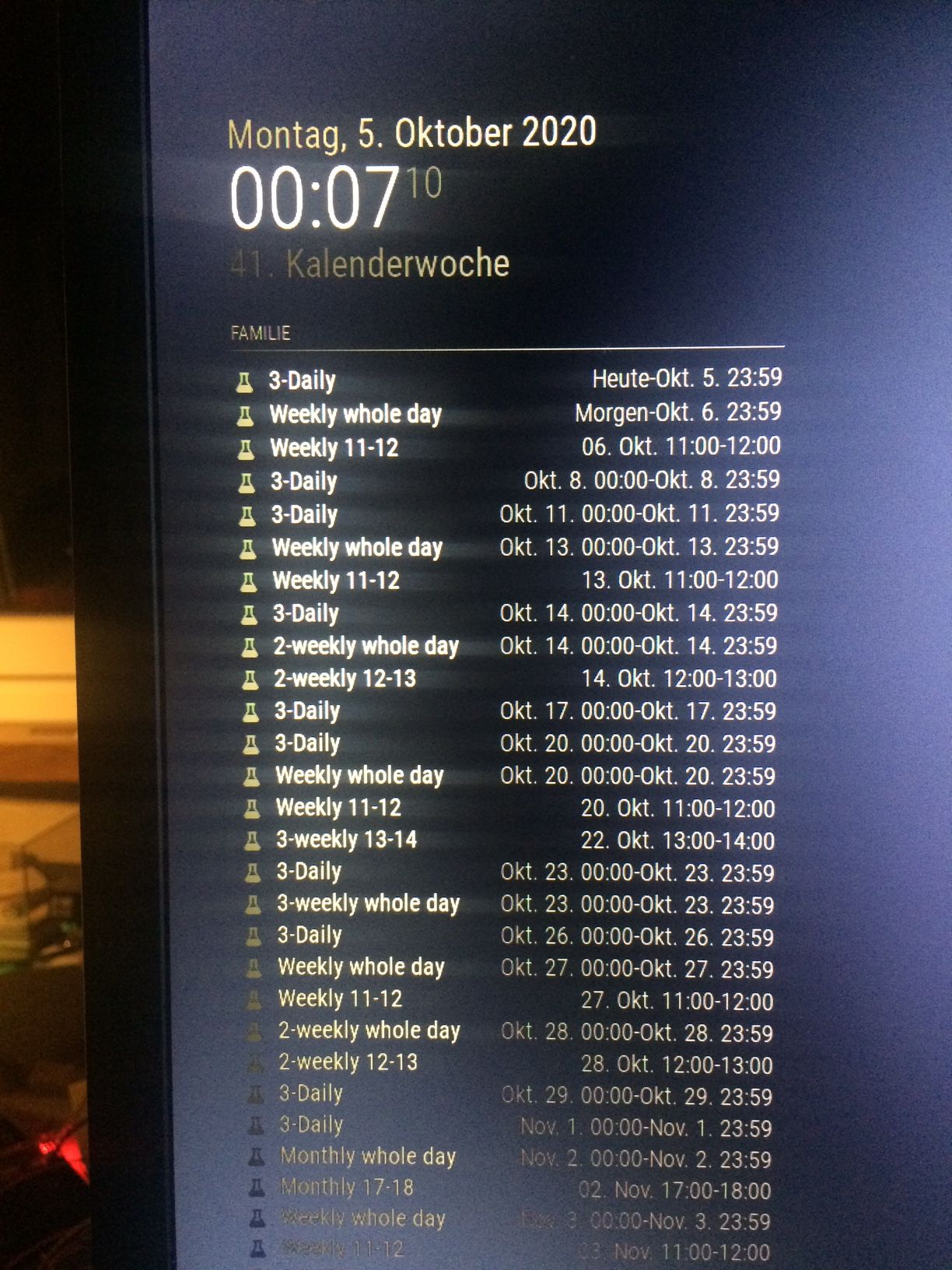
                    There is only that persistent ‘3-weekly whole day’ problem. It’s still one day too late. Most probably that’s so difficult, as it is a user defined interval, something strange seems to bring the parser to a wrong date…
                    For testing, I have added a 3-daily event. This shows correct start/end…

                    But the rest is great! Thanks very much!!!
                    MagicMirror_201005.JPG

                    S 1 Reply Last reply Reply Quote 0
                    • S Offline
                      sdetweil @SwissChemist
                      last edited by

                      @SwissChemist check the end date in your cal entry it was set for the next day.

                      2 -day event

                      Sam

                      How to add modules

                      learning how to use browser developers window for css changes

                      1 Reply Last reply Reply Quote 0
                      • S Offline
                        SwissChemist
                        last edited by

                        @sdetweil
                        All whole day events start at the right day and end one day later. There is no difference in the calendar file, whether it is a weekly, 2-weekly or 3-weekly event.
                        That’s why I do not understand, why weeklies and 2-weeklies are shown correctly and the 3-weekly is shown one day too late…

                        S 2 Replies Last reply Reply Quote 0
                        • S Offline
                          sdetweil @SwissChemist
                          last edited by

                          @SwissChemist but, whole day events are defined as starting and ending on the SAME day.

                          Sam

                          How to add modules

                          learning how to use browser developers window for css changes

                          1 Reply Last reply Reply Quote 0
                          • S Offline
                            sdetweil @SwissChemist
                            last edited by

                            @SwissChemist yeh, that 3-weekly whole day event seems to cause a problem in the rule handler…

                            for THAT rule, it returns the repeating day as the 1st of the 2, (the last of the 2 for the others)
                            but if u take off the ;BYDAY=TH
                            is works properly… (and gives the thrusday date)

                            so, some bug in the rrule module… (not our code)

                            that is also the only weekly whole day rule you have which has a ByDay set.

                            Sam

                            How to add modules

                            learning how to use browser developers window for css changes

                            S 1 Reply Last reply Reply Quote 0
                            • S Offline
                              SwissChemist @sdetweil
                              last edited by

                              @sdetweil
                              As I wondered if the format of an 3-weekly event in ical has an issue, I set up a 3-weekly event in Google calendar and compared the files:

                              BEGIN:VEVENT
                              DTSTART;VALUE=DATE:20201005
                              DTEND;VALUE=DATE:20201006
                              RRULE:FREQ=WEEKLY;INTERVAL=3;BYDAY=MO
                              DTSTAMP:20201005T195008Z
                              UID:835F136F-35A4-44C6-AA16-481F02E5A2D1
                              CREATED:20201005T120626Z
                              DESCRIPTION:
                              LAST-MODIFIED:20201005T120626Z
                              LOCATION:
                              SEQUENCE:0
                              STATUS:CONFIRMED
                              SUMMARY:3-weekly whole day test
                              TRANSP:OPAQUE
                              END:VEVENT
                              

                              Event has been set to 5th of October and DTEND is also one day later than DTSTART for a whole-day-event and it also shows a BYDAY, that means it’s absolutely identical to the ical file…

                              S 1 Reply Last reply Reply Quote 0
                              • S Offline
                                sdetweil @SwissChemist
                                last edited by

                                @SwissChemist like I said, bug in the repeating rule processor, RRULE. not our code.

                                Remove the byday, or the second day

                                Sam

                                How to add modules

                                learning how to use browser developers window for css changes

                                S 1 Reply Last reply Reply Quote 0
                                • S Offline
                                  SwissChemist @sdetweil
                                  last edited by

                                  @sdetweil
                                  Sorry for asking:
                                  If I would import a calendar file from a text file, it would be easy to do the correction (change DTEND or remove BYDAY) in any text editor.
                                  But how to proceed if I directly import data from *.ics link? Is there any ‘hack’ I could apply?
                                  Thanks very much for your patience… All other data are really great now! And somehow I rely on a 3-weekly whole day, as we use to have 3-week iterations in our SCRUM process…

                                  S 1 Reply Last reply Reply Quote 0
                                  • S Offline
                                    sdetweil @SwissChemist
                                    last edited by

                                    @SwissChemist you could create a batch script, run off cron, or started w pm2 (and use sleep to wait)

                                    curl to download the ics,
                                    sed to fix the file,
                                    and put it into the calendar module folder, and
                                    config mm to use it from there

                                    Sam

                                    How to add modules

                                    learning how to use browser developers window for css changes

                                    1 Reply Last reply Reply Quote 0
                                    • S Offline
                                      SwissChemist
                                      last edited by

                                      @sdetweil
                                      Thanks very much for your help! I highly appreciate it!

                                      S 1 Reply Last reply Reply Quote 0
                                      • S Offline
                                        sdetweil @SwissChemist
                                        last edited by

                                        @SwissChemist my pleasure… here is how I config MM to use your file
                                        (note my mm is on a different port)

                                        calendars: [
                                        	{
                                                    url: "http://localhost:8090/modules/default/calendar/school-timetable.ics"
                                                }
                                        ]
                                        

                                        Sam

                                        How to add modules

                                        learning how to use browser developers window for css changes

                                        1 Reply Last reply Reply Quote 0
                                        • S Offline
                                          SwissChemist
                                          last edited by

                                          @sdetweil
                                          Thanks for the example. Looks like a next project for me… :thumbs_up:

                                          S 1 Reply Last reply Reply Quote 0
                                          • S Offline
                                            sdetweil @SwissChemist
                                            last edited by

                                            @SwissChemist

                                            could look something like this

                                            #!/bin/bash
                                            fn=somecal.ics
                                            while true
                                              do 
                                                  # get the file from server
                                                  curl -sL  url_of_remote_ics  >$fn
                                                  # remove the trailing byday=??(end of line), file inline, so changed
                                                  sed -i -e "s/;BYDAY=.*$//g" $fn
                                                 # copy the modified file to the calendar folder
                                                  cp $fn ~/MagicMirror/modules/default/calendar
                                                 # sleep til next cycle
                                                  sleep ??? (seconds til next curl)
                                               done
                                            

                                            have to make this executable with chmod +x script_filename

                                            then
                                            pm2 start script_filename
                                            pm2 save

                                            if you use a json config file ui can give a pretty name of the script… see the installers/pm2_magicmirror.json
                                            pm2 start jsonfile
                                            pm2 save

                                            Sam

                                            How to add modules

                                            learning how to use browser developers window for css changes

                                            S 1 Reply Last reply Reply Quote 0

                                            Hello! It looks like you're interested in this conversation, but you don't have an account yet.

                                            Getting fed up of having to scroll through the same posts each visit? When you register for an account, you'll always come back to exactly where you were before, and choose to be notified of new replies (either via email, or push notification). You'll also be able to save bookmarks and upvote posts to show your appreciation to other community members.

                                            With your input, this post could be even better 💗

                                            Register Login

                                            • 1
                                            • 2
                                            • 3
                                            • 3 / 3
                                            • First post
                                              Last post
                                            Enjoying MagicMirror? Please consider a donation!
                                            MagicMirror created by Michael Teeuw.
                                            Forum managed by Sam, technical setup by Karsten.
                                            This forum is using NodeBB as its core | Contributors
                                            Contact | Privacy Policy