Read the statement by Michael Teeuw here.
I can't display an image and need help.
-
Re: MMM-Volumio
I was looking at an old post where someone had modified a volumio module to display the album artwork. I am not a JS coder but had a go at doing this myself but cannot get the image on my MagicMirror. I can get a little image icon and I have replaced album with albumart just to see have the artwork url. The url’s are correct as a browser will display the artwork jpg. So I have the url, it should be easy but after 2 days my the album covers remain elusive. I have tried so many different ways including the code from the original post.
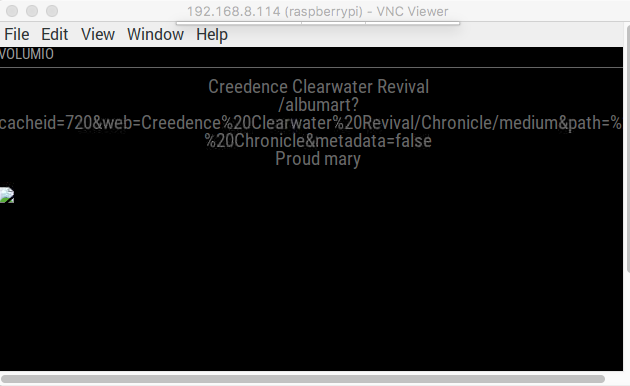
In the screenshot you can see Artist, Albumart (url ) and Title has been displayed. There is an icon for the image on the left.
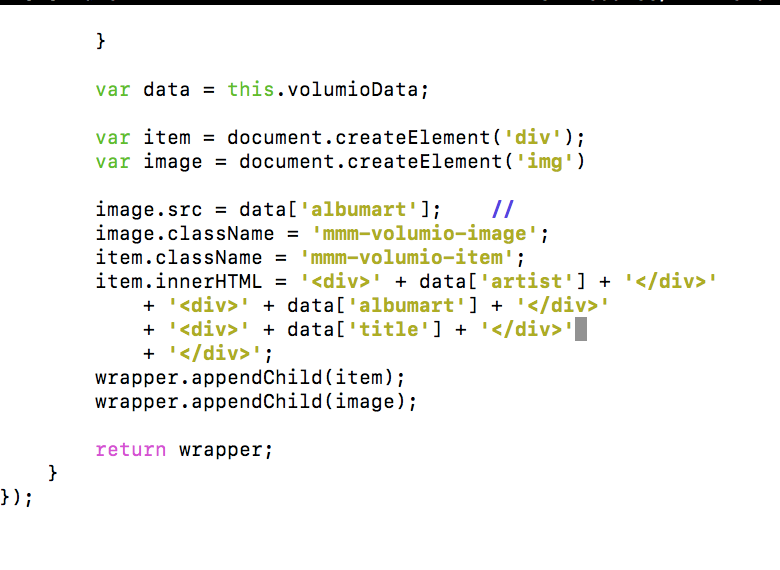
Here is the bit of code I have been fiddling with for 2 day. I have been playing about with the CSS a tiny bit too to move the text etc. and gave the image a className so I could CSS that too. I imagine I am making a rookie mistake and like needing some brackets somewhere. I have tried so many things. I would really appreciate some help. -
var data = this.volumioData; var item = document.createElement('div'); var image = document.createElement('img') image.src = data['albumart']; // image.className = 'mmm-volumio-image'; item.className = 'mmm-volumio-item'; item.innerHTML = '<div>' + data['artist'] + '</div>' + '<div>' + data['albumart'] + '</div>' + '<div>' + data['title'] + '</div>' + '</div>'; wrapper.appendChild(item); wrapper.appendChild(image); return wrapper; } }); -
    var data = this.volumioData;
    var item = document.createElement('div');

    item.className = 'mmm-volumio-item';
    item.innerHTML = '<div>' + data['artist'] + '</div>'
        + '<div>' + data['album'] + '</div>'
        + '<div><img src=' + data['albumart'] + '></div>';

    wrapper.appendChild(item);

    return wrapper;
This is the from the example.
Hello! It looks like you're interested in this conversation, but you don't have an account yet.
Getting fed up of having to scroll through the same posts each visit? When you register for an account, you'll always come back to exactly where you were before, and choose to be notified of new replies (either via email, or push notification). You'll also be able to save bookmarks and upvote posts to show your appreciation to other community members.
With your input, this post could be even better 💗
Register Login