Read the statement by Michael Teeuw here.
Display waste bins in color
-
@kusselin new release available
-
Ok i see…thanks snd now the update how is standing in the update manual here…right
-
@kusselin eh? not sure what u said. run my upgrade script
see
-
o.k thanks
-
here my update installation:
pi@raspberrypi:~ $ bash -c  "$(curl -sL https://raw.githubusercontent.com/sdetweil/MagicMirror_scripts/master/upgrade-script.sh)" apply
No LSB modules are available.
doing test run = false
update log will be in /home/pi/MagicMirror/installers/upgrade.log

saving custom.css
upgrading from version 2.13.0 to 2.14.0
fetching latest revisions
From https://github.com/MichMich/MagicMirror
   3dbe8bfb..10dc315f  master     -> origin/master
 * [new tag]           V2.2.1     -> V2.2.1
 * [new tag]           v.2.1.3    -> v.2.1.3
 * [new tag]           v2.0.0     -> v2.0.0
 * [new tag]           v2.0.1     -> v2.0.1
 * [new tag]           v2.0.2     -> v2.0.2
 * [new tag]           v2.0.3     -> v2.0.3
 * [new tag]           v2.0.4     -> v2.0.4
 * [new tag]           v2.0.5     -> v2.0.5
 * [new tag]           v2.1.0     -> v2.1.0
 * [new tag]           v2.1.1     -> v2.1.1
 * [new tag]           v2.1.2     -> v2.1.2
 * [new tag]           v2.10.0    -> v2.10.0
 * [new tag]           v2.10.1    -> v2.10.1
 * [new tag]           v2.11.0    -> v2.11.0
 * [new tag]           v2.12.0    -> v2.12.0
 * [new tag]           v2.14.0    -> v2.14.0
 * [new tag]           v2.2.0     -> v2.2.0
 * [new tag]           v2.2.2     -> v2.2.2
 * [new tag]           v2.3.0     -> v2.3.0
 * [new tag]           v2.3.1     -> v2.3.1
 * [new tag]           v2.4.0     -> v2.4.0
 * [new tag]           v2.4.1     -> v2.4.1
 * [new tag]           v2.5.0     -> v2.5.0
 * [new tag]           v2.6.0     -> v2.6.0
 * [new tag]           v2.7.0     -> v2.7.0
 * [new tag]           v2.7.1     -> v2.7.1
 * [new tag]           v2.8.0     -> v2.8.0
 * [new tag]           v2.9.0     -> v2.9.0
updating MagicMirror runtime, please wait

> core-js@3.7.0 postinstall /home/pi/MagicMirror/node_modules/core-js
> node -e "try{require('./postinstall')}catch(e){}"

Thank you for using core-js ( https://github.com/zloirock/core-js ) for polyfilling JavaScript standard library!

The project needs your help! Please consider supporting of core-js on Open Collective or Patreon:
> https://opencollective.com/core-js
> https://www.patreon.com/zloirock

Also, the author of core-js ( https://github.com/zloirock ) is looking for a good job -)


> electron@8.5.3 postinstall /home/pi/MagicMirror/node_modules/electron
> node install.js


> magicmirror@2.14.0 install /home/pi/MagicMirror
> echo "Installing vendor files ...
" && cd vendor && npm install --loglevel=error

Installing vendor files ...


> @fortawesome/fontawesome-free@5.15.1 postinstall /home/pi/MagicMirror/vendor/node_modules/@fortawesome/fontawesome-free
> node attribution.js

Font Awesome Free 5.15.1 by @fontawesome - https://fontawesome.com
License - https://fontawesome.com/license/free (Icons: CC BY 4.0, Fonts: SIL OFL 1.1, Code: MIT License)

updated 3 packages and audited 24 packages in 18.623s

1 package is looking for funding
  run `npm fund` for details

found 0 vulnerabilities


> magicmirror@2.14.0 postinstall /home/pi/MagicMirror
> npm run install-fonts && echo "MagicMirror installation finished successfully!
"


> magicmirror@2.14.0 install-fonts /home/pi/MagicMirror
> echo "Installing fonts ...
" && cd fonts && npm install --loglevel=error

Installing fonts ...

audited 1 package in 3.134s
found 0 vulnerabilities

MagicMirror installation finished successfully!

added 55 packages from 85 contributors, removed 261 packages, updated 72 packages and audited 1149 packages in 324.101s

42 packages are looking for funding
  run `npm fund` for details

found 1 low severity vulnerability
  run `npm audit fix` to fix them, or `npm audit` for details
processing dependency changes for active modules with package.json files

processing for module MMM-Carousel please wait
----------------------------------
npm WARN deprecated nodeunit@0.9.5: you are strongly encouraged to use other testing options
npm WARN deprecated coffee-script@1.12.7: CoffeeScript on NPM has moved to "coffeescript" (no hyphen)
npm WARN deprecated request@2.79.0: request has been deprecated, see https://github.com/request/request/issues/3142
npm WARN deprecated resolve-url@0.2.1: https://github.com/lydell/resolve-url#deprecated
npm WARN deprecated urix@0.1.0: Please see https://github.com/lydell/urix#deprecated
npm WARN deprecated hawk@3.1.3: This module moved to @hapi/hawk. Please make sure to switch over as this distribution is no longer supported and may contain bugs and critical security issues.
npm WARN deprecated har-validator@2.0.6: this library is no longer supported
npm WARN deprecated hoek@2.16.3: This version has been deprecated in accordance with the hapi support policy (hapi.im/support). Please upgrade to the latest version to get the best features, bug fixes, and security patches. If you are unable to upgrade at this time, paid support is available for older versions (hapi.im/commercial).
npm WARN deprecated cryptiles@2.0.5: This version has been deprecated in accordance with the hapi support policy (hapi.im/support). Please upgrade to the latest version to get the best features, bug fixes, and security patches. If you are unable to upgrade at this time, paid support is available for older versions (hapi.im/commercial).
npm WARN deprecated boom@2.10.1: This version has been deprecated in accordance with the hapi support policy (hapi.im/support). Please upgrade to the latest version to get the best features, bug fixes, and security patches. If you are unable to upgrade at this time, paid support is available for older versions (hapi.im/commercial).
npm WARN deprecated sntp@1.0.9: This module moved to @hapi/sntp. Please make sure to switch over as this distribution is no longer supported and may contain bugs and critical security issues.
npm WARN deprecated core-js@2.6.12: core-js@<3 is no longer maintained and not recommended for usage due to the number of issues. Please, upgrade your dependencies to the actual version of core-js@3.
npm notice created a lockfile as package-lock.json. You should commit this file.
added 522 packages from 374 contributors and audited 522 packages in 150.454s

14 packages are looking for funding
  run `npm fund` for details

found 88 vulnerabilities (45 low, 12 moderate, 30 high, 1 critical)
  run `npm audit fix` to fix them, or `npm audit` for details
processing complete for module MMM-Carousel

processing for module MMM-Remote-Control please wait
----------------------------------
npm notice created a lockfile as package-lock.json. You should commit this file.
added 31 packages from 26 contributors and audited 31 packages in 15.301s
found 0 vulnerabilities

processing complete for module MMM-Remote-Control

processing for module MMM-SoccerLiveScore please wait
----------------------------------
npm notice created a lockfile as package-lock.json. You should commit this file.
up to date in 1.338s
found 0 vulnerabilities

processing complete for module MMM-SoccerLiveScore

processing for module MMM-Formula1 please wait
----------------------------------
npm WARN deprecated coffee-script@1.12.7: CoffeeScript on NPM has moved to "coffeescript" (no hyphen)
npm WARN deprecated resolve-url@0.2.1: https://github.com/lydell/resolve-url#deprecated
npm WARN deprecated urix@0.1.0: Please see https://github.com/lydell/urix#deprecated
npm WARN deprecated @types/vfile-message@2.0.0: This is a stub types definition. vfile-message provides its own type definitions, so you do not need this installed.
npm notice created a lockfile as package-lock.json. You should commit this file.
added 646 packages from 393 contributors and audited 646 packages in 176.234s

58 packages are looking for funding
  run `npm fund` for details

found 2 low severity vulnerabilities
  run `npm audit fix` to fix them, or `npm audit` for details
processing complete for module MMM-Formula1

processing for module MMM-ioBroker please wait
----------------------------------
npm WARN deprecated mkdirp@0.5.1: Legacy versions of mkdirp are no longer supported. Please update to mkdirp 1.x. (Note that the API surface has changed to use Promises in 1.x.)
npm notice created a lockfile as package-lock.json. You should commit this file.
added 47 packages from 502 contributors and audited 47 packages in 20.087s

3 packages are looking for funding
  run `npm fund` for details

found 1 low severity vulnerability
  run `npm audit fix` to fix them, or `npm audit` for details
processing complete for module MMM-ioBroker

processing for module MMM-Fuel please wait
----------------------------------
npm notice created a lockfile as package-lock.json. You should commit this file.
added 458 packages from 286 contributors and audited 458 packages in 137.315s

84 packages are looking for funding
  run `npm fund` for details

found 0 vulnerabilities

processing complete for module MMM-Fuel

processing for module MMM-PublicTransportHafas please wait
----------------------------------
npm WARN deprecated hafas-client@2.10.4: Deprecated. Use hafas-client@latest.
npm WARN deprecated vbb-translate-ids@3.1.0: Deprecated. Use vbb-translate-ids@latest.
npm notice created a lockfile as package-lock.json. You should commit this file.
added 33 packages from 23 contributors and audited 33 packages in 18.988s

2 packages are looking for funding
  run `npm fund` for details

found 0 vulnerabilities

processing complete for module MMM-PublicTransportHafas

processing for module MMM-Tools please wait
----------------------------------
npm notice created a lockfile as package-lock.json. You should commit this file.
added 3 packages from 3 contributors and audited 3 packages in 4.837s

1 package is looking for funding
  run `npm fund` for details

found 0 vulnerabilities

processing complete for module MMM-Tools

processing for module MMM-Traffic please wait
----------------------------------
npm notice created a lockfile as package-lock.json. You should commit this file.
added 2 packages from 7 contributors and audited 2 packages in 5.081s
found 0 vulnerabilities

processing complete for module MMM-Traffic

restoring custom.css
what sy me this? What must i do for them?
found 1 low severity vulnerability
  run `npm audit fix` to fix them, or `npm audit` for details
processing complete for module MMM-ioBroker
Must i make really npm audit fix in the console??
-
@kusselin ok, wait some more… it will say its done
-
o.k. and this is my version now:
pi@raspberrypi:~ $ cd ~/MagicMirror pi@raspberrypi:~/MagicMirror $ grep version package.json "version": "2.14.0", -
@kusselin ok, then npm start
or pm2 start 0 if u use pm2 -
@sdetweil said in Display waste bins in color:
pm2 start 0
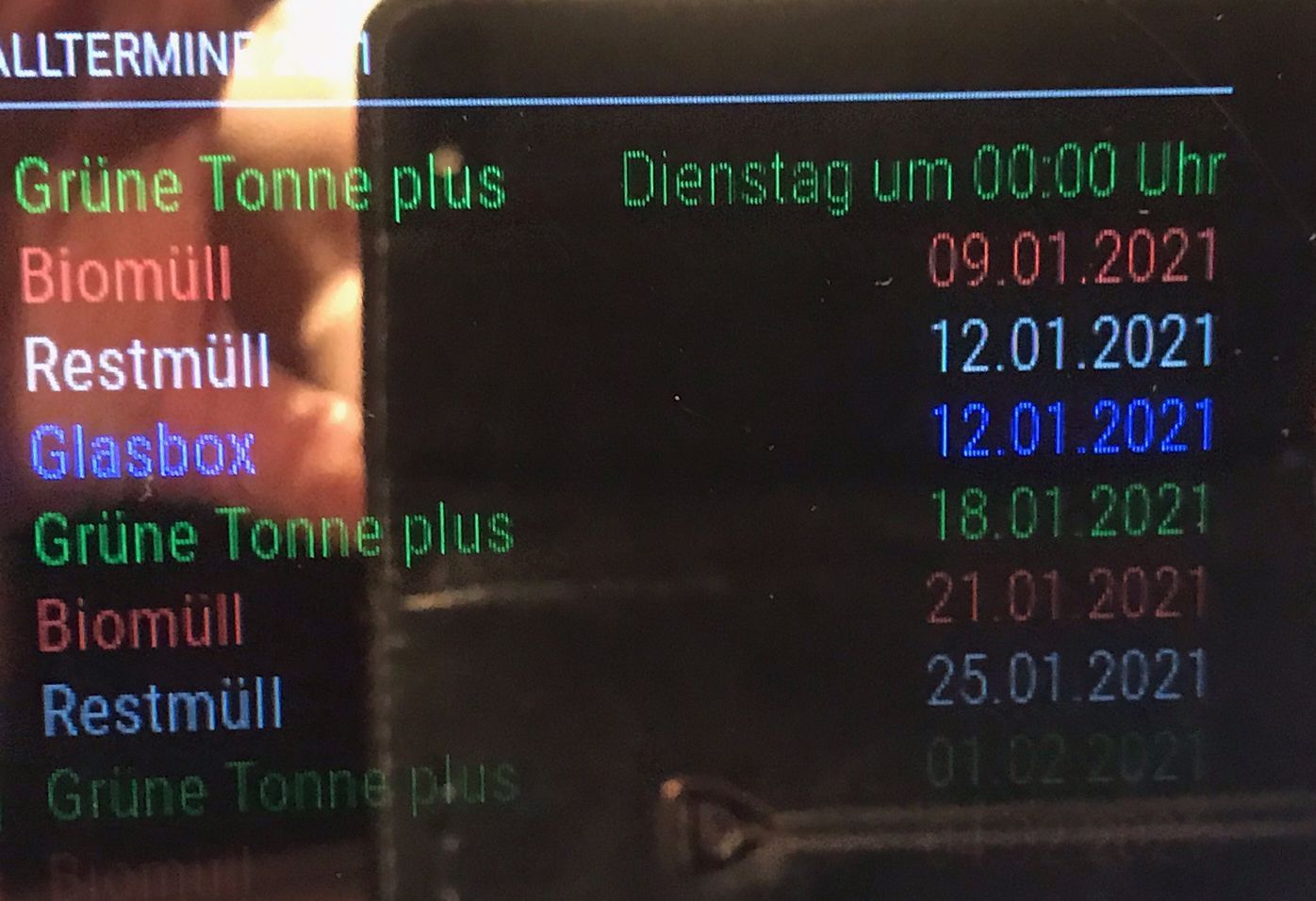
Heeey what should i say!!! Sam and ashistank…YOU ARE THE BEST!!! :-) :-)
After a reboot and npm2 start the colours are there!! :-)
pi@raspberrypi:~ $ pm2 start 0
[PM2] Applying action restartProcessId on app [0](ids: 0)
[PM2] [MagicMirror](0) ✓
[PM2] Process successfully started
┌────┬────────────────────┬──────────┬──────┬───────────┬──────────┬──────────┐
│ id │ name               │ mode     │ ↺    │ status    │ cpu      │ memory   │
├────┼────────────────────┼──────────┼──────┼───────────┼──────────┼──────────┤
│ 0  │ MagicMirror        │ fork     │ 1    │ online    │ 0%       │ 2.5mb    │
└────┴────────────────────┴──────────┴──────┴───────────┴──────────┴──────────┘
Thank You very much !!
-
Sam, it is possible that you can say me the colour for brown in config.js code…the name brown is not working you can see it at the picture
-
-
Thanks…now it run fine

Hello! It looks like you're interested in this conversation, but you don't have an account yet.
Getting fed up of having to scroll through the same posts each visit? When you register for an account, you'll always come back to exactly where you were before, and choose to be notified of new replies (either via email, or push notification). You'll also be able to save bookmarks and upvote posts to show your appreciation to other community members.
With your input, this post could be even better 💗
Register Login