Read the statement by Michael Teeuw here.
module not found error loading module in MagicMirror
-
the message module not found has nothing to do with MagicMirror ‘modules’ but a library USED by a MagicMirror module. sadly we cannot change or intercept the message
a typical error
Cannot find module ‘request’
In recent mm releases we have removed libraries that are discontinued ( aka deprecated).
many mm modules used these but didn’t document it. so they fail
to fix this you need to install the library in the module folder,
so docd ~/MagicMirror/modules cd modulename (where modulename is the module having the error)once there, do
ls package.jsonif the module does NOT provide that file ( ls reponse is ‘No such file or directory’) then do
npm init -yNEVER EVER do this in the MagicMirror folder
if you do/did, then do
git checkout package.jsonthen regardless (in the module folder) do
npm install ???where ??? is the library noted in the message Cannot find module ‘???’
| in the example message above, ??? is request
to find this message, look in the output of npm start. or if you use pm2 to launch mm do
pm2 logs --lines=50 -
S sdetweil pinned this topic on
-
I don’t find the upgrade of MM quite helpful.
In my case under 2.16 one module (MMM-Fuel) did not work and one of my three calendars could not be loaded with MMM-CalendarExt2. In both cases the certificate error was the reason. The certificate had expired. It was, but there are new ones on the servers.
After upgrading to MM 2.17, MMM-Fuel now works, but not MMM-CalendarExt2 and MMM-OneTracker. So there are more problems than before. I definitely did not expect this with an upgrade. Set both modules to
disabled: trueand I’m rid of the black screen for now.
Now I guess I have to work my way through the post-installation.
Here as example the MMM-CalendarExt2 Error:
[24.10.2021 19:48.03.521] [ERROR] App threw an error during load
[24.10.2021 19:48.03.524] [ERROR] Error: Cannot find module 'request'
Require stack:
- /home/pi/MagicMirror/modules/MMM-CalendarExt2/node_helper.js
- /home/pi/MagicMirror/js/app.js
- /home/pi/MagicMirror/js/electron.js
- /home/pi/MagicMirror/node_modules/electron/dist/resources/default_app.asar/main.js
-
at Module._resolveFilename (internal/modules/cjs/loader.js:887:15)
at Function.n._resolveFilename (electron/js2c/browser_init.js:257:1128)
at Function.Module._resolveFilename (/home/pi/MagicMirror/node_modules/module-alias/index.js:49:29)
at Module._load (internal/modules/cjs/loader.js:732:27)
at Function.f._load (electron/js2c/asar_bundle.js:5:12913)
at Module.require (internal/modules/cjs/loader.js:959:19)
at require (internal/modules/cjs/helpers.js:88:18)
at Object.<anonymous> (/home/pi/MagicMirror/modules/MMM-CalendarExt2/node_helper.js:4:17)
at Module._compile (internal/modules/cjs/loader.js:1078:30)
at Object.Module._extensions..js (internal/modules/cjs/loader.js:1108:10)
[24.10.2021 19:48.03.525] [ERROR] Whoops! There was an uncaught exception...
[24.10.2021 19:48.03.531] [ERROR] Error: Cannot find module 'request'
Require stack:
- /home/pi/MagicMirror/modules/MMM-CalendarExt2/node_helper.js
- /home/pi/MagicMirror/js/app.js
- /home/pi/MagicMirror/js/electron.js
- /home/pi/MagicMirror/node_modules/electron/dist/resources/default_app.asar/main.js
-
at Module._resolveFilename (internal/modules/cjs/loader.js:887:15)
at Function.n._resolveFilename (electron/js2c/browser_init.js:257:1128)
at Function.Module._resolveFilename (/home/pi/MagicMirror/node_modules/module-alias/index.js:49:29)
at Module._load (internal/modules/cjs/loader.js:732:27)
at Function.f._load (electron/js2c/asar_bundle.js:5:12913)
at Module.require (internal/modules/cjs/loader.js:959:19)
at require (internal/modules/cjs/helpers.js:88:18)
at Object.<anonymous> (/home/pi/MagicMirror/modules/MMM-CalendarExt2/node_helper.js:4:17)
at Module._compile (internal/modules/cjs/loader.js:1078:30)
at Object.Module._extensions..js (internal/modules/cjs/loader.js:1108:10) {
code: 'MODULE_NOT_FOUND',
requireStack: [
'/home/pi/MagicMirror/modules/MMM-CalendarExt2/node_helper.js',
'/home/pi/MagicMirror/js/app.js',
'/home/pi/MagicMirror/js/electron.js',
'/home/pi/MagicMirror/node_modules/electron/dist/resources/default_app.asar/main.js',
undefined
Cannot find module ‘request’ means now what? I don’t know what to put in place of the “xxx”.
-
where xxx is the library noted in the message cannot find module xxx
so your message was
Cannot find module 'request'so xxx is
requestjust to clarify
there are MORE libraries not found than just request. so I am trying to teach you all how to read the messages and understand what to do… -
@sdetweil Thanks, I will use it that way. MMM-OneTracker has the same “request”. Others had this problem with MMM-DWD-WarnWeather - not me. It is strange.
-
@macg no not strange. the authors didn’t know what they were supposed to do with libs they used. and it ‘worked’ by doing nothing.
oops, request has a fatal security bug, and the authors decided the amount of work to fix it wasn’t worth the effort, as new libs are out that don’t have the problem.
so they discontinued it (aka deprecated), mm doesn’t want to drag that security flaw in and took action to move the base code to another lib, and remove the bad one(s)…
oops now we have lots of old, some unmaintained, modules that used the only copy of the lib and didn’t say so. .(as a dependency in their module’s package.json file)…
so nobody knows, and it’s gone. oops…
-
@macg as for the cert error, not the mm code at all
the certificate authority cert expired and electron didn’t handle it. chromium did
but we have to upgrade electron to a version that works, and drag along all the other stuff
libs not found I already explained
welcome to the world of open source
in my career at IBM there was one cardinal rule
never EVER make changes that break existing apps.
same data in produces the same data out, always.
u made a mistake?! oops, somehow have to make a DIFFERENT input to get a different output.
it takes work, and thought and time.
but developers and customers can work on new value instead of costly reworkin the new internet world time is critical, so ship, and fix as fast as u can, breaking changes need to be DOCUMENTED. what a relief THAT is for users and customers…!
and, stuff that can’t keep up will be discarded ‘quickly’…, yeh, sure… hahahaha… customers think that makes their life easier too. -
@sdetweil I understand that some authors do not use the current libs. The “strange” referred to the fact that I have no problems with MMM-DWD-WarnWeather, but others have to install the module “request”.
Open source is both a curse and a blessing. Now everything works again and MM’s layout changes to the clock module were also quickly undone. :slightly_smiling_face:
-
@macg said in fix for black screen in 2.16 and later:
The “strange” referred to the fact that I have no problems with MMM-DWD-WarnWeather, but others have to install the module “request”.
did u npm install request in the mm folder, or in a module folder where there was no package.json, the latter ends up putting it in the mm/node_modules, the same as the former
-
Maybe this can help some users.
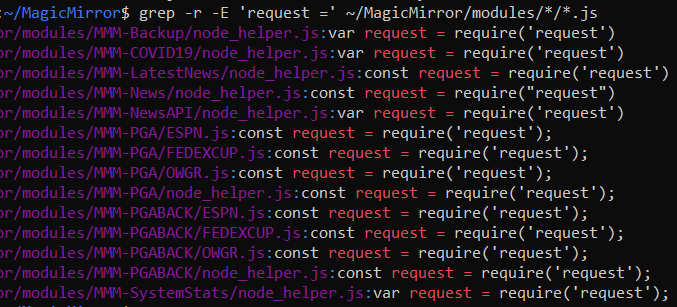
The following will search all *.js files in the modules folder for the reference of request. You can then just enter the module folders and install as per @sdetweil suggestion above. The same can be done for the other missing modules.
grep -r -E '('request')' ~/MagicMirror/modules/*/*.jsor search for multiple problem modules
grep -r -E '('request') | ('valid-url')' ~/MagicMirror/modules/*/*.jsProduces the following:
-
@mumblebaj and then pull off the module name and scan it’s package.json to see if it’s referenced
-
@sdetweil said in fix for black screen in 2.16 and later:
did u npm install request in the mm folder, or in a module folder where there was no package.json, the latter ends up putting it in the mm/node_modules, the same as the former
I installed it the way you suggested. In the two module folders with the addition of package.json (npm init -y) and then npm install request. The MMM-DWD-WarnWeather worked on my mirror from the beginning after updating to MM2.17.
-
I enhanced my upgrade script to do all this for all installed modules…
-
@sdetweil @mumblebaj Thank you two for helping me solve this problem after the last update - I spent a LOT of time looking for the solution that you two helped me (the grep made it easier to find the right modules), the two commands were what fixed it.
Will I have to do this again with the next update?
-
@levon maybe. but if you use my upgrade script, it will do the fixes for you
-
@sdetweil Thanks … I will give this a try next time I’m updating. I thought I had tried it before, but perhaps not. I appreciate you sharing this.
-
@sdetweil I did everything as you said, but …
[17.12.2021 04:05.03.723] [ERROR] WARNING! Could not load config file. Starting with default configuration. Error found: Error: Cannot find module ‘request’
Require stack:- /home/pi/MagicMirror/modules/MMM-bitcoin/node_helper.js
- /home/pi/MagicMirror/js/app.js
- /home/pi/MagicMirror/js/electron.js
- /home/pi/MagicMirror/node_modules/electron/dist/resources/default_app.asar/main.js
-
@arena and , what is the module/library u need to install?
-
@sdetweil fiddled all day today and figured out
it turned out I did not install or update the dependencies inside the modulesorry, thanks
-
@sdetweil Hello everyone, I haven’t been here for a while and my Magic Mirror was switched off…after I switched it on again I made updates to the modules via remote…but I still don’t have any display for some modules like Tankerkönig…when I start the Mirror it always says “Modules cannot be loaded”.
Now, as described by sdetweil, there are commands that you have to execute in the modules in question…but unfortunately I haven’t quite understood how I have to do this in the right order?
It would be really nice if you could explain to me how I have to proceed in order to display the modules again, such as Tankerkönig or mmm-fuel.
Thank you very much in advance for your help.
Greetings
Kussel
i don´t understand that here:
npm install ???

where ??? is the library noted in the message Cannot find module ‘???’

| in the example message above, ??? is request

to find this message, look in the output of npm start. or if you use pm2 to launch mm do
pm2 logs --lines=50
how do I proceed exactly?
pi@raspberrypi:~/MagicMirror/modules/MMM-Tankerkoenig $ npm init -y Wrote to /home/pi/MagicMirror/modules/MMM-Tankerkoenig/package.json: { "name": "MMM-Tankerkoenig", "version": "1.0.0", "description": "This is a module for the [MagicMirror²](https://github.com/MichMich/MagicMirror/) which displays a fuel prices from [Tankerkoenig](https://www.tankerkoenig.de/).", "main": "MMM-Tankerkoenig.js", "scripts": { "test": "echo \"Error: no test specified\" && exit 1" }, "repository": { "type": "git", "url": "git+https://github.com/terenc3/MMM-Tankerkoenig.git" }, "keywords": [], "author": "", "license": "ISC", "bugs": { "url": "https://github.com/terenc3/MMM-Tankerkoenig/issues" }, "homepage": "https://github.com/terenc3/MMM-Tankerkoenig#readme" -
@kusselin find the messages output by mm
search the messages for one like shown (without the ???)
find the name of the library in quotes (now u have ???)
issue a command using that info


Hello! It looks like you're interested in this conversation, but you don't have an account yet.
Getting fed up of having to scroll through the same posts each visit? When you register for an account, you'll always come back to exactly where you were before, and choose to be notified of new replies (either via email, or push notification). You'll also be able to save bookmarks and upvote posts to show your appreciation to other community members.
With your input, this post could be even better 💗
Register Login