Read the statement by Michael Teeuw here.
Three module issues from a new user
-
Hi all, was working on the same thing.
Some icons I wanted to use are in brands, and can’t figure out how to invoke it properly. Tried adding imports in fontawesome.css for it, but no go. Anyone know how/why brands wont work? They are considered free use.
-
@skyfall I do not KNOW for sure… maybe they have to be downloaded separately?
see the last few posts here on getting separate fonts usable after download
https://forum.magicmirror.builders/topic/8758/change-fonts/6?_=1650986841007
-
@sdetweil I don’t think so, I’ve been looking into it and it is included in all.min.css; that’s where the other ones get imported from. Maybe we’re not invoking it properly since the FA 4->6 upgrade that happened in January?
-
maybe all you have to do is npm install the right stuff in the vendor folder
"dependencies": {
	"@fortawesome/fontawesome-free": "^6.1.1",
and this is in the vendor/css/font-awesome.css
@import url(“…/node_modules/@fortawesome/fontawesome-free/css/all.min.css”);
@import url("…/node_modules/@fortawesome/fontawesome-free/css/v4-shims.min.these files are in the folder
sam@sams:~/MagicMirror/vendor/node_modules/@fortawesome/fontawesome-free/css$ ls
all.css fontawesome.min.css svg-with-js.css v4-shims.min.css
all.min.css regular.css svg-with-js.min.css v5-font-face.css
brands.css regular.min.css v4-font-face.css v5-font-face.min.css
brands.min.css solid.css v4-font-face.min.css
fontawesome.css solid.min.css v4-shims.cssi looked up one of the items listed in brands, .fa-apple-pay
in all.css… and its there -
@sdetweil I think we’re on to something here. I’m embarassed but I did notice my dependencies were out of date. I was running FA 5.13.3. Reinstalled and reverified and now running 6.1.1. However, when invoking ‘canadian-maple-leaf’ for example, it’s now showing a broken icon symbol versus nothing!

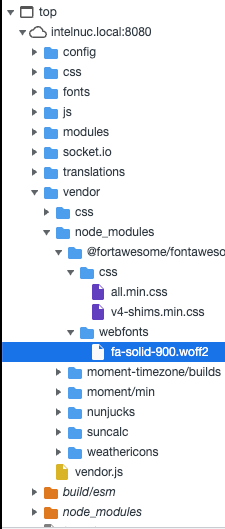
I did also notice it isn’t loading the .woff2 file for the brands fonts, even though it is in the correct directory.
-
I’ve figured it out!
Like the original post, I’m working with Calendar module. I wanted to understand why we could write, say symbol: “cloud” instead of having to declare the full “fas fa-fw fa-cloud” to invoke the symbol.
I went into /modules/default/calendar/calendar.js and noticed the following section of code:
const symbols = this.symbolsForEvent(event);
                                symbols.forEach((s, index) => {
                                        const symbol = document.createElement("span");
                                        symbol.className = "fas fa-fw fa-" + s;
                                        if (index > 0) {
                                                symbol.style.paddingLeft = "5px";
                                        }
                                        symbolWrapper.appendChild(symbol);
                                });
                                eventWrapper.appendChild(symbolWrapper);
                        } else if (this.config.timeFormat === "dateheaders") {
                                const blankCell = document.createElement("td");
                                blankCell.innerHTML = "   ";
                                eventWrapper.appendChild(blankCell);
                        }
calendar.js is hardcoding the fas (solid) font family in, not allowing us to invoke a family like fab (brands). setting the line:
symbol.className = "fas fa-fw fa-" + s;to just:
symbol.className = s;forces us to redeclare every symbol in config.js from “cloud” to “fas fa-fw fa-cloud”, but we can now access all available FA icons.
And so, I get my leaf :)
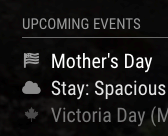 Screen Shot 2022-04-28 at 17.37.44
 -
@skyfall awesome
-
@skyfall I think we could fix that with a little smarter code, and not break existing modules
changesymbol.className = "fas fa-fw fa-" + s;to
// if requested symbol name starts with 'fa-' , get the substring after 'fa-'
// if  not, use as is
symbol.className = "fas fa-fw fa-" +(s.startsWith('fa-')?s.slice(3):s);
of course if the other icon names start with fa-, then u didn’t need any of this…
can u provide an example of the branded icon name?
-
I was using https://fontawesome.com/icons/canadian-maple-leaf?s=brands for example
I was thinking about how to fix this without breaking too; could just be an else if statement checking to see if it starts with “fab” or “fal”, otherwise keeping the fas hardcode. Would let us declare other families and keep the shorthand for the default fas configuration.
-
@skyfall oh, I see you have to call out fa-brands
hm…
maybe if the specific string has more than 1 word
like “fa-brands fa-iconname”
then you use as is (full string)
otherwise you use the default approach of appending the name to the ‘fa-’ already there// if there is a space in the name, 'collectionname iconname' use the string as is // for example "fa-brands fa-canadian-maple-leaf" // else use the current approach symbol.className =(s.indexOf(' ')>0?s:( "fas fa-fw fa-" +s));this would let other prefix specific icons in, and not break old…
-
Yeah, there’s a few things to try and we can make it work without breaking default notation
I think one thing to keep in mind is MM seems to refer to them as “fab” instead of fa-brands; not sure where that translation happens.
I did see some of the commits from January that initially addresses this. I’m mobile right now so I don’t have the references, but it looked like this convention is used in more places than just calendar. Should be the same fix for all instances though.
I’ll experiment with it a bit too when I sit down to look.
-
@skyfall I found this post exactly because of that icon, lol
Have anyone made it work? changing fas to fal does the job for the Canadian maple leaf icon but breaks the others :(
-
@sdetweil said in Three module issues from a new user:
// if there is a space in the name, ‘collectionname iconname’ use the string as is
// for example “fa-brands fa-canadian-maple-leaf”
// else use the current approach
symbol.className =(s.indexOf(’ ')>0?s:( “fas fa-fw fa-” +s));This works perfectly in calendar, however in the CX3 module it does not work, apparently spaces are not allowed
-
it would have been nice if the fontawesome 4 prefixes weren’t hardcoded into the module sources/templates. Would have made changing the icons to something else in so much easier.
-
@kayakbabe I agree.
I went to line 448 and 449 of MMM-CalendarEXT3.js and edited this
        exDom.classList.add('symbol', 'fa-solid')
        exDom.classList.add(...event.symbol.map((s) => {return 'fa-' + s}))
I did it once but since the update I had to reinstall the whole MagicMirror and lost the changes, I did not realized I did not backup that part of the code. I don’t remember what I did but I removed fa-solid and made something that changes fas and fab. based on config.js.
Very similar of what it’s explain on this topic, but I can’t make it work anymore. Sorry for diverting the thread. We should talk about this on a new post as I’m talking about an extension.
FontAwesome is already at version 6. It would be nice if MagicMirror in the future considers a flexible version in case of future updates, where you can choose in config.js if you want “fas” (by default) of “fab” :beaming_face_with_smiling_eyes:
-
 L luisestrada referenced this topic on
-
I’ll swing it back to this thread…
I got access to the extra fontawesome 6 by just copying the contents over the font awesome 4 in the vendors folder. NOT the right way to do it because it will get wiped out if I ever update my mirror. Correct me if I"m wrong, but I think it should have been a subfolder in the mm css folder in order to preserve it.
Also I copied the provider file for openweathermap.js (and gave it a new name) and changed the constants for the weathertype to the following.
(note, i have access to the pro fontawesome so I can use the duotone icons in my mirror).
	/*
	 * Convert the OpenWeatherMap icons to a more usable name.
	 */
	convertWeatherType(weatherType) {
		const weatherTypes = {
			"01d": "fa-duotone fa-sun",
			"02d": "fa-duotone fa-sun-cloud",
			"03d": "fa-duotone fa-cloud-sun",
			"04d": "fa-duotone fa-clouds-sun",
			"09d": "fa-duotone fa-cloud-sun-rain",
			"10d": "fa-duotone fa-cloud-showers-heavy",
			"11d": "fa-duotone fa-cloud-bolt",
			"13d": "fa-duotone fa-snowflake fa-spin-pulse",
			"50d": "fa-duotone fa-sun-haze",
			"01n": "fa-duotone fa-moon-stars night",
			"02n": "fa-duotone fa-moon-cloud night",
			"03n": "fa-duotone fa-clouds-moon night",
			"04n": "fa-duotone fa-cloud-moon-rain night",
			"09n": "fa-duotone fa-cloud-showers night",
			"10n": "fa-duotone fa-cloud-moon-rain night",
			"11n": "fa-duotone fa-cloud-bolt night",
			"13n": "fa-duotone fa-snowflake fa-spin-pulse night",
			"50n": "fa-duotone fa-cloud-fog night"
		};
I think these used to be configurable for the old weather modules in the config.js, but now they are constants defined in the provider file. Make sense because each profider sends differnt weathertype codes and it would be really confusing for people help one another. But then you have geeks like us who ust keep digging and we can usually figure it out maybe with nudges in the right direction.
For Openweathermap (OWM) those constands/weathertypes are based on the “icon” info that OWM sends. I thought about changing that to use the codes that OWM provides since ErikFlowers weathericons now have so many more weathericons and he actually provides a definition for the OWM codes to his icons too.
I did the kickstarter to help Fontawesome create 6, so have all the paid version 6 icons too without subscription fees. I love their weather duotone icons and they do work on the mm if the css is set correctly. They work in the calendar too. I’m sure they’d also work with the same fixes in the third party modules. I think a lot of folks just used the default modules as models of how to build their own so a lot of the hard coded stuff (that should have been config enabled instead) just carried through to their own modules.
All of us need to remember that Mich did this for himself and knew what he wanted. I probably would have hard coded it myself in that situation. We are lucky we have free access to what he began and gave to the public for free. I’m so glad he did. This is a great learning project with a great looking usable end product.

Hello! It looks like you're interested in this conversation, but you don't have an account yet.
Getting fed up of having to scroll through the same posts each visit? When you register for an account, you'll always come back to exactly where you were before, and choose to be notified of new replies (either via email, or push notification). You'll also be able to save bookmarks and upvote posts to show your appreciation to other community members.
With your input, this post could be even better 💗
Register Login