MagicMirror Forum
    • Recent
    • Tags
    • Unsolved
    • Solved
    • MagicMirror² Repository
    • Documentation
    • 3rd-Party-Modules
    • Donate
    • Discord
    • Register
    • Login
    A New Chapter for MagicMirror: The Community Takes the Lead
    Read the statement by Michael Teeuw here.

    MMM-CalendarExt3Agenda

    Scheduled Pinned Locked Moved Utilities
    224 Posts 30 Posters 362.0k Views 32 Watching
    Loading More Posts
    • Oldest to Newest
    • Newest to Oldest
    • Most Votes
    Reply
    • Reply as topic
    Log in to reply
    This topic has been deleted. Only users with topic management privileges can see it.
    • S Offline
      sdetweil @htilburgs
      last edited by sdetweil

      @htilburgs if you have 2 instance and want different css behavior, then you need to add more entries to custom.css using another selector prefix

      you can add a fake name to the classes property (at same level as module and position) and use that name instead of .CX3A.
      note the dot in front means classname

      Sam

      How to add modules

      learning how to use browser developers window for css changes

      htilburgsH 1 Reply Last reply Reply Quote 0
      • htilburgsH Offline
        htilburgs @sdetweil
        last edited by

        @sdetweil thanks Sam for the extra explanation.

        (still trying to learn JS, but not afraid to ask and AI is my best friend) ☺

        S 1 Reply Last reply Reply Quote 0
        • S Offline
          sdetweil @htilburgs
          last edited by sdetweil

          @htilburgs so an example

          in the second instance of agenda

          add

            classes:"agenda2",
          

          after the

            module:"MMM-CalendarExt3Agenda",
          

          and in the css
          copy all the .CX3A settings you have
          and add

          .agenda2 
          

          and a space after .agenda2
          as the start of the line w .CX3A

          .agenda2 .CX3A ....
          

          on all the newly duplicated lines
          leave out the ones you don’t want on the second instance of course

          Sam

          How to add modules

          learning how to use browser developers window for css changes

          htilburgsH 1 Reply Last reply Reply Quote 0
          • htilburgsH Offline
            htilburgs @MMRIZE
            last edited by

            @MMRIZE I’ve tried, but no luck

            (still trying to learn JS, but not afraid to ask and AI is my best friend) ☺

            1 Reply Last reply Reply Quote 0
            • htilburgsH Offline
              htilburgs @sdetweil
              last edited by htilburgs

              @sdetweil Yes! This works. Thanks

              (still trying to learn JS, but not afraid to ask and AI is my best friend) ☺

              1 Reply Last reply Reply Quote 1
              • D Offline
                danny607 @ffingers6
                last edited by

                @ffingers6 how do you get that view? can you post out the config.js and or relevant module JS thanks.

                M 1 Reply Last reply Reply Quote 0
                • M Offline
                  MMRIZE @danny607
                  last edited by

                  @danny607
                  https://forum.magicmirror.builders/topic/16976/mmm-calendarext3agenda/152?_=1725781945711

                  1 Reply Last reply Reply Quote 0
                  • M MMRIZE referenced this topic on
                  • D Offline
                    Dr8ke
                    last edited by

                    This is a great module thank you!

                    It may be something obvious but I’ve been searching without any luck. I’m trying to see how I can get more events to appear in the agenda. But I can seem to go beyond what’s in the screenshot. I’ll be using portrait mode so I have lots of room. I’ve include my config file and CSS file if that helps. Any help would be much appreciated, thank you!
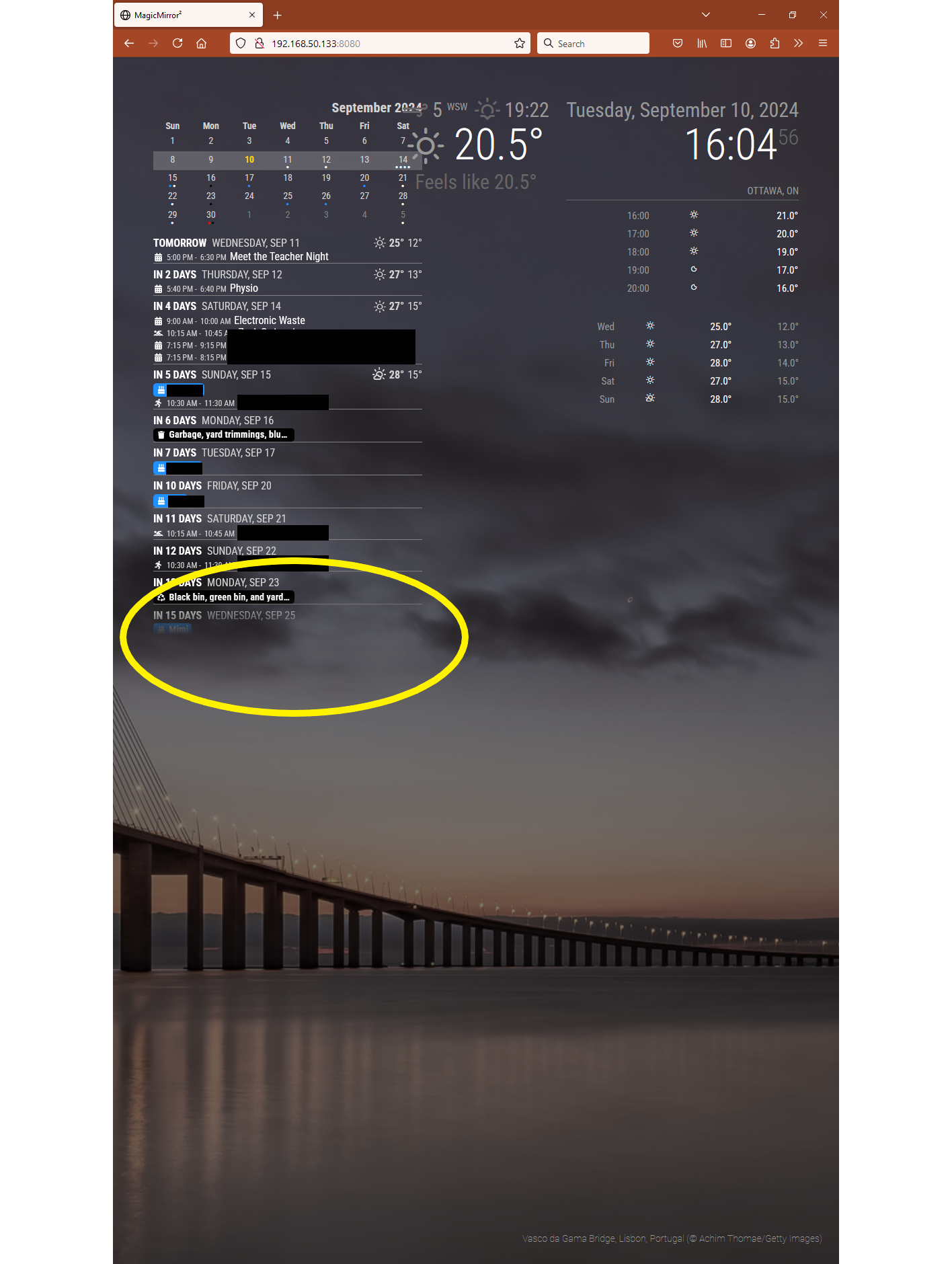
                    Agenda.png

                    Config.js

                    	module: 'calendar',
                    			header: "Calendar",
                    			//position: 'top_center',   *Calendar is needed for the MMM-CalendarExt3Agenda but taking away it's position hides it.
                    						config: {
                    						wrapEvents: true,
                    						fetchInterval: 300000, 
                    						maximumEntries: 100,
                    						displaySymbol: true,
                    						calendars: [
                    

                    Custom.css

                    
                    /******** CX3-Agenda ********/
                    
                    /*Remove CW from the miniMonth*/
                    .CX3A .miniMonth .cw {
                      display: none;
                    }
                    
                    /*show/hide event description or location*/
                    .CX3A .agenda .event .description,
                    .CX3A .agenda .event .location {
                      display: none;
                    }
                    
                    .CX3A .cellBody .fullday .event .headline .symbol,
                    .CX3A .cellBody .fullday .event .headline .symbol * {
                      display: inline-block;
                      color: var(--oppositeColor);
                    }
                    
                    
                    S 1 Reply Last reply Reply Quote 0
                    • S Offline
                      sdetweil @Dr8ke
                      last edited by

                      @Dr8ke here is the full size

                      .CX3A .agenda {
                        position: relative;
                        max-height: 600px;
                        overflow-y: hidden;  // if it gets bigger, truncate and hide
                        mask-image: linear-gradient(to bottom, transparent, black 10%);
                        -webkit-mask-image: -webkit-linear-gradient(90deg, transparent, black 10%);
                      }
                      

                      Sam

                      How to add modules

                      learning how to use browser developers window for css changes

                      D 1 Reply Last reply Reply Quote 0
                      • D Offline
                        Dr8ke @sdetweil
                        last edited by

                        @sdetweil

                        Thank you very much!

                        S 1 Reply Last reply Reply Quote 0
                        • S Offline
                          sdetweil @Dr8ke
                          last edited by

                          @Dr8ke that was from the module css

                          Sam

                          How to add modules

                          learning how to use browser developers window for css changes

                          1 Reply Last reply Reply Quote 0
                          • B Offline
                            bassin12
                            last edited by

                            Good day everyone, I just resurrect my MagicMirror and I saw so many new things and loving the new modules, got everything to work but haven’t figure out one thing with the CalendarExt3Agenda, I would like to display only today events, I tried different configurations with:

                            			startDayIndex: 0,
                            			endDayIndex: 1,
                            

                            With this, I get today and tomorrow, and I know this is right, but when I try

                            			startDayIndex: 0,
                            			endDayIndex: 0,
                            

                            I get a blank today without any event being display, any clue?

                            Thanks

                            Leo

                            M 2 Replies Last reply Reply Quote 0
                            • M Offline
                              MMRIZE @bassin12
                              last edited by

                              @bassin12
                              I’ll look inside; maybe it was my mistake.

                              1 Reply Last reply Reply Quote 0
                              • M Offline
                                MMRIZE @bassin12
                                last edited by

                                @bassin12
                                Updated. There was a logical bug in the code. Sorry.

                                B 1 Reply Last reply Reply Quote 0
                                • B Offline
                                  bassin12 @MMRIZE
                                  last edited by

                                  @MMRIZE Nothing to apologize for, it is a great module.

                                  Leo

                                  1 Reply Last reply Reply Quote 0
                                  • S Offline
                                    shizzlesticks
                                    last edited by

                                    Hi all. I just updated to the latest release of MagicMirror code to take advantage of the fixes for recurring calendar events. Unfortunately all of my calendars with MMM-CalendarExt3Agenda are showing no events after the update. However, I do see that it’s loading them from the ical addresses in the debug logs.

                                    Anyone else having this problem?

                                    S 1 Reply Last reply Reply Quote 0
                                    • S Offline
                                      sdetweil @shizzlesticks
                                      last edited by

                                      @shizzlesticks see
                                      https://forum.magicmirror.builders/topic/19282/version-2-30-0-calendar-fix-for-clipping-broadcast-events

                                      Sam

                                      How to add modules

                                      learning how to use browser developers window for css changes

                                      S 1 Reply Last reply Reply Quote 0
                                      • S Offline
                                        shizzlesticks @sdetweil
                                        last edited by

                                        @sdetweil that worked, thanks!

                                        1 Reply Last reply Reply Quote 0
                                        • R Offline
                                          rkorell
                                          last edited by

                                          Dear all, please help!

                                          I 'm going mad, because I absolutely cannot identify the “error”
                                          I’m using Ext3Aganda “successfully” but I’ve stolen some code and now as I try to optimize I run in an unexpected behaviour.
                                          In the Module call I’ve inserted an eventTransformer (seen this block several times around).
                                          (see code below):

                                          //  Kalenderübersicht (Agendaview)   
                                          
                                          		{
                                          		  module: "MMM-CalendarExt3Agenda",
                                          		  position: "top_left", 
                                          		  //header: "Wichtige Termine",
                                          		  config: {
                                          			  			eventTransformer: (ev) => {
                                          			            const customEvents = [
                                          			              { keyword: "Restmüll", symbol: ["fa-regular fa-trash-can"], color: "grey" },
                                          			              { keyword: "Papier", symbol: ["fa-solid fa-dumbbell"], color: "blue" },
                                          			              { keyword: "Gelber Sack", symbol: ["fa-solid fa-arrows-spin"], color: "yellow" },
                                          			              { keyword: "Biomüll", symbol: ["fa-regular fa-trash-can"], color: "black" },
                                          			              { keyword: "Restmüll & Papier & Gelber Sack", symbol: ["fa-regular fa-trash-can"], color: "fuchsia" },
                                          			              			              
                                          			              { keyword: "Reise", symbol: "fa-solid fa-briefcase", color: "cyan"},
                                          						  { keyword: "Arzt", symbol: "fa-solid fa-user-doctor", color: "red"},
                                          						  { keyword: "Grillen", symbol: "fa-solid fa-grill-hot", color: "red"},
                                          						  { keyword: "Flug", symbol: "fas fa-plane", color: "Gold"},
                                          						  { keyword: "Flughafen", symbol: "fas fa-plane", color: "Gold"},
                                          						  { keyword: "Urlaub", symbol: "fas fa-plane", color: "Gold"},
                                          						  { keyword: "Krankenhaus", symbol: "fa-solid fa-hospital", color: "red"},
                                          						  { keyword: "Fahrt", symbol: "fas fa-car", color: "cyan"},
                                          						  { keyword: "Auto", symbol: "fas fa-car", color: "cyan"},
                                          						  { keyword: "Hochzeit", symbol: "fa-solid fa-heart", color: "gold"},
                                          						  { keyword: "Abendessen", symbol: "fas fa-utensils", color: "yellow"},
                                          						  { keyword: "Restaurant", symbol: "fas fa-utensils", color: "yellow"},
                                          						  { keyword: "Geburtstag", symbol: "fas fa-birthday-cake", color: "white"},
                                          						  { keyword: "Workshop", symbol: "fa-solid fa-screwdriver-wrench", color: "white"},
                                          						  { keyword: "Service", symbol: "fa-solid fa-screwdriver-wrench", color: "white"},
                                          						  { keyword: "Friseur", symbol: "fa-solid fa-scissors", color: "White"},
                                          						  { keyword: "Rad", symbol: "fas fa-biking", color: "White"},
                                          						  { keyword: "Fahrrad", symbol: "fas fa-biking", color: "White"},
                                          						  { keyword: "Zahnarzt", symbol: "fa-solid fa-tooth", color: "White"},
                                          						  { keyword: "Arzt", symbol: "fa-solid fa-stethoscope", color: "White"},
                                          						  { keyword: "Kino", symbol: "fa-solid fa-film", color: "White"},
                                          						  { keyword: "Film", symbol: "fa-solid fa-film", color: "White"},
                                          						  { keyword: "Trainig", symbol: "fa-solid fa-book", color: "White"},
                                          						  { keyword: "Party", symbol: "fa-solid fa-ticket-simple", color: "White"},
                                          						  { keyword: "Theater", symbol: "fa-solid fa-ticket-simple", color: "White"},
                                          			            ]
                                          			            const found = customEvents.find((condition) => {
                                          			              return ev.title.search(condition.keyword) !== -1   
                                          			            				})
                                          			            if (found) {
                                          			                ev.symbol = [ found.symbol ],
                                          			                ev.color = found.color    
                                          			            }
                                          			            if (ev.title.search("Restmüll") !== -1) {
                                          			              ev.symbol = [ "fa-regular fa-trash-can" ],
                                          			              ev.isFullday = [true], 
                                          			              ev.color = "grey"   
                                          			            }
                                          			            if (ev.title.search("Papier") !== -1) {
                                          			              //ev.symbol = [ "fa-regular fa-trash-can" ],
                                          			              ev.isFullday = [true], 
                                          			              ev.color = "blue"  
                                          			            }
                                          			            if (ev.title.search("Gelber Sack") !== -1) {
                                          			              //ev.symbol = [ "fa-solid fa-arrows-spin" ],
                                          			              ev.isFullday = [true],
                                          			              ev.color = "yellow"  
                                          			            }
                                          			            if (ev.title.search("Biomüll") !== -1) {
                                          			              ev.symbol = [ "fa-regular fa-trash-can" ],
                                          			              ev.isFullday = [true],
                                          			              ev.color = "black"  
                                          			            }
                                          						if (ev.title.search("Restmüll & Papier & Gelber Sack") !== -1) {
                                          			              //ev.symbol = [ "fa-regular fa-trash-can" ],
                                          			              ev.isFullday = [true],
                                          			              ev.title = "Alle Tonnen",
                                          			              ev.color = "fuchsia" 
                                          			            }			            
                                          
                                          
                                          			            return ev
                                          			        }, // end Eventtransformer


                                          					// useWeather: false ,
                                          					showMiniMonthCalendar: false,
                                          					//onlyEventDays: 10  -- Nur Tage mit terminen anzeigen ist in der custom.css eingetragen, DAS funktioniert...
                                          					endDayIndex: 30, 
                                          		  
                                          		      	  } // end config CalenderExt3Agenda 
                                          
                                          		},  // End module CalenderExt3Agenda


                                          If I try to delete/comment the “ev.symbol” definition in first or second last of the “if statements” in the event transformer the calendar don’t show up anymore - reproducable.

                                          SAME behaviour “not showing up of complete calendar” occurs if I delete the complete “IF” block from the event transformer.
                                          What I have seen (but not understood): if I insert the complete event transformer block the opening and closing bracket of the config part are not identified as corresponding
                                          (I use sublime editor which marks the corresponding brackets on hovering).

                                          But I cannot find a bracket error …

                                          Any clue?

                                          THANKS a LOT!

                                          (for my understanding: The main part of the “found” function is redundantly repeated in the following “IF” waterfall - right? - So from my understanding the “found” mechanism should be sufficient to do the color/icon job and the if-cascade is obsolete (with exception of the fullday assignment - which I have added to the stolen code).
                                          Or do I miss something?)

                                          Ralf

                                          R 1 Reply Last reply Reply Quote 0
                                          • R Offline
                                            rkorell @rkorell
                                            last edited by

                                            @rkorell
                                            …
                                            I just had an idea and checked the console for ext2 messages…

                                            CX3_shared.mjs:155 Uncaught (in promise) TypeError: symbol.match is not a function
                                                at CX3_shared.mjs:155:32
                                                at Array.forEach (<anonymous>)
                                                at renderSymbol (CX3_shared.mjs:151:18)
                                                at renderEventAgenda (CX3_shared.mjs:256:3)
                                                at drawAgenda (MMM-CalendarExt3Agenda.js:362:22)
                                                at Class.draw (MMM-CalendarExt3Agenda.js:500:11)
                                                at Class.getDom (MMM-CalendarExt3Agenda.js:189:16)
                                                at main.js:132:35
                                                at new Promise (<anonymous>)
                                                at updateDom (main.js:112:10)
                                            

                                            is shown there if I comment the named lines …

                                            • I will double check.

                                            Ralf

                                            R 1 Reply Last reply Reply Quote 0

                                            Hello! It looks like you're interested in this conversation, but you don't have an account yet.

                                            Getting fed up of having to scroll through the same posts each visit? When you register for an account, you'll always come back to exactly where you were before, and choose to be notified of new replies (either via email, or push notification). You'll also be able to save bookmarks and upvote posts to show your appreciation to other community members.

                                            With your input, this post could be even better 💗

                                            Register Login

                                            • 1
                                            • 2
                                            • 8
                                            • 9
                                            • 10
                                            • 11
                                            • 12
                                            • 12 / 12
                                            • First post
                                              Last post
                                            Enjoying MagicMirror? Please consider a donation!
                                            MagicMirror created by Michael Teeuw.
                                            Forum managed by Sam, technical setup by Karsten.
                                            This forum is using NodeBB as its core | Contributors
                                            Contact | Privacy Policy
