MagicMirror Forum
    • Recent
    • Tags
    • Unsolved
    • Solved
    • MagicMirror² Repository
    • Documentation
    • 3rd-Party-Modules
    • Donate
    • Discord
    • Register
    • Login
    A New Chapter for MagicMirror: The Community Takes the Lead
    Read the statement by Michael Teeuw here.

    Black Screen after installing fonts-noto-color-emoji

    Scheduled Pinned Locked Moved Solved Troubleshooting
    26 Posts 4 Posters 7.9k Views 4 Watching
    Loading More Posts
    • Oldest to Newest
    • Newest to Oldest
    • Most Votes
    Reply
    • Reply as topic
    Log in to reply
    This topic has been deleted. Only users with topic management privileges can see it.
    • A Offline
      aunrea @sdetweil
      last edited by

      I did a clean install of mm, added my modules, copied the saved config from the previous install to the new install. Everything looked fine, then I rebooted and now I again have a black screen!!!

      The npm log says:

       verbose cli /usr/bin/node /usr/bin/npm
      1 info using npm@8.11.0
      2 info using node@v16.16.0
      3 timing npm:load:whichnode Completed in 2ms
      4 timing config:load:defaults Completed in 12ms
      5 timing config:load:file:/usr/lib/node_modules/npm/npmrc Completed in 7ms
      6 timing config:load:builtin Completed in 9ms
      7 timing config:load:cli Completed in 9ms
      8 timing config:load:env Completed in 3ms
      9 timing config:load:file:/home/pi/MagicMirror/.npmrc Completed in 0ms
      10 timing config:load:project Completed in 26ms
      11 timing config:load:file:/home/pi/.npmrc Completed in 0ms
      12 timing config:load:user Completed in 3ms
      13 timing config:load:file:/usr/etc/npmrc Completed in 1ms
      14 timing config:load:global Completed in 2ms
      15 timing config:load:validate Completed in 2ms
      16 timing config:load:credentials Completed in 19ms
      17 timing config:load:setEnvs Completed in 7ms
      18 timing config:load Completed in 96ms
      19 timing npm:load:configload Completed in 97ms
      20 timing npm:load:mkdirpcache Completed in 5ms
      21 timing npm:load:mkdirplogs Completed in 5ms
      22 verbose title npm start
      23 verbose argv "start"
      24 timing npm:load:setTitle Completed in 6ms
      25 timing config:load:flatten Completed in 18ms
      26 timing npm:load:display Completed in 23ms
      27 verbose logfile logs-max:10 dir:/home/pi/.npm/_logs
      28 verbose logfile /home/pi/.npm/_logs/2022-08-13T00_05_23_038Z-debug-0.log
      29 timing npm:load:logFile Completed in 36ms
      30 timing npm:load:timers Completed in 1ms
      31 timing npm:load:configScope Completed in 1ms
      32 timing npm:load Completed in 182ms
      33 silly logfile start cleaning logs, removing 1 files
      34 silly logfile done cleaning log files
      

      The pm2 error log says:

      [8711:0812/191224.893179:ERROR:viz_main_impl.cc(186)] Exiting GPU process due to errors during initialization
      [8764:0812/191225.738183:ERROR:gpu_memory_buffer_support_x11.cc(44)] dri3 extension not supported.
      [8716:0812/191225.822559:ERROR:command_buffer_proxy_impl.cc(126)] ContextResult::kTransientFailure: Failed to send GpuControl.CreateCommandBuffer.
      [1644:0812/194324.158131:ERROR:viz_main_impl.cc(186)] Exiting GPU process due to errors during initialization
      [1694:0812/194325.043000:ERROR:viz_main_impl.cc(186)] Exiting GPU process due to errors during initialization
      [1718:0812/194325.555134:ERROR:gpu_memory_buffer_support_x11.cc(44)] dri3 extension not supported.
      [1672:0812/194325.644795:ERROR:command_buffer_proxy_impl.cc(126)] ContextResult::kTransientFailure: Failed to send GpuControl.CreateCommandBuffer.
      [12.08.2022 19:54.36.872] [ERROR] WARNING! Could not load config file. Starting with default configuration. Error found: Error: Cannot find module 'async'
      Require stack:
      - /home/pi/MagicMirror/modules/MMM-Tools/node_helper.js
      - /home/pi/MagicMirror/js/app.js
      - /home/pi/MagicMirror/js/electron.js
      - /home/pi/MagicMirror/node_modules/electron/dist/resources/default_app.asar/main.js
      - 
      [12.08.2022 19:54.36.913] [ERROR] App threw an error during load
      [12.08.2022 19:54.36.926] [ERROR] Error: Cannot find module 'async'
      Require stack:
      - /home/pi/MagicMirror/modules/MMM-Tools/node_helper.js
      - /home/pi/MagicMirror/js/app.js
      - /home/pi/MagicMirror/js/electron.js
      - /home/pi/MagicMirror/node_modules/electron/dist/resources/default_app.asar/main.js
      - 
          at Module._resolveFilename (node:internal/modules/cjs/loader:940:15)
          at n._resolveFilename (node:electron/js2c/browser_init:245:1105)
          at Module._resolveFilename (/home/pi/MagicMirror/node_modules/module-alias/index.js:49:29)
          at Module._load (node:internal/modules/cjs/loader:785:27)
          at c._load (node:electron/js2c/asar_bundle:5:13343)
          at Module.require (node:internal/modules/cjs/loader:1012:19)
          at require (node:internal/modules/cjs/helpers:102:18)
          at Object.<anonymous> (/home/pi/MagicMirror/modules/MMM-Tools/node_helper.js:6:13)
          at Module._compile (node:internal/modules/cjs/loader:1118:14)
          at Module._extensions..js (node:internal/modules/cjs/loader:1173:10)
      [12.08.2022 19:54.36.929] [ERROR] Whoops! There was an uncaught exception...
      [12.08.2022 19:54.36.978] [ERROR] Error: Cannot find module 'async'
      Require stack:
      - /home/pi/MagicMirror/modules/MMM-Tools/node_helper.js
      - /home/pi/MagicMirror/js/app.js
      - /home/pi/MagicMirror/js/electron.js
      - /home/pi/MagicMirror/node_modules/electron/dist/resources/default_app.asar/main.js
      - 
          at Module._resolveFilename (node:internal/modules/cjs/loader:940:15)
          at n._resolveFilename (node:electron/js2c/browser_init:245:1105)
          at Module._resolveFilename (/home/pi/MagicMirror/node_modules/module-alias/index.js:49:29)
          at Module._load (node:internal/modules/cjs/loader:785:27)
          at c._load (node:electron/js2c/asar_bundle:5:13343)
          at Module.require (node:internal/modules/cjs/loader:1012:19)
          at require (node:internal/modules/cjs/helpers:102:18)
          at Object.<anonymous> (/home/pi/MagicMirror/modules/MMM-Tools/node_helper.js:6:13)
          at Module._compile (node:internal/modules/cjs/loader:1118:14)
          at Module._extensions..js (node:internal/modules/cjs/loader:1173:10) {
        code: 'MODULE_NOT_FOUND',
        requireStack: [
          '/home/pi/MagicMirror/modules/MMM-Tools/node_helper.js',
          '/home/pi/MagicMirror/js/app.js',
          '/home/pi/MagicMirror/js/electron.js',
          '/home/pi/MagicMirror/node_modules/electron/dist/resources/default_app.asar/main.js',
          undefined
        ]
      }
      [12.08.2022 19:54.36.981] [ERROR] MagicMirror² will not quit, but it might be a good idea to check why this happened. Maybe no internet connection?
      [12.08.2022 19:54.36.982] [ERROR] If you think this really is an issue, please open an issue on GitHub: https://github.com/MichMich/MagicMirror/issues
      [1635:0812/195502.091221:ERROR:viz_main_impl.cc(186)] Exiting GPU process due to errors during initialization
      [1743:0812/195503.364570:ERROR:viz_main_impl.cc(186)] Exiting GPU process due to errors during initialization
      [1769:0812/195503.879521:ERROR:gpu_memory_buffer_support_x11.cc(44)] dri3 extension not supported.
      [12.08.2022 20:06.05.090] [WARN]  You're using a full whitelist configuration to allow for all IPs
      [1676:0812/200609.075206:ERROR:viz_main_impl.cc(186)] Exiting GPU process due to errors during initialization
      [1730:0812/200610.010984:ERROR:viz_main_impl.cc(186)] Exiting GPU process due to errors during initialization
      [1749:0812/200610.493257:ERROR:gpu_memory_buffer_support_x11.cc(44)] dri3 extension not supported.
      
      
      S 1 Reply Last reply Reply Quote 0
      • S Offline
        sdetweil @aunrea
        last edited by sdetweil

        @aunrea yep

        the link I gave u had the instructions in the 1st post

        find the message, get the name, install it in the module folder

        there are more than one library file missing. depends on the module… so I have to teach you the process.

        Screenshot_20220812-203617_Chrome.jpg

        Sam

        How to add modules

        learning how to use browser developers window for css changes

        A 1 Reply Last reply Reply Quote 0
        • A Offline
          aunrea @sdetweil
          last edited by

          @sdetweil I think when I tried to install mmpm that it didn’t install correctly. I did it again and everything seems fine except I still have a black screen. But somehow in the web using the ip address it loads fine. Why would I get a black screen on the pi but everything working on the web? I even made a change to make sure it wasn’t cached and the change showed up so it’s new.

          A 1 Reply Last reply Reply Quote 0
          • A Offline
            aunrea @aunrea
            last edited by

            I have been getting the following error mm-error.log:

            
            [12.08.2022 22:50.16.819] [WARN]  You're using a full whitelist configuration to allow for all IPs
            [1707:0812/225020.891765:ERROR:viz_main_impl.cc(186)] Exiting GPU process due to errors during initialization
            [1749:0812/225021.867756:ERROR:viz_main_impl.cc(186)] Exiting GPU process due to errors during initialization
            [1768:0812/225022.360451:ERROR:gpu_memory_buffer_support_x11.cc(44)] dri3 extension not supported.
            /home/pi/MagicMirror/node_modules/electron/dist/electron exited with signal SIGINT
            [12.08.2022 23:24.59.722] [WARN]  You're using a full whitelist configuration to allow for all IPs
            [1686:0812/232504.792579:ERROR:viz_main_impl.cc(186)] Exiting GPU process due to errors during initialization
            [1735:0812/232505.286195:ERROR:gpu_memory_buffer_support_x11.cc(44)] dri3 extension not supported.
            [12.08.2022 23:46.19.653] [WARN]  You're using a full whitelist configuration to allow for all IPs
            [1623:0812/234649.995261:ERROR:viz_main_impl.cc(186)] Exiting GPU process due to errors during initialization
            [1766:0812/234650.598873:ERROR:gpu_memory_buffer_support_x11.cc(44)] dri3 extension not supported.
            
            
            S 1 Reply Last reply Reply Quote 0
            • S Offline
              sdetweil @aunrea
              last edited by

              @aunrea are you running the 64 bit raspi os?

              this is a configuration problem when using the Vulcan video driver.

              Sam

              How to add modules

              learning how to use browser developers window for css changes

              A 1 Reply Last reply Reply Quote 0
              • A Offline
                aunrea @sdetweil
                last edited by aunrea

                @sdetweil I am running the 32 bit raspi os. I used the official raspberry pi imager to create it.

                A 1 Reply Last reply Reply Quote 0
                • A Offline
                  aunrea @aunrea
                  last edited by

                  I think it’s a GPU issue. Could it have been a bad install of the os? Should I reinstall?

                  S 1 Reply Last reply Reply Quote 0
                  • S Offline
                    sdetweil @aunrea
                    last edited by

                    @aunrea I do not know

                    Sam

                    How to add modules

                    learning how to use browser developers window for css changes

                    1 Reply Last reply Reply Quote 0
                    • A Offline
                      aunrea
                      last edited by

                      Ok I am going to try a new install on my raspberry pi 4, instead of the 3B I have been using.

                      A 1 Reply Last reply Reply Quote 0
                      • A Offline
                        arosenhave @aunrea
                        last edited by

                        @aunrea any luck resolving this issue?
                        I have a fresh install of MM on an RPI4 (Rasbian OS 32bit) and get the same problem when installing MMM-Face-Reco-DNN. Only errors I have in the logs are the same GPU related ones.

                        And the strange thing is that I have the exact same setup on a different SD card done 6 weeks ago. And that works perfectly. It reporst my MM is outdated, but I don’t dare updating it now.

                        S 2 Replies Last reply Reply Quote 0
                        • S Offline
                          sdetweil @arosenhave
                          last edited by

                          @arosenhave depends on which video driver is enabled in /boot/config.txt

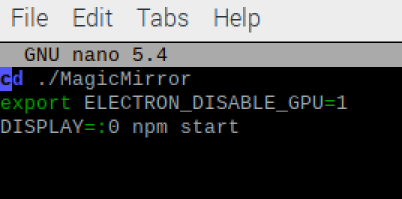
                          edit the script which starts MM
                          and add

                          export ELECTRON_DISABLE_GPU=1

                          before the
                          npm start
                          line

                          Sam

                          How to add modules

                          learning how to use browser developers window for css changes

                          A 1 Reply Last reply Reply Quote 0
                          • S Offline
                            sdetweil @arosenhave
                            last edited by

                            @arosenhave if u want to upgrade, use my script
                            see
                            https://github.com/sdetweil/MagicMirror_scripts

                            and backup

                            see https://github.com/sdetweil/MagicMirror-backup-restore

                            Sam

                            How to add modules

                            learning how to use browser developers window for css changes

                            1 Reply Last reply Reply Quote 0
                            • A Offline
                              arosenhave @sdetweil
                              last edited by

                              @sdetweil This made no difference, I’m afraid :(
                              mm.png

                              The strange thing is that for a split second I can see the other modules loading and displaying and then it all goes black. Like the MMM-Face-Reco-DNN somehow loads in front of everything. If I remove this module from config.js everything displays fine. I have checked the config.js for syntax errors and it reports nothing.

                              S 2 Replies Last reply Reply Quote 0
                              • S Offline
                                sdetweil @arosenhave
                                last edited by

                                @arosenhave yes, reco hides everything til u identify thru the camera yourself

                                then it shows the modules marked as visible for your profile/module classes config

                                Sam

                                How to add modules

                                learning how to use browser developers window for css changes

                                A 1 Reply Last reply Reply Quote 0
                                • S Offline
                                  sdetweil @arosenhave
                                  last edited by

                                  @arosenhave I would need to see the output of the npm start.

                                  black screen is usually a module crash or missing dependencies

                                  Sam

                                  How to add modules

                                  learning how to use browser developers window for css changes

                                  1 Reply Last reply Reply Quote 0
                                  • A Offline
                                    arosenhave @sdetweil
                                    last edited by

                                    @sdetweil I am so sorry. I don’t know how I missed this from one installation to another but feel truly ashamed. What happened is that I used a copy of config.js that I thought was the one working from previous install. But it was missing the classes clause to show the modules.

                                    Again, so sorry and super grateful for putting me on the right track :)

                                    S 1 Reply Last reply Reply Quote 1
                                    • S Offline
                                      sdetweil @arosenhave
                                      last edited by

                                      @arosenhave glad u found it!

                                      Sam

                                      How to add modules

                                      learning how to use browser developers window for css changes

                                      1 Reply Last reply Reply Quote 0

                                      Hello! It looks like you're interested in this conversation, but you don't have an account yet.

                                      Getting fed up of having to scroll through the same posts each visit? When you register for an account, you'll always come back to exactly where you were before, and choose to be notified of new replies (either via email, or push notification). You'll also be able to save bookmarks and upvote posts to show your appreciation to other community members.

                                      With your input, this post could be even better 💗

                                      Register Login

                                      • 1
                                      • 2
                                      • 2 / 2
                                      • First post
                                        Last post
                                      Enjoying MagicMirror? Please consider a donation!
                                      MagicMirror created by Michael Teeuw.
                                      Forum managed by Sam, technical setup by Karsten.
                                      This forum is using NodeBB as its core | Contributors
                                      Contact | Privacy Policy