MagicMirror Forum
    • Recent
    • Tags
    • Unsolved
    • Solved
    • MagicMirror² Repository
    • Documentation
    • 3rd-Party-Modules
    • Donate
    • Discord
    • Register
    • Login
    A New Chapter for MagicMirror: The Community Takes the Lead
    Read the statement by Michael Teeuw here.

    Electron Install Error - Electron not found

    Scheduled Pinned Locked Moved Solved Troubleshooting
    18 Posts 3 Posters 5.1k Views 3 Watching
    Loading More Posts
    • Oldest to Newest
    • Newest to Oldest
    • Most Votes
    Reply
    • Reply as topic
    Log in to reply
    This topic has been deleted. Only users with topic management privileges can see it.
    • S Do not disturb
      sdetweil @CLLA1972
      last edited by

      @CLLA1972 can u do

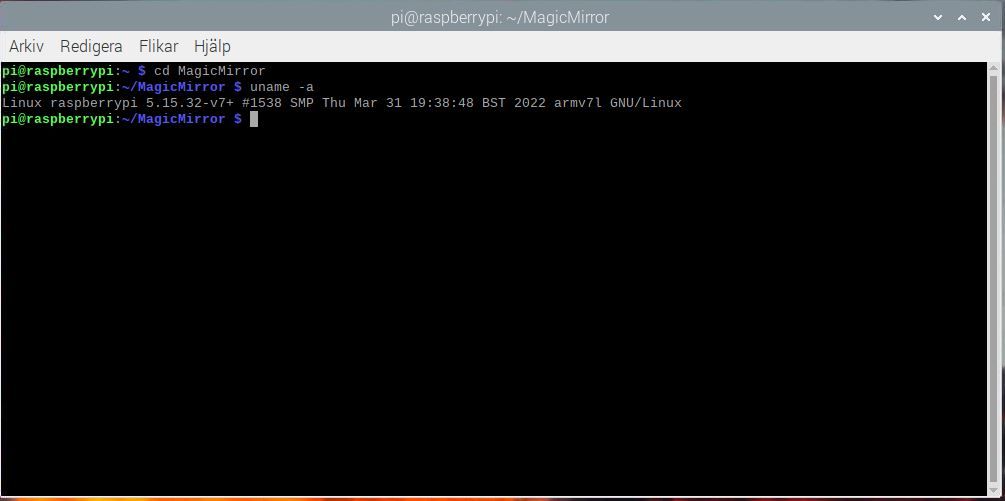
      uname -a

      is this a pi0?

      Sam

      How to add modules

      learning how to use browser developers window for css changes

      C 2 Replies Last reply Reply Quote 0
      • C Offline
        CLLA1972 @sdetweil
        last edited by

        @sdetweil Hi. I am using a PI3B+ /Thanks.

        S 1 Reply Last reply Reply Quote 1
        • S Do not disturb
          sdetweil @CLLA1972
          last edited by

          @CLLA1972

          ok, troublesome

          cd ~/MagicMirror
          rm -rf node_modules/electron
          npm install electron@19.0.15
          

          Sam

          How to add modules

          learning how to use browser developers window for css changes

          C 1 Reply Last reply Reply Quote 0
          • C Offline
            CLLA1972 @sdetweil
            last edited by

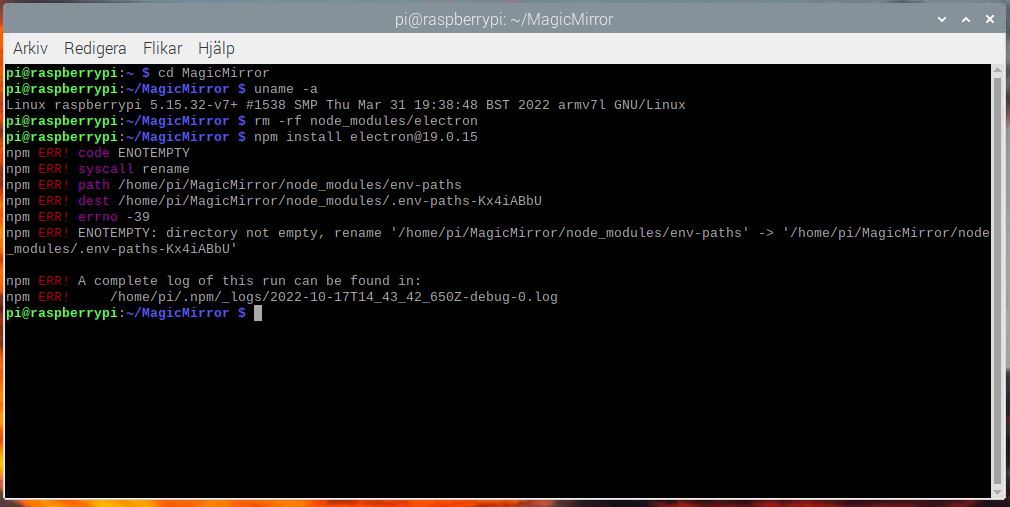
            @sdetweil Image.JPG

            1 Reply Last reply Reply Quote 0
            • C Offline
              CLLA1972 @sdetweil
              last edited by

              @sdetweil Here the result.

              AA.JPG

              S 2 Replies Last reply Reply Quote 0
              • S Do not disturb
                sdetweil @CLLA1972
                last edited by sdetweil

                @CLLA1972
                show output of node -v

                run my upgrade script with force instead of apply (as u are on the latest release)

                bash -c  "$(curl -sL https://raw.githubusercontent.com/sdetweil/MagicMirror_scripts/master/upgrade-script.sh)" force
                

                Sam

                How to add modules

                learning how to use browser developers window for css changes

                1 Reply Last reply Reply Quote 0
                • S Do not disturb
                  sdetweil @CLLA1972
                  last edited by sdetweil

                  @CLLA1972 ok, I don’t get what is going on, but

                  cd ~/MagicMirror
                  rm -rf node_modules/env-paths
                  npm  install  electron@19.0.15
                  

                  Sam

                  How to add modules

                  learning how to use browser developers window for css changes

                  C 1 Reply Last reply Reply Quote 0
                  • C Offline
                    CLLA1972 @sdetweil
                    last edited by

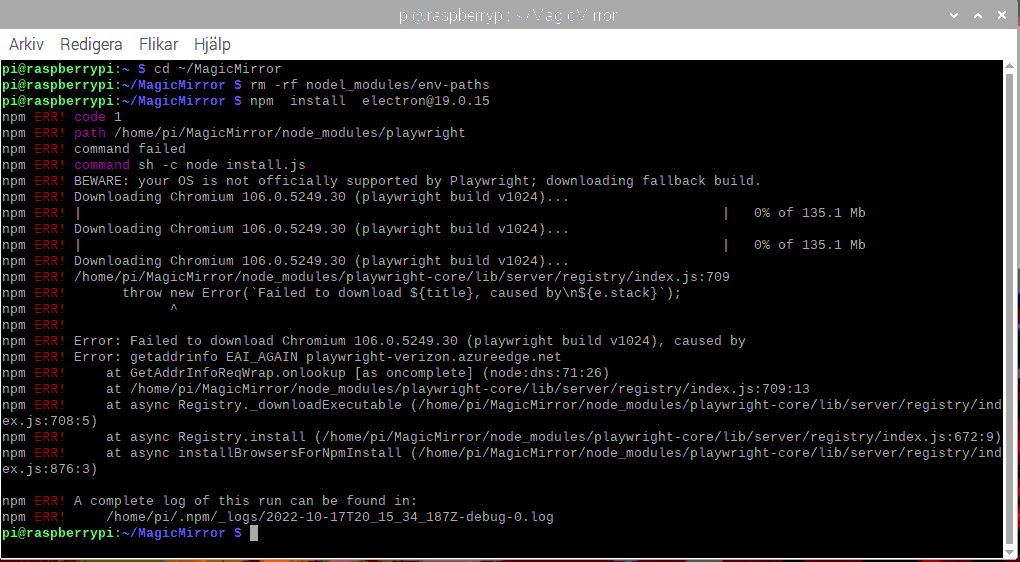
                    @sdetweil Hi again. First of all, thanks for the great help. I am really in deep water here and I really do not want to reboot the whole PI and start from scratch. Here the result from the latest command and the log file. Again THANKS !!AA.JPG [2022-10-17T20_15_34_187Z-debug-0.log](Invalid file type. Allowed types are: .jpg, .jpeg, .png, .gif, .png, .jpg, .jpeg, .gif)

                    C S 2 Replies Last reply Reply Quote 0
                    • C Offline
                      CLLA1972 @CLLA1972
                      last edited by

                      @CLLA1972 574 timing build:link:node_modules/read-pkg/node_modules/semver Completed in 65ms
                      575 timing build:link Completed in 83ms
                      576 info run playwright@1.26.1 install node_modules/playwright node install.js
                      577 info run playwright@1.26.1 install { code: 1, signal: null }
                      578 timing reify:rollback:createSparse Completed in 3063ms
                      579 timing reify:rollback:retireShallow Completed in 5ms
                      580 timing command:install Completed in 329571ms
                      581 verbose stack Error: command failed
                      581 verbose stack at ChildProcess. (/usr/lib/node_modules/npm/node_modules/@npmcli/promise-spawn/lib/index.js:63:27)
                      581 verbose stack at ChildProcess.emit (node:events:527:28)
                      581 verbose stack at maybeClose (node:internal/child_process:1092:16)
                      581 verbose stack at Socket. (node:internal/child_process:451:11)
                      581 verbose stack at Socket.emit (node:events:527:28)
                      581 verbose stack at Pipe. (node:net:709:12)
                      582 verbose pkgid playwright@1.26.1
                      583 verbose cwd /home/pi/MagicMirror
                      584 verbose Linux 5.15.32-v7+
                      585 verbose node v16.16.0
                      586 verbose npm v8.11.0
                      587 error code 1
                      588 error path /home/pi/MagicMirror/node_modules/playwright
                      589 error command failed
                      590 error command sh -c node install.js
                      591 error BEWARE: your OS is not officially supported by Playwright; downloading fallback build.
                      591 error Downloading Chromium 106.0.5249.30 (playwright build v1024)…
                      591 error | | 0% of 135.1 Mb
                      591 error Downloading Chromium 106.0.5249.30 (playwright build v1024)…
                      591 error | | 0% of 135.1 Mb
                      591 error Downloading Chromium 106.0.5249.30 (playwright build v1024)…
                      592 error /home/pi/MagicMirror/node_modules/playwright-core/lib/server/registry/index.js:709
                      592 error throw new Error(Failed to download ${title}, caused by\n${e.stack});
                      592 error ^
                      592 error
                      592 error Error: Failed to download Chromium 106.0.5249.30 (playwright build v1024), caused by
                      592 error Error: getaddrinfo EAI_AGAIN playwright-verizon.azureedge.net
                      592 error at GetAddrInfoReqWrap.onlookup [as oncomplete] (node:dns:71:26)
                      592 error at /home/pi/MagicMirror/node_modules/playwright-core/lib/server/registry/index.js:709:13
                      592 error at async Registry._downloadExecutable (/home/pi/MagicMirror/node_modules/playwright-core/lib/server/registry/index.js:708:5)
                      592 error at async Registry.install (/home/pi/MagicMirror/node_modules/playwright-core/lib/server/registry/index.js:672:9)
                      592 error at async installBrowsersForNpmInstall (/home/pi/MagicMirror/node_modules/playwright-core/lib/server/registry/index.js:876:3)
                      593 verbose exit 1
                      594 timing npm Completed in 330071ms
                      595 verbose unfinished npm timer reify 1666037734674
                      596 verbose unfinished npm timer reify:build 1666037983317
                      597 verbose unfinished npm timer build 1666037983330
                      598 verbose unfinished npm timer build:deps 1666037983332
                      599 verbose unfinished npm timer build:run:install 1666037983509
                      600 verbose unfinished npm timer build:run:install:node_modules/playwright 1666037983511
                      601 verbose code 1
                      602 error A complete log of this run can be found in:
                      602 error /home/pi/.npm/_logs/2022-10-17T20_15_34_187Z-debug-0.log

                      1 Reply Last reply Reply Quote 0
                      • S Do not disturb
                        sdetweil @CLLA1972
                        last edited by

                        @CLLA1972

                        repeat the last message instructions but change the npm install to

                        npm install electron@19.0.15 --omit=dev

                        Sam

                        How to add modules

                        learning how to use browser developers window for css changes

                        karsten13K 1 Reply Last reply Reply Quote 0
                        • karsten13K Online
                          karsten13 @sdetweil
                          last edited by

                          @sdetweil

                          there is a typo in rm -rf nodel_modules/env-paths …

                          S 1 Reply Last reply Reply Quote 0
                          • S Do not disturb
                            sdetweil @karsten13
                            last edited by

                            @karsten13 dang phones

                            Sam

                            How to add modules

                            learning how to use browser developers window for css changes

                            C 1 Reply Last reply Reply Quote 0
                            • C Offline
                              CLLA1972 @sdetweil
                              last edited by

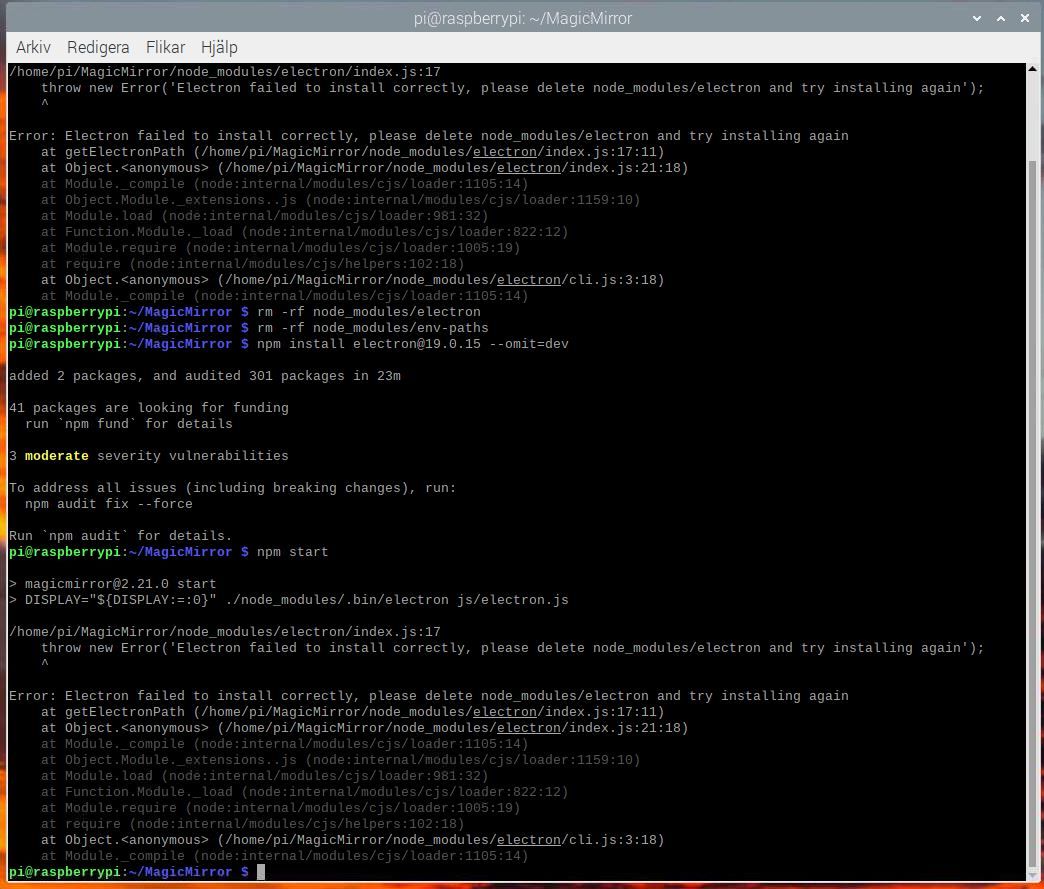
                              @sdetweil Did now the commande without the Typo :flushed_face: and god this one (similar to a previous one) . I am getting close to the solution?AA.JPG :-)

                              S 1 Reply Last reply Reply Quote 0
                              • S Do not disturb
                                sdetweil @CLLA1972
                                last edited by sdetweil

                                @CLLA1972 I don’t know

                                make a backup

                                see my https://github.com/sdetweil/MagicMirror-backup-restore

                                then rename the MagicMirror folder out of the way, and run my install script. see if we can get running
                                see
                                https://github.com/sdetweil/MagicMirror_scripts

                                if so, then run the restore to put back all the modules and config in the new mm folder created by install

                                Sam

                                How to add modules

                                learning how to use browser developers window for css changes

                                C 1 Reply Last reply Reply Quote 0
                                • C Offline
                                  CLLA1972 @sdetweil
                                  last edited by

                                  @sdetweil Thanks! Great! That got me back on track again !!! THANKS !!! :clapping_hands_medium-light_skin_tone: :folded_hands:

                                  1 Reply Last reply Reply Quote 1

                                  Hello! It looks like you're interested in this conversation, but you don't have an account yet.

                                  Getting fed up of having to scroll through the same posts each visit? When you register for an account, you'll always come back to exactly where you were before, and choose to be notified of new replies (either via email, or push notification). You'll also be able to save bookmarks and upvote posts to show your appreciation to other community members.

                                  With your input, this post could be even better 💗

                                  Register Login

                                  • 1 / 1
                                  • First post
                                    Last post
                                  Enjoying MagicMirror? Please consider a donation!
                                  MagicMirror created by Michael Teeuw.
                                  Forum managed by Sam, technical setup by Karsten.
                                  This forum is using NodeBB as its core | Contributors
                                  Contact | Privacy Policy