MagicMirror Forum
    • Recent
    • Tags
    • Unsolved
    • Solved
    • MagicMirror² Repository
    • Documentation
    • 3rd-Party-Modules
    • Donate
    • Discord
    • Register
    • Login
    A New Chapter for MagicMirror: The Community Takes the Lead
    Read the statement by Michael Teeuw here.

    MMM-CalendarExt3 issue Loading / Showing the calendar on Windows

    Scheduled Pinned Locked Moved Solved Troubleshooting
    22 Posts 3 Posters 6.9k Views 3 Watching
    Loading More Posts
    • Oldest to Newest
    • Newest to Oldest
    • Most Votes
    Reply
    • Reply as topic
    Log in to reply
    This topic has been deleted. Only users with topic management privileges can see it.
    • J Offline
      JackHammer325 @sdetweil
      last edited by

      @sdetweil
      just finished the install using cmd

      • made sure to install the fonts and vendor parts
      • as well as change the package.json file and then did run start.

      but it still did the same thing as before.

      1 Reply Last reply Reply Quote 0
      • J Offline
        JackHammer325 @sdetweil
        last edited by

        @sdetweil

        C:\MagicMirror>npm start
        
        > magicmirror@2.26.0 start
        > .\node_modules\.bin\electron js\electron.js
        
        
        C:\MagicMirror>
        
        S 1 Reply Last reply Reply Quote 0
        • S Do not disturb
          sdetweil @JackHammer325
          last edited by sdetweil

          @JackHammer325 no .\ in front

          the doc is wrong. windows doesn’t like . for current directory

          Sam

          How to add modules

          learning how to use browser developers window for css changes

          J 2 Replies Last reply Reply Quote 0
          • J Offline
            JackHammer325 @sdetweil
            last edited by

            @sdetweil
            this is what i have in my package.json file. I removed the “.” like you recommended.
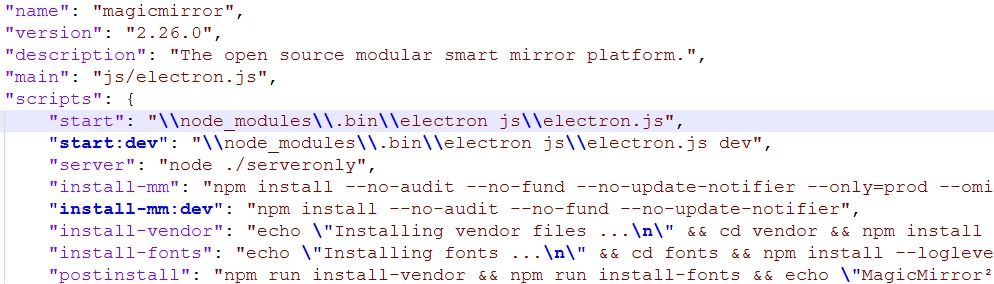
            JSON package.jpg

            now i get “the system cannot find the path specified”

            C:\MagicMirror>npm start
            
            > magicmirror@2.26.0 start
            > \node_modules\.bin\electron js\electron.js
            
            The system cannot find the path specified.
            
            C:\MagicMirror>
            
            S 1 Reply Last reply Reply Quote 0
            • S Do not disturb
              sdetweil @JackHammer325
              last edited by sdetweil

              @JackHammer325 you only removed the dot I said no .\

              so remove the slashes too

              "node_modules\\.bin\\....",
              

              Sam

              How to add modules

              learning how to use browser developers window for css changes

              1 Reply Last reply Reply Quote 0
              • J Offline
                JackHammer325 @sdetweil
                last edited by

                @sdetweil
                sorry guess i didn’t realize.
                I’ve done that and it looks like it’s trying to start but then just goes back to this.

                C:\MagicMirror>npm start
                
                > magicmirror@2.26.0 start
                > node_modules\.bin\electron js\electron.js                 → sits here for about 8-10 seconds
                                                                                                                                                                   then does that
                                                                                                                                                                                   ↓
                C:\MagicMirror>
                
                1 Reply Last reply Reply Quote 0
                • M Offline
                  MMRIZE @JackHammer325
                  last edited by

                  @JackHammer325 said in MMM-CalendarExt3 issue Loading / Showing the calendar on Windows:

                  TypeError: original.map(…).toSorted is not a function

                  Sorry for the late reply.
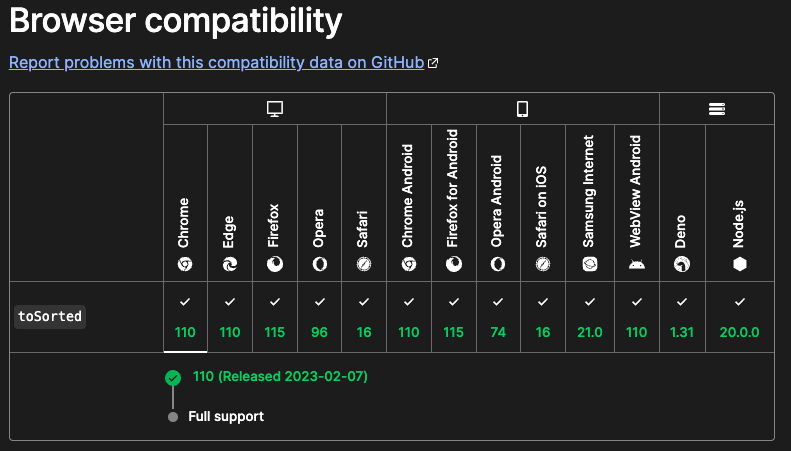
                  This error message is caused by using an old browser or not supported.
                  a063c793-1f3f-49c2-ad40-c725e55f51f6-image.png
                  If you are using Chrome or Chromium, it’s version should be newer than v110( - released, 2023-02-07, Current version is v120). Or for other browser, See above picture.

                  1 Reply Last reply Reply Quote 0
                  • S Do not disturb
                    sdetweil @JackHammer325
                    last edited by

                    @JackHammer325 said in MMM-CalendarExt3 issue Loading / Showing the calendar on Windows:

                    windows 8.1

                    yeh, missed that… That’s why the old browset

                    Sam

                    How to add modules

                    learning how to use browser developers window for css changes

                    M 1 Reply Last reply Reply Quote 0
                    • M Offline
                      MMRIZE @sdetweil
                      last edited by

                      @sdetweil
                      I was happy to use a new feature toSorted but ppl may have trouble with compatibility issue. I’ll provide fallback codes in the next update.

                      S 1 Reply Last reply Reply Quote 1
                      • S Do not disturb
                        sdetweil @MMRIZE
                        last edited by

                        @MMRIZE we have this problem in general… mm used to display on TV’s and ipads/ android tablets… but as we’ve moved to ES6 level js, they no longer work… I find this a sad state for MM… (but I like the new ES6 support)

                        Sam

                        How to add modules

                        learning how to use browser developers window for css changes

                        1 Reply Last reply Reply Quote 0

                        Hello! It looks like you're interested in this conversation, but you don't have an account yet.

                        Getting fed up of having to scroll through the same posts each visit? When you register for an account, you'll always come back to exactly where you were before, and choose to be notified of new replies (either via email, or push notification). You'll also be able to save bookmarks and upvote posts to show your appreciation to other community members.

                        With your input, this post could be even better 💗

                        Register Login

                        • 1
                        • 2
                        • 2 / 2
                        • First post
                          Last post
                        Enjoying MagicMirror? Please consider a donation!
                        MagicMirror created by Michael Teeuw.
                        Forum managed by Sam, technical setup by Karsten.
                        This forum is using NodeBB as its core | Contributors
                        Contact | Privacy Policy