Read the statement by Michael Teeuw here.
MMM-CalendarExt3 issue Loading / Showing the calendar on Windows
-
hello, im very new to all of this and I’ve followed all the guides I have found and I’ve even looked at similar instances on my issue in the forum but i can’t for the life of me figure out what is going wrong.
This is the forum I tried to follow along with and i still couldn’t get it going.
https://forum.magicmirror.builders/topic/18012/problem-installing-new-module-beginner-calendarext3-not-displaying?lang=en-US&page=1
on the other hand this forum showed me how to see in a general area where the problem might be coming from.Here is the current Config that I’m running.
/* MagicMirror² Config
	language: "en",
	locale: "en-US",
	logLevel: ["INFO", "LOG", "WARN", "ERROR"], // Add "DEBUG" for even more logging
	timeFormat: 24,
	units: "metric",

	modules: [
		{
			module: "calendar",
			position: "top_left",
			header: "Upcoming Events",
			coloredText: true,
			config: {
				broadcastPastEvents: true, // <= IMPORTANT to see past events
				calendars: [
					{
						url: "https://ics.calendarlabs.com/76/mm3137/US_Holidays.ics",
						name: "Holiday1",
						color: "#2a4d56",
						symbol: false
					},
					{
						url: "https://calendar.google.com/calendar/xxxx",
						name: "Person1",
						color: "#0872fc",
						symbol: false
					}
				]
			}
		},
		{
			module: "MMM-CalendarExt3",
			position: "bottom_bar",
			title: "my calendars",
			config: {
				mode: "month",
				locale: 'en-US',
				maxEventLines: 5,
				firstDayOfWeek: 0,
				weekIndex: 0,
				weeksInView: 4,
				waitFetch: 10 * 1000,
				refreshInterval: 10 * 60 * 1000,
				glanceTime: 0 * 60 * 1000,
				eventTimeOptions: {
					timeStyle: "short"
				},
				//useSymbol: false,
				calendarSet: [ 'Holiday1' ],
			}
		},
	]
};
after following along in the mentioned forum about locating the issue using dev (developer tools)
I was able to see this - (im currently using “node serveronly” cause for some reason i cant get it to run on its own but anyway thats another topic for another time, so this is what i see in the consol of the web browser).Initializing MagicMirror². translator.js:122 Loading core translation file: translations/en.json translator.js:138 Loading core translation fallback file: translations/en.json loader.js:165 Load script: modules/default/calendar/calendar.js module.js:476 Check MagicMirror² version for module 'calendar' - Minimum version: 2.1.0 - Current version: 2.26.0 module.js:478 Version is ok! module.js:484 Module registered: calendar loader.js:138 Bootstrapping module: calendar loader.js:165 Load script: modules/default/calendar/calendarutils.js loader.js:165 Load script: vendor/node_modules/moment/min/moment-with-locales.js loader.js:142 Scripts loaded for: calendar loader.js:180 Load stylesheet: modules/default/calendar/calendar.css loader.js:180 Load stylesheet: vendor/css/font-awesome.css loader.js:145 Styles loaded for: calendar loader.js:148 Translations loaded for: calendar loader.js:165 Load script: modules/MMM-CalendarExt3/MMM-CalendarExt3.js MMM-CalendarExt3.js:4 This browser doesn't support popover yet. Update your system. module.js:484 Module registered: MMM-CalendarExt3 loader.js:138 Bootstrapping module: MMM-CalendarExt3 loader.js:142 Scripts loaded for: MMM-CalendarExt3 loader.js:180 Load stylesheet: modules/MMM-CalendarExt3/MMM-CalendarExt3.css loader.js:145 Styles loaded for: MMM-CalendarExt3 loader.js:148 Translations loaded for: MMM-CalendarExt3 loader.js:180 Load stylesheet: css/custom.css localhost/:1 Refused to apply style from 'http://localhost:8080/css/custom.css' because its MIME type ('text/html') is not a supported stylesheet MIME type, and strict MIME checking is enabled. loader.js:190 Error on loading stylesheet: css/custom.css calendar.js:97 Starting module: calendar main.js:608 All modules started! MMM-CalendarExt3.js:372 [CX3] Module is not prepared yet, wait a while. getDom @ MMM-CalendarExt3.js:372 (anonymous) @ main.js:138 updateDom @ main.js:118 (anonymous) @ main.js:61 createDomObjects @ main.js:20 modulesStarted @ main.js:611 startModules @ loader.js:43 await in startModules (async) loadNextModule @ loader.js:222 await in loadNextModule (async) loadNextModule @ loader.js:215 await in loadNextModule (async) loadNextModule @ loader.js:215 await in loadNextModule (async) loadModules @ loader.js:225 init @ main.js:595 await in init (async) (anonymous) @ main.js:738 TypeError: original.map(...).toSorted is not a function at formatEvents (CX3_shared.mjs:341:6) at prepareEvents (CX3_shared.mjs:376:10) at Class.draw (MMM-CalendarExt3.js:658:26) at Class.getDom (MMM-CalendarExt3.js:375:16) at main.js:138:35 at new Promise (<anonymous>) at updateDom (main.js:118:10) at Object.updateDom (main.js:676:4) at Class.updateDom (module.js:336:6) at Class.updateAnimate (MMM-CalendarExt3.js:681:10) Promise.catch (async) (anonymous) @ main.js:151 updateDom @ main.js:118 updateDom @ main.js:676 updateDom @ module.js:336 updateAnimate @ MMM-CalendarExt3.js:681 (anonymous) @ MMM-CalendarExt3.js:166 setTimeout (async) (anonymous) @ MMM-CalendarExt3.js:165 Promise.then (async) start @ MMM-CalendarExt3.js:162 startModules @ loader.js:26 loadNextModule @ loader.js:222 await in loadNextModule (async) loadNextModule @ loader.js:215 await in loadNextModule (async) loadNextModule @ loader.js:215 await in loadNextModule (async) loadModules @ loader.js:225 init @ main.js:595 await in init (async) (anonymous) @ main.js:738let me know if this is too much info or not enough or anything really.
-
@JackHammer325 said in MMM-CalendarExt3 issue Loading / Showing the calendar on Windows:
TypeError: original.map(…).toSorted is not a function
Sorry for the late reply.
This error message is caused by using an old browser or not supported.
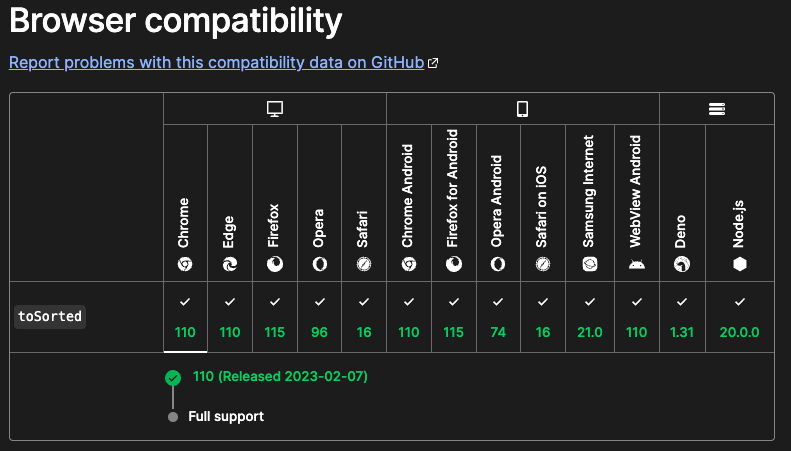
If you are usingChromeorChromium, it’s version should be newer than v110( - released, 2023-02-07, Current version is v120). Or for other browser, See above picture. -
@JackHammer325 did you do the npm install in the module folder?
are you running the correct version of node js? version 18 or above
what platform are you on, show output of
uname -a lsb_release -a node -a npm -a -
yes, I did.
i even double checked .cd ~/MagicMirror/modules git clone https://github.com/MMRIZE/MMM-CalendarExt3 cd MMM-CalendarExt3 npm install git submodule update --init --recursivei even ran the update just to be sure
cd ~/MagicMirror/modules/MMM-CalendarExt3
git pull
npm update
im currently on Node.js ver 18.16.0
running on windows 8.1not entirely sure how to “show output of” that you are asking
-
@JackHammer325 ok, windows
node -v and npm -v
from a command prompt (cmd.exe) window
the others are linux only
-
@sdetweil
node -v = v18.16.0
npm -v = 9.5.1 -
@JackHammer325 are you using the native windows or running in the linux subsystem for windows?
-
@sdetweil
native windows with program Git Bash -
@JackHammer325 do not need git bash
just cmd.exe
npm start
or npm run serverof course u have to change package.json per the instructions due to the windows backslash for path
-
@sdetweil
so i followed these instructions"start": "DISPLAY=\"${DISPLAY:=:0}\" ./node_modules/.bin/electron js/electron.js", "start:dev": "DISPLAY=\"${DISPLAY:=:0}\" ./node_modules/.bin/electron js/electron.js dev",and replace it with
"start": ".\\node_modules\\.bin\\electron js\\electron.js",
"start:dev": ".\\node_modules\\.bin\\electron js\\electron.js dev",
but it still goes back to
C:\magicmirror>
and does nothing. -
PC@WST MINGW32 /c/magicmirror $ npm start > magicmirror@2.26.0 start > .\node_modules\.bin\electron js\electron.js PC@WST MINGW32 /c/magicmirror $ -
@JackHammer325 dont use min
just install under cmd.exe , do the extra steps, then npm start
-
@sdetweil
alright I will try that and let you know of the outcome! -
@sdetweil
just finished the install using cmd- made sure to install the fonts and vendor parts
- as well as change the package.json file and then did run start.
but it still did the same thing as before.
-
C:\MagicMirror>npm start > magicmirror@2.26.0 start > .\node_modules\.bin\electron js\electron.js C:\MagicMirror> -
@JackHammer325 no .\ in front
the doc is wrong. windows doesn’t like . for current directory
-
@sdetweil
this is what i have in my package.json file. I removed the “.” like you recommended.
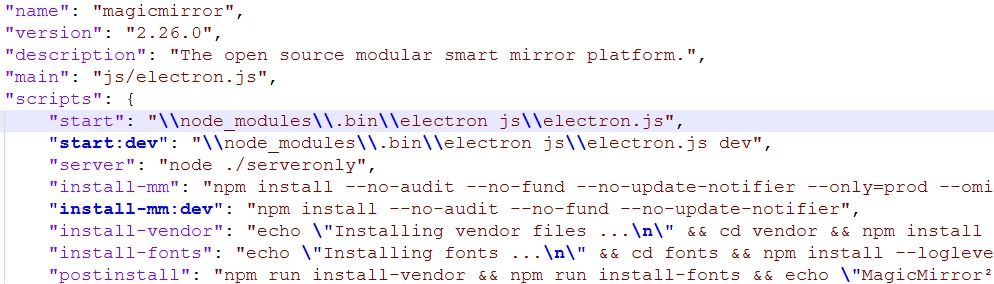
now i get “the system cannot find the path specified”
C:\MagicMirror>npm start > magicmirror@2.26.0 start > \node_modules\.bin\electron js\electron.js The system cannot find the path specified. C:\MagicMirror> -
@JackHammer325 you only removed the dot I said no .\
so remove the slashes too
"node_modules\\.bin\\....", -
@sdetweil
sorry guess i didn’t realize.
I’ve done that and it looks like it’s trying to start but then just goes back to this.C:\MagicMirror>npm start > magicmirror@2.26.0 start > node_modules\.bin\electron js\electron.js → sits here for about 8-10 seconds then does that ↓ C:\MagicMirror> -
@JackHammer325 said in MMM-CalendarExt3 issue Loading / Showing the calendar on Windows:
TypeError: original.map(…).toSorted is not a function
Sorry for the late reply.
This error message is caused by using an old browser or not supported.
If you are usingChromeorChromium, it’s version should be newer than v110( - released, 2023-02-07, Current version is v120). Or for other browser, See above picture. -
@JackHammer325 said in MMM-CalendarExt3 issue Loading / Showing the calendar on Windows:
windows 8.1
yeh, missed that… That’s why the old browset
Hello! It looks like you're interested in this conversation, but you don't have an account yet.
Getting fed up of having to scroll through the same posts each visit? When you register for an account, you'll always come back to exactly where you were before, and choose to be notified of new replies (either via email, or push notification). You'll also be able to save bookmarks and upvote posts to show your appreciation to other community members.
With your input, this post could be even better 💗
Register Login