MagicMirror Forum
    • Recent
    • Tags
    • Unsolved
    • Solved
    • MagicMirror² Repository
    • Documentation
    • 3rd-Party-Modules
    • Donate
    • Discord
    • Register
    • Login
    A New Chapter for MagicMirror: The Community Takes the Lead
    Read the statement by Michael Teeuw here.

    MMM-Pir or MMM-PIR-Sensor

    Scheduled Pinned Locked Moved Solved Troubleshooting
    27 Posts 6 Posters 11.0k Views 5 Watching
    Loading More Posts
    • Oldest to Newest
    • Newest to Oldest
    • Most Votes
    Reply
    • Reply as topic
    Log in to reply
    This topic has been deleted. Only users with topic management privileges can see it.
    • S Offline
      svenpisa
      last edited by

      Just for fun, I have now entered a different GPIO pin in sensor.py and started sudo python motion_sensor.py. Nothing happens here. So I have already selected the correct pin. But as you say, it’s probably the script.
      How can I uninstall the motion sensor again? Simply delete the folder or is there a clean way?
      I guess I’ll have to look for another solution, won’t I?

      S 1 Reply Last reply Reply Quote 0
      • S Do not disturb
        sdetweil @svenpisa
        last edited by

        @svenpisa yes, just delete the folder

        Sam

        How to add modules

        learning how to use browser developers window for css changes

        S 1 Reply Last reply Reply Quote 0
        • S Do not disturb
          sdetweil @sdetweil
          last edited by

          @svenpisa

          see these

          https://forums.raspberrypi.com/viewtopic.php?t=328633

          https://projects.raspberrypi.org/en/projects/physical-computing/11

          Sam

          How to add modules

          learning how to use browser developers window for css changes

          1 Reply Last reply Reply Quote 0
          • A Offline
            Andrei.Leahu
            last edited by

            I have the same problem. The Module is not working, I tried so many parameter changes. Besides that I tried to read the values of the PIR with a python script and is working. To power on/off the monitor via console is working too. I don’t know what to try else

            S 1 Reply Last reply Reply Quote 0
            • S Do not disturb
              sdetweil @Andrei.Leahu
              last edited by

              @Andrei-Leahu can you show the info from npm start.
              Right after
              starting application

              Sam

              How to add modules

              learning how to use browser developers window for css changes

              A 1 Reply Last reply Reply Quote 0
              • A Offline
                Andrei.Leahu @sdetweil
                last edited by

                @sdetweil Hello here is the Info Log: magicmirror@2.26.0 start

                DISPLAY=“${DISPLAY:=:0}” ./node_modules/.bin/electron js/electron.js

                [2024-10-06 14:00:06.410] [LOG] Starting MagicMirror: v2.26.0
                [2024-10-06 14:00:06.456] [LOG] Loading config …
                [2024-10-06 14:00:06.469] [LOG] config template file not exists, no envsubst
                [2024-10-06 14:00:07.561] [INFO] Checking config file /home/xenon/MagicMirror/config/config.js …
                [2024-10-06 14:00:07.688] [INFO] Your configuration file doesn’t contain syntax errors :)
                [2024-10-06 14:00:07.689] [INFO] Checking modules structure configuration …
                [2024-10-06 14:00:07.770] [INFO] Your modules structure configuration doesn’t contain errors :)
                [2024-10-06 14:00:08.526] [LOG] Loading module helpers …
                [2024-10-06 14:00:08.537] [LOG] No helper found for module: alert.
                [2024-10-06 14:00:08.625] [LOG] Initializing new module helper …
                [2024-10-06 14:00:08.626] [LOG] Module helper loaded: updatenotification
                [2024-10-06 14:00:08.641] [LOG] No helper found for module: clock.
                [2024-10-06 14:00:08.644] [LOG] No helper found for module: compliments.
                [2024-10-06 14:00:08.646] [LOG] No helper found for module: weather.
                [2024-10-06 14:00:08.726] [LOG] Initializing new module helper …
                [2024-10-06 14:00:08.728] [LOG] Module helper loaded: MMM-GoogleKeep
                [2024-10-06 14:00:08.732] [LOG] No helper found for module: MMM-CalendarExt3.
                [2024-10-06 14:00:09.350] [LOG] Initializing new module helper …
                [2024-10-06 14:00:09.351] [LOG] Module helper loaded: calendar
                [2024-10-06 14:00:10.016] [LOG] Initializing new module helper …
                [2024-10-06 14:00:10.017] [LOG] Module helper loaded: MMM-BackgroundSlideshow
                [2024-10-06 14:00:10.053] [LOG] Initializing new module helper …
                [2024-10-06 14:00:10.055] [LOG] Module helper loaded: MMM-Pir
                [2024-10-06 14:00:10.058] [LOG] All module helpers loaded.
                [2024-10-06 14:00:10.104] [LOG] Starting server on port 8080 …
                [2024-10-06 14:00:10.979] [LOG] Server started …
                [2024-10-06 14:00:10.981] [LOG] Connecting socket for: updatenotification
                [2024-10-06 14:00:10.983] [LOG] Starting module helper: updatenotification
                [2024-10-06 14:00:10.985] [LOG] Connecting socket for: MMM-GoogleKeep
                [2024-10-06 14:00:10.987] [LOG] [MMM-GoogleKeep_helper]:: Starting node_helper for module [MMM-GoogleKeep]
                [2024-10-06 14:00:10.988] [LOG] Connecting socket for: calendar
                [2024-10-06 14:00:11.013] [LOG] Starting node helper for: calendar
                [2024-10-06 14:00:11.019] [LOG] Connecting socket for: MMM-BackgroundSlideshow
                [2024-10-06 14:00:11.027] [LOG] Connecting socket for: MMM-Pir
                [2024-10-06 14:00:11.040] [LOG] Sockets connected & modules started …
                [2024-10-06 14:00:11.581] [LOG] Launching application.
                [2024-10-06 14:00:16.406] [INFO] System information:

                SYSTEM: manufacturer: Raspberry Pi Foundation; model: Raspberry Pi 4 Model B Rev 1.2; virtual: false

                OS: platform: linux; distro: Raspbian GNU/Linux; release: 11; arch: arm; kernel: 6.1.21-v8+

                VERSIONS: electron: 27.3.5; used node: 18.17.1; installed node: 20.8.0; npm: 10.9.0; pm2:

                OTHER: timeZone: Europe/Berlin; ELECTRON_ENABLE_GPU: undefined

                [2024-10-06 14:00:17.370] [LOG] Create new calendarfetcher for url: xxxx- Interval: 2000
                [2024-10-06 14:00:17.661] [LOG] Create new calendarfetcher for url: xxxxxx - Interval: 2000
                [2024-10-06 14:00:17.671] [LOG] [MMM-Pir] Version: 1.5.4 rev: 240824
                [2024-10-06 14:00:17.680] [LOG] [MMM-Pir] [LIB] [PIR] Mode 0 Selected (onoff library)
                [2024-10-06 14:00:17.768] [LOG] [MMM-Pir] [CALLBACK] Pir: PIR_STARTED
                [2024-10-06 14:00:17.770] [LOG] [MMM-Pir] [LIB] [PIR] Started!
                [2024-10-06 14:00:17.773] [LOG] [MMM-Pir] [LIB] [SCREEN] Mode 1: vcgencmd
                [2024-10-06 14:00:17.775] [LOG] [MMM-Pir] [LIB] [SCREEN] Start.
                [2024-10-06 14:00:17.777] [LOG] [MMM-Pir] [CALLBACK] Screen: SCREEN_PRESENCE true
                [2024-10-06 14:00:17.806] [LOG] [MMM-Pir] [CALLBACK] Screen: SCREEN_SHOWING
                [2024-10-06 14:00:17.808] [LOG] [MMM-Pir] Started!
                [2024-10-06 14:00:17.812] [INFO] updatenotification: Updater Class Loaded!
                [2024-10-06 14:00:17.813] [INFO] updatenotification: Checking PM2 using…
                [2024-10-06 14:00:17.817] [INFO] Checking git for module: MMM-GoogleKeep
                [2024-10-06 14:00:17.873] [INFO] BACKGROUNDSLIDESHOW: Reading directory “modules/MMM-BackgroundSlideshow/exampleImages/” for images.
                [2024-10-06 14:00:17.877] [INFO] BACKGROUNDSLIDESHOW: 4 files found
                [2024-10-06 14:00:17.881] [INFO] BACKGROUNDSLIDESHOW: reading path “modules/MMM-BackgroundSlideshow/exampleImages//1.png”
                [2024-10-06 14:00:17.882] [LOG] resizeImages: false
                [2024-10-06 14:00:17.935] [INFO] Checking git for module: MMM-CalendarExt3
                [2024-10-06 14:00:17.958] [LOG] [MMM-Pir] [LIB] [SCREEN] Display: Force On Start
                [2024-10-06 14:00:17.960] [LOG] [MMM-Pir] [LIB] [SCREEN] Display ON.
                [2024-10-06 14:00:18.016] [INFO] Checking git for module: MMM-BackgroundSlideshow
                [2024-10-06 14:00:18.103] [INFO] Checking git for module: MMM-Pir
                [2024-10-06 14:00:18.312] [INFO] Checking git for module: MagicMirror
                [2024-10-06 14:00:18.632] [LOG] Stream closed.
                [2024-10-06 14:00:19.094] [INFO] Calendar-Fetcher: Broadcasting 0 events from xxxxx
                [2024-10-06 14:00:19.260] [INFO] Calendar-Fetcher: Broadcasting 0 events from xxxxx
                [2024-10-06 14:00:19.266] [LOG] [MMM-Pir] [CALLBACK] Screen: SCREEN_POWERSTATUS true
                [2024-10-06 14:00:19.268] [LOG] [MMM-Pir] [LIB] [SCREEN] [POWER] Display from false —> true
                [2024-10-06 14:00:19.273] [LOG] [MMM-Pir] [CALLBACK] Screen: SCREEN_OUTPUT { timer: ‘00:20’, bar: 0 }
                [2024-10-06 14:00:20.280] [LOG] [MMM-Pir] [CALLBACK] Screen: SCREEN_OUTPUT { timer: ‘00:19’, bar: 1000 }
                [2024-10-06 14:00:20.429] [LOG] {
                note_text: {
                header: ’
                text: [
                ‘â Pampers’
                ]
                }
                }
                [2024-10-06 14:00:20.599] [LOG] [MMM-GoogleKeep] finished running…
                [2024-10-06 14:00:20.851] [INFO] updatenotification: You are not using pm2
                [2024-10-06 14:00:21.382] [LOG] [MMM-Pir] [CALLBACK] Screen: SCREEN_OUTPUT { timer: ‘00:18’, bar: 2000 }
                [2024-10-06 14:00:21.553] [INFO] xxxx
                [2024-10-06 14:00:21.768] [INFO] Calendar-Fetcher: Broadcasting 0 events from xxx
                [2024-10-06 14:00:22.405] [LOG] [MMM-Pir] [CALLBACK] Screen: SCREEN_OUTPUT { timer: ‘00:17’, bar: 3000 }
                [2024-10-06 14:00:23.465] [LOG] [MMM-Pir] [CALLBACK] Screen: SCREEN_OUTPUT { timer: ‘00:16’, bar: 4000 }
                [2024-10-06 14:00:23.820] [INFO] Calendar-Fetcher: Broadcasting 0 events from xxxx
                [2024-10-06 14:00:24.475] [LOG] [MMM-Pir] [CALLBACK] Screen: SCREEN_OUTPUT { timer: ‘00:15’, bar: 5000 }
                [2024-10-06 14:00:25.477] [LOG] [MMM-Pir] [CALLBACK] Screen: SCREEN_OUTPUT { timer: ‘00:14’, bar: 6000 }

                S 1 Reply Last reply Reply Quote 0
                • S Do not disturb
                  sdetweil @Andrei.Leahu
                  last edited by

                  @Andrei-Leahu thanks. Bullseye, 64bit,

                  @bugsounet will have to look at this

                  Sam

                  How to add modules

                  learning how to use browser developers window for css changes

                  bugsounetB 1 Reply Last reply Reply Quote 0
                  • bugsounetB Offline
                    bugsounet Banned @sdetweil
                    last edited by

                    @sdetweil I know but MMM-Pir v2 is under-coding

                    In all case:

                    • [MMM-Pir] [LIB] [PIR] Mode 0 Selected (onoff library) : onoff library will be removed
                    • [MMM-Pir] [LIB] [SCREEN] Mode 1: vcgencmd : vcgencmd will be removed
                    A 1 Reply Last reply Reply Quote 0
                    • A Offline
                      Andrei.Leahu @bugsounet
                      last edited by

                      @bugsounet I understand, so to make it work I should use now another mode right? Thank you

                      A 1 Reply Last reply Reply Quote 0
                      • A Offline
                        Andrei.Leahu @Andrei.Leahu
                        last edited by Andrei.Leahu

                        so I tried xset dpms force off and on and they are working so I will use mode: 2 for the screen. Now I have this behavior for pir_mode:1 : the counter is not counting down as if the sensor is always on maybe?
                        pir_mode:2 not working. Thank you

                        1 Reply Last reply Reply Quote 0
                        • J Offline
                          jefftse
                          last edited by

                          Did anyone get MMM-PIR-Sensor work with bookworm?

                          S 1 Reply Last reply Reply Quote 0
                          • S Do not disturb
                            sdetweil @jefftse
                            last edited by

                            @jefftse MMM-Zpir has had lots of changes recently due to bookworm

                            Sam

                            How to add modules

                            learning how to use browser developers window for css changes

                            J 1 Reply Last reply Reply Quote 0
                            • J Offline
                              jefftse @sdetweil
                              last edited by

                              @sdetweil does it still work? I can’t get it to work to save my life?

                              S 2 Replies Last reply Reply Quote 0
                              • S Do not disturb
                                sdetweil @jefftse
                                last edited by

                                @jefftse yes, the parms changed, different mode

                                Sam

                                How to add modules

                                learning how to use browser developers window for css changes

                                1 Reply Last reply Reply Quote 0
                                • S Do not disturb
                                  sdetweil @jefftse
                                  last edited by

                                  @jefftse please don’t double post. all users with reputation below 2 have their posts reviewed before they go live. this stops all the junk posts, advertising, etc
                                  but sometimes the reviewers sleep. lol

                                  Sam

                                  How to add modules

                                  learning how to use browser developers window for css changes

                                  J 1 Reply Last reply Reply Quote 1
                                  • J Offline
                                    jefftse @sdetweil
                                    last edited by

                                    @sdetweil gotcha. can you point me the right post to fix this please?

                                    S 1 Reply Last reply Reply Quote 0
                                    • S Do not disturb
                                      sdetweil @jefftse
                                      last edited by

                                      @jefftse i dont have THE answer

                                      see the module doc, there are lots of modes
                                      https://github.com/bugsounet/MMM-Pir
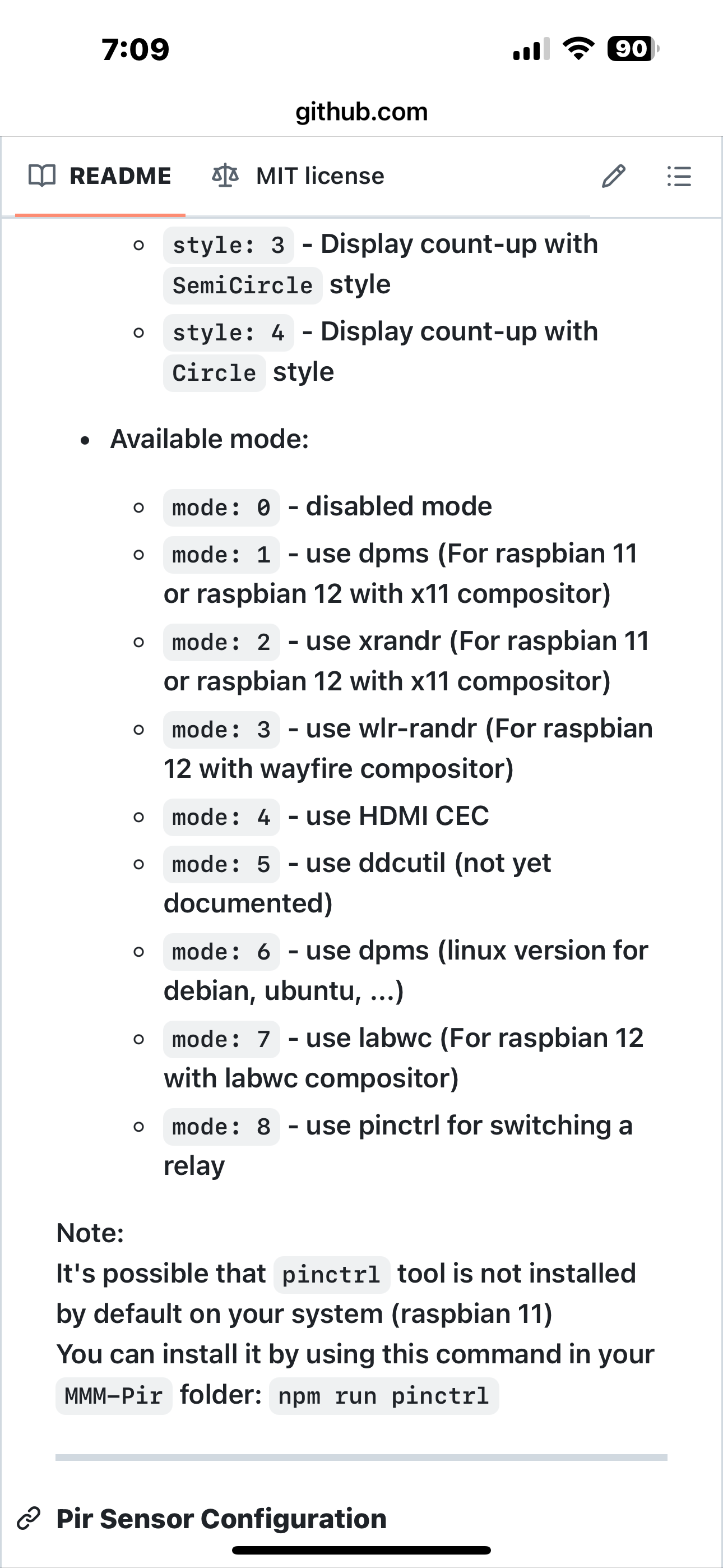
                                      IMG_0541.png

                                      Sam

                                      How to add modules

                                      learning how to use browser developers window for css changes

                                      J 1 Reply Last reply Reply Quote 0
                                      • J Offline
                                        jefftse @sdetweil
                                        last edited by

                                        @sdetweil thank you and i got it working!

                                        1 Reply Last reply Reply Quote 1
                                        • S sdetweil has marked this topic as solved on

                                        Hello! It looks like you're interested in this conversation, but you don't have an account yet.

                                        Getting fed up of having to scroll through the same posts each visit? When you register for an account, you'll always come back to exactly where you were before, and choose to be notified of new replies (either via email, or push notification). You'll also be able to save bookmarks and upvote posts to show your appreciation to other community members.

                                        With your input, this post could be even better 💗

                                        Register Login

                                        • 1
                                        • 2
                                        • 2 / 2
                                        • First post
                                          Last post
                                        Enjoying MagicMirror? Please consider a donation!
                                        MagicMirror created by Michael Teeuw.
                                        Forum managed by Sam, technical setup by Karsten.
                                        This forum is using NodeBB as its core | Contributors
                                        Contact | Privacy Policy