MagicMirror Forum
    • Recent
    • Tags
    • Unsolved
    • Solved
    • MagicMirror² Repository
    • Documentation
    • 3rd-Party-Modules
    • Donate
    • Discord
    • Register
    • Login
    A New Chapter for MagicMirror: The Community Takes the Lead
    Read the statement by Michael Teeuw here.

    Notification Timer none dosent work

    Scheduled Pinned Locked Moved Solved Troubleshooting
    18 Posts 2 Posters 5.6k Views 2 Watching
    Loading More Posts
    • Oldest to Newest
    • Newest to Oldest
    • Most Votes
    Reply
    • Reply as topic
    Log in to reply
    This topic has been deleted. Only users with topic management privileges can see it.
    • S Do not disturb
      sdetweil @fischi87
      last edited by

      @fischi87 just don’t specify the timer value

      Sam

      How to add modules

      learning how to use browser developers window for css changes

      F 1 Reply Last reply Reply Quote 0
      • F Offline
        fischi87 @sdetweil
        last edited by fischi87

        @sdetweil how is it possible the make a notification what will display without a timer? i want show a notification and want cancel this notification by my self where my next question is, how can i cancel a notification, is there a way for it? like the alert.

        S 1 Reply Last reply Reply Quote 0
        • S Do not disturb
          sdetweil @fischi87
          last edited by

          @fischi87 just don’t add the timer: value in the notification you send

          Sam

          How to add modules

          learning how to use browser developers window for css changes

          F 1 Reply Last reply Reply Quote 0
          • F Offline
            fischi87 @sdetweil
            last edited by

            @sdetweil this dont work, it displaed just 3 sek wihout the timer.

            S 1 Reply Last reply Reply Quote 0
            • S Do not disturb
              sdetweil @fischi87
              last edited by sdetweil

              @fischi87 the doc says, if you don’t specify timer in a notification type, then the config option display_time will be used (and defaults to 3.5 seconds, 3500ms)
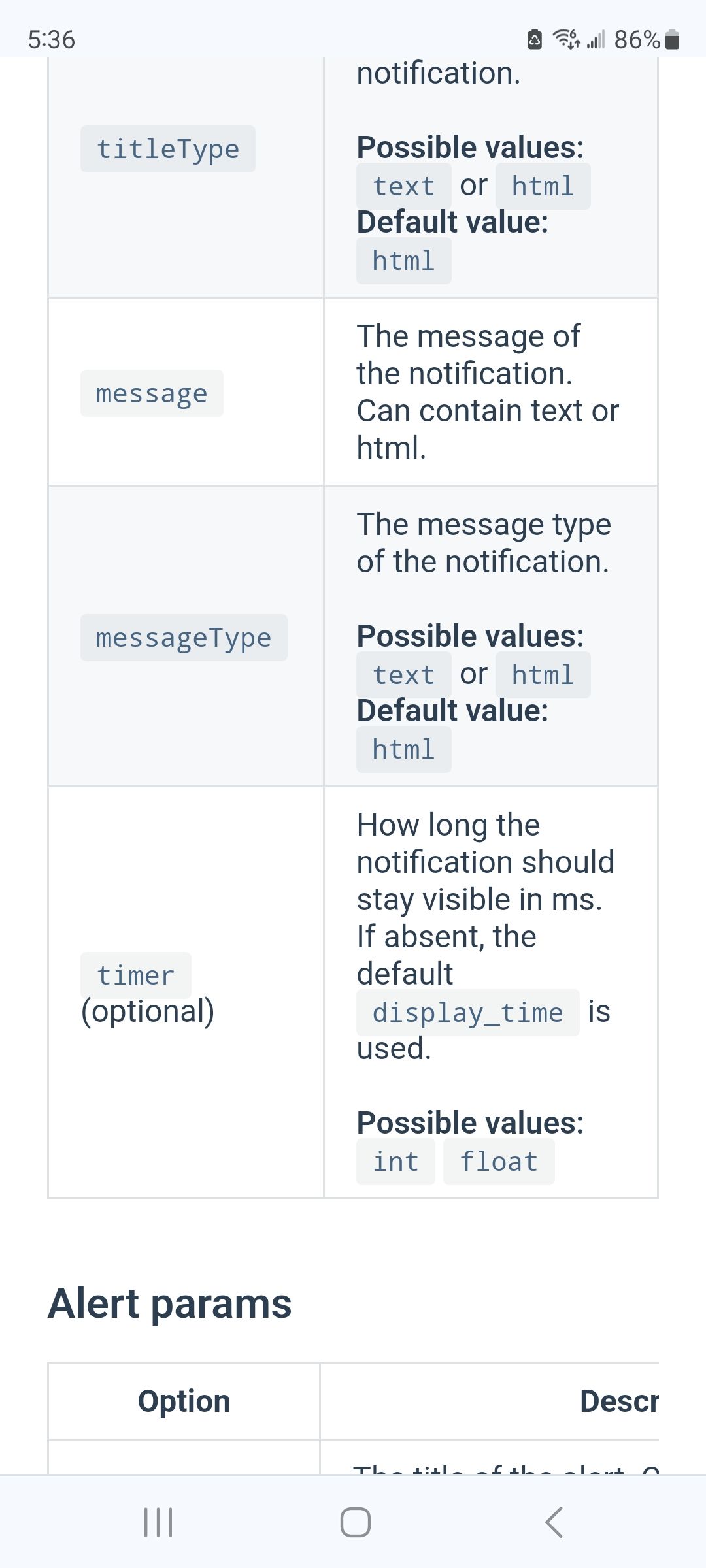
              Screenshot_20240222_053646_Chrome.jpg

              if you use an alert type , then no timer value will cause the message to be displayed til removed

              note one has a type in the payload (notification type) and one does not (alert type)
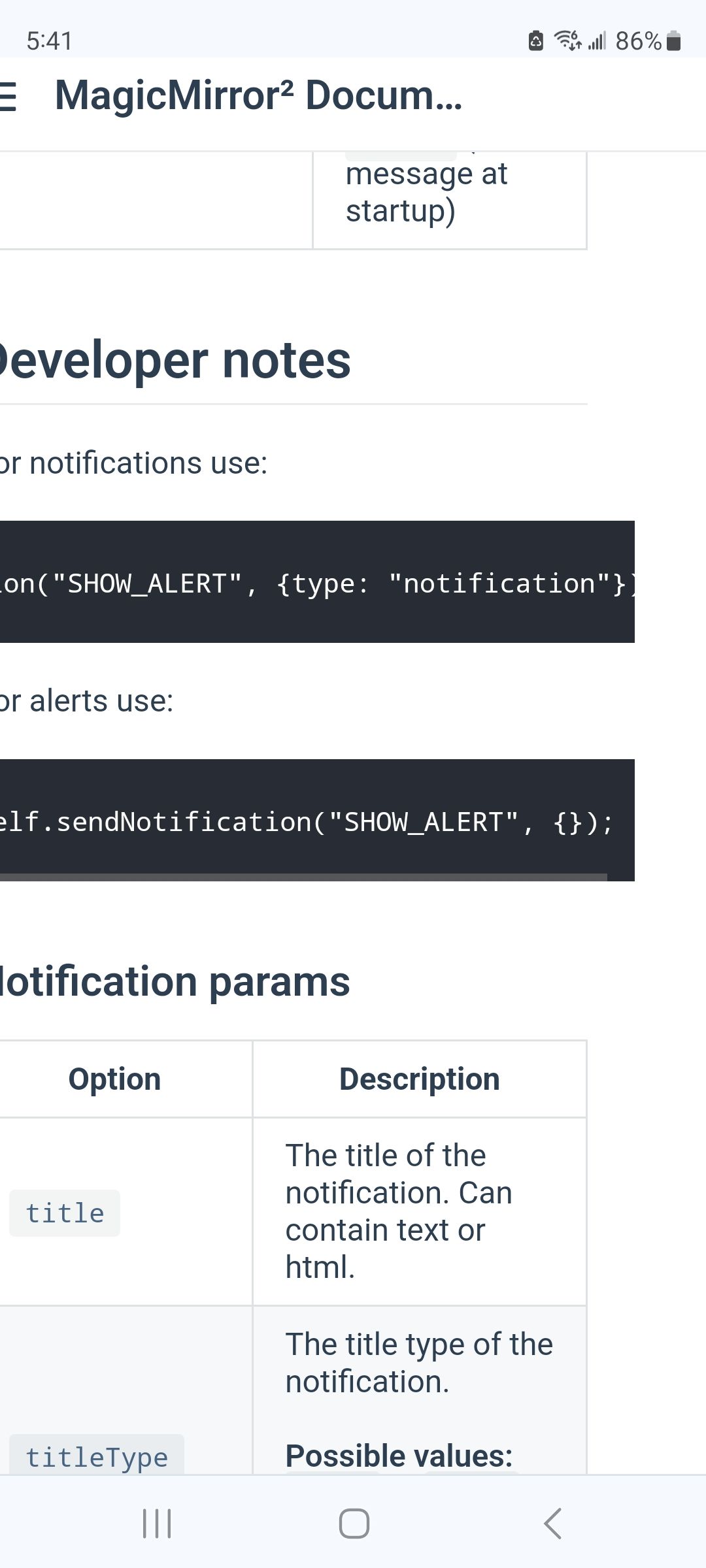
              Screenshot_20240222_054152_Chrome.jpg

              so your notification should be

              {
                  commandId: "Finish",
                  notiID: "SHOW_ALERT",
                  notiPayload: {  message: 'Der Monitor ist eingeschaltet.' }
                },
              

              Sam

              How to add modules

              learning how to use browser developers window for css changes

              F 1 Reply Last reply Reply Quote 0
              • F Offline
                fischi87 @sdetweil
                last edited by

                @sdetweil

                ur are right for the alert but with the type notification (SHOW_ALERT with type = notification) are 2 different things. if i send a show alert without a type it displed me the alert with blur background and so on and with the type: notification it shows me a little box with my message and this notification canceled after 3 sek. i didnt set a timer or a display_time, the alert shows as long i want but the notification canceld alter 3 sek. this is my problem!

                S 1 Reply Last reply Reply Quote 0
                • S Do not disturb
                  sdetweil @fischi87
                  last edited by

                  @fischi87 yes, the doc says

                  if you don’t specify timer in a notification type, then the config option

                  display_time 
                  

                  will be used (and defaults to 3.5 seconds, 3500ms)

                  so, add a new property to the alert module config:{} block
                  (if it doesn’t have a config:{} block, add one)

                   display_time: 7*24*60*60*1000  // 7 days in milliseconds
                  

                  Sam

                  How to add modules

                  learning how to use browser developers window for css changes

                  F 1 Reply Last reply Reply Quote 0
                  • F Offline
                    fischi87 @sdetweil
                    last edited by

                    @sdetweil

                    and how can i cancel before the timer (7days) finished?

                    S 1 Reply Last reply Reply Quote 0
                    • S Do not disturb
                      sdetweil @fischi87
                      last edited by

                      @fischi87 you have to send another notification, read the doc

                      Sam

                      How to add modules

                      learning how to use browser developers window for css changes

                      F 1 Reply Last reply Reply Quote 0
                      • F Offline
                        fischi87 @sdetweil
                        last edited by

                        @sdetweil

                        I read it already 100 times but nothing will work. Sorry is there a issue with the Modul? I think i dont ger also no updatenotifications?

                        Greedings

                        S 1 Reply Last reply Reply Quote 0
                        • S Do not disturb
                          sdetweil @fischi87
                          last edited by

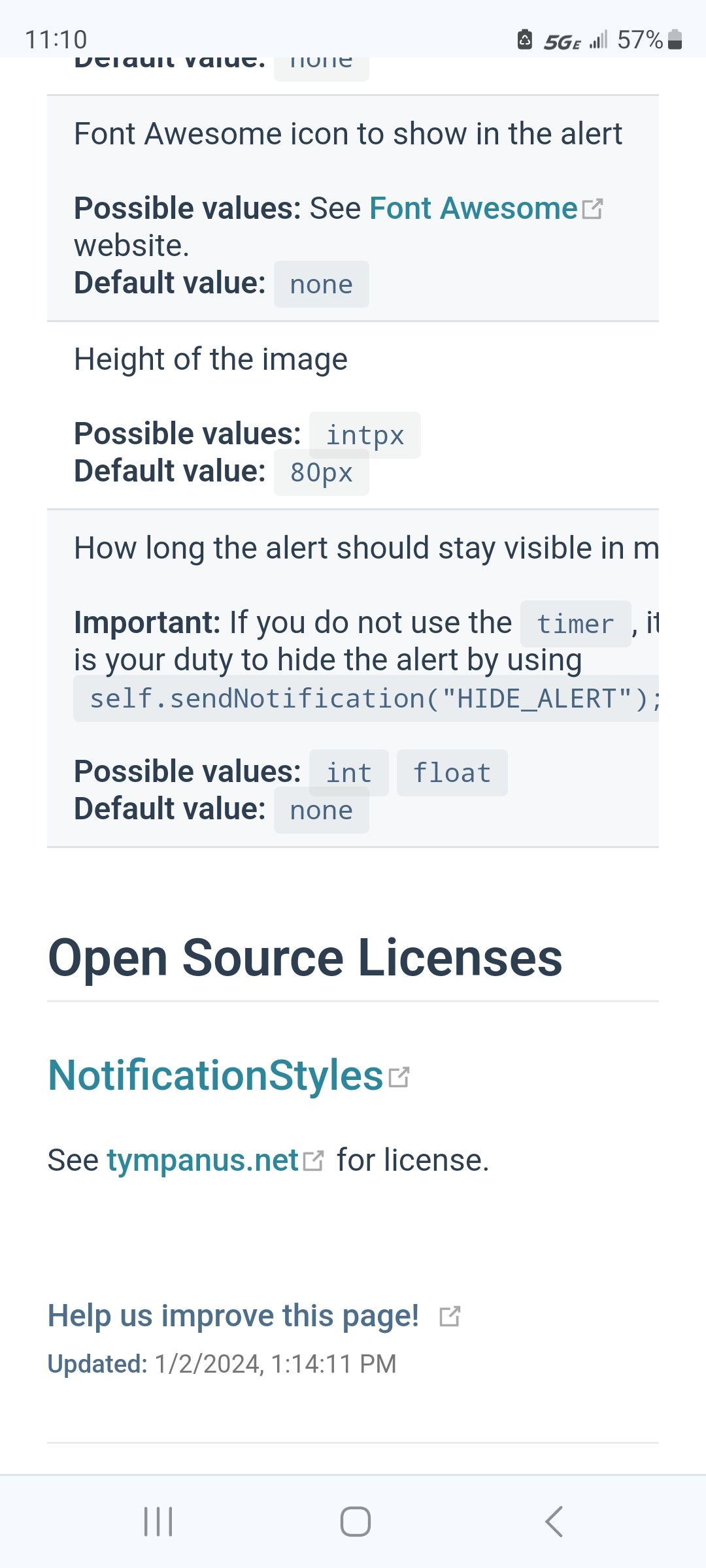
                          @fischi87 come on.

                          send the HIDE_ALERT notifications

                          Screenshot_20240222_111037_Chrome.jpg

                          Sam

                          How to add modules

                          learning how to use browser developers window for css changes

                          F 1 Reply Last reply Reply Quote 0
                          • F Offline
                            fischi87 @sdetweil
                            last edited by

                            @sdetweil

                            Sorry i think we Talk for different things. With the alert it works but not with the notification. I will See that i can show u a picture later maybe u will understand what i mean!

                            For now thanks for it time!

                            S 1 Reply Last reply Reply Quote 0
                            • S Do not disturb
                              sdetweil @fischi87
                              last edited by sdetweil

                              @fischi87 notification has to time out, either the notification timer value or the display_time value

                              Sam

                              How to add modules

                              learning how to use browser developers window for css changes

                              F 1 Reply Last reply Reply Quote 0
                              • F Offline
                                fischi87 @sdetweil
                                last edited by

                                @sdetweil

                                That sucks

                                S 1 Reply Last reply Reply Quote 0
                                • S Do not disturb
                                  sdetweil @fischi87
                                  last edited by

                                  @fischi87 one could always submit an enhancement request issue to the MM github page…
                                  Sam

                                  How to add modules

                                  learning how to use browser developers window for css changes

                                  1 Reply Last reply Reply Quote 0

                                  Hello! It looks like you're interested in this conversation, but you don't have an account yet.

                                  Getting fed up of having to scroll through the same posts each visit? When you register for an account, you'll always come back to exactly where you were before, and choose to be notified of new replies (either via email, or push notification). You'll also be able to save bookmarks and upvote posts to show your appreciation to other community members.

                                  With your input, this post could be even better 💗

                                  Register Login

                                  • 1 / 1
                                  • First post
                                    Last post
                                  Enjoying MagicMirror? Please consider a donation!
                                  MagicMirror created by Michael Teeuw.
                                  Forum managed by Sam, technical setup by Karsten.
                                  This forum is using NodeBB as its core | Contributors
                                  Contact | Privacy Policy