MagicMirror Forum
    • Recent
    • Tags
    • Unsolved
    • Solved
    • MagicMirror² Repository
    • Documentation
    • 3rd-Party-Modules
    • Donate
    • Discord
    • Register
    • Login
    A New Chapter for MagicMirror: The Community Takes the Lead
    Read the statement by Michael Teeuw here.

    Trouble Integrating MMM-OpenWeatherMapForecast with OpenWeather API v3.0

    Scheduled Pinned Locked Moved Solved Troubleshooting
    29 Posts 2 Posters 3.8k Views 2 Watching
    Loading More Posts
    • Oldest to Newest
    • Newest to Oldest
    • Most Votes
    Reply
    • Reply as topic
    Log in to reply
    This topic has been deleted. Only users with topic management privileges can see it.
    • S Offline
      Socrates @sdetweil
      last edited by

      @sdetweil
      Thanks for your replies. I forgot to mention that, before posting this here, i did update the module. Infact to be on the safe side i renamed the folder MMM-OpenWeatherMapForecast to preserve it as a backup, and then used git clone to download the new module and ran npm install from within the MMM-OpenWeatherMapForecast folder.

      1 Reply Last reply Reply Quote 0
      • S Offline
        Socrates @sdetweil
        last edited by

        @sdetweil

        Did a git pull no, luck.

        S 1 Reply Last reply Reply Quote 0
        • S Do not disturb
          sdetweil @Socrates
          last edited by

          @Socrates ok, edit the node_helper.js

          and change the end of line 63 from

           HH:mm") + " ** ERROR ** " + error);
          

          to

           HH:mm") + " ** ERROR ** " + response .statusCode);
          

          then restart MagicMirror and look at the output of npm start

          im guessing its 401, access denied

          is your new apikey with a credit card?

          Sam

          How to add modules

          learning how to use browser developers window for css changes

          S 1 Reply Last reply Reply Quote 0
          • S Offline
            Socrates @sdetweil
            last edited by

            @sdetweil
            Also wanted to let you know I am using one openweather api for a different module in mm and thats working fine, only this module its not working, the module wont even show up on mm screen.

            S 1 Reply Last reply Reply Quote 0
            • S Do not disturb
              sdetweil @Socrates
              last edited by

              @Socrates I took your config, used my v3 apikey and it works…
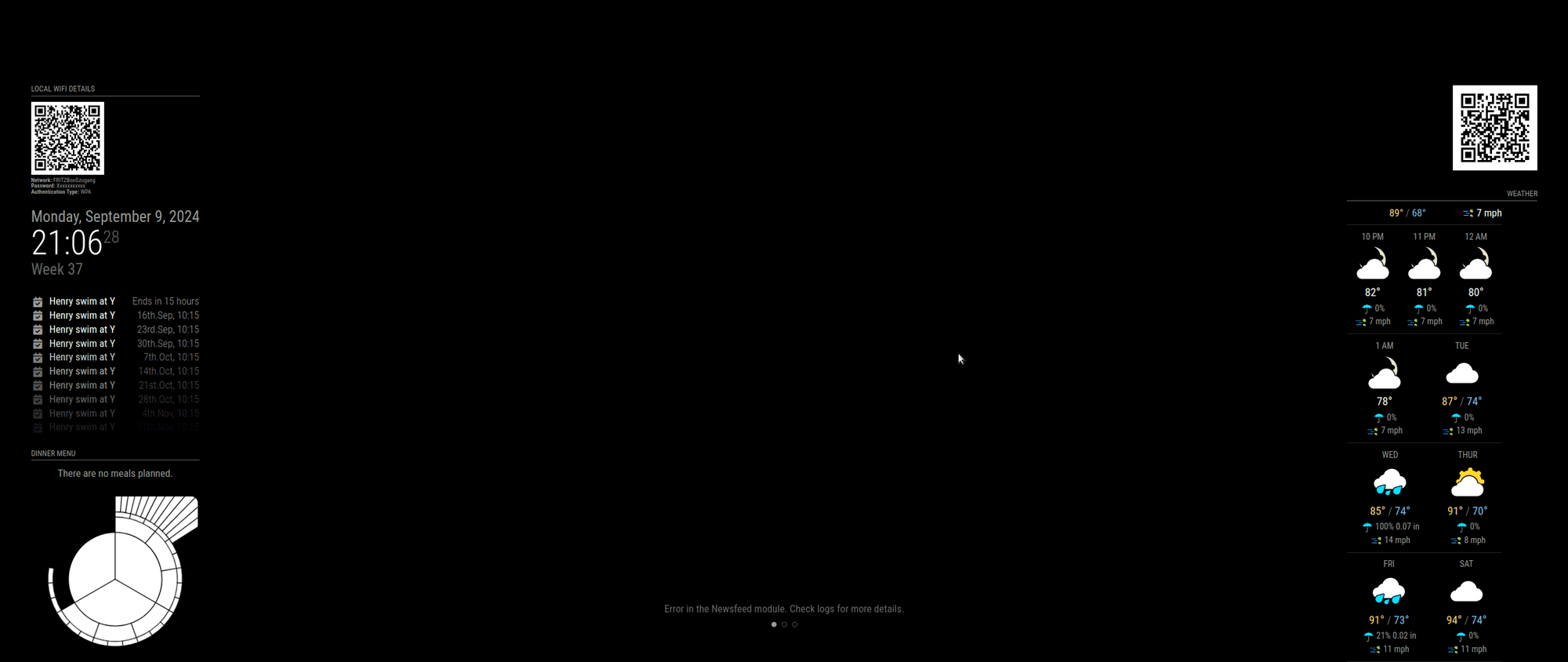
              Screenshot at 2024-09-09 21-06-28.png

              Sam

              How to add modules

              learning how to use browser developers window for css changes

              S 1 Reply Last reply Reply Quote 0
              • S Offline
                Socrates @sdetweil
                last edited by

                @sdetweil
                hello and good evening again. No i do not have a credit card on file with Openweathermap. Its a free tier.
                Also, may i request you to guide me where to find the output file? I have mm on auto start while rebooting

                S 1 Reply Last reply Reply Quote 0
                • S Offline
                  Socrates @sdetweil
                  last edited by

                  @sdetweil
                  So do i need to sign up for a paid API using a credit card? Or do u think there is an inconsistency with my MMM-OWMF module? I have made the changes to the node_helper.js file just as you suggested and restarted MM, still no avail.

                  S 1 Reply Last reply Reply Quote 0
                  • S Do not disturb
                    sdetweil @Socrates
                    last edited by sdetweil

                    @Socrates i believe the 3.0 free tier also requires a credit card on file…
                    they give you 1000 calls no charge per day, but if you go over they charge you
                    see the link ‘Pay as you call’
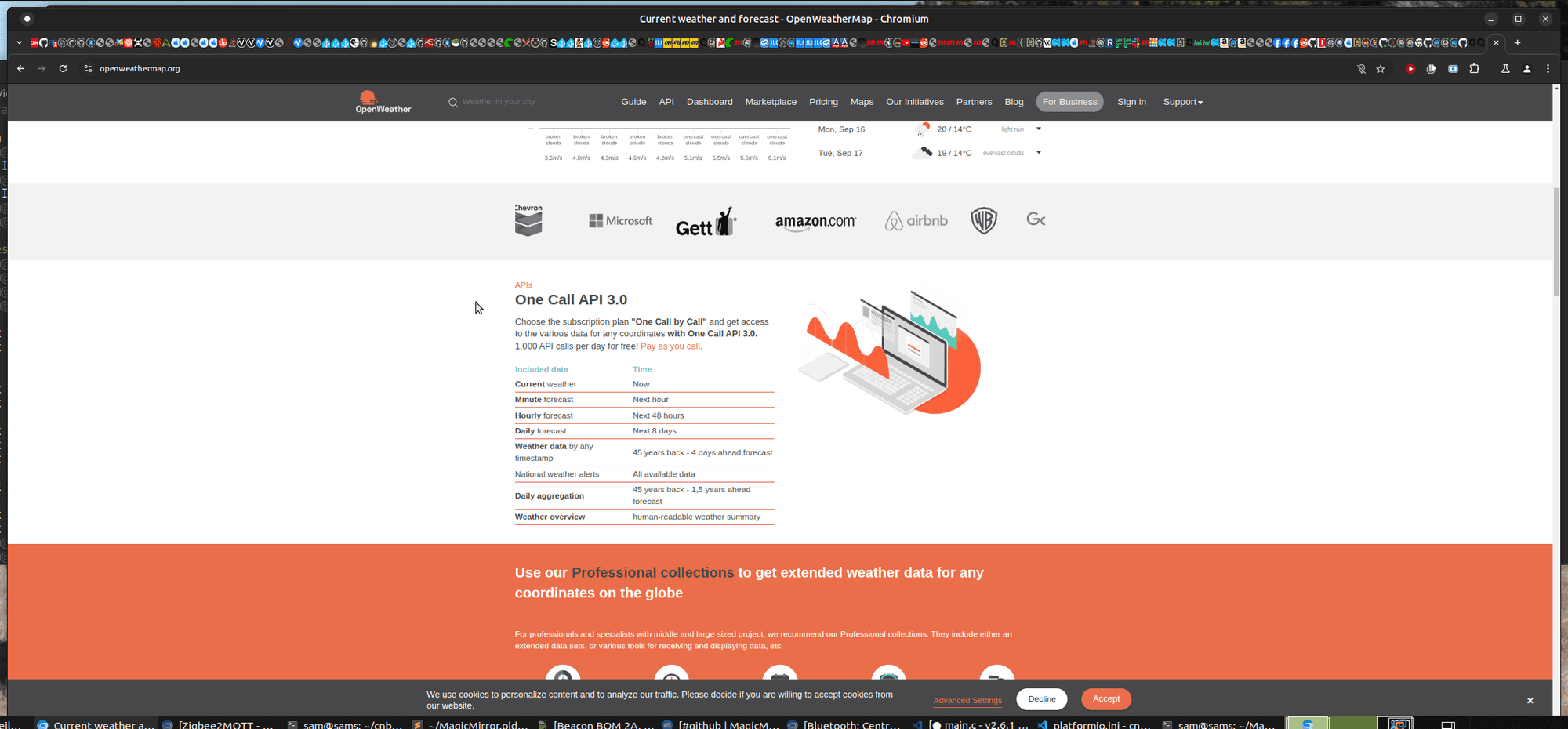
                    Screenshot at 2024-09-09 21-42-48.png

                    (vs prevent the api from working)
                    this is new for 3.0
                    the linked pages says

                    'One Call API 3.0 is included to the “One call by call” subscription plan only, users pay for the actual use of the product. '
                    

                    if you are using pm2 to autolaunch then the output will be here

                    pm2 logs --lines=xxxx
                    

                    where xxxx is the number of the most recent lines of the log to display,
                    default 15

                    you may need more

                    I always recommend using manual start mode while debugging, this makes the output easier to access

                    pm2 status 
                    

                    will show the running apps

                    pm2 stop all 
                    

                    will stop them all

                    manual start

                    cd ~/MagicMirror
                    npm start 
                    

                    ctrl-c at the terminal or
                    ctrl-q on the mm screen to stop mm

                    once things are resolved

                    pm2 status
                    pm2 start x
                    

                    where x is the number of the line for the app to start or the name on that line
                    0 or MagicMirror as shown below on one of my systems

                    ┌────┬────────────────────┬──────────┬──────┬───────────┬──────────┬──────────┐
                    │ id │ name               │ mode     │ ↺    │ status    │ cpu      │ memory   │
                    ├────┼────────────────────┼──────────┼──────┼───────────┼──────────┼──────────┤
                    │ 0  │ MagicMirror        │ fork     │ 5    │ online    │ 0%       │ 2.5mb    │
                    └────┴────────────────────┴──────────┴──────┴───────────┴──────────┴──────────┘
                    

                    Sam

                    How to add modules

                    learning how to use browser developers window for css changes

                    S 1 Reply Last reply Reply Quote 0
                    • S Do not disturb
                      sdetweil @Socrates
                      last edited by sdetweil

                      @Socrates said in Trouble Integrating MMM-OpenWeatherMapForecast with OpenWeather API v3.0:

                      restarted MM, still no avail.

                      all that change did was output the status code to the log , instead of the empty error

                      so, the log output will tell you
                      Im sure its 401

                      I hacked my apikey , and this is what the line should look like in the log

                      [2024-09-09 21:49:07.454] [LOG]   [MMM-OpenWeatherMapForecast] 9-Sep-24 21:49 ** ERROR ** 401
                      

                      Sam

                      How to add modules

                      learning how to use browser developers window for css changes

                      1 Reply Last reply Reply Quote 0
                      • S Offline
                        Socrates
                        last edited by

                        Sounds good, its getting very late here in Houston, I will check this in the morning, add a credit card on file with OpenWeather and subscribe to a v3.0 api, make the changes accordingly and let u know in the morning. Thanks again for helping me out with this.

                        1 Reply Last reply Reply Quote 0
                        • S Offline
                          Socrates
                          last edited by

                          Ok, before i go to sleep i had to do this.
                          I added a credit card on openweather and subscribed for the plan.
                          created a new api, and added it to the owmf module config file.

                          restarted mm, and navigated to the log file, and i see this…

                          [2024-09-10 00:52:18.498] [LOG] [MMM-OpenWeatherMapForecast] 10-Sep-24 00:52 ** ERROR ** 401
                          [2024-09-10 00:52:18.526] [INFO] .
                          [2024-09-10 00:52:18.527] [INFO] Beginning of Update Data:
                          [2024-09-10 00:52:18.529] [INFO] .
                          [2024-09-10 00:52:18.544] [INFO] {

                          1 Reply Last reply Reply Quote 0
                          • S Offline
                            Socrates @sdetweil
                            last edited by

                            @sdetweil
                            Sorry to keep nagging you. But today morning when i started troubleshooting MM, i see the Weather title bar show up, but the whole module per say is loading.
                            I have the credit card on file with openweather, and have subscribed to v3.0 api
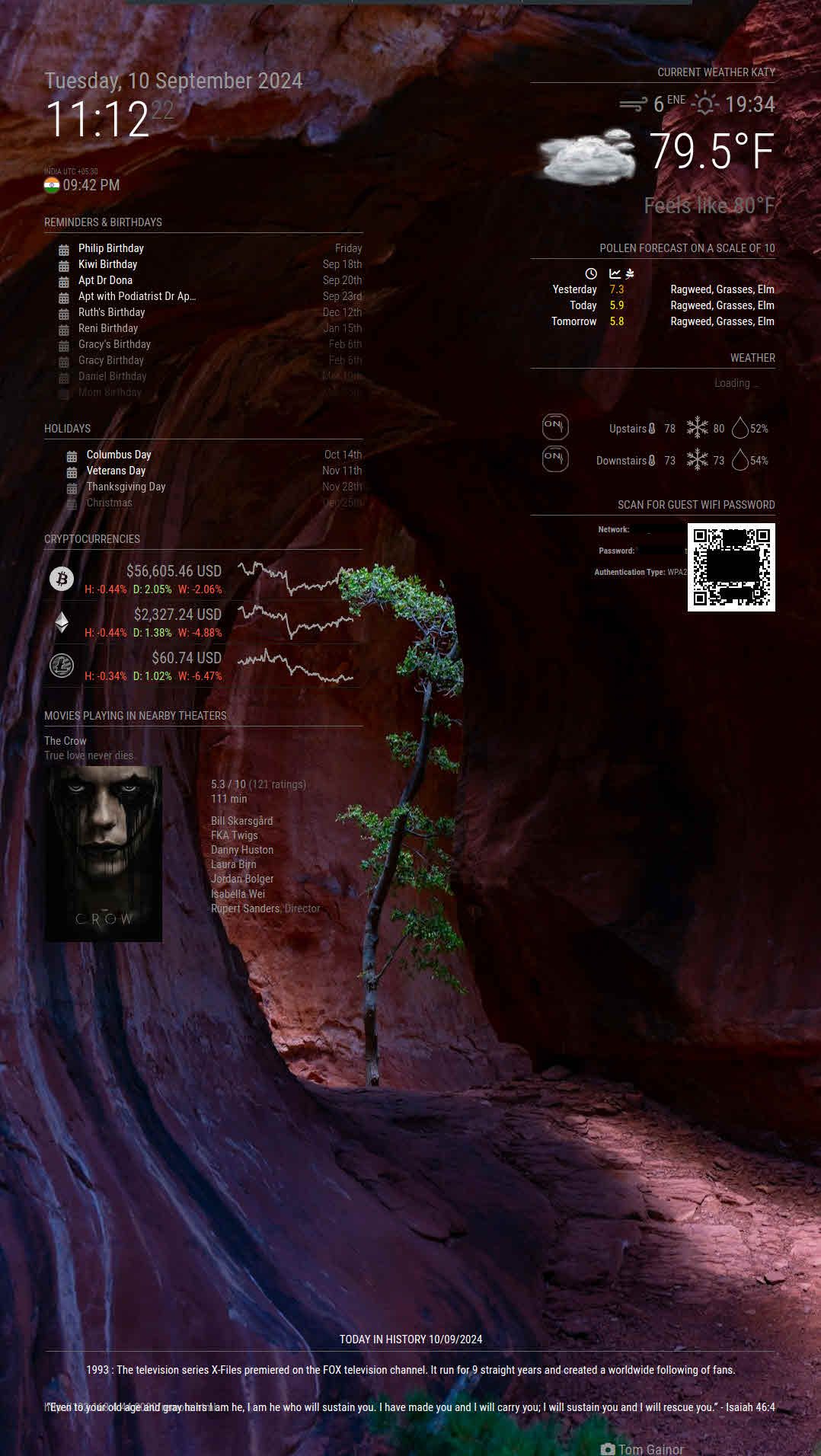
                            2024-09-10_11-12-38.jpg

                            S 1 Reply Last reply Reply Quote 0
                            • S Do not disturb
                              sdetweil @Socrates
                              last edited by

                              @Socrates can you show the log output?

                              Sam

                              How to add modules

                              learning how to use browser developers window for css changes

                              S 1 Reply Last reply Reply Quote 0
                              • S Offline
                                Socrates @sdetweil
                                last edited by

                                @sdetweil
                                Thanks, i have pm’ed you the output, as the output file contains api keys and all google calander private url details. Hence sent it to you through pm

                                S 1 Reply Last reply Reply Quote 0
                                • S Do not disturb
                                  sdetweil @Socrates
                                  last edited by

                                  @Socrates sent pm back

                                  Sam

                                  How to add modules

                                  learning how to use browser developers window for css changes

                                  S 1 Reply Last reply Reply Quote 0
                                  • S Offline
                                    Socrates @sdetweil
                                    last edited by

                                    @sdetweil
                                    It looks like i might be facing an issue with the OpenWeather api. Under services tab i see this msg. It looks like Hourly and Daily forcast is still not available to me.
                                    My membership services shows. See screenshot below.
                                    alt text

                                    However my subscription shows its active with the paid membership
                                    alt text

                                    I have written an email to OpenWeather support, as soon as i hear from them, i will report back. I think this has to do with my subscription and for them to activate the daily forcast on my account.

                                    S 2 Replies Last reply Reply Quote 0
                                    • S Do not disturb
                                      sdetweil @Socrates
                                      last edited by

                                      @Socrates when u need to upload a pic, use the 2nd icon from the right (upload image) on the editor toolbar

                                      Sam

                                      How to add modules

                                      learning how to use browser developers window for css changes

                                      S 1 Reply Last reply Reply Quote 0
                                      • S Do not disturb
                                        sdetweil @Socrates
                                        last edited by

                                        @Socrates remember it worked ok from my system

                                        Sam

                                        How to add modules

                                        learning how to use browser developers window for css changes

                                        S 1 Reply Last reply Reply Quote 0
                                        • S Offline
                                          Socrates @sdetweil
                                          last edited by

                                          @sdetweil
                                          With my API key?

                                          S 1 Reply Last reply Reply Quote 0
                                          • S Do not disturb
                                            sdetweil @Socrates
                                            last edited by

                                            @Socrates yes, i copied your config exactly, and disabled mine…

                                            Sam

                                            How to add modules

                                            learning how to use browser developers window for css changes

                                            S 2 Replies Last reply Reply Quote 0

                                            Hello! It looks like you're interested in this conversation, but you don't have an account yet.

                                            Getting fed up of having to scroll through the same posts each visit? When you register for an account, you'll always come back to exactly where you were before, and choose to be notified of new replies (either via email, or push notification). You'll also be able to save bookmarks and upvote posts to show your appreciation to other community members.

                                            With your input, this post could be even better 💗

                                            Register Login

                                            • 1
                                            • 2
                                            • 1 / 2
                                            • First post
                                              Last post
                                            Enjoying MagicMirror? Please consider a donation!
                                            MagicMirror created by Michael Teeuw.
                                            Forum managed by Sam, technical setup by Karsten.
                                            This forum is using NodeBB as its core | Contributors
                                            Contact | Privacy Policy