Read the statement by Michael Teeuw here.
iFrame blank when displaing http://<ipaddress LMS server>:9000/material
-
I have used the iFrame (as well as MMM-iFrame) module(s) for showing the material skin interface of the Lyrion Media Server, formerly know as SqueezeServer or Logitech Media Server.
But since the latest MMM update (2.28.0), the iFrame show completely blank.
There are no (mpm) log errors or warnings when restarting MM2. Other websites, e.g. nu.nl as well as http://<ipaddress LMS server>:9000 (so the standard skin) are working.
How can I troubleshoot this? -
O, to add this probably important information: This issue only exists on the mirror (Rpi Electron app) itself, not when browsing from another device to http://<ip address mirror>:8080. In that case it works perfectly well.
-
@stephanvdplas this module runs all in browser, so no messages in the npm start console
open the developers window, ctrl-shift-i, select the console tab
add a unique part of the module name to the filter field.
my guess is a cors error, or a reject due to our UserAgent name
-
@sdetweil ok I’ll have to attach a kb and mouse to the pi then. Will try this tonight.
-
@stephanvdplas you can do debug from a different system if you configured MagicMirror config.js to allow remote system access
-
@stephanvdplas no errors at all! Only a deprecation warning but it is about a different module .
Please help me to further troubleshoot. All other web content I tried is working fine and the content I want to show is working fine when browsing the mirror in a different browser via http://<ip address mirror>:8080.
So it must be some strange thing in electron or jsnode.
-
@stephanvdplas in the network tab I see errors:
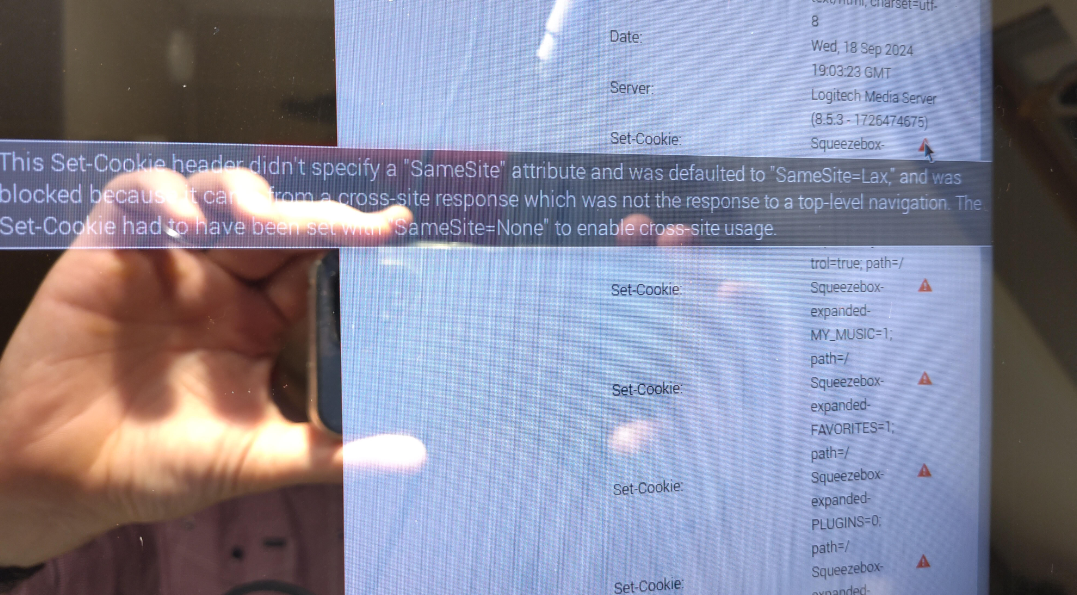
This Set-Cookie header didn’t specify a “SameSite” attribute and was defaulted to “SameSite=Lax”, and was blocked because it came from a cross-site response which was not the response to a top-level navigation. The Set-Cookie had to have been set with “SameSite=None to enable cross-site usage.” -
@stephanvdplas said in iFrame blank when displaing http://<ipaddress LMS server>:9000/material:
Set-Cookie header didn’t specify a “SameSite” attribute and was defaulted to “SameSite=Lax”
Ok, I don’t KNOW for certain, but our cors proxy might work there
change the url in the iframe config to
http://localhost:MM_PORT/cors?
the rest like this
// the url
url=http://www.test.com/path?param1=value1 // example
// if there are headers, skip if not
&sendheaders=header1:value1,header2:value2&expectedheaders=header1,header2
make sure quotes around the url string
-
mm has a simple internal cors proxy you could try.
So instead using the
<original-url>in the iframe you could tryhttp://localhost:8080/cors?url=<original-url>.E.g. if your
<original-url>ishttps://example.comtryhttp://localhost:8080/cors?url=https://example.com -
ups, sam was quicker …
-
@sdetweil said in iFrame blank when displaing http://<ipaddress LMS server>:9000/material:
@stephanvdplas said in iFrame blank when displaing http://<ipaddress LMS server>:9000/material:
Set-Cookie header didn’t specify a “SameSite” attribute and was defaulted to “SameSite=Lax”
Ok, I don’t KNOW for certain, but our cors proxy might work there
change the url in the iframe config to
http://localhost:MM_PORT/cors?
the rest like this
// the url
url=http://www.test.com/path?param1=value1 // example
// if there are headers, skip if not
&sendheaders=header1:value1,header2:value2&expectedheaders=header1,header2
make sure quotes around the url string’’
It doesn’t work. Now there are no errors, but it only shows an empty frame.
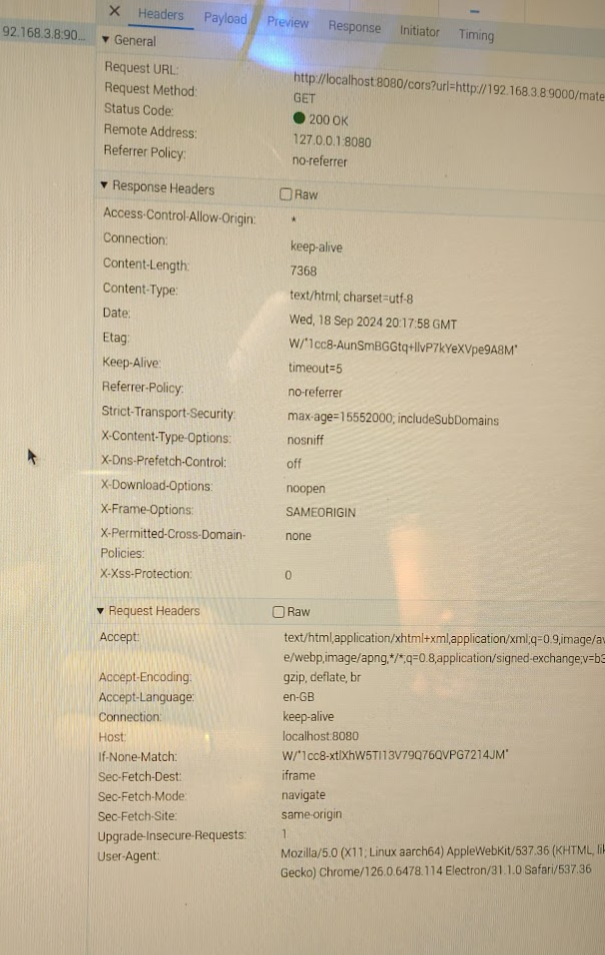
In the Preview tab, it shows {{snackbar.msg}}
[24-09-18 22:33:38.8839] Slim::Utils::Misc::msg (1319) Warniing : [22:33:38.8838] “my” variable $mobile masks earlier declaration in same scope at (eval 5777) line 46.This warning is also seen in the debug log of LMS server, also when I open the 192.168.3.8/material on a browser on a windows machine (where the site is loading correctly).
-
@stephanvdplas There is another thing:
In the preview tab of the content it shows: Failed to load response data: Connection is closed, can’t dispatch pending call to Network.getResponseBody
-
@stephanvdplas now I am out of my knowledge range.
@karsten13 maybe has more skill here…
-
@sdetweil said in iFrame blank when displaing http://<ipaddress LMS server>:9000/material:
@karsten13 maybe has more skill here…
sorry, no. Maybe google has some findings.
-
you could try adding
        electronOptions: {
                webPreferences: { webSecurity: false },
        },
in
config.js -
@karsten13 good option. I tried it (actually I placed the option directly in the electron.js script) but it doesn’t change the situation at all.
-
I can only guess without having the debug case …
You can google and try changing
electronOptionsDefaultsand/orelectronSwitchesDefaultsinjs/electron.jsif you find something … -
@karsten13 I am quite sure about having the config right:
	let electronSwitchesDefaults = ["autoplay-policy", "no-user-gesture-required"];
	app.commandLine.appendSwitch(...new Set(electronSwitchesDefaults, config.electronSwitches));
	let electronOptionsDefaults = {
		width: electronSize.width,
		height: electronSize.height,
		icon: "mm2.png",
		x: 0,
		y: 0,
		darkTheme: true,
		webPreferences: {
			contextIsolation: true,
			nodeIntegration: false,
			zoomFactor: config.zoom,
			webSecurity: false
		},
		backgroundColor: "#000000"
	};

	// DEPRECATED: "kioskmode" backwards compatibility, to be removed
	// settings these options directly instead provides cleaner interface
	if (config.kioskmode) {
		electronOptionsDefaults.kiosk = true;
	} else {
		electronOptionsDefaults.show = false;
		electronOptionsDefaults.frame = false;
		electronOptionsDefaults.transparent = true;
		electronOptionsDefaults.hasShadow = false;
		electronOptionsDefaults.fullscreen = true;
	}

	const electronOptions = Object.assign({}, electronOptionsDefaults, config.electronOptions);

	// Create the browser window.
	mainWindow = new BrowserWindow(electronOptions);
So the webSecurity line is the only thing I added/changed.
-
@stephanvdplas said in iFrame blank when displaing http://<ipaddress LMS server>:9000/material:
I am quite sure about having the config right
sorry, my point is you have to google the error with the keyword “electron” and check if you find something which you can test
-
@karsten13 sorry to report that there is no other possibility than to revert back to electron 30.0.0
After this, the iFrame works again. After re-installing 31.0.0, it is broken again.
So no I have implemented this workaround.sudo npm install electron@30.0.0this command saved my
lifemirror

Hello! It looks like you're interested in this conversation, but you don't have an account yet.
Getting fed up of having to scroll through the same posts each visit? When you register for an account, you'll always come back to exactly where you were before, and choose to be notified of new replies (either via email, or push notification). You'll also be able to save bookmarks and upvote posts to show your appreciation to other community members.
With your input, this post could be even better 💗
Register Login