MagicMirror Forum
    • Recent
    • Tags
    • Unsolved
    • Solved
    • MagicMirror² Repository
    • Documentation
    • 3rd-Party-Modules
    • Donate
    • Discord
    • Register
    • Login
    A New Chapter for MagicMirror: The Community Takes the Lead
    Read the statement by Michael Teeuw here.

    MMM-Fireworks

    Scheduled Pinned Locked Moved Entertainment
    16 Posts 5 Posters 3.9k Views 5 Watching
    Loading More Posts
    • Oldest to Newest
    • Newest to Oldest
    • Most Votes
    Reply
    • Reply as topic
    Log in to reply
    This topic has been deleted. Only users with topic management privileges can see it.
    • C Offline
      chrisfr1976
      last edited by

      Hi,

      I’ve created a quick module for New Year’s Eve or other events you’d like to highlight on your mirror.

      The MMM-Fireworks module brings a visually stunning fireworks display to your MagicMirror, designed to celebrate special occasions. The fireworks animation runs best in the fullscreen_above region, creating an immersive experience. The start time and duration of the display are configurable via the config.js file.

      MMM-Fireworks

      MMM-Fireworks

      Have fun and take care :-)
      Chris.

      Regards, Chris.

      S C 2 Replies Last reply Reply Quote 3
      • S Offline
        sdetweil @chrisfr1976
        last edited by

        @chrisfr1976 awesome

        Sam

        How to add modules

        learning how to use browser developers window for css changes

        1 Reply Last reply Reply Quote 0
        • C Offline
          chrisfr1976 @chrisfr1976
          last edited by

          Hello,

          a short update since time is running out :)

          I’ve modified the code a little. In my set up I had some performance problems with the animation.

          So I put all other modules in the “Hide” during the animation is running. Afterwards everything will come back (so the plan).

          I don’t know if everybody likes or needs this. So I show the modified code just here.

          Replace the complete code in “MMM-Fireworks.js” with this:

          Module.register("MMM-Fireworks", {
              defaults: {
                  startDateTime: "2024-12-31T23:59:00", // ISO format
                  duration: 60000, // Duration in milliseconds
              },
          
              start: function () {
                  this.fireworksActive = false;
              },
          
              getDom: function () {
                  const wrapper = document.createElement("div");
                  wrapper.id = "fireworksContainer";
                  return wrapper;
              },
          
              notificationReceived: function (notification, payload, sender) {
                  if (notification === "DOM_OBJECTS_CREATED") {
                      this.scheduleFireworks();
                  }
              },
          
              scheduleFireworks: function () {
                  const startTime = new Date(this.config.startDateTime).getTime();
                  const currentTime = Date.now();
                  const delay = startTime - currentTime;
          
                  if (delay > 0) {
                      setTimeout(() => this.startFireworks(), delay);
                  } else {
                      console.warn("Fireworks start time has already passed.");
                  }
              },
          
              startFireworks: function () {
                  this.fireworksActive = true;
                  const container = document.getElementById("fireworksContainer");
                  container.classList.add("fullscreen");
          
                  const canvas = document.createElement("canvas");
                  canvas.id = "fireworksCanvas";
                  container.appendChild(canvas);
          
                  this.sendNotificationToModules("HIDE"); // Module ausblenden
          
                  const fireworks = new Fireworks(canvas);
                  fireworks.start();
          
                  setTimeout(() => {
                      this.stopFireworks(fireworks, container);
                  }, this.config.duration);
              },
          
              stopFireworks: function (fireworks, container) {
                  fireworks.stop();
                  container.innerHTML = ""; // Clear the canvas
                  this.fireworksActive = false;
                  this.sendNotificationToModules("SHOW"); // Module wieder einblenden
              },
          
              sendNotificationToModules: function (action) {
                  MM.getModules().enumerate((module) => {
                      if (module.name !== "MMM-Fireworks") {
                          if (action === "HIDE") {
                              module.hide(500); // Mit Animation ausblenden
                          } else if (action === "SHOW") {
                              module.show(500); // Mit Animation einblenden
                          }
                      }
                  });
              },
          
              getStyles: function () {
                  return ["MMM-Fireworks.css"];
              },
          
              getScripts: function () {
                  return ["fireworks.js"];
              }
          });


          Party on!

          Cheers Chris.

          Regards, Chris.

          C 1 Reply Last reply Reply Quote 0
          • C Offline
            chrisfr1976 @chrisfr1976
            last edited by

            Hello,

            unfortunately even more optimizations were necessary. So I update the repository.

            New:

            • hides all modules during animation
            • suspends all modules during animation

            Reduced effects:

            createExplosion(x, y) {
                    const particleCount = 25; // was 50
            
            this.particles.forEach((p) => {
                        p.x += p.vx;
                        p.y += p.vy;
                        p.vy += 0.01; // less gravity
                        p.alpha -= 0.01;
                    });
            
            
                setup() {
                    this.canvas.width = this.width*0.95 //reduced width 
                    this.canvas.height = this.height*0.95 //reduced height
                    window.addEventListener("resize", () => this.resize());
                }
            
            • And updated CSS to be in the middle of the screen again.

            Hopefully you’ll celebrate this, too!

            Regards, Chris.

            C 1 Reply Last reply Reply Quote 1
            • plainbrokeP Offline
              plainbroke
              last edited by

              Worked for me earlier when I tested it this afternoon.
              Nice module…

              Slow learner. But trying anyways.
              MM is on Raspberry Pi 4B w/8gb ram loaded on a 128gb nvme drive.
              Running Trixie and the latest MM version.

              1 Reply Last reply Reply Quote 0
              • C Offline
                com1cedric @chrisfr1976
                last edited by

                @chrisfr1976

                Hello!

                great idea, you module !

                but does it really work ? it does not appear on my mirror, after installing it.

                Can you please re-check on your side ?

                Thanks in advance and have a good evening,

                Cédric

                S C 2 Replies Last reply Reply Quote 0
                • S Offline
                  sdetweil @com1cedric
                  last edited by

                  @com1cedric what position did you set it to?

                  Sam

                  How to add modules

                  learning how to use browser developers window for css changes

                  1 Reply Last reply Reply Quote 0
                  • C Offline
                    chrisfr1976 @com1cedric
                    last edited by

                    @com1cedric see my answer on GitHub. It only starts if the start time is exactly now or in the future.

                    Regards, Chris.

                    S 1 Reply Last reply Reply Quote 0
                    • S Offline
                      sdetweil @chrisfr1976
                      last edited by

                      @chrisfr1976 why would you want it in the past?

                      oh, and NOW is impossible to catch

                      Sam

                      How to add modules

                      learning how to use browser developers window for css changes

                      C 1 Reply Last reply Reply Quote 0
                      • C Offline
                        chrisfr1976 @sdetweil
                        last edited by

                        @sdetweil no, the start time is relevant. If the start time is in the past and the effect time may be stll okay like 3652460601000, the effect does not start. This could be the problem here. So you really need to wait for the defined time in the config.
                        I‘ve spent several minutes with waiting….

                        Regards, Chris.

                        S 1 Reply Last reply Reply Quote 0
                        • S Offline
                          sdetweil @chrisfr1976
                          last edited by

                          @chrisfr1976 if the start time is in the past and the event time is in the future, then the start time should be now. (however that gets calculated, literal or adjusted offset…)

                          I am not looking at the doc or code

                          Sam

                          How to add modules

                          learning how to use browser developers window for css changes

                          plainbrokeP 1 Reply Last reply Reply Quote 0
                          • plainbrokeP Offline
                            plainbroke @sdetweil
                            last edited by

                            @sdetweil
                            worked on my mirror

                            Slow learner. But trying anyways.
                            MM is on Raspberry Pi 4B w/8gb ram loaded on a 128gb nvme drive.
                            Running Trixie and the latest MM version.

                            C 1 Reply Last reply Reply Quote 1
                            • C cgillinger referenced this topic on
                            • C Offline
                              chrisfr1976 @plainbroke
                              last edited by

                              I have completely reworked the MMM-Fireworks module!

                              New:

                              • It is now using the p5.js library. So it is now faster and I’ve added more config options.
                              • Also the timing problem ist solved. You can define a start date and time. If you need to restart your mm inbetween it continues.
                              • you can install it today and enjoy on next new years eve. (The JavaScript’s setTimeout is solved here (has a maximum delay roughly 2³¹–1 milliseconds - only 24.8 days)
                              • Added a text overlay
                              • runs as before in fullscreen but also “in a box” as every other module
                              • And the best: the explosion effect is now really nice!

                              Bild Text

                              Bild Text

                              Regards, Chris.

                              C 1 Reply Last reply Reply Quote 1
                              • C Offline
                                chrisfr1976 @chrisfr1976
                                last edited by

                                @chrisfr1976 Hi,
                                maybe interesting also for others: There is a canvas opacity parameter set now. So you can can keep all your stuff visible in the background while the fireworks is dancing on your mirror. I didn’t had this feature in mind, but I got this request on GitHub. I like that, too ;-)

                                A picture from my playground to explain what I mean:
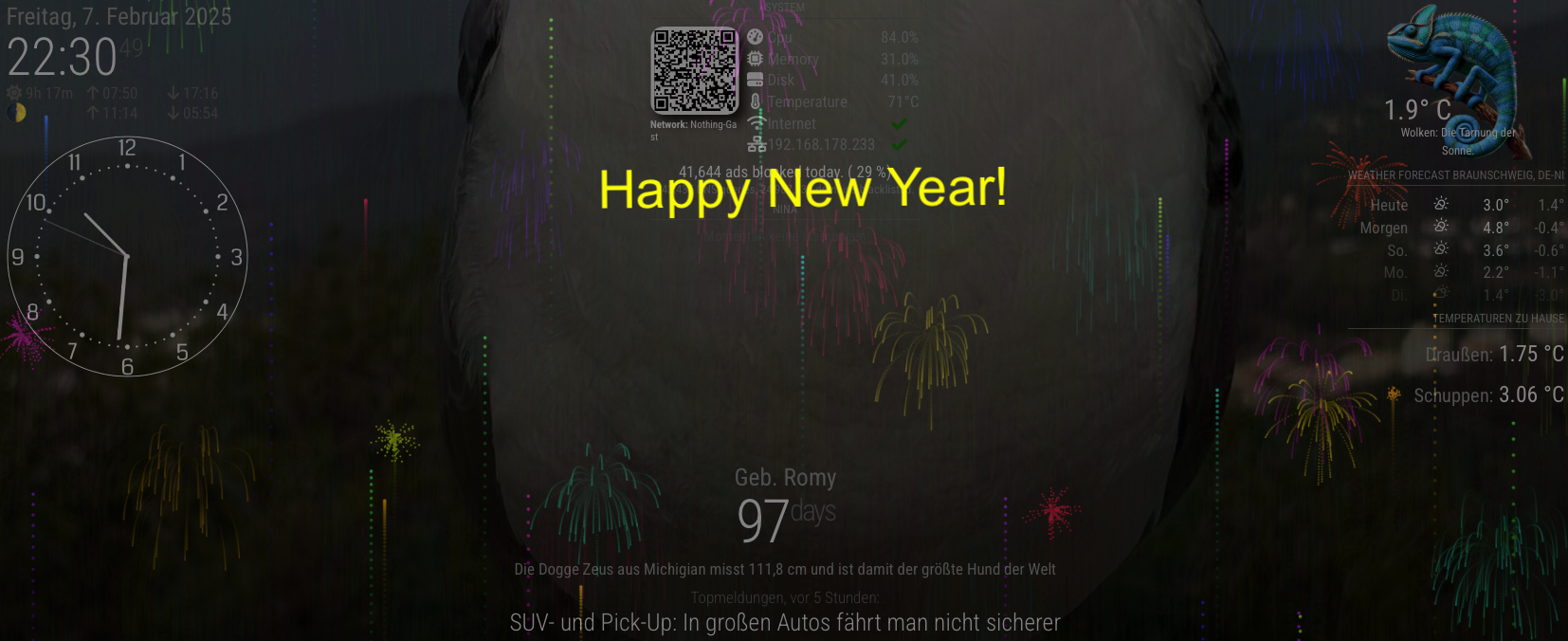
                                Bildschirmfoto 2025-02-07 um 22.30.49.png

                                Regards, Chris.

                                C 1 Reply Last reply Reply Quote 1
                                • C Offline
                                  chrisfr1976 @chrisfr1976
                                  last edited by chrisfr1976

                                  Hi,
                                  I’ve just released an update to solve several requests and problems.

                                  https://github.com/ChrisF1976/MMM-Fireworks

                                  • Multiple Scheduled Events:
                                    • The module now accepts an array of scheduled events (each with its own start time and text message). At each event time, the fireworks start with the corresponding overlay text.
                                  • Two separate notifications have been added:
                                    • NotificationStart (e.g. “FireFireFire”) starts the fireworks immediately using either the notification’s payload text or a default (textNotification).
                                    • NotificationStop (e.g. “StopFire”) stops the fireworks immediately if they are running.
                                    • When a notification is received, it overrides the scheduled events temporarily without affecting future scheduled shows.

                                  See also updated config!

                                  You can test the notifications with this simple module. I used it during development. I created a small start and stop button you can use.
                                  If you want to test the notification sender module you need to change the “fullscreen_above” to any other region of the mirror. Otherwise you cannot click on the buttons because they’re “behind” the MMM-Fireworks module…

                                  Config:

                                  {
                                    module: "MMM-NotificationSender",
                                    position: "top_left",
                                    config: {
                                      startNotification: "FireFireFire",
                                      stopNotification: "StopFire",
                                      startText: "Test me!", //leave blank to use text from MMM-Fireworks
                                      stopText: "Stop Fire", //nothing happens currently - maybe not needed
                                    }
                                  },
                                  

                                  Module:

                                  Module.register("MMM-NotificationSender", {
                                    // Default configuration options. These can be overwritten in config.js.
                                    defaults: {
                                      // Notification names to send. Other modules can listen to these names.
                                      startNotification: "START_NOTIFICATION",
                                      stopNotification: "STOP_NOTIFICATION",
                                      // Text payloads for the notifications.
                                      startText: "This is a start notification.",
                                      stopText: "This is a stop notification."
                                    },
                                  
                                    // Called when the module is started
                                    start: function() {
                                      Log.info("Starting module: " + this.name);
                                    },
                                  
                                    // Override the getDom method to create your custom UI.
                                    getDom: function() {
                                      // Create a wrapper element to contain the buttons.
                                      var wrapper = document.createElement("div");
                                      wrapper.style.textAlign = "center";
                                  
                                      // Create the Start button
                                      var startBtn = document.createElement("button");
                                      startBtn.innerHTML = "Start";
                                      startBtn.style.marginRight = "10px";
                                      startBtn.addEventListener("click", this.sendStartNotification.bind(this));
                                      wrapper.appendChild(startBtn);
                                  
                                      // Create the Stop button
                                      var stopBtn = document.createElement("button");
                                      stopBtn.innerHTML = "Stop";
                                      stopBtn.addEventListener("click", this.sendStopNotification.bind(this));
                                      wrapper.appendChild(stopBtn);
                                  
                                      return wrapper;
                                    },
                                  
                                    // Function to send the start notification
                                    sendStartNotification: function() {
                                      // Log to console and MagicMirror logs to check the button click event.
                                      console.log("Start button pressed. Sending start notification...");
                                      Log.info(
                                        "Sending start notification: " +
                                          this.config.startNotification +
                                          " with payload: " +
                                          JSON.stringify({ text: this.config.startText })
                                      );
                                  
                                      // Send the notification with the configured name and payload.
                                      this.sendNotification(this.config.startNotification, { text: this.config.startText });
                                    },
                                  
                                    // Function to send the stop notification
                                    sendStopNotification: function() {
                                      // Log to console and MagicMirror logs to check the button click event.
                                      console.log("Stop button pressed. Sending stop notification...");
                                      Log.info(
                                        "Sending stop notification: " +
                                          this.config.stopNotification +
                                          " with payload: " +
                                          JSON.stringify({ text: this.config.stopText })
                                      );
                                  
                                      // Send the notification with the configured name and payload.
                                      this.sendNotification(this.config.stopNotification, { text: this.config.stopText });
                                    }
                                  });


                                  Regards, Chris.

                                  A 1 Reply Last reply Reply Quote 1
                                  • A Offline
                                    almightyyoshi @chrisfr1976
                                    last edited by

                                    @chrisfr1976 Thanks for this. I installed it in April when we were selling our house and used it as a welcome sign when people came through. Question for you: would you be able to make it so we can put in just a month and day for a start date? I was hoping to put in a list of birthdays and not have to remember to change the year.

                                    1 Reply Last reply Reply Quote 0

                                    Hello! It looks like you're interested in this conversation, but you don't have an account yet.

                                    Getting fed up of having to scroll through the same posts each visit? When you register for an account, you'll always come back to exactly where you were before, and choose to be notified of new replies (either via email, or push notification). You'll also be able to save bookmarks and upvote posts to show your appreciation to other community members.

                                    With your input, this post could be even better 💗

                                    Register Login

                                    • 1 / 1
                                    • First post
                                      Last post
                                    Enjoying MagicMirror? Please consider a donation!
                                    MagicMirror created by Michael Teeuw.
                                    Forum managed by Sam, technical setup by Karsten.
                                    This forum is using NodeBB as its core | Contributors
                                    Contact | Privacy Policy