Read the statement by Michael Teeuw here.
cron job hdmi on and off
-
-
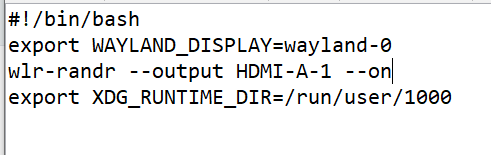
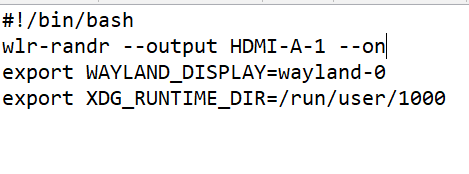
@Sam-0 no… the exports have to be before the wlr_randr
-
@sdetweil
thank you i made the adjustment
-
You only had to change the 1 into a 0.
Not to move the lines around, especially not the ones with export.#!/bin/bash export WAYLAND_DISPLAY=wayland-0 export XDG_RUNTIME_DIR=/run/user/1000 wir-randr --output HDMI-A-1 --onBut you are slowly getting there :-)
Wax on, wax off
Screen on, screen off. -
@
ok i will adjust it and see if it works -
@evroom said in cron job hdmi on and off:
You only had to change the 1 into a 0.
Not to move the lines around, especially not the ones with export.#!/bin/bash export WAYLAND_DISPLAY=wayland-0 export XDG_RUNTIME_DIR=/run/user/1000 wir-randr --output HDMI-A-1 --onBut you are slowly getting there :-)
Wax on, wax off
Screen on, screen off.Man who catch fly with chopstick, accomplish anything😆
-
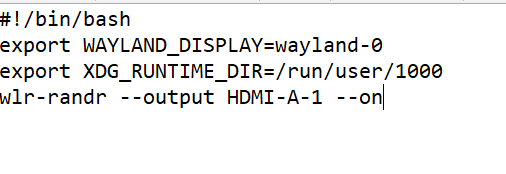
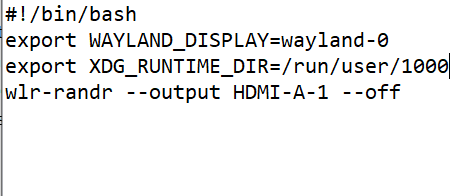
ok is this good now? :) let me know the result tomorrow…
-
@Sam-0 think so yes
-
yes it works very well thank you for your patience with me I hope others can now set it up more easily
thanks again for the effort -
S sdetweil has marked this topic as solved on

Hello! It looks like you're interested in this conversation, but you don't have an account yet.
Getting fed up of having to scroll through the same posts each visit? When you register for an account, you'll always come back to exactly where you were before, and choose to be notified of new replies (either via email, or push notification). You'll also be able to save bookmarks and upvote posts to show your appreciation to other community members.
With your input, this post could be even better 💗
Register Login