MagicMirror Forum
    • Recent
    • Tags
    • Unsolved
    • Solved
    • MagicMirror² Repository
    • Documentation
    • 3rd-Party-Modules
    • Donate
    • Discord
    • Register
    • Login
    A New Chapter for MagicMirror: The Community Takes the Lead
    Read the statement by Michael Teeuw here.

    Upcoming Release April 1, 2026 , breaking changes, some operational changes

    Scheduled Pinned Locked Moved Upcoming Features
    12 Posts 5 Posters 163 Views 5 Watching
    Loading More Posts
    • Oldest to Newest
    • Newest to Oldest
    • Most Votes
    Reply
    • Reply as topic
    Log in to reply
    This topic has been deleted. Only users with topic management privileges can see it.
    • BKeyportB Offline
      BKeyport Module Developer @sdetweil
      last edited by

      @sdetweil what will happen with those of us using multiple configs/css?

      The "E" in "Javascript" stands for "Easy"

      S 1 Reply Last reply Reply Quote 0
      • S Offline
        sdetweil @BKeyport
        last edited by sdetweil

        @BKeyport nothing has changed… the config folder holds the same configs
        and if there were multiple css files, you had to use env variables or the config parm to name it… , the path would change to config/custom.css or config/cssfile2.css whatever

        Sam

        How to add modules

        learning how to use browser developers window for css changes

        BKeyportB 1 Reply Last reply Reply Quote 0
        • BKeyportB Offline
          BKeyport Module Developer @sdetweil
          last edited by

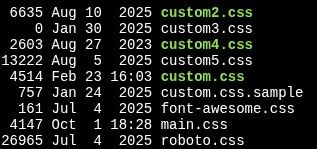
          OK - so currently my CSS folder is:

          e0edeb56-a001-4f68-a472-81b053658752-image.jpeg

          What gets moved?
          (FWIW, I don’t know what the CSS files are other than custom and main)

          I’m currently setting the CSS file with customCss: "css/custom3.css", in the config,

          I’ll change that to customCss: "config/custom3.css", ?

          as far as the launching of the server, it’s bash script is:

          cd /home/bkey1970/MagicMirror
          export MM_CONFIG_FILE=config/config3.js
          export MM_PORT=8082
          export ELECTRON_DISABLE_GPU=1
          DISPLAY=:0 npm run server


          nothing changes, right?

          The "E" in "Javascript" stands for "Easy"

          S 1 Reply Last reply Reply Quote 0
          • S Offline
            sdetweil @BKeyport
            last edited by sdetweil

            @BKeyport the custom*.css files get moved. All the rest stays.

            Correct on your config file change for css file

            Correct on your startup file. You are doing run server, so are not affected by the change to npm start

            also, technically you don’t need DISPLAY=:0
            from this

            DISPLAY=:0 npm run server
            

            as the server doesn’t use the UI

            Sam

            How to add modules

            learning how to use browser developers window for css changes

            karsten13K 1 Reply Last reply Reply Quote 0
            • mumblebajM Offline
              mumblebaj Module Developer @sdetweil
              last edited by

              @sdetweil All my modules are working well on the dev branch. 🤞

              Check out my modules at: https://github.com/mumblebaj?tab=repositories
              Check my blog-post: https://mumblebaj.xyz/
              Check my MM Container: https://hub.docker.com/repository/docker/mumblebaj/magicmirror/general

              1 Reply Last reply Reply Quote 3
              • karsten13K Offline
                karsten13 @sdetweil
                last edited by

                @sdetweil said:

                the custom*.css files get moved

                no, only css/custom.css and only if the target specified in config.customCss doesn’t exist.

                This is the normal setup used by ~95% of the users, we cannot handle every edge case so these users must change it manually.

                @BKeyport said:

                I’m currently setting the CSS file with customCss: “css/custom3.css”, in the config,

                I’ll change that to customCss: “config/custom3.css”, ?

                in your setup no file is moved automatically. As you are already using the config.customCss feature you can do the changes before next release by

                • move all the custom*.css file from css to config
                • change config.customCss: "config/custom3.css"
                S 1 Reply Last reply Reply Quote 1
                • S Offline
                  sdetweil @karsten13
                  last edited by sdetweil

                  @karsten13 good point on the move now

                  My script would have moved them

                  Have to add a check for the custom css config option

                  Sam

                  How to add modules

                  learning how to use browser developers window for css changes

                  R 1 Reply Last reply Reply Quote 0
                  • R Offline
                    rkorell @sdetweil
                    last edited by

                    @sdetweil I’ve identified some of current modules (not MY modules) to use moment.js heavily.
                    Does it make sense to contact their developers proactively or even open an “issue” ?
                    From my mirror-build the impacted modules are: MMM-Strava, MMM-MyGarbage and MMM-NowPlayingOnSpotify …

                    With regards to planned weather module changes MMM-CalendarExt3Agenda relies on some weather information but this is handled by notification so it should work…

                    Warm regards,
                    Ralf

                    S 1 Reply Last reply Reply Quote 0
                    • S Offline
                      sdetweil @rkorell
                      last edited by

                      @rkorell on the moment info, we removed it from calendar. Doesn’t mean your modules have to change.

                      The weather notification interface did not change. No modules should be impacted

                      Sam

                      How to add modules

                      learning how to use browser developers window for css changes

                      BKeyportB 1 Reply Last reply Reply Quote 1
                      • BKeyportB Offline
                        BKeyport Module Developer @sdetweil
                        last edited by

                        @sdetweil For clarification does that remove moment.js system wide, or is it just that module? Will other modules need to add it to their package.json files?

                        The "E" in "Javascript" stands for "Easy"

                        S 1 Reply Last reply Reply Quote 0
                        • S Offline
                          sdetweil @BKeyport
                          last edited by

                          @BKeyport currently moment and moment-time zone are still included in the base

                          Sam

                          How to add modules

                          learning how to use browser developers window for css changes

                          1 Reply Last reply Reply Quote 0

                          Hello! It looks like you're interested in this conversation, but you don't have an account yet.

                          Getting fed up of having to scroll through the same posts each visit? When you register for an account, you'll always come back to exactly where you were before, and choose to be notified of new replies (either via email, or push notification). You'll also be able to save bookmarks and upvote posts to show your appreciation to other community members.

                          With your input, this post could be even better 💗

                          Register Login

                          • 1 / 1
                          • First post
                            Last post
                          Enjoying MagicMirror? Please consider a donation!
                          MagicMirror created by Michael Teeuw.
                          Forum managed by Sam, technical setup by Karsten.
                          This forum is using NodeBB as its core | Contributors
                          Contact | Privacy Policy