Read the statement by Michael Teeuw here.
Upcoming Release April 1, 2026 , breaking changes, some operational changes
-
Breaking changes in upcoming April release,
We’ve structurally reorganized the system to strictly separate user data from repository data.The modules folder now contains only user data in the form of third-party modules. The standard modules included with MagicMirror² have been moved to a separate directory, defaultmodules.,
The css folder now contains only data belonging to the MagicMirror repository.
The previously located custom.css file has been moved to the config folder. This happens automatically the first time you start the new version of MagicMirror². The installer and upgrade scripts will do this too
The way config.js is loaded has changed. This should not affect standard users. However, it may have side effects for third-party modules. The client (browser) no longer loads config.js directly from the file system but via the web server (/config).,
Support for config.js.template files has been removed. we will not generate the final config.js like we do today.
Instead, config.js now supports curly braced bash variables. and the .env file remains the same
Users who previously used a template must copy its contents into config.js once
If MagicMirror² is running as an Electron application:
We’ve changed the default window manager in the startup script from X11 to Wayland. Most Raspberry Pi OS users are likely now using trixie or bookworm, which already ship with Wayland as the default. Running node --run start is now equivalent to node --run start:wayland. Users still using X11 must now switch to node --run start:x11.
The kioskmode, which has been marked as deprecated for 10 years, has been removed. If the kiosksmode parameter is set in config.js, it can be removed; it is now ineffective. You may need to adjust electronOptions parameters if you used kiosksmode before.
If you think any modules you’ve developed may be impacted, you can use the develop branch to test . see this topic about how to get the develop branch if you need to do that
https://forum.magicmirror.builders/post/86422also if you test as a user and find any issues
please use this topic for any issues you find…
Also,
there are substantial changes to the Calendar module to finally cleanup all the date, timezone, and Daylight savings problems. this removes the use of the moment js library
a complete rewrite of the weather module, to move data acquisition into the node_helper and share that data between module instances (current/forecast for example) … this will help reduce the number of api calls the module makes when there are multiple instances.
-
@sdetweil what will happen with those of us using multiple configs/css?
-
@BKeyport nothing has changed… the config folder holds the same configs
and if there were multiple css files, you had to use env variables or the config parm to name it… , the path would change to config/custom.css or config/cssfile2.css whatever -
OK - so currently my CSS folder is:
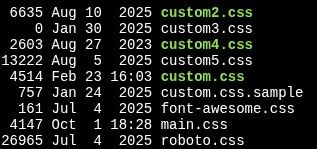
What gets moved?
(FWIW, I don’t know what the CSS files are other than custom and main)I’m currently setting the CSS file with
customCss: "css/custom3.css",in the config,I’ll change that to
customCss: "config/custom3.css",?as far as the launching of the server, it’s bash script is:
cd /home/bkey1970/MagicMirror
export MM_CONFIG_FILE=config/config3.js
export MM_PORT=8082
export ELECTRON_DISABLE_GPU=1
DISPLAY=:0 npm run server
nothing changes, right?
-
@BKeyport the custom*.css files get moved. All the rest stays.
Correct on your config file change for css file
Correct on your startup file. You are doing run server, so are not affected by the change to npm start
also, technically you don’t need DISPLAY=:0
from thisDISPLAY=:0 npm run serveras the server doesn’t use the UI
-
@sdetweil All my modules are working well on the dev branch. 🤞
-
the custom*.css files get moved
no, only
css/custom.cssand only if the target specified inconfig.customCssdoesn’t exist.This is the normal setup used by ~95% of the users, we cannot handle every edge case so these users must change it manually.
I’m currently setting the CSS file with customCss: “css/custom3.css”, in the config,
I’ll change that to customCss: “config/custom3.css”, ?
in your setup no file is moved automatically. As you are already using the
config.customCssfeature you can do the changes before next release by- move all the
custom*.cssfile fromcsstoconfig - change
config.customCss: "config/custom3.css"
- move all the
-
@karsten13 good point on the move now
My script would have moved them
Have to add a check for the custom css config option
-
@sdetweil I’ve identified some of current modules (not MY modules) to use moment.js heavily.
Does it make sense to contact their developers proactively or even open an “issue” ?
From my mirror-build the impacted modules are: MMM-Strava, MMM-MyGarbage and MMM-NowPlayingOnSpotify …With regards to planned weather module changes MMM-CalendarExt3Agenda relies on some weather information but this is handled by notification so it should work…
Warm regards,
Ralf -
@rkorell on the moment info, we removed it from calendar. Doesn’t mean your modules have to change.
The weather notification interface did not change. No modules should be impacted
-
@sdetweil For clarification does that remove moment.js system wide, or is it just that module? Will other modules need to add it to their package.json files?
The “E” in “Javascript” stands for “Easy”
-
@BKeyport currently moment and moment-time zone are still included in the base
-
@BKeyport s like they only removed the usage of moment.js from the default calendar module.
-
 K karsten13 referenced this topic on
-
P parnic referenced this topic on


Hello! It looks like you're interested in this conversation, but you don't have an account yet.
Getting fed up of having to scroll through the same posts each visit? When you register for an account, you'll always come back to exactly where you were before, and choose to be notified of new replies (either via email, or push notification). You'll also be able to save bookmarks and upvote posts to show your appreciation to other community members.
With your input, this post could be even better 💗
Register Login