Read the statement by Michael Teeuw here.
MMM-CalendarExt3Agenda - Event Transforming not working - Mirror 2.35.0
-
I’m having a problem with event transforming not working anymore in Mirror 2.35.0
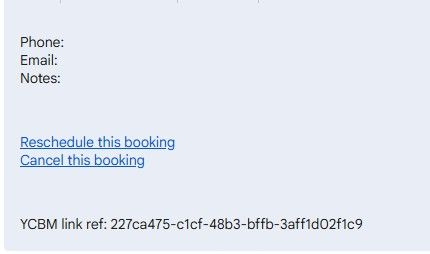
the client title (Client’s name) is shown instead of the ev.title I want (Client)
Nothing is in the logs - help!
Here’s the code:
	{
	  		module: "MMM-CalendarExt3Agenda",
  			position: "bottom_center",
  			classes: "page1",
  			config: {
  				eventTransformer: (ev) => {
					if (ev.title.search("🏠 Personal Commitment") > -1) {
						ev.title = ev.title.replace("🏠 Personal Commitment","Personal Commitment")
					}
					if(ev.description && ev.description.search("YCBM") > -1) {
       					 	ev.title = "Client"
 					}
					return ev
				},
				showMiniMonthCalendar: false,
				//onlyEventDays: 1,
				waitFetch: 5000,
				refreshInterval: 10000,
				animationSpeed: 0,
				calendarSet: ["Main", "Lemay", "Holidays"],
			}
		},
-
@BKeyport can you use console.log to log the description. See it in the dev window console
-
There is a big rewrite of calendar this release . To fix the dates, dst/std, and timezone conversions. @kristjanesperanto did a great job. Also fixing node-iCal
Both also get rid of moment
I didn’t see any issues in testing, but I didn’t have any transforms
-
@sdetweil As I said, I cannot find any errors in any logs I know how to access. (Other than the usual updating DOM without display, etc).
As for the re-writes, I don’t know enough about it, and in the middle of tax season, so I don’t have time to learn.
-
@BKeyport NO… I was asking you to add a
console.log(“ev description-.”+ev.description+“<-”)
to your tranformer
then you can see the contents of the description field…
as this runs in the browser, you would have to open the developers window, console tab, and put ext3, in the filter field to see the messages
then you would know exactly what is there. and it may give indication of the problem
you could also dump the fields
console.log(“ev fields=”,ev)
note the comma here, it will haveJS to do the unpacking of the fields in ev

Hello! It looks like you're interested in this conversation, but you don't have an account yet.
Getting fed up of having to scroll through the same posts each visit? When you register for an account, you'll always come back to exactly where you were before, and choose to be notified of new replies (either via email, or push notification). You'll also be able to save bookmarks and upvote posts to show your appreciation to other community members.
With your input, this post could be even better 💗
Register Login