MagicMirror Forum
    • Recent
    • Tags
    • Unsolved
    • Solved
    • MagicMirror² Repository
    • Documentation
    • 3rd-Party-Modules
    • Donate
    • Discord
    • Register
    • Login
    A New Chapter for MagicMirror: The Community Takes the Lead
    Read the statement by Michael Teeuw here.

    MMM-Memo - Add some memos on your page and manage them through HTTP request

    Scheduled Pinned Locked Moved Productivity
    41 Posts 23 Posters 28.0k Views 23 Watching
    Loading More Posts
    • Oldest to Newest
    • Newest to Oldest
    • Most Votes
    Reply
    • Reply as topic
    Log in to reply
    This topic has been deleted. Only users with topic management privileges can see it.
    • JanneJ Offline
      Janne
      last edited by Janne

      Hi,

      Just a help to other magic Mirror builders.

      I have implemented this nice module. :smiling_face_with_heart-eyes:

      When I send URL-request I got the error “No memo file found”. After some grumbling and deep dive I found that it was because my language was not supported (Danish).

      I added my language-file under the translation directory and added the yellow line.
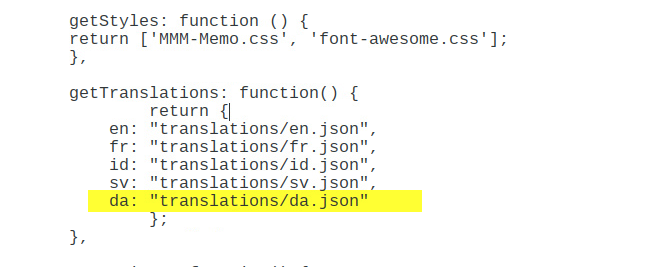
      0_1537432767972_b1c9a796-6d8c-49b7-a1da-c571b2f895e7-image.png

      Hope it can be of help to others. :smiling_face_with_smiling_eyes:

      1 Reply Last reply Reply Quote 2
      • C Offline
        Crayyy
        last edited by Crayyy

        I still am unable to add or modify the memos in any way :) I don’t understand how to use the HTTP command to pass commands to the module, Here is what I typed at the SSH command prompt. “http://192.168.1.175:8080/AddMemo?memoTitle=SHOPPING&item=Fruits&level=INFO” but I get the following errors and no memo on my mirror :( “-bash: http://192.168.1.175:8080/AddMemo?memoTitle=: No such file or directory
        [7]- Exit 127 http://192.168.1.175:8080/AddMemo?memoTitle=SHOPPING
        [8]+ Done item=Fruits” please help :)

        F 1 Reply Last reply Reply Quote 0
        • L Offline
          lovesicker
          last edited by

          @schnibel

          Thank you for providing us this fantastic module! It’s so useful.

          I have a suggestion: could you merge multiple instances of MMM-Memo into only one instance? Like the following:
          {
          module: ‘MMM-Memo’,
          config{
          {
          memo1
          memoTitle: XXXX
          position:
          },
          {
          memo2
          memoTitle:YYYY
          position:
          },
          …
          }

          Because there are six instances of MMM-Memo at least, the system performance will be affected and there are always many notifications about this module in console log when any notifications send by any modules.

          1 Reply Last reply Reply Quote 0
          • R Offline
            Robinson128
            last edited by

            Thank you for this module that I like a lot despite the harm I had to use it without Jarvis. :) beginner in computer science and big noob for HTML CSS and many other things. I search a little but I did not find how to make notes appear after each other in the same memo. The oldest note in 1 and the most recent in 2,3 or 4 and so on. Thanks for your help.
            (Google traduction)

            1 Reply Last reply Reply Quote 0
            • WasupDudeW Offline
              WasupDude Banned
              last edited by

              Such a usefull topic,thanks

              1 Reply Last reply Reply Quote 0
              • WasupDudeW Offline
                WasupDude Banned
                last edited by

                This post is deleted!
                1 Reply Last reply Reply Quote 0
                • F Offline
                  FruityBebbles @Crayyy
                  last edited by

                  @Crayyy same issue… did you find a fix?

                  1 Reply Last reply Reply Quote 0
                  • S Do not disturb
                    sdetweil
                    last edited by sdetweil

                    ok… I installed this module…

                    u define in the config.js a tag to identify acceptable incoming ‘memos’…
                    memoTitle

                    once I did that I was able, in a browser to do

                    http://192.168.2.26:8086/addMemo?memoTitle=testing&item=foobar
                    and I got back
                    {“status”:“success”,“item”:{“memoTitle”:“testing”,“level”:“INFO”,“item”:“foobar”,“timestamp”:“2019-09-16T00:12:05.199Z”}}
                    and a memo appears on the mirror screen

                    192.168.2.26 is my mirror ip address, and 8086 is the port in the config.js

                    in config.,js I have

                      address: "", // Address to listen on, can be:   
                                            // - "localhost", "127.0.0.1", "::1" to listen on loopback interface
                                            // - another specific IPv4/6 to listen on a specific interface
                                            // - "", "0.0.0.0", "::" to listen on any interface
                                            // Default, when address config is left out, is "localhost"
                      port: 8086,
                      ipWhitelist: [],   // allow anyone to connect
                    

                    if address:“localhost” then only from INSIDE the mirror machine is allowed to make connections to mirror application

                    if I do this

                    http://192.168.2.26:8086/addMemo
                    

                    the response is

                    {"status":"failed","error":"No 'memoTitle' given."}
                    

                    if I do this

                    http://192.168.2.26:8086/addMemo?memoTitle=testing
                    

                    where memoTitle matches the value specified in config.js

                        {
                            module: 'MMM-Memo',
                            position: 'top_left',
                            classes: 'default everyone',        // if using MMM-ProfileSwitcher module
                            config: {
                                // See 'Configuration options' for more information.
                                memoTitle: "testing"
                            }    
                    

                    then i get this

                    {"status":"failed","error":"No 'item' given."}
                    

                    so, http://192.168.2.26:8086/addMemo?memoTitle=testing&item=

                    note to have multiple memo pages, you need to add the module to the config.js multiple times, with different memoTitle values…

                    readme
                    If you declare several modules in the config/config.js file, you will get several memo notes on your MagicMirror2 profile.
                    

                    Sam

                    How to add modules

                    learning how to use browser developers window for css changes

                    1 Reply Last reply Reply Quote 1
                    • G Offline
                      gschmall
                      last edited by

                      There needs to be a config switch to disable the showing of the pin. Like “showPin” which is set to true by default. I have a small mirror and the pin takes up a lot of vertical space.

                      1 Reply Last reply Reply Quote 0
                      • R Offline
                        roccodicarlo
                        last edited by

                        This post is deleted!
                        1 Reply Last reply Reply Quote 0
                        • R Offline
                          roccodicarlo
                          last edited by

                          I installed jarvis and have it sort of working but I am not sure how you convert numbers that are text (one, two, three) from the STT engine to integers for the phone number or memo item number etc. that must be included in the HTTP get quest

                          1 Reply Last reply Reply Quote 0
                          • E Offline
                            Ernst
                            last edited by Ernst

                            Hello

                            Maybe it is off use to anyone

                            I made a html offline document on my phone to add and remove items from memo’s.
                            It is not super clean but it is an start :face_with_stuck-out_tongue_winking_eye:

                            alt text

                            
                            <!--
                            http://192.168.178.23:8080/AddMemo?memoTitle=TODO&item=LED%20Driver&level=INFO
                            http://192.168.178.23:8080/RemoveMemo?memoTitle=TODO&item=1
                            
                            
                            <a href="//192.168.178.23:8080/RemoveMemo?memoTitle=TODO&item=1"><button type="submit">Item 1</button>
                            -->
                            <html>
                              <head>
                                <title>Smart mirror form</title>
                            
                                <style>
                                  
                                  body, div, form, input, select, p { 
                                  font-family: Roboto, Arial, sans-serif;
                                  font-size: 14px;
                                  color: #666;
                                  }
                                  h1 {
                                  margin: 0;
                                  font-weight: 400;
                                  }
                                  h3 {
                                  margin: 12px 0;
                                  color: #8ebf42;
                                  }
                                  .main-block {
                                  display: flex;
                                  justify-content: center;
                                  align-items: center;
                                  background: #fff;
                                  }
                                  form {
                                  width: 80%;
                                  padding: 20px;
                                  }
                                  fieldset {
                                  border: 1px solid #8ebf42;
                                  
                                  }
                                 
                                  label {
                                  padding: 0 5px;
                                  text-align: right;
                                  vertical-align: middle;
                                  }
                                  input {
                                  padding: 5px;
                                  vertical-align: middle;
                                  }
                                  .checkbox {
                                  margin-bottom: 10px;
                                  }
                                  
                                  select {
                                  background: transparent;
                            	  width: 100px;
                                  }
                                 
                                  .checkbox input, .children input {
                                  width: auto;
                                  margin: -2px 10px 0 0;
                                  }
                                  .checkbox a {
                                  color: #8ebf42;
                                  }
                                  .checkbox a:hover {
                                  color: #82b534;
                                  }
                                  button {
                                  width: 75px;
                                  padding: 10px 0;
                                  margin: 10px auto;
                                  border-radius: 5px; 
                                  border: none;
                                  background: #8ebf42; 
                                  font-size: 14px;
                                  font-weight: 600;
                                  color: #fff;
                                  }
                                  button:hover {
                                  background: #82b534;
                                  }
                                 
                                  label {
                                  width: 40%;
                                  }
                                  input {
                                  width: 100px;
                                  }
                            	  .center {
                            		margin-left: auto;
                            		margin-right: auto;
                            		}
                            		table {
                            			width: 80%;
                            			border: 1px solid black;
                            			}
                                 
                                  }
                                </style>
                              </head>
                              <body>
                              <center>
                                <div class="main-block">
                            	<!-- http://192.168.178.23:8080/?name=niks  
                            	
                            	http://192.168.178.23:8080/AddMemo?memoTitle=TODO&item=LED%20Driver&level=INFO
                            	-->
                                <form action="http://192.168.178.23:8080/AddMemo" method="get">
                                  <h1>Smart mirror</h1>
                            	  
                                  <fieldset>      
                                    <legend>
                                      <h3>Add/Remove item</h3>
                                    </legend>           
                                    <fieldset>
                                    <br>
                                     
                                    <!--<input type="hidden" name="memoTitle" value="ToDo"> -->
                            		<label>Add item</label><input type="text" name="item" required>
                            		
                            		<select name="memoTitle" >
                            		        <option value="" disabled selected hidden> Lijst Name</option>
                                            <option value="ToDo">ToDo</option>
                                            <option value="Test">Test</option>
                                    </select>
                            		
                            		
                            		<input type="hidden" name="level" value="INFO">
                                   
                            
                                  . <button type="submit" href="/">Add</button>
                            	  </form>
                            	  
                            	  </fieldset>
                            	  <fieldset>
                                <form action="http://192.168.178.23:8080/RemoveMemo" method="get">
                            	
                            	<!--<input type="hidden" name="memoTitle" value="ToDo"> -->
                            	<label>Remove Item</label>  
                            	<select name="memoTitle" >
                            		        <option value="" disabled selected hidden> Lijst Name</option>
                                            <option value="ToDo">ToDo</option>
                                            <option value="Test">Test</option>
                                    </select>
                            
                                          <select name="item" >
                            			  
                                            <option value="" disabled selected hidden> Lijst Nr</option>
                                            <option value="1">1</option>
                                            <option value="2">2</option>
                                            <option value="3">3</option>
                                            <option value="4">5</option>
                                            <option value="5">5</option>
                                            <option value="6">6</option>
                                          </select>
                                 .        <button type="submit" href="/">Remove</button>
                            	</form>
                            	<!--<a href="http://192.168.178.23:8080/RemoveMemo?memoTitle=TODO&item=1"><button type="button">Item 1</button> -->
                              </div>
                            
                            code_text
                            
                            E 1 Reply Last reply Reply Quote 0
                            • E Offline
                              Ernst @Ernst
                              last edited by

                              @Ernst
                              Hmm I can’t post html code here

                              Does anyone know how?

                              S 1 Reply Last reply Reply Quote 0
                              • S Do not disturb
                                sdetweil @Ernst
                                last edited by

                                @Ernst u have to have a space after every <

                                terrible,… no workaround

                                Sam

                                How to add modules

                                learning how to use browser developers window for css changes

                                E 1 Reply Last reply Reply Quote 0
                                • E Offline
                                  Ernst @sdetweil
                                  last edited by

                                  @sdetweil
                                  Alright another way :-)
                                  link file

                                  You can download it over there :face_with_stuck-out_tongue_winking_eye:

                                  1 Reply Last reply Reply Quote 0

                                  Hello! It looks like you're interested in this conversation, but you don't have an account yet.

                                  Getting fed up of having to scroll through the same posts each visit? When you register for an account, you'll always come back to exactly where you were before, and choose to be notified of new replies (either via email, or push notification). You'll also be able to save bookmarks and upvote posts to show your appreciation to other community members.

                                  With your input, this post could be even better 💗

                                  Register Login

                                  • 1
                                  • 2
                                  • 3
                                  • 2 / 3
                                  • First post
                                    Last post
                                  Enjoying MagicMirror? Please consider a donation!
                                  MagicMirror created by Michael Teeuw.
                                  Forum managed by Sam, technical setup by Karsten.
                                  This forum is using NodeBB as its core | Contributors
                                  Contact | Privacy Policy