Read the statement by Michael Teeuw here.
PIR Sensor + Raspi
-
Hi everyone!
I’ve got a doubt. I’ve been watching a few videos on youtube on how to connect the pir sensor to the raspi.
In every video, they use an arduino or a protoboard. Is this really necesary, or with the female-female cable, the PIR sensor and the raspi is enought?Kind regards
-
Hi,
you do not need to use an arduino or anything else. Just connect the Pir-Sensor to the raspberry pi like this:
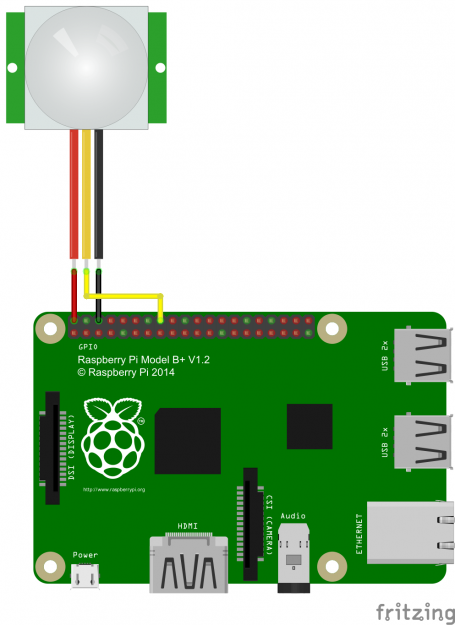
-
I have it wired a little different. I have it connected to a different GPIO Pin.
Following this guide worked beautifully.
https://www.raspberrypi.org/learning/parent-detector/worksheet/ -
@PtrBld Thank you very much!
-
@PtrBld Hi! I am trying yo use the PIR-Sensor module, but I have no result, the screen never goes black.
I have connected the cables as the picture you post. Any idea why is not working? -
@pepemujica said in PIR Sensor + Raspi:
Any idea why is not working?
Maybe you should calibrate your PIR sensor tuning. There are two little orange knobs where you can adjust the sensitivity of the sensor.

-
@pepemujica Good way to make sure you have it connected correctly and that the PIR is operating is to try out the python code in the link I sent.
from gpiozero import MotionSensor

pir = MotionSensor(4)
while True:
    if pir.motion_detected:
        print("Motion detected!")
Keeping in mind for both this code and the module that you have the correct pin number.
-
@McSorley said in PIR Sensor + Raspi:
Keeping in mind for both this code and the module that you have the correct pin number.
How do I know in what pin are the 3 cables connected?
-
@pepemujica www.raspberrypi.org/documentation/usage/gpio-plus-and-raspi2/
You have 5v, Ground, then GPIO.
-
@McSorley so, the (4) you’ve put in the example before, wich of the 3 cables is?
Sorry, I’m pretty new in this, and I can’t get it easyly -
@McSorley Hi I have tested, and always says motion detected, never ends, even when there is no motion
-
Try again what PtrBld suggested with calibrating the PIR Sensor Tuning by turning the knobs so see if you get different results.
Otherwise, this image show you which pins you have connected. If oyou have it set up the way PtrBld suggested, you change the code to 24.

-
i have the same problem, my magic mirror installation is fine, but when it comes to pir motion sensor installation , i have not able to set it up it correctly, my pir will sense it when there is a movement but my magic mirror has no reaction, it will just stays on.any suggestion…i have rasp pi 3, pir motion sens conn to gpio 18. no error message. …
{
module: 'MMM-PIR-Sensor',
    config: {
        sensorPIN: '18',
        powerSaving: 'true'
    }
},
(my module config)
Hello! It looks like you're interested in this conversation, but you don't have an account yet.
Getting fed up of having to scroll through the same posts each visit? When you register for an account, you'll always come back to exactly where you were before, and choose to be notified of new replies (either via email, or push notification). You'll also be able to save bookmarks and upvote posts to show your appreciation to other community members.
With your input, this post could be even better 💗
Register Login