Read the statement by Michael Teeuw here.
MMM-Strava
-
Description:
MMM-Strava allows you to view your Strava activity data right on your MagicMirror.
The module currently displays the following information:
- The number of activities for the period.
- The total distance for the period.
- The total number of achievements (recent period only).
In addition you can configure the following options
- Which period to display stats for your activities: Recent (last 4 weeks), year to date or all time
- Which activities (and the order activities) should be displayed.
- The units (miles/kilometres) used to display the total distance for each activity
Screenshots:
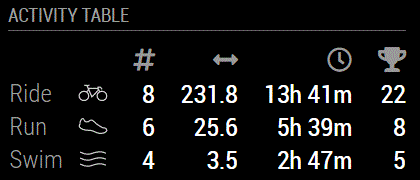
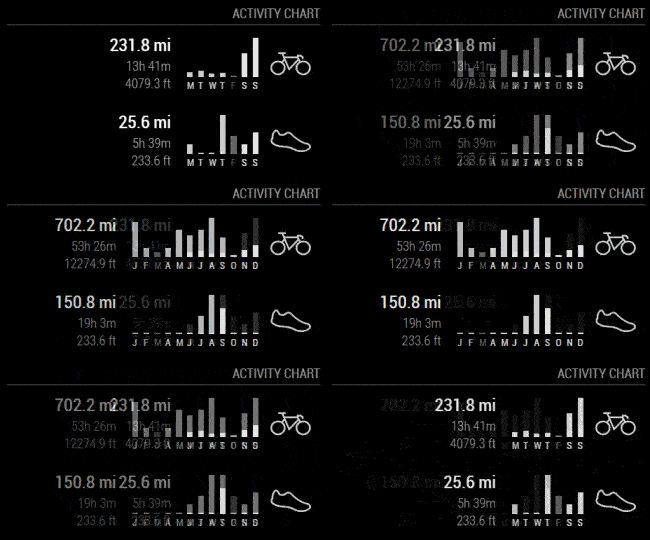
Download:
[card:ianperrin/MMM-Strava]
Change log:
1.0.0
- Initial Version
1.1.0
- Added option to rotate through the different periods (
auto_rotate). - Added option to set the interval between rotations (
updateInterval). - Added
chartmode option to display last weeks activity as per Strava profile
1.1.1
- Added German translations (thanks @fewieden)
- Added localisations for chart labels
1.1.2
- Added
localeoption to overide globalconfig.language
1.1.3
- Improved bar heights in
chartmode - Added option to show elevation in table mode (thanks @khassel)
- Add support for multiple athletes (thanks @khassel)
- Added Hungarian translation (thanks @peet86)
- Added Indonesian translation (thanks @slametps)
1.1.4
- Internal fixes to improve performance, logging and documentation
- Support for private activities
1.1.5
- Include virtual rides in
chartmode
1.1.6
- Internal fixes
1.1.7
- Show elevation in minor units (metres/feet)
2.0.0 (BETA)
See (https://forum.magicmirror.builders/topic/457/mmm-strava/37)
2.0.0
- Support for changes to the Strava oAuth model.
- Statistics displayed in
tablemode are configurable via thestatsoption. periodoption is now supported inchartmode.- Multiple instances of the module should now be supported.
2.0.1
- Bug fixes for token refresh issues.
2.1.0
- Adds a BETA
chartTypeoption to toggle between classic bar chart and radial histogram
2.2.0
- Adds
digitsoption to control the number of decimal places shown for the distance and elevation stats
2.3.0
- Adds support for the
statsoption inbarchartmode - Adds support for additional
activitiesinchartmode
-
An option has been added to determine whether the module should automatically rotate through the different periods (
auto_rotate), and the interval between rotations (updateInterval).
Note: To add this feature to your mirror, you’ll need to update your module. Follow these instructions.
“Live as if you were to die tomorrow. Learn as if you were to live forever.” - Mahatma Gandhi
-
An updated version of the module is now available which includes the option to display your last weeks activity in a more graphical format (similar to how it is displayed on your Strava profile).

To enable this feature on your mirror,
- The MMM-Strava module should be installed (or updated)
- The
mode: "chart"option should be added to your config.js file
Note if the new
modeoption is not included (or set if it is not set tochart) the classic table layout will be used. -
@ianperrin Hi, I add Strava rotate like below, but only this module stopped(blank) after 7 hours running. all modules still running well, but Strava, please suggest a hint to solve this issue, thank you very much.
iMAGiCJAKE
{ module: 'MMM-Strava', position: 'top_right', header: 'STRAVA ACTIVITY', config: { strava_id: 'xxxxxxx', access_token: 'xxxxxxxxxx', auto_rotate: true } }, -
@iMAGiC are you able to share the contents of your log at the time the module stopped refreshing?
“Live as if you were to die tomorrow. Learn as if you were to live forever.” - Mahatma Gandhi
-
@ianperrin sorry for late reply, it was quite busy this week, I will try it again in this week.
btw, could this module run and show two people record? for ex. one for me, one for my wife. -
@ianperrin sorry for late reply, it was quite busy this week, I will try it again in this week.
btw, could this module run and show two people record? for ex. one for me, one for my wife.The module doesn’t currently support multiple people. However you could try adding the module twice to your
config.jsfile.“Live as if you were to die tomorrow. Learn as if you were to live forever.” - Mahatma Gandhi
-
@ianperrin
I tried that(add twice), both aren’t show any record. -
@ianperrin add twice will cause 2 modules won’t work. and after I tested in an all new Raspbian Jessie installation, it still happen abnormal flashing in rotate mode or stop showing anything after 10 mins or more, but every time happened.
in pm2 log won’t show anything error on this module. I will turn it to no rotate mode anyway.Choice * Judgment * Values
-
@ianperrin I made a video for saying abnormal flashing in table rotate mode, if like like to see it.
https://goo.gl/KNdkk7 -
-
Great module! I tried to implement but my module is stuck at “Loading…”
Guessing it has something to do with the API creation. I have my athlete ID that I see when I look at my Strava profile.
I ended up with a Client ID, Client Secret and Access Token when I created the API. Guessing I should be using only the Access Token?
Also, when I created the API, I had to put in a website and authorization callback domain. Not sure if these have an affect but I used the internal IP for the raspberry pi for both. Is that right? Thanks!
-
Hi
Did you get a resolution to your issue as I seem to have similar issue with module stuck at Loading…
When I look at the terminal window I am getting error:
Error performing request: Unauthorized. Access Token will be reset.
Error while fetching new athlete stats.Look at code this is a 401 error.
I am getting confused as I thought the Strava API key was public but from this error it looks as though it wants to authorise API Key.
As this is an old post I will create a new post this evening with some more detail.
-
Hi Ian
Can you help as I think I am getting confused.
I carried out the following steps:
- Imported MMM-Strava into my modules folder.
- Logged into my Strava account and navigated ->Settings->My API Application
- Created an application icon
- Completed fields, Application Name = MyData, Category = Other, Website = https://Strava.com, Authorization Callback Domain = 127.0.0.1
- Click update button
- Copied Client ID and Your Access Token (?) (permissions: public)
- Update MagicMirror config.js with Client ID and Your Access Token
- Restarted MagicMirror
When MagicMirror displays the Strava modules says Loading… and looking at the terminal window I can see errors:
Error performing request: Unauthorized. Access Token will be reset.
Error while fetching new athlete stats.Which looks to be a 401 error from code that, access token has not been authorised.
Can anybody point me to what I am doing wrong.
-
Hi,
sounds you took the client id from the strava api page as input for strava_id of the module?
Input of strava_id: https://support.strava.com/hc/en-us/articles/216928797-Where-do-i-find-my-Strava-ID-
Karsten.
-
Hi
Firstly thank you for your reply.
You are correct I used the client id and when I replaced this with the strava id as your link described all works great.
Thanks again.
-
Hello,
I have the problems that with the following config the module is always “loading…”.Can someone help me?
{ module: 'MMM-Strava', position: 'top_left', config: { strava_id: 'xxx1, xxx2', access_token: 'xxx1, xxx2', activities: 'run', athlete_text: 'Tine, Basti', auto_rotate: 'true' } }, -
try it with the missing brackets:
{ module: 'MMM-Strava', position: 'top_left', config: { strava_id: ['xxx1', 'xxx2'], access_token: ['xxx1', 'xxx2'], activities: ['run'], athlete_text: ['Tine', 'Basti'], auto_rotate: 'true' } }, -
Unfortunately, no solution
-
your setup works for me, changed only strava_id’s and access_token’s.
Did you put every single strava_id and every single access_token in single quotes as provided in my example? In your post you put 2 things in one single quote …
Other possibilities: Wrong strava data (id/token)? Did you read the documentation how to get strava_id?
Did you take a look in the logs?
If I test it with your testdata xxx I find these lines in the logs:Error performing request: Unauthorized. Access Token will be reset. Error while fetching new athlete stats.



Hello! It looks like you're interested in this conversation, but you don't have an account yet.
Getting fed up of having to scroll through the same posts each visit? When you register for an account, you'll always come back to exactly where you were before, and choose to be notified of new replies (either via email, or push notification). You'll also be able to save bookmarks and upvote posts to show your appreciation to other community members.
With your input, this post could be even better 💗
Register Login