MagicMirror Forum
    • Aktuell
    • Tags
    • Unsolved
    • Solved
    • MagicMirror² Repository
    • Documentation
    • 3rd-Party-Modules
    • Donate
    • Discord
    • Registrieren
    • Anmelden
    A New Chapter for MagicMirror: The Community Takes the Lead
    Read the statement by Michael Teeuw here.

    Sync private iCloud calendar with MagicMirror

    Geplant Angeheftet Gesperrt Verschoben Tutorials
    162 Beiträge 58 Kommentatoren 384.3k Aufrufe 65 Watching
    Lade mehr Beiträge
    • Älteste zuerst
    • Neuste zuerst
    • Meiste Stimmen
    Antworten
    • In einem neuen Thema antworten
    Anmelden zum Antworten
    Dieses Thema wurde gelöscht. Nur Nutzer mit entsprechenden Rechten können es sehen.
    • AlbinolanA Offline
      Albinolan @Maros
      zuletzt editiert von

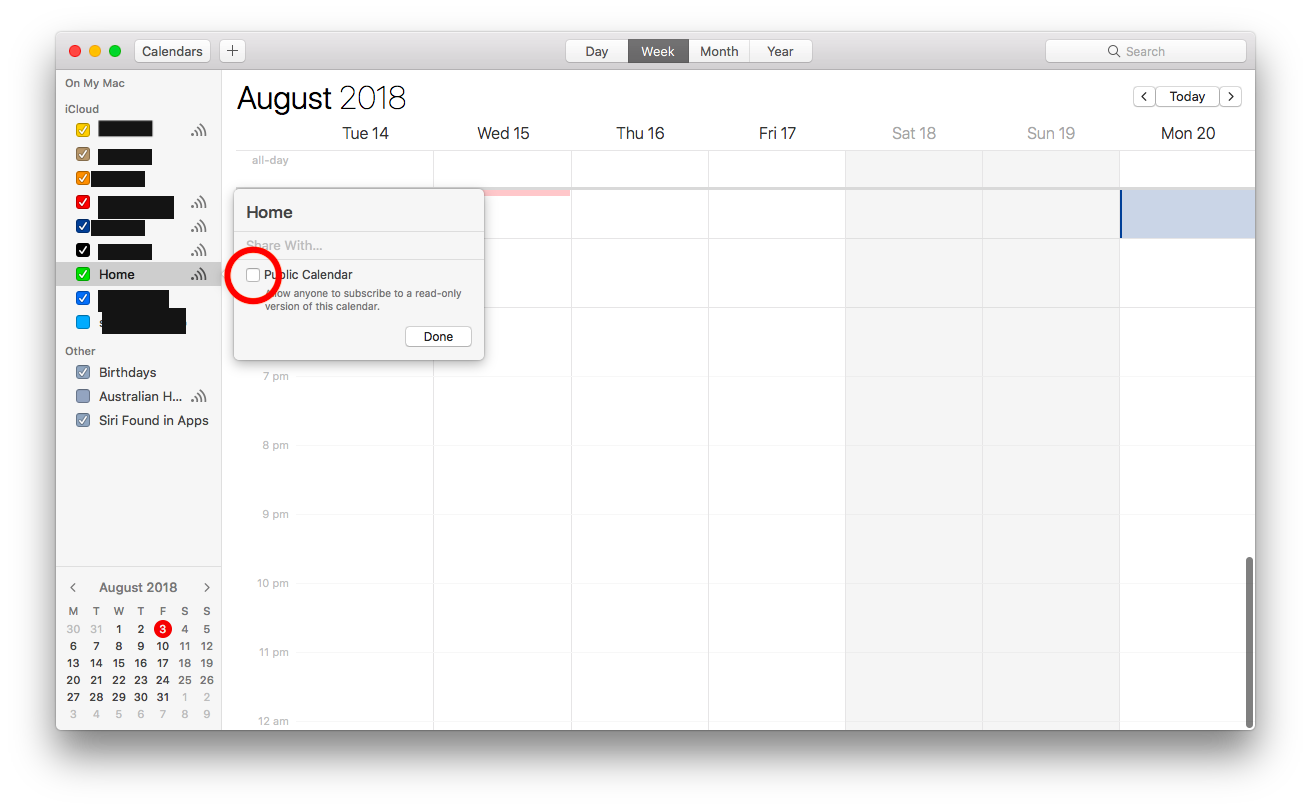
      @maros you can add the bday calendar in the default calendar module by making your iCloud calendar public (tick the box circled in this screenshot), and you should be given a link that you can copy into the config file.
      If you want to use google calendars, it should be similar. Just look up how to publicly share a google calendar, and get the link from there to put into your config.
      0_1533261220454_Screen Shot 2018-08-03 at 11.48.03 am.png

      1 Antwort Letzte Antwort Antworten Zitieren 0
      • AlbinolanA Offline
        Albinolan @Maros
        zuletzt editiert von

        @maros One problem (which this thread was originally trying to solve) was the inability to prevent others from accessing the calendar. If a web crawler can find your link, they too will be able to read your calendar.

        1 Antwort Letzte Antwort Antworten Zitieren 1
        • MarosM Offline
          Maros
          zuletzt editiert von Maros

          @Albinolan but in icloud calendar Birthday calendar have not option to public.

          it’s marked as others

          @justjim1220 i’ve tried also this in gmail i’ve copied url for birthday calendar (public url to this calendar) and add it to my calendar module

          {
          symbol: “calendar”,
          url: “https://calendar.google.com/calendar/xxxxxxxxxxxx”
          },

          but it’s not showing any upcomming birthday

          ok i’ve made temporary solution but it’s not ideal …

          what i’ve done - open Google Calendar - Export and Import
          exported all calendars to .ics
          i’ve copied birthday calendar to rpi (using scp birthday.ics pi@:MagicMirror/modules/calendars)

          in config.js i’ve creaded new entry for newly created calendar.

          problem is it’s static so if you want to add new birthday you have to edit file birthday.ics

          1 Antwort Letzte Antwort Antworten Zitieren 0
          • J Offline
            jhp392819
            zuletzt editiert von

            @Beh

            First, thank you! This is great. I got three different iCal calendars to all work perfectly.

            I can’t, however, seem to get a holiday calendar to show. The vdirsyncer discover doesn’t show the iCal US Holiday calendar, so I can’t use the one that is provided by iCloud. So I decided to use the calendarlabs that comes as a default with MagicMirror. But it’s showing up on electron when I npm start

            I’ve included my code below. Can anyone tell me why the calendarlabs US holiday calendar isn’t showing up?

            Do I need to create a 4th .ics file form calendarlabs to store locally to use with vdirsyncer? Is that why the default code in MagicMirror for calendarlabs no longer works?

            Thanks.

            {
                module: 'calendar',
                position: 'top_left',   // This can be any of the regions. Best results in left or right regions.
                config: {
                    colored: true,   // Activate coloring
                    maximumNumberOfDays: 10,
                    maximumEntries: 7,
            	timeFormat: 12,
                    calendars: [
                            // "ME Calendar"
                            {
                                    url: 'http://localhost:8080/modules/calendars/home.ics',
                                    symbol: 'calendar',
                                    color: '#5bc0de'   // Assign color
                            },
                            // "YOU Calendar"
                            {
                                    url: 'http://localhost:8080/modules/calendars/work.ics',
                                    symbol: 'calendar',
                                    color: '#FFF000'  // Assign color
                            },
            		// "ME & YOU Calendar"
                           	{
                                	url: 'http://localhost:8080/modules/calendars/65839DD3-D523-48E6-931B-D2DB201A1C36.ics',
                                    symbol: 'calendar',
                                    color: '#5bbf21'  // Assign color
                           	},
            		// "Holiday Calendar"
                           	{
                                	url: 'http://www.calendarlabs.com/templates/ical/US-Holidays.ics',
                                    symbol: 'calendar',
                                    color: '#ab00ff'  // Assign color
                           	}
            
                    ]
                }
            },
            
            1 Antwort Letzte Antwort Antworten Zitieren 0
            • Y Offline
              yk
              zuletzt editiert von

              Fantastic effort! Thanks!
              I’ve got everything working except the timer functionality (just doesn’t seem to take). Any ideas?

              BehB 1 Antwort Letzte Antwort Antworten Zitieren 0
              • S Offline
                showbizkid
                zuletzt editiert von

                Thanks gentlemen for allowing me to join your group. I am presently stuck on the " touch ~/.vdirsyncer/config". My pi claims I am unable to use touch. error is touch: cannot touch '/home pi/.vdirsyncer/config. No such file or directory. Do I need to be in the MagicMirror directory to execute this command?

                BehB 1 Antwort Letzte Antwort Antworten Zitieren 0
                • BehB Offline
                  Beh @showbizkid
                  zuletzt editiert von

                  @showbizkid Did you create the .vdirsyncer folder first? Sounds like it is not present…

                  1 Antwort Letzte Antwort Antworten Zitieren 0
                  • BehB Offline
                    Beh @yk
                    zuletzt editiert von

                    @yk Dis you activate the systemd unit for the timer? You can enable it with sudo systemctl enable vdirsyncer.timer you can also check via sudo systemctl status vdirsyncer.timer, is it’s enabled already. If so, it should work…

                    E 2 Antworten Letzte Antwort Antworten Zitieren 0
                    • G Offline
                      Gullfrode
                      zuletzt editiert von

                      Does the https://caldav.icloud.com still work for you guys?
                      My credentials are right, the rest of the conig is same as the config,
                      I get this error:

                      pi@raspberrypi:~ $ vdirsyncer discover
                      Discovering collections for pair iCloud_to_MagicMirror
                      Mirror:
                        - "HERE-GOES-THE-UUID-OF-THE-CALENDAR-YOU-WANT-TO-SYNC"
                      warning: Failed to discover collections for iCloud, use `-vdebug` to see the full traceback.
                      error: Unknown error occured: 401 Client Error: Unauthorized for url: https://caldav.icloud.com/.well-known/caldav
                      error: Use `-vdebug` to see the full traceback.
                      error: 1 out of 1 tasks failed.
                      

                      Get an error if I type vdirsyncer discover -vdebug (no such option)

                      Have tried both Norwegian and US accounts, with and without two-way authentication.

                      1 Antwort Letzte Antwort Antworten Zitieren 0
                      • G Offline
                        Gullfrode
                        zuletzt editiert von

                        I forgot that apple had changed all its calendars this fall. Generated an app+spesific password, and it worked…

                        1 Antwort Letzte Antwort Antworten Zitieren 1
                        • 1
                        • 2
                        • 6
                        • 7
                        • 8
                        • 9
                        • 10
                        • 16
                        • 17
                        • 8 / 17
                        • Erster Beitrag
                          Letzter Beitrag
                        Enjoying MagicMirror? Please consider a donation!
                        MagicMirror created by Michael Teeuw.
                        Forum managed by Sam, technical setup by Karsten.
                        This forum is using NodeBB as its core | Contributors
                        Contact | Privacy Policy