MagicMirror Forum
    • Recent
    • Tags
    • Unsolved
    • Solved
    • MagicMirror² Repository
    • Documentation
    • 3rd-Party-Modules
    • Donate
    • Discord
    • Register
    • Login
    A New Chapter for MagicMirror: The Community Takes the Lead
    Read the statement by Michael Teeuw here.

    Remove I frame border

    Scheduled Pinned Locked Moved Troubleshooting
    11 Posts 4 Posters 2.9k Views 3 Watching
    Loading More Posts
    • Oldest to Newest
    • Newest to Oldest
    • Most Votes
    Reply
    • Reply as topic
    Log in to reply
    This topic has been deleted. Only users with topic management privileges can see it.
    • B Offline
      barnosch
      last edited by

      should ne something like this in your
      /css/custom.css file

      .MMM-iFrame {   //exact name of the module
      border: none;  //or border: 0px;
      }
      
      S 1 Reply Last reply Reply Quote 0
      • S Offline
        stephanvdplas @barnosch
        last edited by

        @barnosch said in Remove I frame border:

        should ne something like this in your
        /css/custom.css file

        .MMM-iFrame {   //exact name of the module
        border: none;  //or border: 0px;
        }
        

        I tried your suggestion, but still a border is shown. Is there any other option?

        S 1 Reply Last reply Reply Quote 0
        • S Offline
          sdetweil @stephanvdplas
          last edited by

          @stephanvdplas which module are you using for iframe?

          Sam

          How to add modules

          learning how to use browser developers window for css changes

          S 1 Reply Last reply Reply Quote 0
          • S Offline
            stephanvdplas @sdetweil
            last edited by

            @sdetweil

            @stephanvdplas said in Remove I frame border:

            @barnosch said in Remove I frame border:

            should ne something like this in your
            /css/custom.css file

            .MMM-iFrame {   //exact name of the module
            border: none;  //or border: 0px;
            }
            

            I tried your suggestion, but still a border is shown. Is there any other option?

            MMM-Iframe:

            		{
            			module: 'MMM-iFrame',
            			header: 'Speelt nu',
            			position: 'bottom_left',	// This can be any of the regions.
            			config: {
            				// See 'Configuration options' for more information.
            //					url: ["http://server.vdplas.net:9000/material/?player=dc:a6:32:18:b6:fd&layout=desktop&action=expandNowPlaying/true&css=msk--np-only&js=msk--np-only&single=true&theme=Black"],  // as many URLs you want or you can just ["ENTER IN URL"] if single URL.
            					url: ["http://server.vdplas.net:9000/material/?player=dc:a6:32:18:b6:fd&layout=desktop&action=expandNowPlaying/true&css=msk--np-only&js=msk--np-only&single=true&theme=Black"],  // as many URLs you want or you can just ["ENTER IN URL"] if single URL.
            					updateInterval: 500 * 60 * 1000, // rotate URLs every 30 seconds
            					width: "700", // width of iframe
            					height: "260", // height of iframe
            					frameWidth: "100" // width of embedded iframe, height is beeing calculated by aspect ratio of iframe
            				}
            		},
            
            S 1 Reply Last reply Reply Quote 0
            • S Offline
              sdetweil @stephanvdplas
              last edited by

              @stephanvdplas if the border is INSIDE the frame, then u cannot change it. that is the point of frame. inline embedded frame of original content

              Sam

              How to add modules

              learning how to use browser developers window for css changes

              S 1 Reply Last reply Reply Quote 0
              • S Offline
                stephanvdplas @sdetweil
                last edited by

                @sdetweil said in Remove I frame border:

                @stephanvdplas if the border is INSIDE the frame, then u cannot change it. that is the point of frame. inline embedded frame of original content

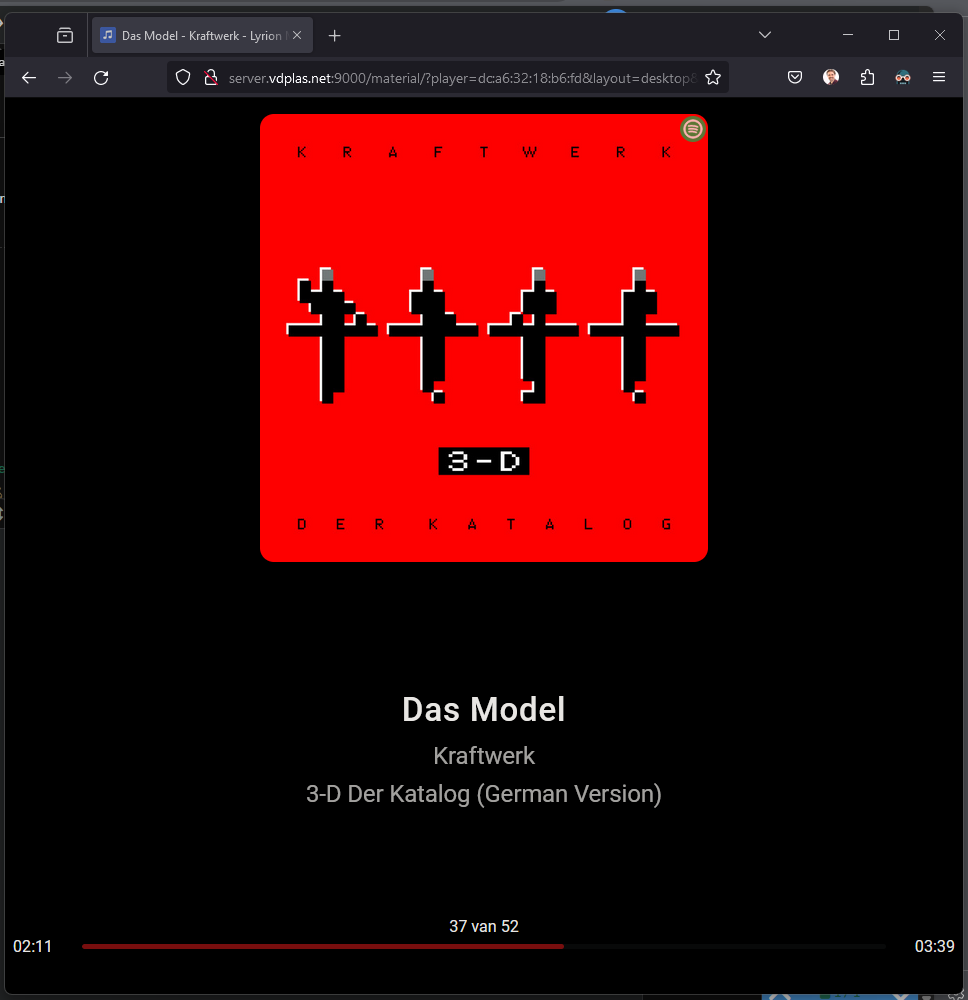
                There is certainly no border in the content. At least not what I see when using differen devices with this same URL
                85a112d4-89bf-4529-8adc-db916f013b8e-image.png

                Also the border appears directly, whereas the content is loaded in 5 seconds

                S 1 Reply Last reply Reply Quote 0
                • S Offline
                  sdetweil @stephanvdplas
                  last edited by sdetweil

                  @stephanvdplas awesome. I’m not sure of the css, but I want to teach you how you can find and resolve it yourself for any content

                  see
                  https://forum.magicmirror.builders/post/90135

                  using the browser developers window, you can examine AND set styles on the element content. once you know what you need, then you can copy/paste that into custom.css

                  I ‘think’ the example css provided is too vague, and the actual element doesn’t inherit from the content selected

                  in css, the stuff before the { is called the selector clause. it selects the content that the stuff AFTER the { will be applied to.

                  I use thise cheat sheet to hemp me remember all the possibilities
                  https://www.w3schools.com/cssref/css_selectors.php

                  in MagicMirror the outer block is given the module name as a class
                  so
                  .MMM-iFrame
                  is correct, but, that element is a div
                  and there are a couple more div elements inside, so I don’t think border:none is inherited.

                  I ‘think’ the selector clause needs the specific element iframe added

                  .MMM-iFrame iframe {
                  

                  but if you use the developers window you will know for sure

                  Sam

                  How to add modules

                  learning how to use browser developers window for css changes

                  S 1 Reply Last reply Reply Quote 0
                  • S Offline
                    stephanvdplas
                    last edited by

                    <iframe src="https://server.vdplas.net:8999/material/?player=dc:a6:32:18:b6:fd&amp;layout=desktop&amp;action=expandNowPlaying/true&amp;css=msk--np-only&amp;js=msk--np-only&amp;single=true&amp;theme=Black" width="675" height="250" scrolling="no"></iframe>
                    
                    iframe[Attributes Style] {
                        width: 675px;
                        height: 250px;
                    }
                    user agent stylesheet
                    iframe {
                        overflow-clip-margin: content-box !important;
                        overflow: clip !important;
                        border-width: 2px;
                        border-style: inset;
                        border-color: initial;
                        border-image: initial;
                    }
                    

                    Here indeed I see a border. Still no clue where it comes from.

                    1 Reply Last reply Reply Quote 0
                    • S Offline
                      stephanvdplas @sdetweil
                      last edited by

                      @sdetweil I found it!

                      In custom.css I place the following section:

                      iframe{
                      
                      border:0 ; 
                      /*transform: scale(0.5) ; */
                      /*margin-bottom: 200px;*/
                      
                      }
                      

                      (source: https://github.com/AgP42/MMM-iFrame-Ping/blob/master/MMM-iFrame-Ping.css)

                      Thanks for your support!

                      S 1 Reply Last reply Reply Quote 0
                      • S Offline
                        sdetweil @stephanvdplas
                        last edited by

                        @stephanvdplas please be careful…

                        the selector clause WILL ALWAYS select ALL elements that match across the entire web page…

                        so, you should focus on THIS module

                        .MMM-iFrame iframe{
                        
                        border:0 ; 
                        
                        }
                        

                        that means ALL iframe tags <iframe
                        inside class .MMM-iFrame

                        but not any OTHER module

                        Sam

                        How to add modules

                        learning how to use browser developers window for css changes

                        1 Reply Last reply Reply Quote 0

                        Hello! It looks like you're interested in this conversation, but you don't have an account yet.

                        Getting fed up of having to scroll through the same posts each visit? When you register for an account, you'll always come back to exactly where you were before, and choose to be notified of new replies (either via email, or push notification). You'll also be able to save bookmarks and upvote posts to show your appreciation to other community members.

                        With your input, this post could be even better 💗

                        Register Login

                        • 1 / 1
                        • First post
                          Last post
                        Enjoying MagicMirror? Please consider a donation!
                        MagicMirror created by Michael Teeuw.
                        Forum managed by Sam, technical setup by Karsten.
                        This forum is using NodeBB as its core | Contributors
                        Contact | Privacy Policy