Read the statement by Michael Teeuw here.
Quit MM with script
-
Hi,
I’m kinda fresh to the python & bash programming but I make some progress.
I set up my MM with additional modules and an Alexa Skill via AWS services which works quite well (atm turn HDMI port on/off + start MM via npm start trigger)
This works all without any problems at the moment. I set up today the MM launch via pm2 which launches the application after every reboot. Right know I’m looking for any script (bash / python, …?) with whom I could stop the MM instance (going on I would like to activate this via an Alexa Skill trigger)//#taken from www.cyber-omelette.com/2017/01/alexa-run-script.html print(message) if message == "on": os.system("~/on.sh") elif message == "off": os.system("~/off.sh") elif message == "start": os.system("~/mm.sh")I tried some things I came up with but I’m kind clueless how I could do this :/
So I’m looking for two options to quit MM - CTRL-C isn’t an option cause I’m using my rpi without any keyboard that’s why I try to set up everything with Alexa voice commands:-
-> Script for deactivating MM which has been started by pm2*
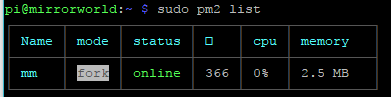
-
-> Script for deactivation MM which hast been started manual*
//#taken from MM tutorial
//#used for pm2 & manual start with Alexa skill (if needed)
/cd ~/MagicMirror
DISPLAY=:0 npm start
If anyone have some recommendations & hints for me I would be more than pleased
Cheers Ben
-
-
@start-the-fire said in Quit MM with script:
CTRL-C isn’t an option cause I’m us
Hi, maybe you can use my bash script mmhelper.sh to start/stop MagicMirror from the command line or from another script (e.q. python, nodejs).
#!/bin/bash
#
#	mmhelper.sh  start | stop | status | hdmi_on | hdmi_off| hdmi_status
#
#   Last edited:    10.09.2017          (c) Mr.Sponti
#
#set -x

HOME=/home/pi
PATH=$PATH:$PWD
MY_NAME=$(basename -- "$0")

function monitor_on() {
    /opt/vc/bin/tvservice --preferred > /dev/null 2>&1
    sudo chvt 6
    sudo chvt 7
}

function monitor_off() {
    /opt/vc/bin/tvservice --off > /dev/null 2>&1
}

function monitor_status() {
    #  get power status --> 1 = off ,  0 = on
    power=$(/opt/vc/bin/tvservice --status |grep "TV is off"|wc -l)
    if [ $power -eq 1 ]
    then
        echo "off"
    elif [ $power -eq 0 ]
    then
        echo "on"
    fi
}

# check first runstring parameter
if [ -z "$1" ]
then
	cmd=start
else
	cmd=$1
fi

case $cmd in
    "start") #  start MagicMirror
        pm2 start mm
        ;;
    "stop") #  stop MagicMirror
        pm2 stop all
        ;;
    "status")
        pm2 status mm
        ;;
    "hdmi_on") #  switch monitor on
        monitor_on
        monitor_status
        ;;
    "hdmi_off") # switch monitor off
        monitor_off
        monitor_status
        ;;
    "hdmi_status")
        monitor_status
        ;;
    *) echo "undefined command"
       echo "usage: $MY_NAME start|stop|status|hdmi_on|hdmi_off|hdmi_status"
esac
You also need the mm.sh script in your home directory!
pm2 flush

# start Magic Mirror system
cd ~/MagicMirror
DISPLAY=:0 npm start
Merry Christmas!

Hello! It looks like you're interested in this conversation, but you don't have an account yet.
Getting fed up of having to scroll through the same posts each visit? When you register for an account, you'll always come back to exactly where you were before, and choose to be notified of new replies (either via email, or push notification). You'll also be able to save bookmarks and upvote posts to show your appreciation to other community members.
With your input, this post could be even better 💗
Register Login