Read the statement by Michael Teeuw here.
Daytime vs Night Time Mirror
-
I have finally got my 7" touch screen sort of setup to what I am looking for.
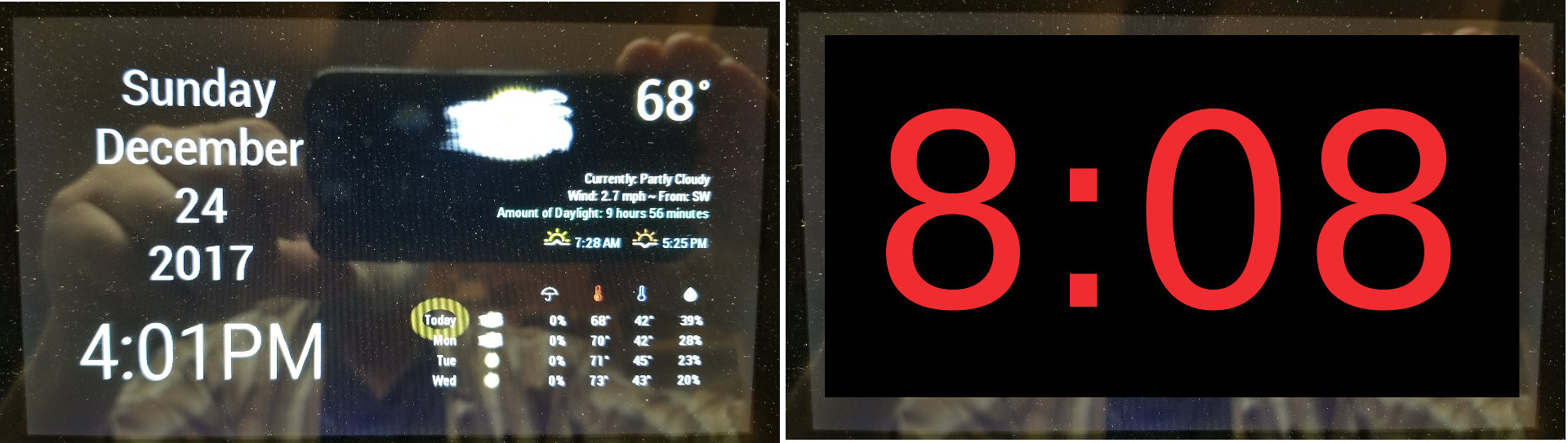
As you can see I have made adjustments to the clock module with some custom css. The first image is the daytime the second image is what I envision.
Here is what I would like to do.
Lets say at 7pm every night the current screen changes to a clock with no date, just the time in huge red colored numbers. And then at 7am every morning it reverts back to my main page.
I know I can set up a schedule to do this, but here is where I do not know how to proceed. How to have two different clock modules. One for daytime with its own css and one for night time also with its own css.Thanks for the advice.
Carltonb
-
@carltonb small hint, setup the clock module two times in the config and toggle between them with mmm-modulescheduler.
add a class to both entrys in the config like day and night.
then in the custom css you can apply different rules based on the day and night class
-
Thanks. Have started the process and so far it looks promising.
Happy Holidays
Carltonb -
@strawberry-3.141 Thanks for the help. Got it working. Spent 5 hours yesterday figuring word names, spacing, periods in names, etc.
Learned a lot.
Now I just need to determine what a good dark bedroom color is for my nighttime mode. The red I tried last night was super bright.
Again thanks to all that helped.
Carltonb

Hello! It looks like you're interested in this conversation, but you don't have an account yet.
Getting fed up of having to scroll through the same posts each visit? When you register for an account, you'll always come back to exactly where you were before, and choose to be notified of new replies (either via email, or push notification). You'll also be able to save bookmarks and upvote posts to show your appreciation to other community members.
With your input, this post could be even better 💗
Register Login