MagicMirror Forum
    • Recent
    • Tags
    • Unsolved
    • Solved
    • MagicMirror² Repository
    • Documentation
    • 3rd-Party-Modules
    • Donate
    • Discord
    • Register
    • Login
    A New Chapter for MagicMirror: The Community Takes the Lead
    Read the statement by Michael Teeuw here.

    [MMM-NowPlayingOnSpotify] – Display the currently on Spotify playing song

    Scheduled Pinned Locked Moved Entertainment
    76 Posts 50 Posters 82.2k Views 51 Watching
    Loading More Posts
    • Oldest to Newest
    • Newest to Oldest
    • Most Votes
    Reply
    • Reply as topic
    Log in to reply
    This topic has been deleted. Only users with topic management privileges can see it.
    • E Offline
      E3V3A
      last edited by

      Wow look very cool.

      Also you don’t need any third party app to connect to Spotify.

      How does it work? Shazam kind of magic?

      "Everything I do (here) is for free – altruism is the way!"
      MMM-FlightsAbove, MMM-Tabulator, MMM-Assistant (co-maintainer)

      schlachtkreuzer6S 1 Reply Last reply Reply Quote 0
      • schlachtkreuzer6S Offline
        schlachtkreuzer6 @E3V3A
        last edited by

        @E3V3A description is on github ;)

        Step 2 – Create and authorise a Spotify app
        In order to be able to connect to the Spotify API you need to create an app in the Spotify developer area. Then you need to authorise the app to access your personal data. Et voilà!

        The module provides you with a special app which describes all the necessary steps and which guides you through the whole process. To use this app change into the authorization folder and start the app by typing node app.

        cd authorization
        node app
        When the app is running you can access it by opening localhost:8888 in your browser. Provided you are doing this directly on your Raspberry Pi. If you want to access the app remotely just type the ip address or the name of your Raspberry like so for instance: http://raspi:8888. Then you should see the authorisation app like below.

        …

        1 Reply Last reply Reply Quote 0
        • M Offline
          marcnlx
          last edited by

          Awesome module! I use it in fullscreen_below which creates a nice effect!
          I did change the css a little (added margin-left and changed width to 90% for the album cover because this looks nicer with my custom.css), but this is really a great module.

          R 1 Reply Last reply Reply Quote 1
          • R Offline
            raywo Module Developer @marcnlx
            last edited by

            @marcnlx Awesome idea! Maybe you can add a screenshot.

            M 1 Reply Last reply Reply Quote 1
            • B Offline
              BananaBro
              last edited by

              Very cool module! Thanks for that.
              The Setup with your App is really easy and it seemed to work. After a restart your module loaded and showed my currently played song.
              But it won’t update. Progress bar wont run forwards. Next Song is not shown. Even after another restart the initial song is displayed.

              Do you have any Tips how to fix this? :)

              R 1 Reply Last reply Reply Quote 0
              • R Offline
                raywo Module Developer @BananaBro
                last edited by

                @BananaBro sounds weird. Do you have a free or a premium account?

                1 Reply Last reply Reply Quote 0
                • B Offline
                  BananaBro
                  last edited by

                  Premium Account. I just tried to create a new App in the Spotify developer dashboard with new Client ID and Secret and set up the Module once more.
                  For now its working…
                  Maybe it was just Spotify messing something up! I keep you updated if it will stop working for me again.
                  Thanks again for this nice module.

                  R 1 Reply Last reply Reply Quote 0
                  • R Offline
                    raywo Module Developer @BananaBro
                    last edited by

                    @BananaBro glad to hear that it is working now.

                    1 Reply Last reply Reply Quote 0
                    • M Offline
                      marcnlx @raywo
                      last edited by

                      @raywo said in [MMM-NowPlayingOnSpotify] – Display the currently on Spotify playing song:

                      @marcnlx Awesome idea! Maybe you can add a screenshot.

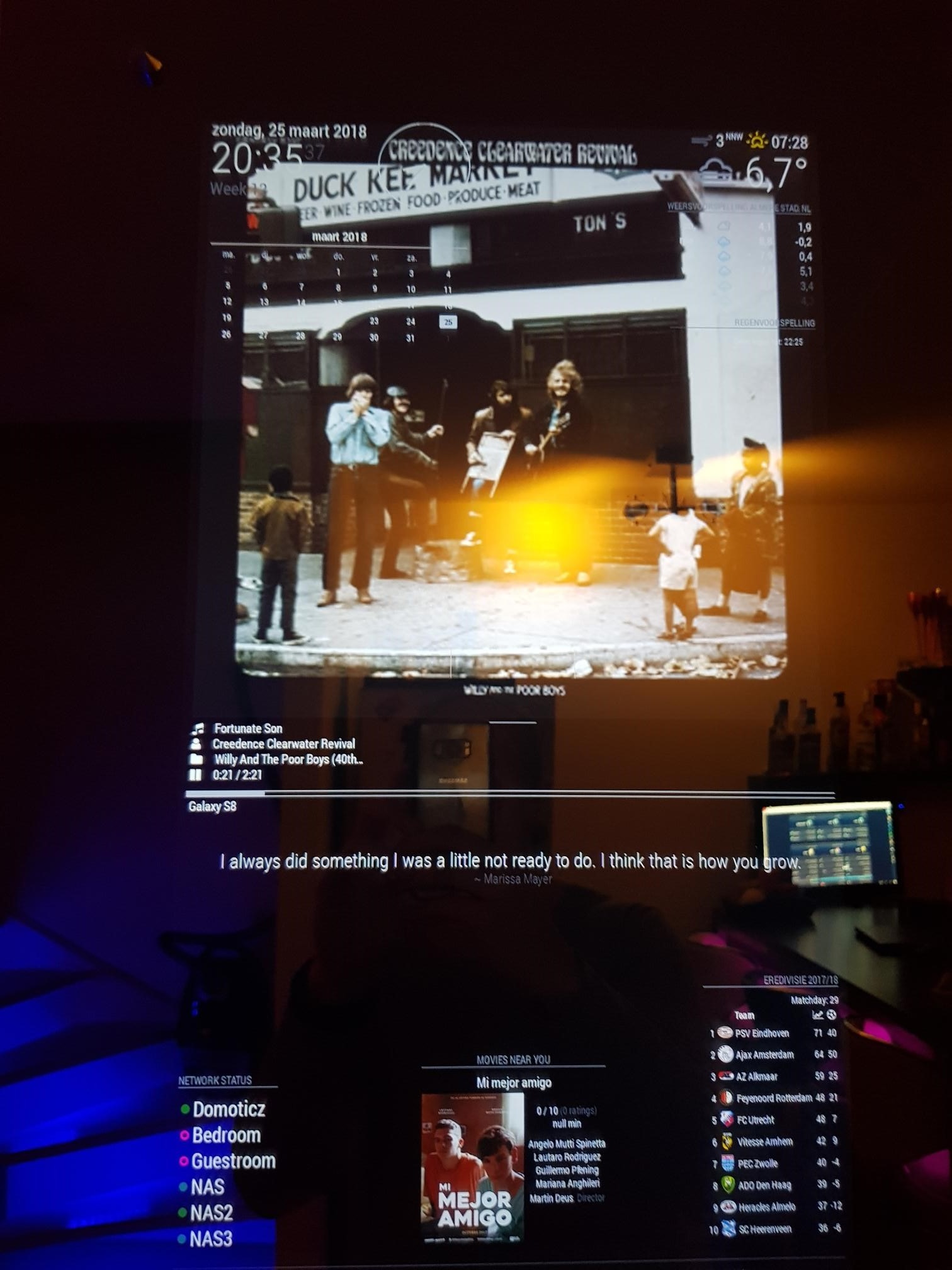
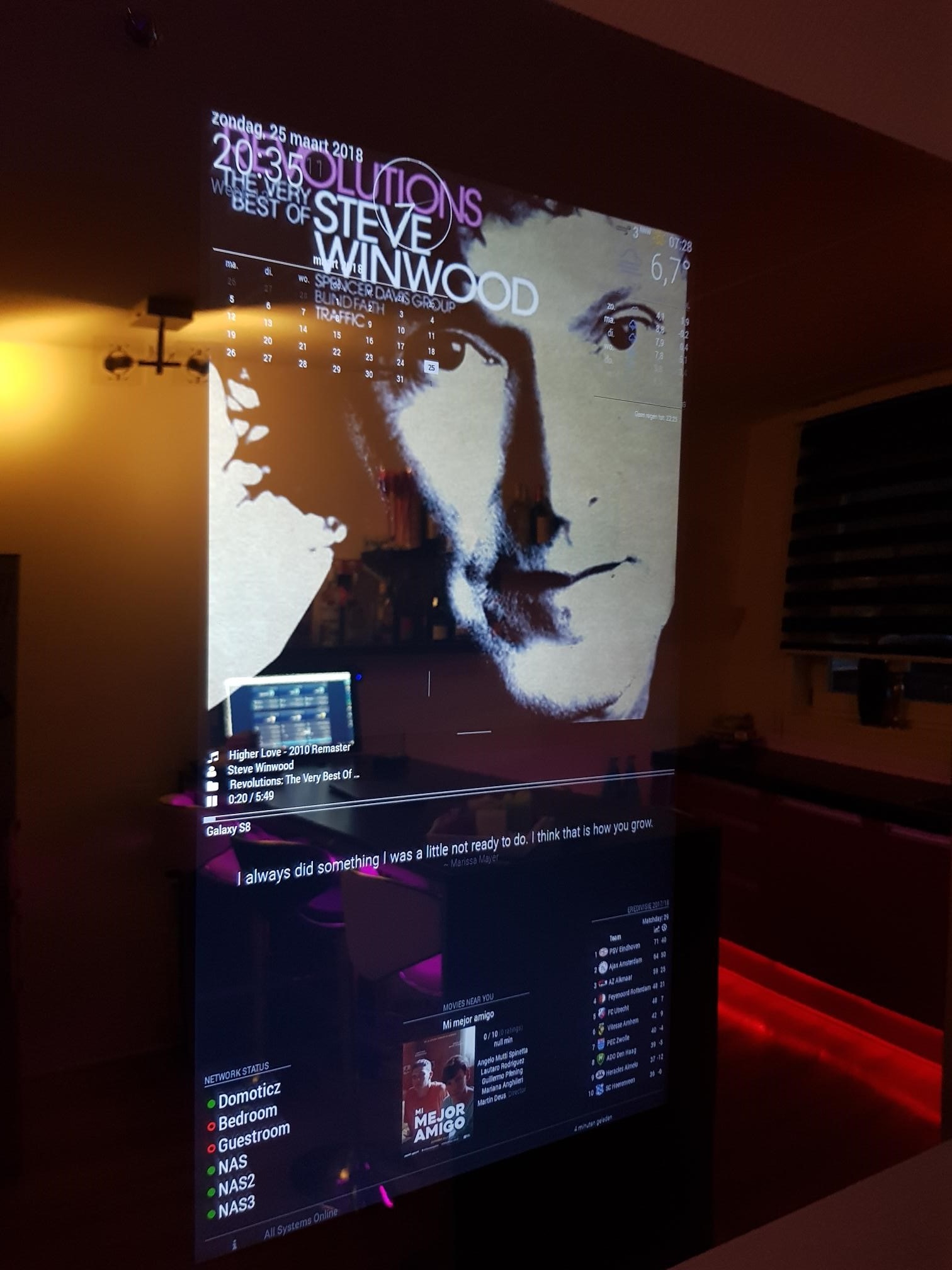
                      Sure, here you go.
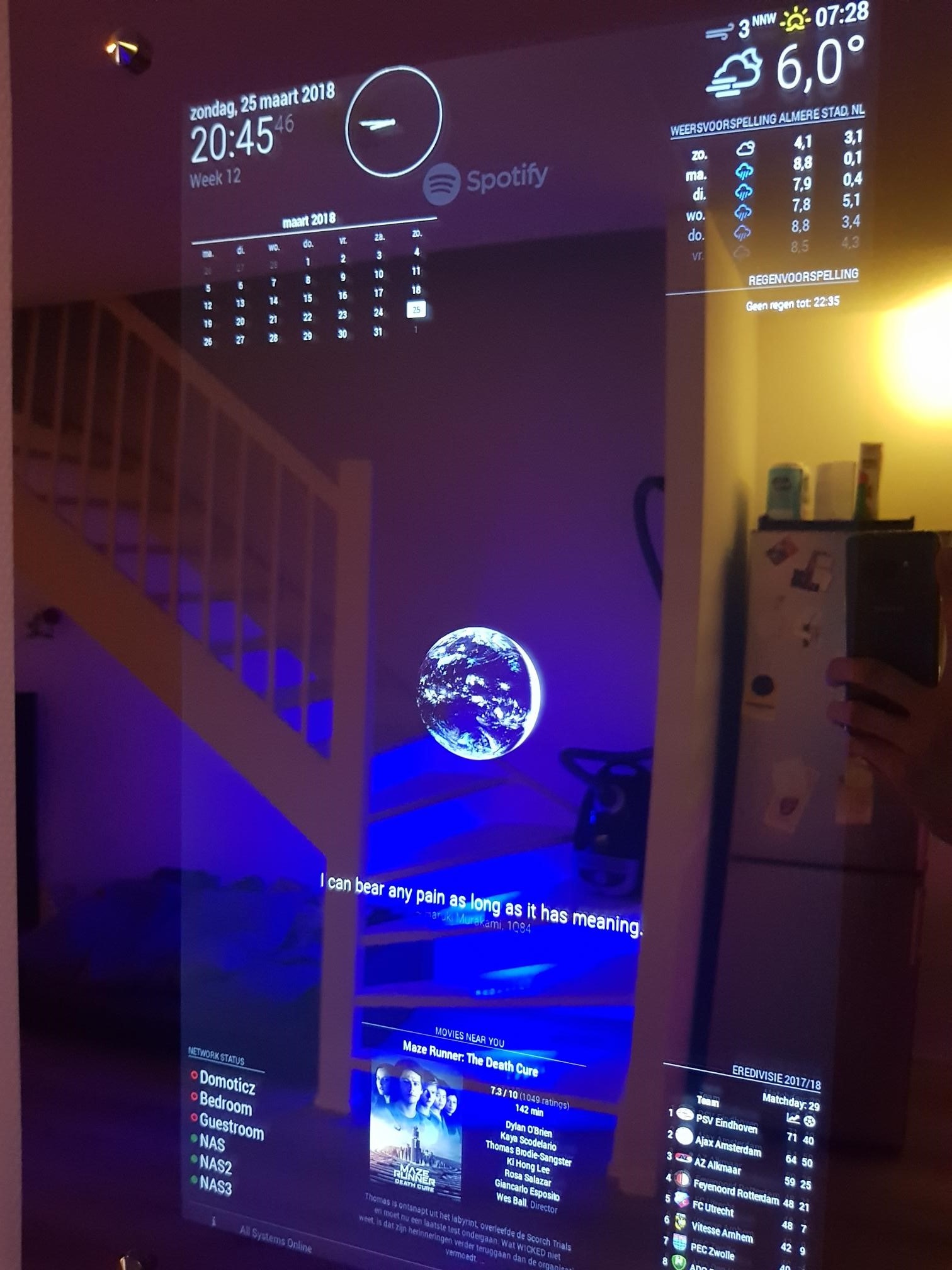
                      0_1522055674873_01.jpg

                      0_1522055682572_02.jpg

                      0_1522055688638_03.jpg

                      1 Reply Last reply Reply Quote 1
                      • tidus5T Offline
                        tidus5
                        last edited by

                        Thanks!!! just amazing.
                        Any chance you work on an version for touch screen @Raywo?

                        R 1 Reply Last reply Reply Quote 0
                        • R Offline
                          raywo Module Developer @tidus5
                          last edited by

                          @tidus5 what should that version do?

                          tidus5T 1 Reply Last reply Reply Quote 0
                          • G Offline
                            goprojojo
                            last edited by goprojojo

                            Workst great!
                            Is it possible to change the size of the album cover?

                            R 1 Reply Last reply Reply Quote 0
                            • R Offline
                              raywo Module Developer @goprojojo
                              last edited by

                              @goprojojo The width of the cover art is determined by the width of the column you placed the module in. It is set to 100%. You can change it by adjusting the width property of the .NPOS_albumCover class in css/styles.css.

                              1 Reply Last reply Reply Quote 1
                              • tidus5T Offline
                                tidus5 @raywo
                                last edited by

                                @raywo
                                control the volume, play pause next previous and maybe the playlist content ?

                                every morning I changing my playlist on my phone and this is my ultimate goal to have it in the screen :-)

                                R 1 Reply Last reply Reply Quote 0
                                • R Offline
                                  raywo Module Developer @tidus5
                                  last edited by

                                  @tidus5 Controlling volume and playback should be feasible. But changing the playlist? That would require an interface and a lot of interaction. That kind of defeats the purpose of a MagicMirror.

                                  Actually I don’t know whether I will work on this control features but feel free to fork the project and add as much as you want.

                                  1 Reply Last reply Reply Quote 0
                                  • schlachtkreuzer6S Offline
                                    schlachtkreuzer6
                                    last edited by schlachtkreuzer6

                                    Hi @raywo
                                    It stuck on step two… after I register the app to my account. Just saying: Wait for step 2 to complete. And doing nothing more.
                                    Hmm, any idea? Did I made a mistake?

                                    SOLUTION:
                                    Okay for anyone running into the same problem:
                                    You can get everything out of the link from your browser. Just copy and paste it in a text editor.

                                    Link looks like that:
                                    http::8888/#access_token=your access token&refresh_tokenyour refresh token&client_idyour client ID from spotify developer site&client_secretyour client secret from the develover site

                                    Copy the 4 elements in the module configuration:

                                    {
                                    module: "MMM-NowPlayingOnSpotify",
                                    position: "bottom_left",
                                    
                                       config: {
                                         showCoverArt : "true",
                                         clientID: "your client ID",
                                         clientSecret: "your client secret",
                                         accessToken: "your access token",
                                         refreshToken: "your refresh token",
                                          }
                                    },
                                    

                                    That’s it 😊

                                    R 1 Reply Last reply Reply Quote 0
                                    • R Offline
                                      raywo Module Developer @schlachtkreuzer6
                                      last edited by

                                      @schlachtkreuzer6 You need to enter both your secret ID and client secret in the input boxes and then click “Authorize my app!”. After that the message in Step 3 should disappear and show you exactly what you need to copy in your config.js.

                                      You need to make sure that you put the shown callback url in the app’s setting on Spotify.

                                      schlachtkreuzer6S 1 Reply Last reply Reply Quote 0
                                      • schlachtkreuzer6S Offline
                                        schlachtkreuzer6 @raywo
                                        last edited by

                                        @raywo I did that but it stops after the authorization.

                                        1 Reply Last reply Reply Quote 0
                                        • M Offline
                                          muffinimal
                                          last edited by

                                          Hey @raywo ,

                                          Thanks developing this module. It’s one of the first modules I tried to set up on my setup.

                                          Your instructions on how to configure very clear. Being new to MagicMirror I couldn’t get it to work fully, though. I finally figured out what I did wrong (I am still in the dark as to where I can find some useful logs): I installed your module to /home/pi instead of to the MagicMirror-folder.

                                          As I didn’t want to bother on finding out on how to uninstall, I simply moved the entire directory to the right place and the module seems to run fine now :D

                                          1 Reply Last reply Reply Quote 2
                                          • D Offline
                                            dherl0623
                                            last edited by

                                            Awesome module! I’d been using the MMM-Scrobbler, but this is a better module in my opinion. Your instructions are clear and easy to follow as well! I really like how instant it is as well. I currently just set this up while on break at work, so I can’t check it out at home yet, but watching from a VNC, it is incredibly responsive! Thanks again sir!

                                            1 Reply Last reply Reply Quote 1

                                            Hello! It looks like you're interested in this conversation, but you don't have an account yet.

                                            Getting fed up of having to scroll through the same posts each visit? When you register for an account, you'll always come back to exactly where you were before, and choose to be notified of new replies (either via email, or push notification). You'll also be able to save bookmarks and upvote posts to show your appreciation to other community members.

                                            With your input, this post could be even better 💗

                                            Register Login

                                            • 1
                                            • 2
                                            • 3
                                            • 4
                                            • 1 / 4
                                            • First post
                                              Last post
                                            Enjoying MagicMirror? Please consider a donation!
                                            MagicMirror created by Michael Teeuw.
                                            Forum managed by Sam, technical setup by Karsten.
                                            This forum is using NodeBB as its core | Contributors
                                            Contact | Privacy Policy