Read the statement by Michael Teeuw here.
MMM-PIR-Sensor problems
-
Hi there,
At the moment I am a bit proud having built a working smart mirror using IKEA RIBBA in 40x50cm.
But, for saving energy, I connected a PIR HC-SR504 to a Raspberry Pi 3 like this: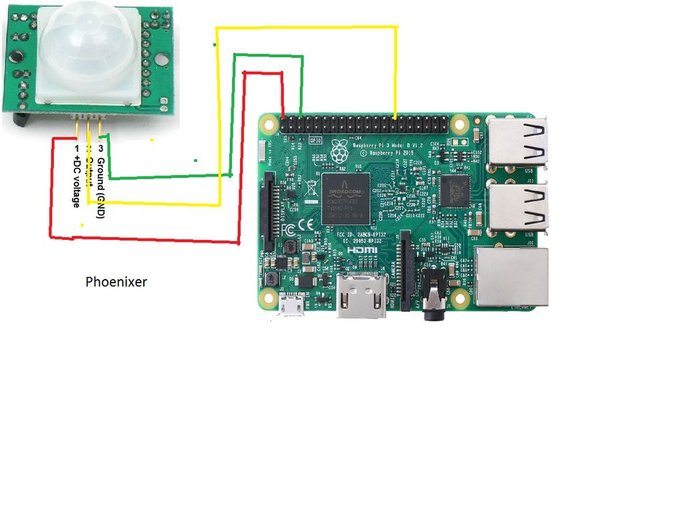
Instructions: I followed these instructions by StacheEnthusiast by:
- cd ~/MagicMirror/modules
- git clone https://github.com/paviro/MMM-PIR-Sensor.git
- cd ~/MagicMirror/modules/MMM-PIR-Sensor
- npm install wiring-pi
- sudo usermod -a -G gpio pi
- sudo chmod u+s /opt/vc/bin/tvservice && sudo chmod u+s /bin/chvt
- mv node_helper.js node_helper_backup.js
- sudo nano node_helper.js (copied and pasted his code) and saved this
- inserted this into config.js:
	{
		module: 'MMM-PIR-Sensor',
		config: {
			sensorPIN: 25,
			powerSaving: true,
			offDelay: 30000,
		}
	}
But, it is not working… so I executed npm install in directory MMM-PIR-Sensor afterwards. Still not working… After booting, the screen is showing MagicMirror with all modules. After a couple of minutes, the monitor is showing a blank screen with backlight switched on. The module does not cut off HDMI signal and the HC-SR504 does not switch back to MagicMirror. I can not see if the sensor is recognizing me.
“GPIO -v” shows the message "Unable to determine hardware version. I see: Hardware : BCM2835 - expecting BCM2708 or BCM2709. Please report this to project@drogon.net.”. Version 2.25 instead of a newer version is install, even after “npm install wiring-pi”.
I am not sure having configured the module correctly, because as shown above I have connected the sensor to pin22/GPIO25. Is my module setting correct ?
And, the HC-SR504 is offering 2 potentio meters (detection delay/sensing distance) and a jumper (impulse signal permanently or just one). Don´t know what do here:
The mirror is fixed on a wall, where people are crossing several times a day. The mirror monitor should switch on if a person is standing in front of the mirror for about 5 seconds as long as the person is standing there.Would like to save some energy - some help would be very great… Thanks in advance.
-
@blebbens I have checked on my js file
It says for the offDelay seconds (30000 = almost 8:20 hours or so. Long time to look at yourself.)
{
    		 module: 'MMM-PIR-Sensor',
		   		config: {
					powerSavingDelay:40
				}
  		},
I am also connected to PIN 25 so no need to add to config.
This my is config.js I hope it helps. Mine works perfect.
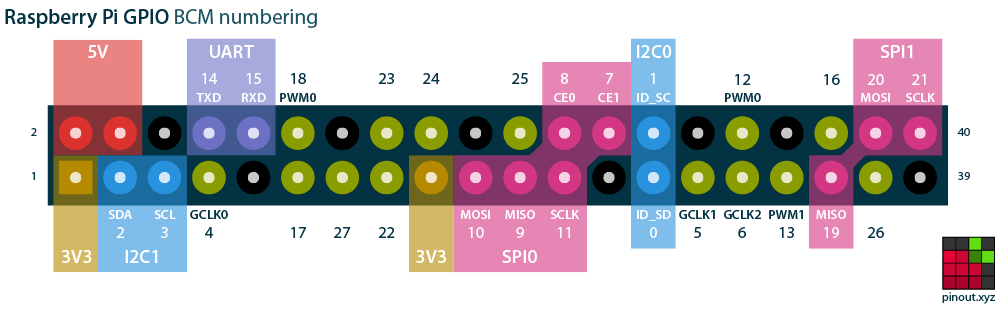
If you are unsure about the pins check this at the bottom of the page.
https://pinout.xyz/
-
The only thing missing is the energy saving PIR-module…
Okay, now my config.js PIR-part looks like this:
{
			module: 'MMM-PIR-Sensor',
			config: {
				//sensorPIN: 25,
				powerSaving: true,
				offDelay: 60,
			}
		},
After booting magic mirror, the monitor is showing the working magic mirror. After a few minutes (not the 60 seconds as setup in MMM-PIR-Sensors config.js-part) the screen is showing a blank black screen with backlight on is full power consumption. Seems, as if the HDMI signal does not get the OFF order… A problem with a screen saver, perhaps ? Turned it off as shown in the official tutorial (running Raspbian Stretch).
Running in front of the PIR does not turn the magic mirror screen on. Pressing a key on the wireless keyboard does turn it back on…
So, there are 2 problems: why does the HDMI switches to “show blank screen” instead of “switch off” ? What kind of settings do I have to do with the PIR-Jumper and potent meters ?
-
@Charley said in MMM-PIR-Sensor problems:
powerSavingDelay:40
You may want to change your config to only: powerSavingDelay:40
If you switch off thru HDMI then powerSaving:true is not needed imho.
and better use powerSavingDelay: 60 instaead of offDelay just copy mine config.js settings from above it should work -
Okay, I changed to your config.js-settings.
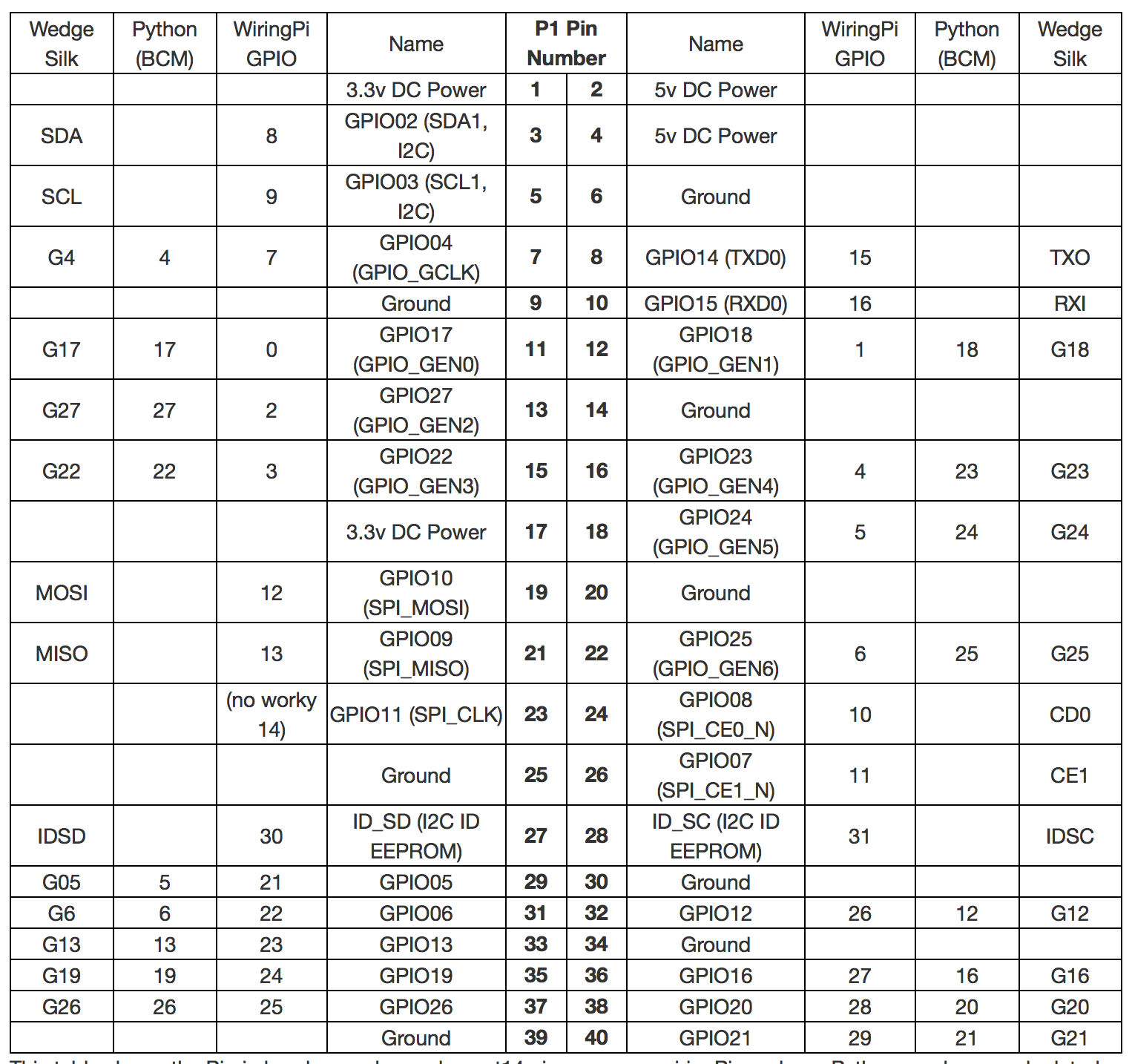
Not sure if I have connected the cables correctly RPIPIR.
According to github, default is pin#22 (BCM).
Since the beginning I connected the data cable to pin#22/GPIO 25.
But, github is telling BCM22 should be default, so I now connected it to pin#15/BCM22.
Tried to find correct pins using the scheme above. -
I have just checked my Mirror I am at pin 22
The 8th pin on the bottom -
Yes, it is connected to the 8th bottom from the left…
Building the mirror, setting up the pi and magic mirror with modules - no problems… until trying to use the PIR…
HDMI signal is sending still in blank screen… magic mirror does not turn back on… it still does not care about the PIR.
at what position are your potentio meters and the jumper ?
-
My PIR has no jumper. From banggood
The two potentiometers are both in the middle position.
There are a few more topics on the screen not reacting properly a few LCD screens do not support switching thru HDMI.I tested the PIR on an Arduino Nano to see when it was detecting and at what range, but you can also do that with a Raspberry.
-
Normally the monitor is switching to standby if there is no signal from HDMI. I think the problem is the Raspberry. Found nothing to fix this.
I am also wondering why magic mirror switches to no signal/blank screen after a couple of minutes. Is there a possibility to change this to a fix number of seconds? Seems as if the MMM-PIR-setting for switching on/off in seconds has no effect.
-
Maybe you have screensaver not disabled.
-
Now, screensaver is disabled… PIR not working. Display is switched on all the time…
Perhaps, the problem could be the installed GPIO 2.25 instead of a newer version?
After running npm install wiring-pi version 2.25 is still running. -
You could try if you are using the right GPIO by pulling the pin Up.
Take a 10k Resistor one side on 5V and the other side tap the GPIO pin that is what the PIR would do. Then you can check if you use the proper pin.
-
I am sure I am using GPIO22.
I am wondering about the display, which is not switching off. It stays on all the time.
Could it be a problem with the fact that the user “pi” is logged in ?
Why does the display not switch off ?
-
Maybe your PIR is always HIGH
thats is why you should check with a resistor if it works.
Or disconnect the OUT pin to see in the screen stays off. -
Maybe you are right. I tried using MagicMirror-Display-Controller and started the pir.py-python script… the output: “Motion detected… setting timer to 180 seconds”.
Okay, I am a bit afraid, because it is a bit difficult to take a look at the Raspberry Pi - I have to change the place after all is working and final.
Let´s say, the PIN is telling HIGH (=motion detected) the whole time. What do I have to do then ? I am new to linux/RPi and learning day to day.
I try without data connection PIR->RPi
-
As I wrote in my previous message check if the GPIO is low when you disconnect the PIR
I always check all parts with an Arduino Nano or Uno to see if it works and if it needs settings it is easily done before installing.
This evening I will not be online any much longer. -
Thanks for helping…
Without the PIR-Data-Pin connected to GPIO 22, the script does not show the message “motion detected”. It is counting from 180 to 0. Think this means the GPIO is LOW then.
I think all I need now is what to do next. Broken PIR ? Wrong PIR-settings (Potentio meters, Jumper) ?
-
You could try to use a pull-up resistor maybe the PIR output is 5V
Check this website. Otherwise your PIR is broken. If you are in the Netherlands i can post by snailmail another one to you that works for sure,
-
I have 8 HC-SR501 bought a while ago. Some of them are green, some blue.
Tested all of them now…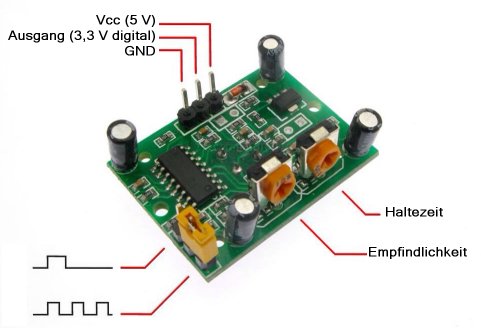
The message is the same: OUT connected… Motion detected. OUT not connected, no motion detected… Think, this means OUT and HIGH are working.
But, the PIR sensor delivers motion detected permanently if connected.
So, according to your PullUp-Link I have to put a 10kohm resistor between Raspberry Pi GPIO 22 and PIR-OUT ?
I am wondering why none of those tutorials are telling this. Some of my PIRs should work with 3.3V-OUT ?
I am afraid there is a mistake I am making, but I don´t know which one and how to solve it. That´s the last part missing for my mirror, the important part.
-
What you could do is put a 10k Resistor between GPIO 22 and GND. if the PIR disconnects your PIN is pulled LOW.
PIRs may give different signals my PIR only gives a high (3v3)
Hello! It looks like you're interested in this conversation, but you don't have an account yet.
Getting fed up of having to scroll through the same posts each visit? When you register for an account, you'll always come back to exactly where you were before, and choose to be notified of new replies (either via email, or push notification). You'll also be able to save bookmarks and upvote posts to show your appreciation to other community members.
With your input, this post could be even better 💗
Register Login