Read the statement by Michael Teeuw here.
Apache Permissions: can't duplicating config.js.sample
-
I’m new to this and getting stuck following Apache instructions. I would appreciate any guidanace.
Apache Permissions. I can’t update or change anything in Apache even using sudo commands in Terminal. I am trying to copy file
~/config.js.samplefrom MagicMirror2 folder (cp sudo nano/var/www/html/MagicMirror/config/config.js.sampleso that I can rename and remove the ‘sample’, but I am getting permissions denied. I can’t simple rename theconfig.js.samplefile either. How can I edit files in Apache server? I have no experience with Apache permissions and can’t move forward until I get this resolved.Pat
-
@CaptainFalcon323 What happens if you right click the Magic Mirror folder > Open in Terminal > and enter command
npm start? Do you still get the ‘need to config’ prompt? -
Figured this out. I was able to give my default user “pi” permissions to write in /var/www/
-
@patm189 why (and how) are you using Apache vor MM v2 in the first place? It ships its own web server, you can’t use it with apache.
-
@paviro thanks for the comment. Honestly, I have no experience with this sort of thing so I’ve been following online tutorials saying to install Apache. I might just wipe my SD Card and start over (…again).
Let me know if I’m misunderstanding, but if I install MagicMirror2 then I do not need Apache? Install link below:
(curl -sL https://raw.githubusercontent.com/MichMich/MagicMirror/master/installers/raspberry.sh | bash)Which directory should I download this into? Once it’s installed, the other trouble I’m having is actually locating a
index.phpfile, which is what I believe should launch with reboot once I adjust autostart file with this line (among others)@midori -e Fullscreen -a http://localhost/MagicMirror/index.phpWhen I input this
index.phpfile I get a Not Found error upon reboot and launch. THANK YOU!Pat
-
-
Thanks @paviro! [grabs cup of coffee] Going to take another crack at this!
-
Well i’ll be damned. Following the instructions worked! Haha. Thanks for bearing with me.
-
Hello all!
I’m also new to this sort of thing (little/no coding experience) and I too have been following online tutorials but haven’t been getting results… So, I switched to following the README, but haven’t made it very far.
I’ve downloaded the necessary files from git hub using:
(curl -sL https://raw.githubusercontent.com/MichMich/MagicMirror/master/installers/raspberry.sh | bash)Due to my lack of coding knowledge, I’m unsure how to duplicate the config.js.sample file (so that the file becomes config.js) - referring to this line in the README:
Duplicate "config/config.js.sample to config/config.js.I’ve tried typing this into the terminal under the magic mirror directory but nothing happens. I’ve also gone into my File Manager—> Directory Tree----> MagicMirror----> confi folder----> copied and pasted the “config.js.sample” file and renamed it to “config.js”.
From there I’ve gone to https:///MagicMirror/ (from another computer on the same network)to see what it all looks like. I get a message that says I need to create a config file (of that mine has an error in it and to use a JavaScript Linter).
Any and all help would be appreciated especially at an ELi5 level :D Thanks in advance!
-
go into the config directory with a terminal and type
sudo cp config.js.sample config.js
-
@feuerball
sudoshould not be necessary. -
just for safety :P
-
@feuerball yes for safety you should NOT use it! :P
-
Hi @CaptainFalcon323, you can also go into this folder within the File Manager interface and literally Copy the file, Paste it and rename to remove .sample at the end. Whatever is easier.
-
Wow, thanks for the quick replies! Unfortunately, I’m at work right now, so I’ll have try these when I get home in ~4 hours and I’ll let you know know how it works out.
So this what I’m getting:
1a) Go to the File Manager, copy/pasta the file “config.js.sample” and rename it “config.js.sample”
OR
1b) Go into the config directory and “cp config.js.sample config.sjs”
- To check to see if it worked go to:
“https:///MagicMirror/”?
If it worked, I should be seeing some stuff there?
If it didn’t, I should see what I have been seeing (i.e. that i need to create a config file)?
Thanks again!
-
Yes, but for 1a) be sure to remove ‘sample’ at the end. I assume that was a typo, but just want to make sure we’re on same page. File should be “config.js”
-
Oh, yes, you’re correct. The file should be renamed to “config.js”!
Just got home from work and went route 1a) I figured that would be easier.
Please see photo above. If it doesn’t work, try right clicking and open it in another tab. If it doesn’t work, it was a picture of my config folder in my directory. It shows a picture of two files: “config.js”
& “config.js.sample”Easy enough, now when I go to "http:///MagicMirror/ " I’m still getting the message that I need to create a config file. I’m confused. Do I need to make changes to the config file (i.e. put in my weather API key, location, etc before it anything will show up?
-
@CaptainFalcon323 What happens if you right click the Magic Mirror folder > Open in Terminal > and enter command
npm start? Do you still get the ‘need to config’ prompt? -
That did it! Wow, awesome! Thanks so much for all of your help! I really appreciate. :)
-
@patm189 hi, I saw that you helped @CaptainFalcon323 get his project running. I’d really like some help on mine. I think I am having a similar problem. When i go to my pi’s ip address, i get this.
Index of /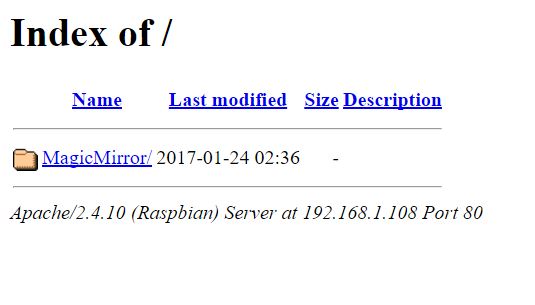
So i followed your directions above and typed npm start while inside the MagicMirror folder in the terminal. This is what I get.
> magicmirror@2.1.0 start /var/www/html/MagicMirror
> electron js/electron.js

sh: 1: electron: not found

npm ERR! magicmirror@2.1.0 start: `electron js/electron.js`
npm ERR! Exit status 127
npm ERR!
npm ERR! Failed at the magicmirror@2.1.0 start script.
npm ERR! This is most likely a problem with the magicmirror package,
npm ERR! not with npm itself.
npm ERR! Tell the author that this fails on your system:
npm ERR!     electron js/electron.js
npm ERR! You can get their info via:
npm ERR!     npm owner ls magicmirror
npm ERR! There is likely additional logging output above.
npm ERR! System Linux 4.4.38+
npm ERR! command "/usr/bin/nodejs" "/usr/bin/npm" "start"
npm ERR! cwd /var/www/html/MagicMirror
npm ERR! node -v v0.10.29
npm ERR! npm -v 1.4.21
npm ERR! code ELIFECYCLE
npm WARN This failure might be due to the use of legacy binary "node"
npm WARN For further explanations, please read
/usr/share/doc/nodejs/README.Debian

npm ERR!
npm ERR! Additional logging details can be found in:
npm ERR!     /var/www/html/MagicMirror/npm-debug.log
npm ERR! not ok code 0
please help! I’ve been trying to figure out how to make this project for weeks!
-
Soo looks like i fixed it by re cloneing the MagicMirror git and following directions. But now I am getting a blank black screen on the the MagicMirror webpage. When i inspect it, i get this
Uncaught TypeError: Cannot read property 'getElementsByClassName' of null
    at moduleNeedsUpdate (main.js:134)
    at updateDom (main.js:104)
    at Object.updateDom (main.js:472)
    at Class.updateDom (module.js:296)
    at clock.js:43
moduleNeedsUpdate @ main.js:134
updateDom @ main.js:104
updateDom @ main.js:472
updateDom @ module.js:296
(anonymous) @ clock.js:43
thoughts?

Hello! It looks like you're interested in this conversation, but you don't have an account yet.
Getting fed up of having to scroll through the same posts each visit? When you register for an account, you'll always come back to exactly where you were before, and choose to be notified of new replies (either via email, or push notification). You'll also be able to save bookmarks and upvote posts to show your appreciation to other community members.
With your input, this post could be even better 💗
Register Login