Read the statement by Michael Teeuw here.
MMM-CalendarExt2
-
@mmrize Is there a plan for MMM-CalendarExt3 in the near future? :alien:
if so, when can it be expected? -
@ge I do not think the module provides any clickable elements
typically the MM is a passive output only device, w no keyboard or mouse
none of my modules provide clickable elements
-
@flemmingss
I’m trying to build a new X3 from the scratch, which will respect default MM’s behaviours, will be independent of legacy/externalmomentJsor other 3rd parties, will be more modular and lighter than X2 and with a few new features.
But it needs more days or weeks to release. I wish I have more dedicated time to that work. Sorry. -
How can I add an image to the background of a specific slot, such as a pumpkin to October 31 or a Christmas tree to December 25. I was thinking of .slotcontent, but not sure how to filter that. Also, how would it be done for things like Hannukah, where there aren’t set days. I was also thinking of using dayofyear, but leap years would mess with that, and still wouldn’t solve Hannukah or any other shifting holidays.
-
@almightyyoshi
Eachslotmay have its characteristic class name like;- slot : all slots have slot as its class name.
- daily, weekly, monthly, week, month, current, upcoming : mode of view
- period, agenda, weekSlot, cellSlot, timelineSlot… : types of slot.
- seq_0, seq_1, … : slot sequence in view
- thisyear, thismonth, thisweek, today : slot relation with today.
- year_2018, month_12, week_51, day_25, weekday_6, dayofyear_361, … : You can specify slot with this class names.
So, let’s guess what these class selector in your CSS means;
.slot.daily.thismonth.weekday_6. Or.slot.month_12.day_25.
After specifying the slot, you can control its header/content/footer or events inside..slot.daily.month_12.day_25 .slotContent { background-image: url( ... ); }https://github.com/MMM-CalendarExt2/MMM-CalendarExt2/blob/master/docs/Styling.md
The non-gregorian calendar is not supported.
-
Hi all,
I’m not quite sure how to achive that relative time format is displayed correctly. Please notice the given picture
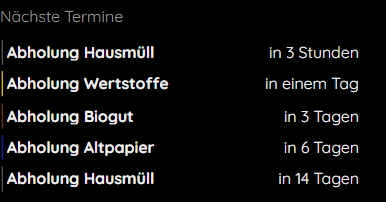
Where it says “in 3 Stunden” (german for in 3 hours) it should say tomorrow and where it says “in einem Tag” (german for tommorow) it should be the day after tommorrow as the event starts tomororw plus a few hours.
Any suggestion how to achive that ? -
I don’t suppose there’s a dummies guide to make this work?
-
@ccr41981 this is one of the most complex modules. and the author does not support it anymore.
so it’s community help
-
@gekberlin
RelativeTime would be auto-scaled by remain period to target time from now on. So “tomorrow” is displayed as “in X hours” because after X hours the tomorrow will begin. “In 10 days” means exactly “in 10days and a few hours”
So it is not so desirable to display exact time, especially fullday events.
Use dateFormat or dateTimeFormat. See the localization part also.RelativeTime itself is more useful when you use it to display near events in 24 hours.
-
@sdetweil understood, I got that from the thread. Was just hoping there was some other documentation than the main GitHub page. I don’t want to ask a bunch of annoying questions, but I could use some help.
-
@ccr41981 no other doc. so ask away and maybe someone can help.
-
@sdetweil Very well. So, how does one set this up? I installed the module, but it doesn’t show up at all. I’ve put in my ics links in the calendar spots, but nothing. I’ve gleaned that there is something to be done with custom css, but I haven’t been able to figure it out. Can someone break down what needs to be done just get a visual going?
-
@ccr41981 you’ve read the config doc?
https://github.com/MMM-CalendarExt2/MMM-CalendarExt2/blob/master/docs/Configuration.md
use the example, and your url .
also, this module suffers from a missing library ( that was removed from the base a couple releases back )
in the module folder (MagicMirror/modules/MMM-CalendarExt2) do
npm install request --save -
@sdetweil I DID use that example, but I did not know about the missing library. I will run that and let you know.
Thank you for taking the time.
-
@ccr41981 said in MMM-CalendarExt2:
@sdetweil I DID use that example, but I did not know about the missing library. I will run that and let you know.
Thank you for taking the time.
Ugh, still nothing.
Out of curiosity, are there any resolution constraints? Or are there any problems with running this on something other than a raspberry pi? I am running MagicMirror2 on my Windows 10 machine, just to play around with the settings while I wait on my pi.
-
@ccr41981 no idea
2 things
1 look for messages where you start MM
npm start2, open the developers window, mm screen, ctrl-shift-i, select the tab labeled ‘console’ and then put a unique part of the module name in the filter field (ext for example)
-
@sdetweil Yikes, ok, I’ll figure out what all that means.
I’ve only been running it in server mode, since I haven’t been able to resolve the Display error to make it run as it’s own instance. I’ll try and resolve that and do these steps.
-
@ccr41981 said in MMM-CalendarExt2:
@sdetweil Yikes, ok, I’ll figure out what all that means.
I’ve only been running it in server mode, since I haven’t been able to resolve the Display error to make it run as it’s own instance. I’ll try and resolve that and do these steps.
AS YOU WERE. For some unknown reason, the calendar just popped up
-
-
@sdetweil I’ve been through those posts about the display error, but i will go back and try to troubleshoot again.
However, the calendar did just pop up, so now I can go tinker with the look and set up my interface. Thanks for your help.
Hello! It looks like you're interested in this conversation, but you don't have an account yet.
Getting fed up of having to scroll through the same posts each visit? When you register for an account, you'll always come back to exactly where you were before, and choose to be notified of new replies (either via email, or push notification). You'll also be able to save bookmarks and upvote posts to show your appreciation to other community members.
With your input, this post could be even better 💗
Register Login