MagicMirror Forum
    • Recent
    • Tags
    • Unsolved
    • Solved
    • MagicMirror² Repository
    • Documentation
    • 3rd-Party-Modules
    • Donate
    • Discord
    • Register
    • Login
    A New Chapter for MagicMirror: The Community Takes the Lead
    Read the statement by Michael Teeuw here.

    Default Calendar Module will not display an annually/monthly recurring event at end of March.

    Scheduled Pinned Locked Moved Unsolved Troubleshooting
    15 Posts 3 Posters 7.1k Views 3 Watching
    Loading More Posts
    • Oldest to Newest
    • Newest to Oldest
    • Most Votes
    Reply
    • Reply as topic
    Log in to reply
    This topic has been deleted. Only users with topic management privileges can see it.
    • REBR Offline
      REB
      last edited by REB

      I’ve been pulling my hair out trying to figure this out. I can set a single event or a recurring weekly event and it will show up on my MM2 display.

      But if I change the event to an annually recurring event on either 29th, 30th or 31st of March, it does not show up.

      I have created the events in both Google Calendar and in Outlook (which 2-way syncs with Google Calendar - that works perfectly). I’m using Office 365 on Windows 10 Pro

      I can set annually recurring events for the end of April and they show up fine.

      Any suggestions please?

      Thank you

      1 Reply Last reply Reply Quote 0
      • REBR Offline
        REB
        last edited by

        Just to clarify, I’m using the default Calendar module.

        I assume no-one else is having the same issue?

        1 Reply Last reply Reply Quote 0
        • JanneJ Offline
          Janne
          last edited by

          Hi,
          I just tested it and I have no problems with a recurring event from a Google calender to the module MMM_Calender.

          REBR 1 Reply Last reply Reply Quote 0
          • REBR Offline
            REB @Janne
            last edited by REB

            Thanks @janne - can you please confirm you used the same dates as myself - 29-31 March?

            I think I’ll set up a second Google calendar and see what happens with that.

            Update: Same thing happens with a different Google calendar.

            Time to disable everything else and see what happens.

            Further update: The problem also occurs with a monthly recurring event. I set up a monthly recurring event on March 29 2019 and the April and May events both show up but not the March 29 occurrence.

            Daily and weekly events show up OK.

            JanneJ 1 Reply Last reply Reply Quote 0
            • REBR Offline
              REB
              last edited by

              I have even tried a second MM2 setup and that is the same as above. The second setup is just used as a clock and current weather display but I disabled those modules just in case.

              A bit of a long shot but I wonder if it has anything to do with there only being 28 days in February and something is messing with just March. I’ll be interested to see if the events shows up once we get to March 1st.

              1 Reply Last reply Reply Quote 0
              • JanneJ Offline
                Janne @REB
                last edited by

                @reb
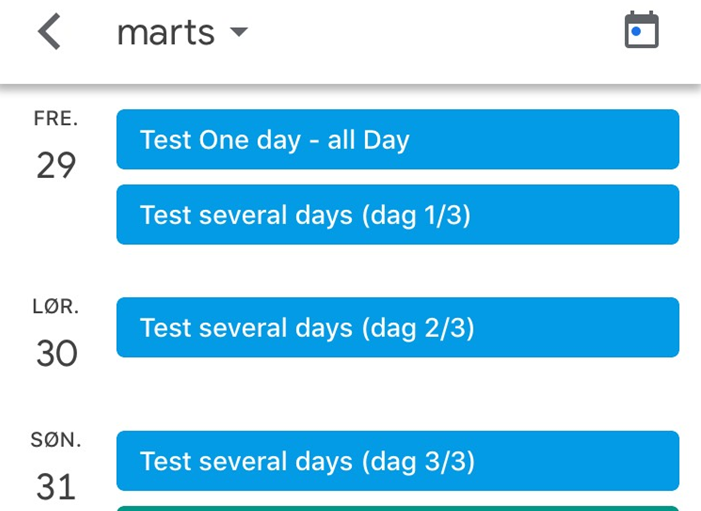
                Here is an example of two events.
                0_1551170689301_943815ca-5d59-4195-baae-03aadb1a9ab8-image.png

                As you can see it is shown on my MM.

                0_1551170711650_cbf24380-c737-46f3-b439-5a2b68721d25-image.png

                1 Reply Last reply Reply Quote 0
                • REBR Offline
                  REB
                  last edited by REB

                  Thanks @Janne.

                  I guess it must be a problem either with my Google calendar or my MM2 installations. As the problem appears on both of my MM2 setups, I’m guessing the problem is with Google - but I’ve no idea what or why.

                  Just a thought - were those events monthly and/or annually recurring events? Daily or weekly recurring events show up fine on those dates.

                  1 Reply Last reply Reply Quote 0
                  • REBR Offline
                    REB
                    last edited by

                    I’m following this up as I still have the same problem even though I created an brand new Google Account and only added two events to the calendar.

                    One was an annually occurring event on 29 March and the other a single event on 30 March. Only the single event showed up on my MM calendar. I’m sharing the calendar through the secret link provided by Google. Annually recurring events on other dates before and after 29 - 31 March appear on my MM correctly.

                    I’m at a loss as to where the issue might be.

                    Can someone else please create a Google Calendar event that recurs either monthly or annually on the 29, 30 or 31 March and then confirm that the event appears on the their MM calendar module. Please note that I am using the default Calendar module as supplied with MM2 V2.6.0.

                    My next step will be to try a different calendar module but I’d like to know where the problem lies with the default module.

                    Thank you in advance.

                    S 1 Reply Last reply Reply Quote 0
                    • S Offline
                      sdetweil @REB
                      last edited by

                      @REB i will try to look at this today

                      Sam

                      How to add modules

                      learning how to use browser developers window for css changes

                      1 Reply Last reply Reply Quote 0
                      • S Offline
                        sdetweil
                        last edited by sdetweil

                        I just added two yearly recurring events, one on Mar 29, and one on April 1.

                        Both displayed on the event list on the default calendar

                        my calendar config is (also shows in relative mode)

                           {
                              disabled: false,
                              module: "calendar",
                              position: "top_left",
                              config: {
                                showEnd: false,
                                timeFormat: 'asbolute',
                                calendars: [
                                  {
                                    symbol: "family ",
                                   // url: "webcal://calendar.google.com/calendar/ical/........"
                                  },
                        
                                ]
                              }
                           },
                        

                        Sam

                        How to add modules

                        learning how to use browser developers window for css changes

                        1 Reply Last reply Reply Quote 0
                        • REBR Offline
                          REB
                          last edited by REB

                          @sdetweil said in Default Calendar Module will not display an annually/monthly recurring event at end of March.:

                          showEnd: false,

                          @sdetweil Thank you for your efforts. This is my config…

                          {
                          			module: "calendar",
                          			position: "top_center",
                          			header: "Upcoming Events",
                          			config: {
                          				showEnd: false,
                          				fade: false,
                          				colored: true,
                          				coloredSymbolOnly: true,
                          				maxTitleLength: 30,
                          				timeFormat: "absolute",
                          				calendars: [
                          					{
                          						symbol: "calendar-check-o ",
                          						url: "https://calendar.google.com/calendar/ical/xxxxxxxxx/basic.ics",
                          						color: "yellow",
                          					}
                          				],
                          				maximumEntries: 15
                          			}
                          		},
                          

                          The url’s are different - yours starts with “webcal:” whereas mine starts “https:” - probably because mine is a private calendar. I did try making my Google Calendar ‘Public’ but that didn’t make any difference.

                          Edit: Just changed ‘https:’ to ‘webcal:’ and it made no difference.

                          S 1 Reply Last reply Reply Quote 0
                          • S Offline
                            sdetweil @REB
                            last edited by

                            @REB try without maximumEntries

                            I will test that later today

                            Sam

                            How to add modules

                            learning how to use browser developers window for css changes

                            1 Reply Last reply Reply Quote 0
                            • REBR Offline
                              REB
                              last edited by

                              @sdetweil I’d already tried that. In fact, I didn’t have that config entry originally - I just used the default of 10. I added extra entries to see if it made a difference - it didn’t :frowning_face:

                              Incidentally, I exported my Google Calendar and the annual events show up in there - albeit one of the troublesome entries appears twice for some reason.

                              S 1 Reply Last reply Reply Quote 0
                              • S Offline
                                sdetweil @REB
                                last edited by

                                @REB i changed from a full day event to an hour each year and it still presented ok…

                                would u be willing to share your cal url? send email to my userid as here at gmail

                                Sam

                                How to add modules

                                learning how to use browser developers window for css changes

                                1 Reply Last reply Reply Quote 0
                                • REBR Offline
                                  REB
                                  last edited by

                                  @sdetweil I’ll send the url over. Thank you for your assistance with this.

                                  1 Reply Last reply Reply Quote 0

                                  Hello! It looks like you're interested in this conversation, but you don't have an account yet.

                                  Getting fed up of having to scroll through the same posts each visit? When you register for an account, you'll always come back to exactly where you were before, and choose to be notified of new replies (either via email, or push notification). You'll also be able to save bookmarks and upvote posts to show your appreciation to other community members.

                                  With your input, this post could be even better 💗

                                  Register Login

                                  • 1 / 1
                                  • First post
                                    Last post
                                  Enjoying MagicMirror? Please consider a donation!
                                  MagicMirror created by Michael Teeuw.
                                  Forum managed by Sam, technical setup by Karsten.
                                  This forum is using NodeBB as its core | Contributors
                                  Contact | Privacy Policy