I also have this message, but everything works. It’s only a hint.
Are there some other messages?
B
Offline
A New Chapter for MagicMirror: The Community Takes the Lead
Read the statement by Michael Teeuw here.
Read the statement by Michael Teeuw here.
Posts
-
RE: MMM-SystemStats (cpu temp/load, fre ram ...)
-
RE: Split up Utilities?
I like the idea. Split IOT and Homeautomation.
What is with modules like Mail check? Any idea -
RE: Blank Screen on Pi 1 after successful Install
@Kisaua i have the mirror running on a RPi B with Fullscreen Midori. Check your Node version and Midori version.
Here is a Midori autostart tutorial with kiosk mode. http://www.benjaminroesner.com/blog/autostart-midori-browser-vollbild-kiosk-mode-via-konsole-ohne-desktop/ -
MMM-FHEM shows values from FHEM devices ...
[card:benroe/MMM-FHEM]
This module can show any reading value from a FHEM device.
If the module is in the position top_ bar, or bottom_bar it looks like this …
and if its in a left, or right column it’s compact style.You can also add any icon in front and a text suffix.
Known issue:
- multiple MMM-FHEM modules in the config/on the mirror will overwrite each other
-
RE: multiple module instances overwrites itself values
Ok other question.
If i setup a module twice in the config, do they share the variables from the code? -
RE: 1.1k members and a short update regarding myself
Wish you a good time in Berlin. Did you found a apartment in Berlin? It’s a horror to find a good one. :D
-
RE: diy-guys Mirror
@diy-guy the link is not working. Is that a Ikea frame?
-
RE: FHEM Module
@DirkS i am working on a module for FHEM. It works, but i have one bug. If i solved it, i will relase it.
Here is a screenshot.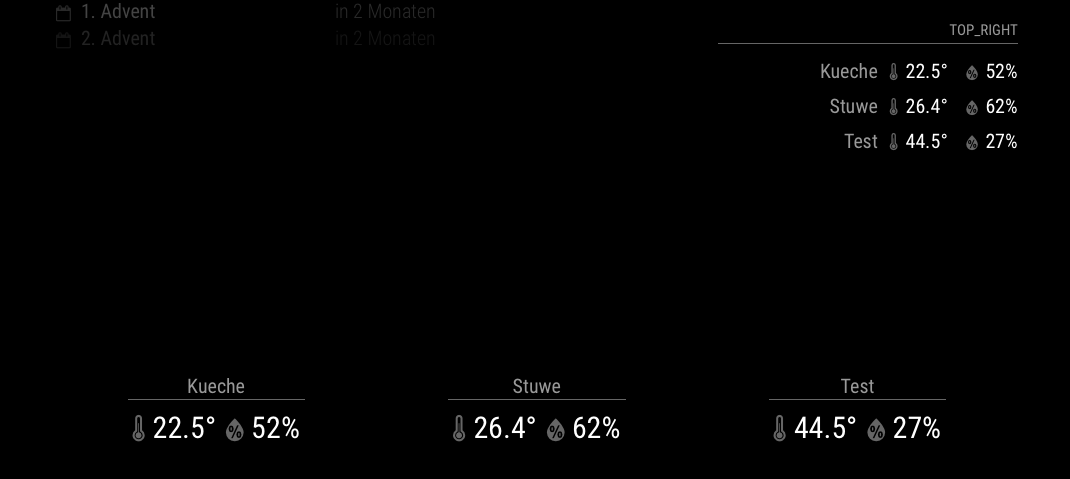
-
RE: Cato's mirror
Great read and thanks for sharing your misstakes, too. It’s usfull to learn from others experinces.
-
MMM-SystemStats (cpu temp/load, fre ram ...)
[card:benroe/MMM-SystemStats]
It’s testet with a Raspberry Pi.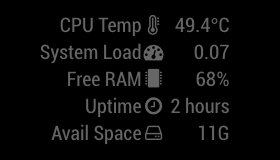
ToDO:
- icons
- sd-card available space
- better indication for the system load
If you found an issue, please report it here.
If you like the module, give it a star on Github. -
multiple module instances overwrites itself values
Hello,
i am working on a module for FHEM. The module can show data like temperature from FHEM devices. It is working, but if i add two instances of the module to theconfig.jsit overwrites the dom values.{ module: 'MMM-FHEM', position: 'bottom_bar', config: { host: '192.168.178.28', port: '8083', deviceNames: [ 'LaCr.Thermo01', 'LaCr.Thermo02', 'LaCr.Thermo03', ], deviceReadings: [ { name: 'temperature', icon: 'wi wi-thermometer', suffix: '°' }, { name: 'humidity', icon: 'wi wi-humidity', suffix: '%' }, ], }, }, { module: 'MMM-FHEM', position: 'top_right', header: 'top_right', config: { host: '192.168.178.28', port: '8083', deviceNames: [ 'LaCr.Thermo03', 'LaCr.Thermo04', 'LaCr.Thermo05', ], deviceReadings: [ { name: 'temperature', icon: 'wi wi-thermometer', suffix: '°' }, { name: 'humidity', icon: 'wi wi-humidity', suffix: '%' }, ], }, },Right values should different from the bottom one.
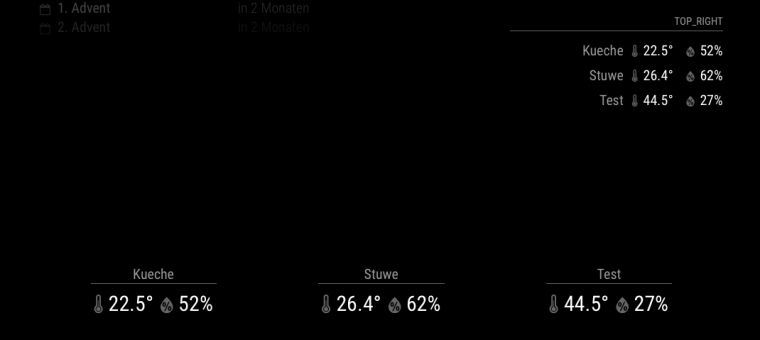
Any idea why? You can find the code here https://github.com/BenRoe/MMM-FHEM
-
RE: Blank Screen on Pi 1 after successful Install
Maybe i found the problem. I am working on a FHEM module for MM. I changed the
config.jsand had a wrong module name in it. After reload the screen was black.
@chase please check yourconfig.jsfor spelling or json format errors. -
RE: Blank Screen on Pi 1 after successful Install
Should the url contain the port?
192.168.0.7:8080? -
RE: Blank Screen on Pi 1 after successful Install
Try a newer node version.
Here is a blog post (unfortunately in german) how to install the latest version. Deinstall the node before you install the newer version.
http://www.benjaminroesner.com/blog/node-js-raspberry-pi-installieren/#variante2 -
RE: Blank Screen on Pi 1 after successful Install
Which node.js Version is installed? Maybe this is the problem.
-
RE: Blank Screen on Pi 1 after successful Install
@bharathvenkat i use MM with
node serveronlyand a Midori Browser on my Raspberry PI B. Theoretically it should work on your RPi. Like Mr.Meeseeks (btw rick and morty is awesome) proposed, open the developer console in the browser and check if there is some code.@pagoa he is using
node serveronly. With this command electron is not used. -
RE: Debugging
I could not use
Log.log('foobar');in the node_helper.js and if i useconsole.log('foobar');the log is shown in the CLI. Is there a solution to show it in the Browser Console?
