MagicMirror Forum
    • Recent
    • Tags
    • Unsolved
    • Solved
    • MagicMirror² Repository
    • Documentation
    • 3rd-Party-Modules
    • Donate
    • Discord
    • Register
    • Login
    1. Home
    2. briantogo
    3. Posts
    A New Chapter for MagicMirror: The Community Takes the Lead
    Read the statement by Michael Teeuw here.
    B
    Offline
    • Profile
    • Following 0
    • Followers 0
    • Topics 9
    • Posts 22
    • Groups 0

    Posts

    Recent Best Controversial
    • RE: MMM-temp-ds18b20 temp font size

      I was able to change the refresh rate on the module Sam, so I could drill down into the developers window . It looks like the temperature font is inherited from the main.css file, so I added the following to the custom.css file;

      .MMM-temp-ds18b20 .small.dimmed.w1.w1-thermometer (
      :root {
      –color-text: #999;
      –color-text-dimmed: #666;
      –color-text-bright: #fff;
      –color-background: #000;
      –font-primary: “Roboto Condensed”;
      –font-secondary: “Roboto”;
      –font-size: 80px;
      –font-size-xsmall: 0.75rem;
      –font-size-small: 1rem;
      –font-size-medium: 1.5rem;
      –font-size-large: 3.25rem;
      –font-size-xlarge: 3.75rem;
      –gap-body-top: 60px;
      –gap-body-right: 60px;
      –gap-body-bottom: 60px;
      –gap-body-left: 60px;
      –gap-modules: 30px;

      Font is still too small. Suggestions?
      Thanks,
      Brian
      }
      posted in Troubleshooting
      B
      briantogo
    • RE: MMM-temp-ds18b20 temp font size

      Thanks Sam. How do I make refresh rate very long?

      posted in Troubleshooting
      B
      briantogo
    • MMM-temp-ds18b20 temp font size

      Greetings,
      I am trying to adjust the temperature font on my ds18b20 using the MMM-temp-ds18b20 module I’d like the temperature font to be a size much larger than x-large, roughly 3 times that size. I have the font size of 80px set for ChameleonWeather, and that’s the size I’d like for my indoor temp sensor.

      I’m unable to locate using the developers windows, but am unable to drill past

      because the developers window keeps resetting.

      Any suggestions?

      Thanks,
      Brian

      posted in Troubleshooting
      B
      briantogo
    • Nest Camera

      Hello, I have a Nest camera that I would like to stream to my Magic Mirror, but have been struggling to find a module that will allow this. I do not with to share the stream publically. Any suggestions?

      posted in Troubleshooting
      B
      briantogo
    • MMM-ChameleonWeather extra images

      How were the chameleon images created? Is it possible to change the colors of the images found under the “frog” folder?

      posted in Troubleshooting
      B
      briantogo
    • RE: MMM-ChameleonWeather shows wrong temp

      That fixed the issue Chris after an upgrade. Thanks for the help!

      posted in Troubleshooting
      B
      briantogo
    • MMM-ChameleonWeather shows wrong temp

      When I run MMM-ChameleonWeather with imperial as my choice of temperature, the display adds a 1 to the temp. So instead of showing 83 degrees outside, it displays 183. It works fine when set to celcius. Any ideas?

      posted in Troubleshooting
      B
      briantogo
    • RE: MMM-temp-ds18b20 disable second sensor

      Thanks Sam, I had already changed “headers” field to ‘inside’, and I like it’s size and placement. I had removed the field “label” under the sensor field hoping to remove it from the config. Now I have re-added the label field, but left it blank. Now the config.js looks like this;

      sensors:[
      {
      id: “28-xxxxxxxxxxxx”,
      label: “”
      },

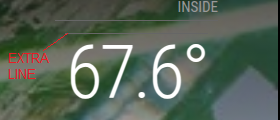
      Now, it just displays an extra line above the temp reading. Is there a way to, let’s say, zero out or cancel that field altogether? Is there perhaps a word I could type in between the quotes like Null or Void?

      Here is a screen grab from my mirror;
      20250630_20h22m06s_grim.png

      Thanks again,
      Brian

      posted in Troubleshooting
      B
      briantogo
    • RE: MMM-temp-ds18b20 disable second sensor

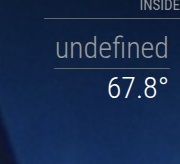
      Thanks Sam, that did remove the second sensor, but there is still undefined section above the temp to get rid of, as shown in the attachment. Any suggestions on that?20250630_10h39m23s_grim.jpg

      posted in Troubleshooting
      B
      briantogo
    • MMM-temp-ds18b20 disable second sensor

      I am using MMM-temp-ds18b20, but would like to disable the second sensor. I am also trying to get rid of any headers, so only the temperature from the ds18b20 is showing. I’ve looked around the Developers window, hoping to find a way to hide everything but the one temp, and couldn’t find anything there. I’ve adjusted the config.js entry to show this;

      {
             module: 'MMM-temp-ds18b20',
             position: 'top_right',
             config: {
                  refreshInterval: 10, // in seconds
                  displayMode: 'x-stack',
                  sensors:[
                      {
                          id: "28-021502d77aff",
                      },
                      {
                      }
                  ]
              }
          },
      

      Any suggestions?
      Thanks,
      Brian

      posted in Troubleshooting
      B
      briantogo
    • RE: DS18b20 issues

      I used a work through from Sam called “module not found error loading module in MagicMirror” dated Oct. 22/ 2021

      posted in Troubleshooting
      B
      briantogo
    • RE: DS18b20 issues

      OK, got MMM-temp-ds18b20 working, now I just have to figure the syntax needed to remove the second sensor.

      posted in Troubleshooting
      B
      briantogo
    • DS18b20 issues

      I would like to display the temp from my DS18b20 sensor, but am having issues. I tried the following two modules: MMM-Temperature & MMM-temp-ds18b20. Both have failed on my RPi 5 running latest OS. I fear the read me’s for these modules are outdated. What’s the latest and greatest module to use? Has anyone had recent success in getting readings from this device to display on their MM’s?

      posted in Troubleshooting
      B
      briantogo
    • RE: MMM-OpenWeatherForecast bigger fonts and icons

      Thanks Sam, can I just copy all the MMM-OpenWeatherForecast.css contents to custom.css and increase size numbers and test? Or any other suggestions?

      posted in Troubleshooting
      B
      briantogo
    • RE: MMM-RAIN-MAP Zoom not working

      That worked! Thanks for the help!

      posted in Utilities
      B
      briantogo
    • RE: I am using the default clock module in analog mode. Is there a way to enlarge the date up top, and change the thickness of the clock hands?

      Finally got it Sam, thanks for the help

      posted in Troubleshooting
      B
      briantogo
    • MMM-OpenWeatherForecast bigger fonts and icons

      Greetings,
      I am using MagicMirror in my man cave, 20 feet away from where we sit to watch movies. Other than the outside temp, all other fonts and icons are too small to read. How can I enlargen that? I’ve included the entry from my config.js;

      {
          module: "MMM-OpenWeatherForecast",
          position: "top_left",
          header: "Forecast",
          config: {
            apikey: "xxxxxxx", //only string here
            latitude: 42.213206,            //number works here
            longitude: "-82.898381",          //so does a string
            units: "imperial"
          }
        },
      

      Thanks,
      Brian

      posted in Troubleshooting
      B
      briantogo
    • MMM-RAIN-MAP Zoom not working

      Hi. I am unable to zoom into my property even after changing my defaultZoomLevel to 20. I have included part of the config.js file;

      {
       module: "MMM-RAIN-MAP",
       position: "bottom_left",
       config: {
        animationSpeedMs: 400,
        colorScheme: 20,
        colorizeTime: true,
        defaultZoomLevel: 20,
        displayTime: false,
        displayTimeline: false,
        displayClockSymbol: false,
        displayHoursBeforeRain: -1,
        extraDelayLastFrameMs: 1000,
        extraDelayCurrentFrameMs: 3000,
        invertColors: false,
        markers: [
         { lat: 42.2132, lng: -82.8983, color: "red" },
         ],
       mapPositions: [
         { lat: 42.2132, lng: -82.8983, zoom: 8, loops: 1 },
         { lat: 42.2132, lng: -82.8983, zoom: 8, loops: 2 },
         { lat: 42.2132, lng: -82.8983, zoom: 8, loops: 1 },
         { lat: 42.2132, lng: -82.8983, zoom: 8, loops: 2 },
         { lat: 42.2132, lng: -82.8983, zoom: 8, loops: 2 },
        ],
        mapUrl: "https://a.tile.openstreetmap.de/{z}/{x}/{y}.png",
        mapHeight: "420px", // must be a pixel value (no percent)
        mapWidth: "500px", // must be a pixel value (no percent)
        maxHistoryFrames: -1,
        maxForecastFrames: -1,
        substitudeModules: [],
        updateIntervalInSeconds: 300,
       }
      },
      

      Thanks,
      Brian

      posted in Utilities
      B
      briantogo
    • RE: I am using the default clock module in analog mode. Is there a way to enlarge the date up top, and change the thickness of the clock hands?

      Hi Sam, I loaded my new RPi5 with 16 GB’s ram, and boy does it fly!

      So getting back to issue, I tried changing the clock hands in clock_styles.css. I changed the hour hand to 2 and changed the minute hand to 20, and could not tell the difference.

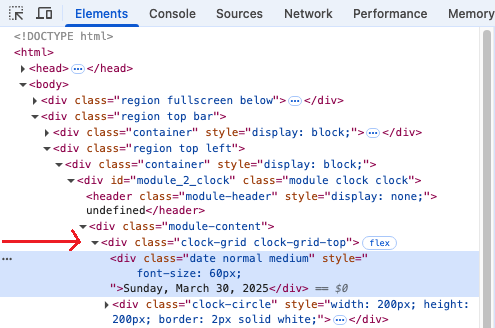
      Also, I could not change the text size of the date above the analog clock. When I use the developer mode, I cannot expand

      When I click the drop down arrow, it briefly expands then contracts again.

      Any suggestions please?

      Thanks,
      Brian!

      51770e03-baa3-45d2-8111-9e6fd5bcb14e-image.png

      posted in Troubleshooting
      B
      briantogo
    • RE: I am using the default clock module in analog mode. Is there a way to enlarge the date up top, and change the thickness of the clock hands?

      @sdetweil
      OK, so I get all this Sam, thanks for the help, but now I have a new issue. I’m using a Pi3, and I don’t think it has the horsepower to run Magic Mirror smoothly. The program frequently locks up, mmm-rain-map is the first to freeze. And now I can’t expand the various lines in the developers window.

      So now I’m thinking of getting a Pi5 with 16 GB’s of RAM. What do you think?

      Thanks,
      Brian

      posted in Troubleshooting
      B
      briantogo
    • 1
    • 2
    • 1 / 2