@sdetweil what do you mean with nom install in their folder?
A New Chapter for MagicMirror: The Community Takes the Lead
Read the statement by Michael Teeuw here.
Read the statement by Michael Teeuw here.
C
Offline
Posts
-
RE: Noob need support for MM2 Update to 2.2.2
-
RE: Noob need support for MM2 Update to 2.2.2
during npm install I got the following info: npm WARN ajv-keywords@2.1.1 requires a peer of ajv@^5.0.0 but none was installed.
How can I check which version is installed?
-
RE: Wheather/ Wunderground not loading
Thanks - then I have to try another module and update MM2…
Hope it works out…
-
Noob need support for MM2 Update to 2.2.2
Hi guys,
based on my issue with the Wunderground API which is still expired I would like to install the DarkSkyForecast weather module which requires version MM 2.2.2 as a minimum. How can I update the system? The target is only the update without reinstalling or configuring my modules?
Thanks Chris -
RE: Wheather/ Wunderground not loading
WU does not supply new API keys for free - I am looking for an opportunity only to change tie PAKi key in teh confis - an leaf the rest as it is. I was happy to have my mirrior confugured as it is… ;-)
-
RE: Wheather/ Wunderground not loading
Thanks for the info - how can I implement another key in the module? Do I have to install a new weather module or is Wunderground working with another API key?
-
Wheather/ Wunderground not loading
Hi guys,
after a while of operation (https://forum.magicmirror.builders/topic/6101/my-1st-mm-project-as-a-noob-1-2m-x-0-6m-with-22-display?page=1) my wheather is not loading anymore on my mirror.
Sometimes I had to rebbot the mirror several times to get it started - now the wheater module is not loading anymore? Any hints for a noob to check?
Config:
{module: ‘MMM-WunderGround’,
position: ‘top_right’,
config: {
apikey: ‘xxxxxxxxxxxx’,
pws: ‘xxxxxxxxxxxxx’,hourly: ‘1’,
fctext: ‘1’,
fcdaycount: “4”,
fcdaystart: “0”,
hourlyinterval: “3”,
hourlycount: “2”,
alerttime: 10000,
alerttruncatestring: “english:”,
roundTmpDecs: 1,
coloricon: true,
daily:1,
iconset: “colourful”,
UseCardinals: 0,
layout: “horizontal”,
debug: 1,
sysstat: 0
}
With the command npm start dev I see following error:
{
“response”: {
“version”:“0.1”,
“termsofService”:“http://www.wunderground.com/weather/api/d/terms.html”,
“features”: {
}
,
“error”: {
“type”: “invalidkey”
,“description”: “this key is not valid due to exceeding rate plan”
}
}
}MMM-WunderGround.js:821 Uncaught TypeError: Cannot read property ‘estimated’ of undefined
at Class.processWeather (MMM-WunderGround.js:821)
at Class.socketNotificationReceived (MMM-WunderGround.js:1249)
at module.js:183
at r. (socketclient.js:25)
at r.emit (index.js:133)
at r.onevent (socket.js:270)
at r.MMSocket.self.socket.onevent (socketclient.js:19)
at r.onpacket (socket.js:228)
at r. (index.js:21)
at r.emit (index.js:133)Any ideas?
Thanks, Chris -
RE: My 1st MM Project as a noob.... 1,2m x 0,6m with 22" display
The mentioned temperature was to high. I changed the PWS now and everything is fine…
-
RE: My 1st MM Project as a noob.... 1,2m x 0,6m with 22" display
I ordered the controller via ebay. Only type your display information (in my case LTM220MT05) and you will find a lot of offers (e.g. https://www.ebay.com/sch/i.html?_from=R40&_trksid=p4712.m570.l1313.TR0.TRC0.H0.XLTM220MT05.TRS0&_nkw=LTM220MT05&_sacat=0 )
… I think you can also order via alibaba.com. -
RE: My 1st MM Project as a noob.... 1,2m x 0,6m with 22" display
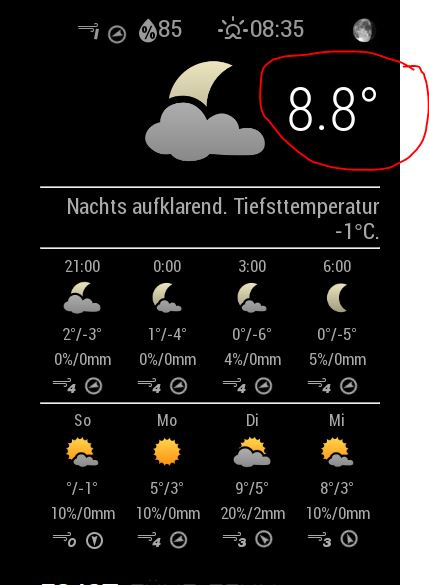
Here is my config for the wunderground weather:
{
    module: 'MMM-WunderGround',
    position: 'top_right',
    config: {
        apikey: 'xxxxxxxxxxxxxxxxxxxxx',
        pws: 'pws:xxxxxxxxxxx18',
        hourly: '1',
        fctext: '1',
        fcdaycount: "4",
        fcdaystart: "0",
        hourlyinterval: "3",
        hourlycount: "2",
        alerttime: 10000,
        alerttruncatestring: "english:",
	roundTmpDecs: 1,
	coloricon: true,
	daily:1,
	iconset: "colourful",
	UseCardinals: 0,
	layout: "horizontal",
	debug: 1,
	sysstat: 0
    }
But maybe you know what temperature is shown in the top (see pic) or how can I delete this - seems to be a wrong number…