sounds like a good plan :)
edit:
i also made changes to the scripts so now u were able to end them via “ctrl+c”.
Don’t know if i did everything correct but it works here. :)
I am just electronics technician and no programer ^^
 C
Offline
C
Offline
sounds like a good plan :)
edit:
i also made changes to the scripts so now u were able to end them via “ctrl+c”.
Don’t know if i did everything correct but it works here. :)
I am just electronics technician and no programer ^^
Thats how i tested and it works like a charm. I just set up a fresh raspbian stretch Desktop.
There was no need to install wiring-pi! the scripts just ran “out of the box”.
PIR: https://www.amazon.de/Aukru-HC-SR501-Menschliche-Pyroelektrizität-Bewegungssensor/dp/B00R2U8LLG
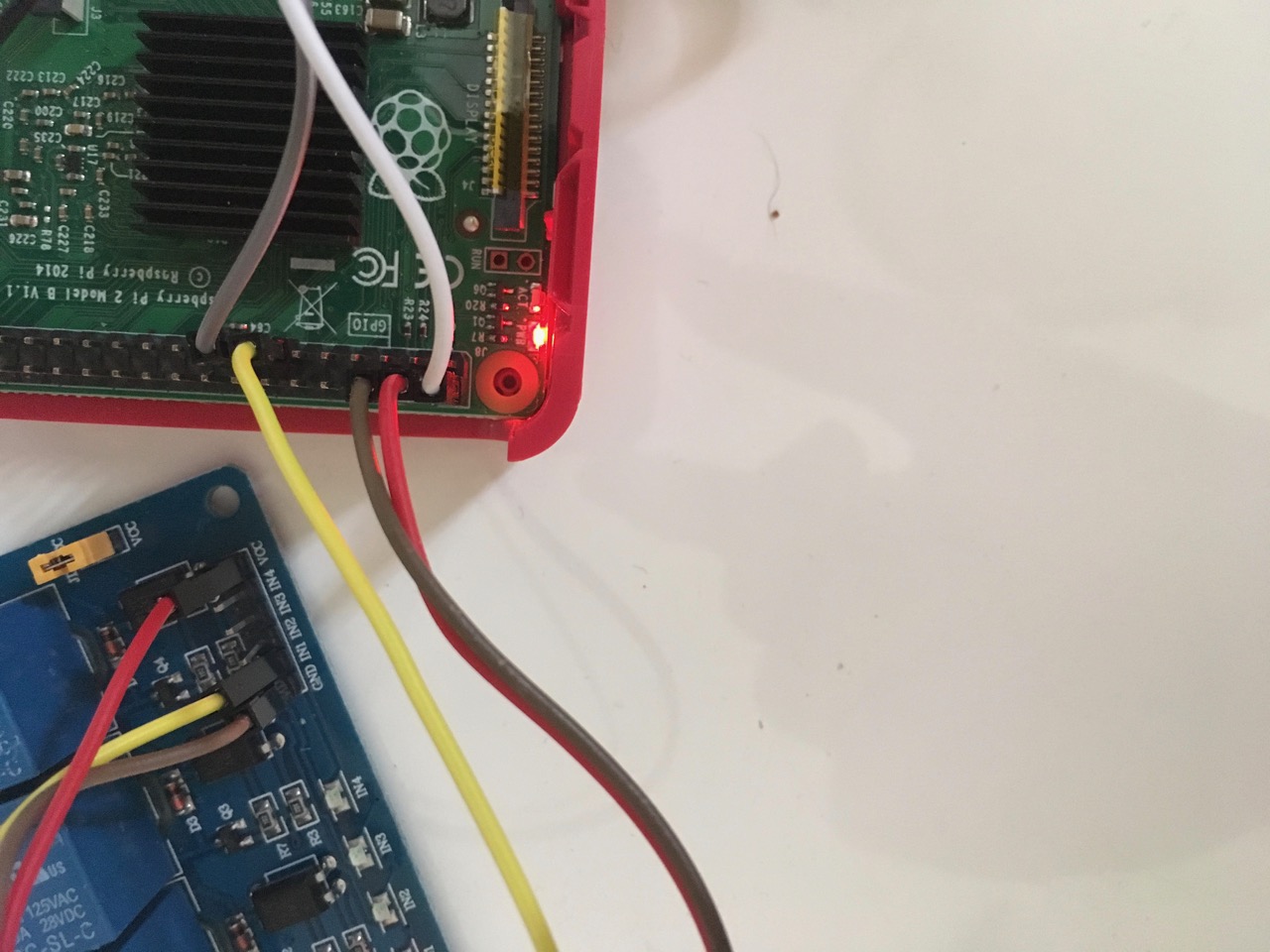
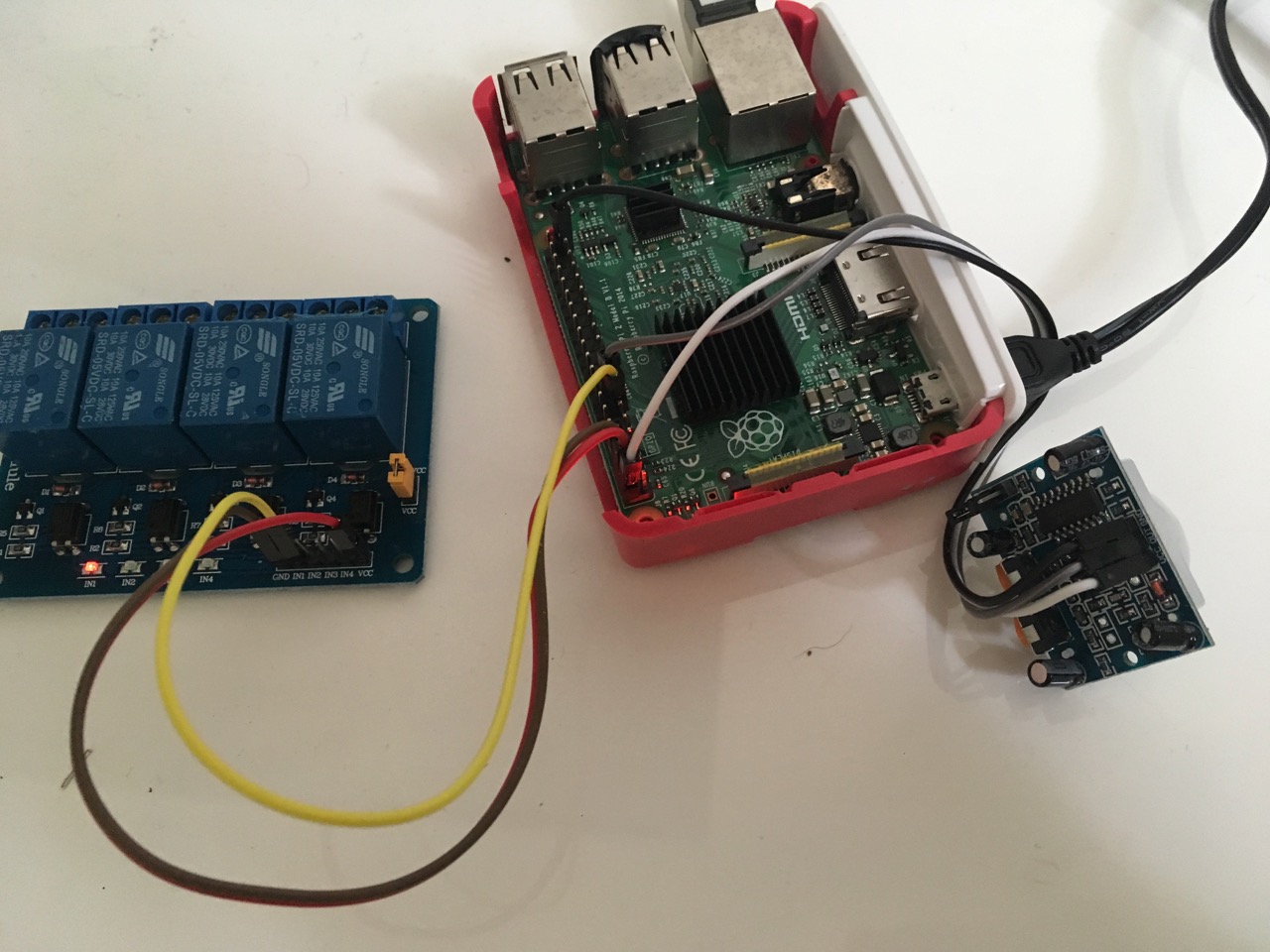
I am sorry bro, but u did it wrong :(
U need to connect the relay with the 5v pin! Look at my tutorial at around Point 5. There is a picture how to connect. Just leave the button away
Relay                        Raspberry
+                            Pin 2 or 4 (5V)
-                            Pin 6 or any other GND (GND)
in                           PIN 13 (GPIO 27)
the wifi on the RPi 3 is not the best. So i installed an automatically wifi_rebooter here. U could try that as well: http://alexba.in/blog/2015/01/14/automatically-reconnecting-wifi-on-a-raspberrypi/
in my case my Pi pings my router address every 3 minutes and when it cannot reach it, it reboots it’s wifi itself.
For your other problem u could try “nmon”.
sudo apt-get install nmon
start it by simply typing nmon
when it starts u can type letters to choose what u want it to show. with “t, l, m, c” it will show u “top processes”, “long therm CPU usage”, “memory usage” and “actual CPU usage”
that is nice to know… So wiring-pi installs an old version?! Than i need to update my tutorial ^^Thanks mate
And how do you connect the relay? What relay do u use? is it active low or active high? U can try to connect a transistor or an pull up/down resistor to it, so that should disable the trigger from it. If u want to try i can send an image how to connect. It can also be, that your Power supply of the RPi is to small…
I am looking for a far field mic, too.
I just googled a little bit and this one should be very good: https://www.seeedstudio.com/ReSpeaker-Mic-Array-Far-field-w%2F-7-PDM-Microphones-p-2719.html
It detects your voice from 360° and the review are good as well. Maybe its also possible to install it on top or under your mirror so it will be hidden. Unfortunately its a little bit expensive.
I also heard, that the PS3 eye camera got a far field mic build in and it works out of the box on a raspberry: https://www.amazon.de/Sony-9600459-PLAYSTATION-Eye/dp/B000W3YQ1Y
In some cases it could be, that USB mic’s got a little more latency…
Anyhow, i would appreciate to hear what mic u buy and maybe u can give a little review ^^
In my opinion the most user friendly way is a PIR sensor ^^
Or u just install a button :)
@MadScientist
sorry, did a mistake. I edited my post above. just edit the *.sh files.
@MadScientist
Alright…
Because your relay turns on i think you did everything right. Probably there is a problem with your Module installation… but thats just a guess. Maybe u didn’t give the module the rights to turn on gpio’s?
sudo usermod -a -G gpio pi (the „pi“ at the end stands for your username)
If u did that and it doesn’t work at all you can try to do it with an external script. Follow these steps:
cd
nano monitor_on.sh
put in this:
gpio -g mode 27 out
sleep 0.2
gpio -g write 27 1
save with “ctrl+x” and “y”
nano monitor_off.sh
put in this:
gpio -g mode 27 out
sleep 0.2
gpio -g write 27 0
save with “ctrl+x” and “y”
chmod +x monitor_on.sh (to make it executable)
chmod +x monitor_off.sh
nano pir.py
put in this:
#!/usr/bin/env python

import sys
import time
import RPi.GPIO as io
import subprocess

io.setmode(io.BCM)
SHUTOFF_DELAY = 120 # in seconds, how long the monitor will be on until next button press or PIR detection
PIR_PIN = 22       # 15 on the board (this needn't to be a PIR. Can be a button also)
LED_PIN = 16      # optional

def main():
    io.setup(PIR_PIN, io.IN)
    io.setup(LED_PIN, io.OUT)
    turned_off = False
    last_motion_time = time.time()

    while True:
        if io.input(PIR_PIN):
            last_motion_time = time.time()
            io.output(LED_PIN, io.LOW)
            print ".",
            sys.stdout.flush()
            if turned_off:
                turned_off = False
                turn_on()
        else:
            if not turned_off and time.time() > (last_motion_time +
                                                 SHUTOFF_DELAY):
                turned_off = True
                turn_off()
            if not turned_off and time.time() > (last_motion_time + 1):
                io.output(LED_PIN, io.HIGH)
        time.sleep(.1)

def turn_on():
	subprocess.call("sh /home/pi/monitor_on.sh", shell=True)

def turn_off():
	subprocess.call("sh /home/pi/monitor_off.sh", shell=True)

if __name__ == '__main__':
    try:
        main()
    except KeyboardInterrupt:
        io.cleanup()
save with “ctrl+x” and “y”
chmod +x pir.py
You can check if your button works by simply typing python pir.py. Every time u move through the PIR or press the button it will show you several …
End the test with “ctrl+c”
The Shutoff delay in the script defines how long the relay will be turned on after detection through the pir.
If that works u can add the script to the rc.local to start it automatically when booting up.
Ah I see…
I will write u this evening. We will get it working ;)
U could also quick try the script from this tutorial (at point 5). It will be done in 2 minutes ^^
Maybe u missed the connection?
@MadScientist said in {HowTo} turn on/off your monitor (Time based, PIR/Button, App):
Unable to determine hardware version. I see: Hardware : BCM2835
Huh… a quick google search tells, that this could be several causes. Some wrote to update or downgrade the kernel., some wrote to update wiring pi and so on.
So its not a problem of the module at all. I’m sorry but for the first u should try to google.
Maybe start with this: https://www.raspberrypi.org/forums/viewtopic.php?f=28&t=182191
However you should start a new thread if you cannot get to target :(
gpio -g write 27 1 and off with gpio -g write 27 0 ?How about that :D
(don’t take it too seriously)
@richland007 said in Failure of v2.2.0:
expected 50 and got 54
as i can read here a simple npm install in the modules folders should bring u to target :)
no need to shame ;)
i have had this problem, too.
Since i played around with new modules and deleted other modules it doesn’t comes up again.
we discussed that issue already here
I can’t help u, but maybe it really helps if you would uncomment modules step by step (maybe two at the same time) and wait if the error comes up again.
I know, that will take a while, but for me it would be the choice how to solve it.
I have no other idea, i am sorry :(
glad to hear that.
moreover u did a great job with your mirror ;)