MagicMirror Forum
    • Recent
    • Tags
    • Unsolved
    • Solved
    • MagicMirror² Repository
    • Documentation
    • 3rd-Party-Modules
    • Donate
    • Discord
    • Register
    • Login
    1. Home
    2. dazza120
    3. Posts
    A New Chapter for MagicMirror: The Community Takes the Lead
    Read the statement by Michael Teeuw here.
    D
    Offline
    • Profile
    • Following 0
    • Followers 0
    • Topics 27
    • Posts 295
    • Groups 0

    Posts

    Recent Best Controversial
    • RE: Problems with Config.js on Pi4 BlackScreen

      @sdetweil I think i found the problem mmm-nest-status install messes up the MM install, i think other are having simular things with other modules. i installed MMM-SystemStats changed the config file tested it and it was working find, i installed mmm-nest-status and didn’t alter the config for that so that should have just ment it wouldn’t run that module. i have attached the code below does this shead any light?

      pi@raspberrypi:~ $ cd MagicMirror/modules
      pi@raspberrypi:~/MagicMirror/modules $ git clone https://github.com/BenRoe/MMM-SystemStats
      Cloning into 'MMM-SystemStats'...
      remote: Enumerating objects: 22, done.
      remote: Counting objects: 100% (22/22), done.
      remote: Compressing objects: 100% (14/14), done.
      remote: Total 231 (delta 10), reused 16 (delta 8), pack-reused 209
      Receiving objects: 100% (231/231), 88.08 KiB | 578.00 KiB/s, done.
      Resolving deltas: 100% (122/122), done.
      pi@raspberrypi:~/MagicMirror/modules $ cd MMM-SystemStats
      pi@raspberrypi:~/MagicMirror/modules/MMM-SystemStats $ npm install
      npm notice created a lockfile as package-lock.json. You should commit this file.
      added 1 package from 1 contributor and audited 1 package in 1.265s
      found 0 vulnerabilities
      
      pi@raspberrypi:~/MagicMirror/modules/MMM-SystemStats $ cd
      pi@raspberrypi:~ $ cd MagicMirror
      pi@raspberrypi:~/MagicMirror $ npm  run config:check
      
      > magicmirror@2.8.0 config:check /home/pi/MagicMirror
      > node tests/configs/check_config.js
      
      Checking file...  /home/pi/MagicMirror/config/config.js
      Your configuration file doesn't contain syntax errors :)
      pi@raspberrypi:~/MagicMirror $ cd modules
      pi@raspberrypi:~/MagicMirror/modules $ git clone https://github.com/michael5r/mmm-nest-status.git
      Cloning into 'mmm-nest-status'...
      remote: Enumerating objects: 135, done.
      remote: Total 135 (delta 0), reused 0 (delta 0), pack-reused 135
      Receiving objects: 100% (135/135), 65.27 KiB | 718.00 KiB/s, done.
      Resolving deltas: 100% (77/77), done.
      pi@raspberrypi:~/MagicMirror/modules $ cd mmm-nest-status
      pi@raspberrypi:~/MagicMirror/modules/mmm-nest-status $ npm install
      npm WARN deprecated undefined@0.1.0: this package has been deprecated
      npm WARN saveError ENOENT: no such file or directory, open '/home/pi/MagicMirror/modules/package.json'
      npm notice created a lockfile as package-lock.json. You should commit this file.
      npm WARN enoent ENOENT: no such file or directory, open '/home/pi/MagicMirror/modules/package.json'
      npm WARN modules No description
      npm WARN modules No repository field.
      npm WARN modules No README data
      npm WARN modules No license field.
      
      removed 1 package in 1.141s
      found 0 vulnerabilities
      
      pi@raspberrypi:~/MagicMirror/modules/mmm-nest-status $ cd
      pi@raspberrypi:~ $ pm2 restart MagicMirror
      Use --update-env to update environment variables
      [PM2] Applying action restartProcessId on app [MagicMirror](ids: 0)
      [PM2] [MagicMirror](0) ✓
      ┌─────────────┬────┬──────┬────────┬───┬─────┬──────────┐
      │ Name        │ id │ mode │ status │ ↺ │ cpu │ memory   │
      ├─────────────┼────┼──────┼────────┼───┼─────┼──────────┤
      │ MagicMirror │ 0  │ fork │ online │ 2 │ 0%  │ 2.5 MB   │
      └─────────────┴────┴──────┴────────┴───┴─────┴──────────┘
       Use `pm2 show <id|name>` to get more details about an app
      pi@raspberrypi:~ $ npm  run config:check
      npm ERR! path /home/pi/package.json
      npm ERR! code ENOENT
      npm ERR! errno -2
      npm ERR! syscall open
      npm ERR! enoent ENOENT: no such file or directory, open '/home/pi/package.json'
      npm ERR! enoent This is related to npm not being able to find a file.
      npm ERR! enoent 
      
      npm ERR! A complete log of this run can be found in:
      npm ERR!     /home/pi/.npm/_logs/2019-07-13T20_08_21_703Z-debug.log
      pi@raspberrypi:~ $ 


      Complete log from .npm folder

      0 info it worked if it ends with ok
      1 verbose cli [ '/usr/bin/node', '/usr/local/bin/npm', 'run', 'config:check' ]
      2 info using npm@6.10.1
      3 info using node@v10.15.2
      4 verbose config Skipping project config: /home/pi/.npmrc. (matches userconfig)
      5 verbose stack Error: ENOENT: no such file or directory, open '/home/pi/package.json'
      6 verbose cwd /home/pi
      7 verbose Linux 4.19.57-v7l+
      8 verbose argv "/usr/bin/node" "/usr/local/bin/npm" "run" "config:check"
      9 verbose node v10.15.2
      10 verbose npm  v6.10.1
      11 error path /home/pi/package.json
      12 error code ENOENT
      13 error errno -2
      14 error syscall open
      15 error enoent ENOENT: no such file or directory, open '/home/pi/package.json'
      16 error enoent This is related to npm not being able to find a file.
      17 verbose exit [ -2, true ]
      
      
      posted in Troubleshooting
      D
      dazza120
    • RE: Problems with Config.js on Pi4 BlackScreen

      @sdetweil yep im cd-ing into the module folder and then running npm install, ill start over again and go through it slowly but ive probably built the mirror 20 from scratch no issues before with config but ive altered it too much now thinking that was it so its from scratch now but copying back the old config should have sorted any of those issues, does your installer work?

      posted in Troubleshooting
      D
      dazza120
    • RE: Problems with Config.js on Pi4 BlackScreen

      @sdetweil still nothing in the dev console mate, i can start the whole build over again but everytime i go to change the config it doesnt work

      posted in Troubleshooting
      D
      dazza120
    • RE: Problems with Config.js on Pi4 BlackScreen

      @sdetweil pm2 start or the dev thing?

      posted in Troubleshooting
      D
      dazza120
    • RE: Problems with Config.js on Pi4 BlackScreen

      @sdetweil changed it what now mate

      posted in Troubleshooting
      D
      dazza120
    • RE: Problems with Config.js on Pi4 BlackScreen

      @sdetweil no i mearly placed it in the magicmirror folder path. its set to Cd /MagicMirror folder already and pm2 -help isnt displaying a list of pm2 commands

      posted in Troubleshooting
      D
      dazza120
    • RE: Problems with Config.js on Pi4 BlackScreen

      @sdetweil ok done, what to do now. ive just copied the installer one and overwrite the magic mirror path one

      posted in Troubleshooting
      D
      dazza120
    • RE: Problems with Config.js on Pi4 BlackScreen

      @sdetweil i unhide my files and one is in the location i said with no text and the other is in installer as you said with text

      posted in Troubleshooting
      D
      dazza120
    • RE: Problems with Config.js on Pi4 BlackScreen

      @sdetweil /home/pi/MagicMirror The mm.sh should it contain text?

      posted in Troubleshooting
      D
      dazza120
    • RE: Problems with Config.js on Pi4 BlackScreen

      @sdetweil its in that path already but it is completely empty. should it contain text?

      posted in Troubleshooting
      D
      dazza120
    • RE: Problems with Config.js on Pi4 BlackScreen

      @sdetweil hi im getting the dev window then into console bet there is nothing at all in there just > So what do i have to run in the dev window is it cd MagicMirrior then pm2 start MagicMirrior? im lost just work dam you mirror lol

      posted in Troubleshooting
      D
      dazza120
    • RE: Problems with Config.js on Pi4 BlackScreen

      Could this be the problem? Never been any issues with the pi 3 on Rasbian, and thank you sir offering to help much appreciated

      npm ERR! path /home/pi/package.json
      npm ERR! code ENOENT
      npm ERR! errno -2
      npm ERR! syscall open
      npm ERR! enoent ENOENT: no such file or directory, open '/home/pi/package.json'
      npm ERR! enoent This is related to npm not being able to find a file.
      npm ERR! enoent 
      
      npm ERR! A complete log of this run can be found in:
      npm ERR!     /home/pi/.npm/_logs/2019-07-13T16_51_46_205Z-debug.log
      
      
      posted in Troubleshooting
      D
      dazza120
    • Problems with Config.js on Pi4 BlackScreen

      Hi there seems to be a problem with the config.js on the Pi 4 running MagicMirror 2.8.0 this a clean copy of both Buster and the MagicMirror. when i edit the Config file it Black Screens after Pm2 Restart MagicMirror, i can go back into config and Undo the text that i put in but it still black screens after restart, i have also copied over the sample config to replace everything in the config file and then pm2 restart MagicMirror still get a black screen. When ever i alter the config from stock it stops working. Now my saved Config file that was working on 2.7.1 is now toast where I’ve been looking for answers there it appears it is MagicMirror’s fault or Buster implementation of MM. Anyone still up and running on Buster and the New 2.8.0 MM. So kind of confirmed i saved the original config file and overwrite the altered one and its just blackscreen on restart, only one package is installed and that is mmm-nest-status and that isn’t in the config file so it shouldn’t present any issues but i think the new MM isn’t playing nice with Buster on the Pi4

      posted in Troubleshooting
      D
      dazza120
    • config.js help

      Guys and Girls can you help my config has gone to Well you know, can you help me sort this as i just cant see whats up i have removed the code for all the keys so its just empty “” thanks in advance

      /* Magic Mirror Config Sample
       *
       * By Michael Teeuw http://michaelteeuw.nl
       * MIT Licensed.
       *
       * For more information how you can configurate this file
       * See https://github.com/MichMich/MagicMirror#configuration
       *
       */
      
      var config = {
      	address: "localhost", // Address to listen on, can be:
      	                      // - "localhost", "127.0.0.1", "::1" to listen on loopback interface
      	                      // - another specific IPv4/6 to listen on a specific interface
      	                      // - "", "0.0.0.0", "::" to listen on any interface
      	                      // Default, when address config is left out, is "localhost"
      	port: 8080,
      	ipWhitelist: ["127.0.0.1", "::ffff:127.0.0.1", "::1"], // Set [] to allow all IP addresses
      	                                                       // or add a specific IPv4 of 192.168.1.5 :
      	                                                       // ["127.0.0.1", "::ffff:127.0.0.1", "::1", "::ffff:192.168.1.5"],
      	                                                       // or IPv4 range of 192.168.3.0 --> 192.168.3.15 use CIDR format :
      	                                                       // ["127.0.0.1", "::ffff:127.0.0.1", "::1", "::ffff:192.168.3.0/28"],
      
      	language: "en",
      	timeFormat: 24,
      	units: "metric",
      
      	modules: [
      		{
                              module: "MMM-Remote-Control-Repository",
                      }
                      },
                      {
                              module: "alert",
                      }
                      },
                      {
                              module: "MMM-Remote-Control",
                              position: "center",
                      }
                      },
                      {
                              module: "clock",
                              position: "top_left"
                      }
                      },
                      {
                             module: "mmm-hue-lights",
                             position: "bottom_right",
                             config: {
                             bridgeIp: "192.168.1.23",
                             user: "",
                             updateInterval: "1000",
                             hideOff: "false",
                             displayMode: "groups",
                             displayType: "list",
                             minimalList: "true",
                             coloredList: "true",
                             hideFilter: ["home-away"],
                             alignment: "right",
                     }
                     },
                     {
                            module: "compliments",
                            position: "lower_third",
                     },
                     {
                            module: "MMM-NOAA3",
                            position: "top_right",
                            config: {
                            provider: "darksky",
                            apiKey: "",
                            airKey: "", 
                            css: "NOAA3",
                            updateInterval: 15,
                            userlat: "51.806460",
                            userlon: "-0.778230"
                    }
                    },  
                    {
                           module: "calendar",
                           header: "Calendar",
                           position: "top_left",
                           config: {
                           timeFormat:"absolute",
                           titleReplace: {"United Kingdom:" : ""},
                           urgency: 0,
                           getRelative: 6,
                           fullDayEventDateFormat: "D MMMM",
                           dateFormat: "D MMMM - H:mm:ss",
                           fetchInterval: 4000000,
                           colored: true,
                           coloredSymbolOnly: true,
                           maximumEntries: 9,
                           showEnd: false,
                           Calendars: [
                   {
                           symbol: "calendar-check-o ",
                           url: "https://www.officeholidays.com/ics/ics_country_code.php?iso=GB",
                   }
                   },
                   {
                          module: "mmm-nest-status",
                          position: "bottom_left", // pick whichever position you want
                          config: {
                          token: "",
                          displayMode: "all",
                          displayType: "list",
                          thermostatsToShow: "all",
                          units: "metric",
                          updateInterval: "50000",
                          thermostatSize: "small",
                          alignment: "left",
                   // ... and whatever else configuration options you want to use
                  }
                  },
                  {
                          module: "MMM-SystemStats",
                          position: "Top_Center", 
                          updateInterval: 5000,
                          align: "right",
                          units: "metric",
                          label: "text"
                  }
                  },
                  {
                          module: "newsfeed",
                          position: "bottom_bar",
                          config: {
                          feeds: [
                  {
                          title: "BBC NEWS UK",
                          url: "http://feeds.bbci.co.uk/news/uk/rss.xml"
                   }
                   ],
                         showSourceTitle: true,
                         showPublishDate: true
                  }
              },
          ]
      };
      /*************** DO NOT EDIT THE LINE BELOW ***************/
      if (typeof module !== "undefined") {module.exports = config;}
      
      
      posted in Troubleshooting
      D
      dazza120
    • RE: MM with multiple monitors - is it doable?

      @kroket said in MM with multiple monitors - is it doable?:

      Hello guys…

      I have a question. Did anyone try to build core MM on a RPI or ivn windows and then connect multiple monitors to it, so that you would have a small MM in every room, so that you could operate with it from all over the house?

      Or you can use the new Pi4 to display two monitor of the same thing and just extend the micro HDMI cable

      posted in General Discussion
      D
      dazza120
    • RE: Raspberry Pi 4 Released !

      @mumblebaj said in Raspberry Pi 4 Released !:

      @dazza120 I assume we dont need all that cooling power just to run the mirror? :rolling_on_the_floor_laughing:

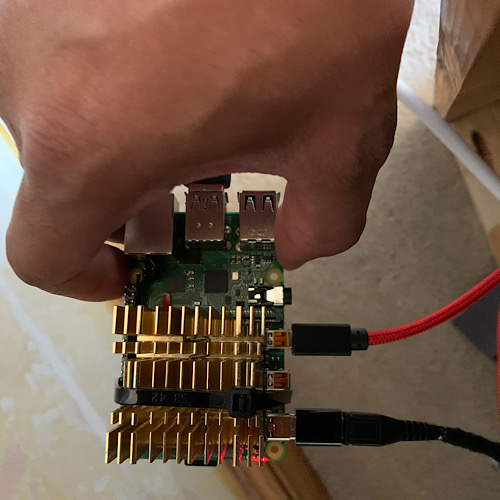
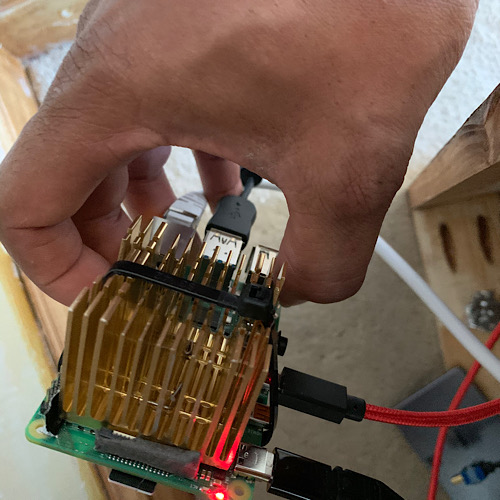
      😂 no but the Pi 4 is a really hot 🥵 CPU where cooling is most defo needed with heat sink it’s 55 at rest, others have reported it at 66 at rest and in a case at 77 heatsink is a must on this one. The second heatsink is more in line and I was able to bed it fully down with one thermal pad. Installing an update ie firmware took over 5mins on full gig and using 60 to 70% CPU that’s a lot of heat seen as my active cooling solution is only active with the TV on for the most part it will be passive, in the UK at the mo we are having a good summer so it’s hot room temp 25 so bigger the better 😝

      posted in Hardware
      D
      dazza120
    • RE: new script for mirror release upgrades

      Thanks for your hard work Sir 🤙🏾

      posted in General Discussion
      D
      dazza120
    • RE: Raspberry Pi 4 Released !

      @Cr4z33 said in Raspberry Pi 4 Released !:

      @dazza120 oh alright that’s the same solution I used with another board. 👍🏼

      @Cr4z33 new heat sink now an it sits flush with one thermal pad temp is 78 after two tests back to back better contact with CPU and less thermal transfer material.

      1_1562344703675_2163EFDF-F069-41AD-BD20-2AEB1DCCE781.jpeg 0_1562344703675_06FD03DB-B390-4522-A0C6-08D566722F1E.jpeg

      posted in Hardware
      D
      dazza120
    • RE: Raspberry Pi 4 Released !

      @Cr4z33 said in Raspberry Pi 4 Released !:

      @dazza120 oh alright that’s the same solution I used with another board. 👍🏼

      PS you will have to grid down the heat sink by the hdmi cable and the wings to allow it to fully seat the heat sink

      posted in Hardware
      D
      dazza120
    • RE: Raspberry Pi 4 Released !

      @Cr4z33 said in Raspberry Pi 4 Released !:

      @dazza120 and how did you fix the heatsink to the board?

      Thermal tape and a cable tie around the board and heat sink as long as the pi isn’t viewable then it doesn’t really matter it is a lot taller with the heat sink though. But at least if you really wanted to you could run this passively, I will have a little fan as well but that works when the tv is on so running the mirror in the background would be all of this heat sink no fan

      posted in Hardware
      D
      dazza120
    • 1
    • 2
    • 3
    • 4
    • 5
    • 6
    • 14
    • 15
    • 4 / 15