I am using MMM-CalendarExt
D
Offline
A New Chapter for MagicMirror: The Community Takes the Lead
Read the statement by Michael Teeuw here.
Read the statement by Michael Teeuw here.
Posts
-
My kitchen dashboard
This was definitely an interesting project to do. Mounting the monitor to a door was not easy and it didn’t turn out the way I thought it might. I should have used a solid wood door with no panels. With the way it is mounted I still have a spice rack mounted on the other side of the door. As far modules go I am still having problems getting some modules to work(ring door bell, Awesome Alexa to name a couple). Right now I have a copy of my hidden page on a visible page because I am not sure how to unhide it when I want to see it. Thank you for everyone that has taken there time to make these modules. Here are some before and after pics.
https://imgur.com/a/yznz9vO -
MMM-ISS-Live
I have this module working well. The only issue is when the video is playing it tells me that my browser is out of date. What browser is it and how do I update it? Thank you for your help. I hope by the end of next week I will be able to post a picture of my project.
-
RE: MMM-CalendarExt
Turns out there is some type of miscommunication if an event is reoccurring. I deleted those events and just put them in 1 at a time and if worked fine. The times are still in 24 hours instead of 12 but I can live with that.
-
RE: NFL Score Module
Is there a way to have player statistics without using voice, Just have it there full time? If game day scores is on the left side maybe have the stats on the right side?
This is a great module though.
-
RE: write events to Calendar on MM
Thank you, I have already ordered a microphone and speaker and that is the next module I was going to try.
-
RE: write events to Calendar on MM
If it is a Google calendar would using a Google assistant module work?
-
RE: MMM-CalendarExt
Here is the code again in easier to read format:
{ module: 'MMM-CalendarExt', position: "top_bar", config: { system:{ show:['weeks'], redrawInterval:60000, }, views:{ weeks:{ position:'bottom_bar', counts:5, showWeeks:1, weeksTitle: 'weeks', weeksFormat: 'wo', weekdayFormat: 'dd', titleFormat: 'D', OverTitleFormat: 'MMM D', monthTitleFormat:"MMMM", //overflowRolling: 1, //overflowHeight: 80, //overflowDuration: 50, //oneLineEvent: 0, }, }, calendars :[ { //symbol:"calendar-o", styleName: "style6", symbol: 'us@md', url: "/basic.ics" }, { styleName: "style6", symbol: 'us@md', url: "webcal://www.calendarlabs.com/ical-calendar/ics/76/US_Holidays.ics" }, ], } }, -
MMM-CalendarExt
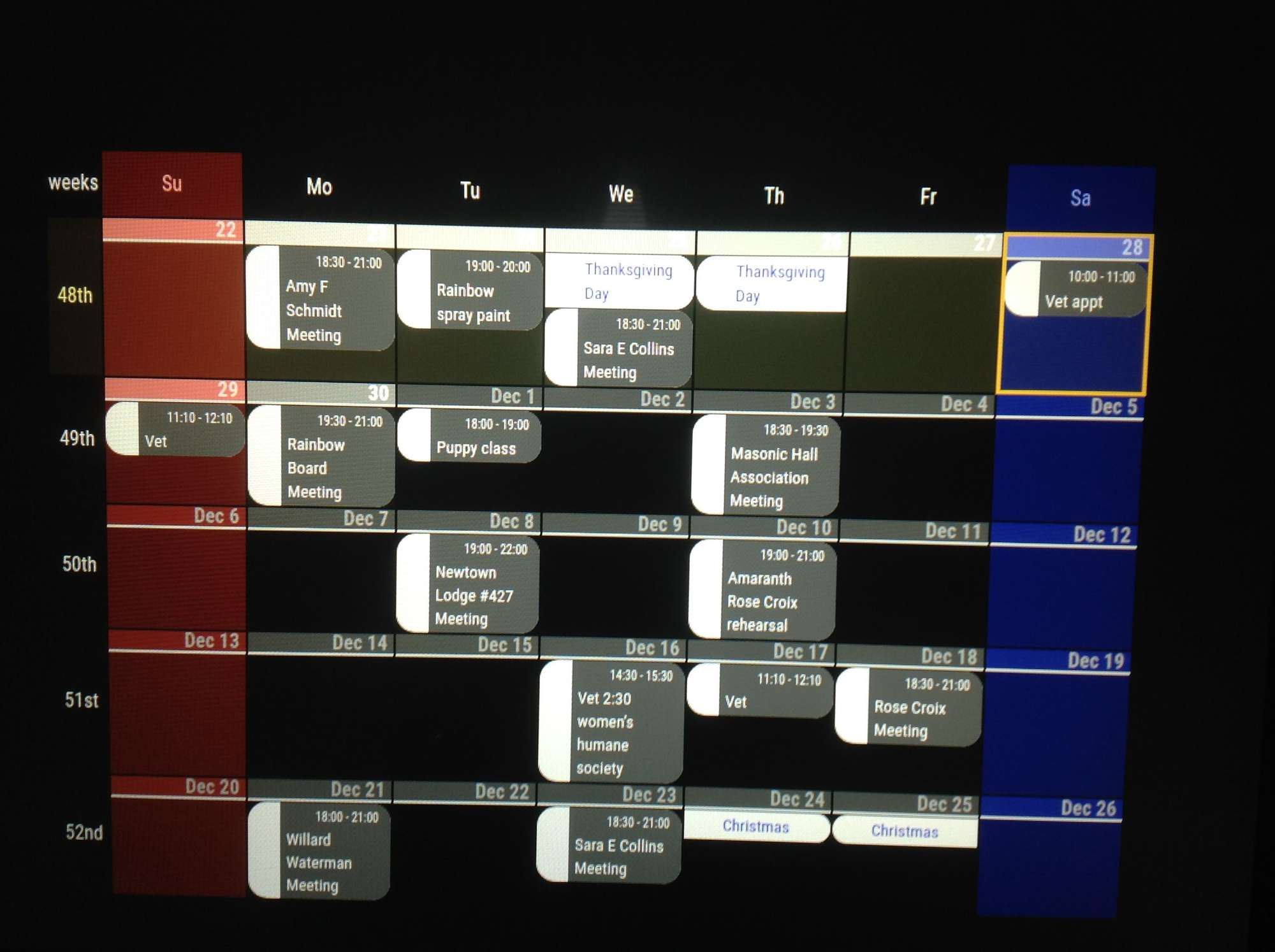
I am new to all this, forgive me if I am missing something easy. I am trying to add the calendar into my Dashboard I am trying to create. I am using 2 calendars, my personal calendar(google) and a US Holidays calendar. On December 1st I have 2 events but one is showing up the day before and on December 9th I have an event that shows up on December 8th and the same for December 11th, It shows up on December the 10th. I am not sure how to fix that, Also you can see the Holidays show up 2 days in a row. Thanksgiving is on Wednesday and Thursday, and Christmas is 2 days. Also on the MMM config(and in Google) i have the time set to 12 hours and in the calendar it displays 24. Does anyone have any ideas on how to fix these problems? Hopefully the picture uploads. Here is my config. I tried somethings and commented them out.
module: ‘MMM-CalendarExt’,
position: “top_bar”,
config: {
system:{
show:[‘weeks’],
redrawInterval:60000,
},
views:{
weeks:{
position:‘bottom_bar’,
counts:5,
showWeeks:1,
weeksTitle: ‘weeks’,
weeksFormat: ‘wo’,
weekdayFormat: ‘dd’,
titleFormat: ‘D’,
OverTitleFormat: ‘MMM D’,
monthTitleFormat:“MMMM”,
//overflowRolling: 1,
//overflowHeight: 80,
//overflowDuration: 50,
//oneLineEvent: 0,}, }, calendars :[ { //symbol:"calendar-o", styleName: "style6", symbol: 'us@md', url: "/basic.ics" }, { styleName: "style6", symbol: 'us@md', url: "webcal://www.calendarlabs.com/ical-calendar/ics/76/US_Holidays.ics" }, ],}
},