@sdetweil Thank you that did the trick. Only issue I see to be running into at the moment is Midori telling me it can’t find the page it is looking for.
F
Offline
A New Chapter for MagicMirror: The Community Takes the Lead
Read the statement by Michael Teeuw here.
Read the statement by Michael Teeuw here.
Posts
-
RE: Raspberry Pi Zero W for Magic Mirror
-
RE: Raspberry Pi Zero W for Magic Mirror
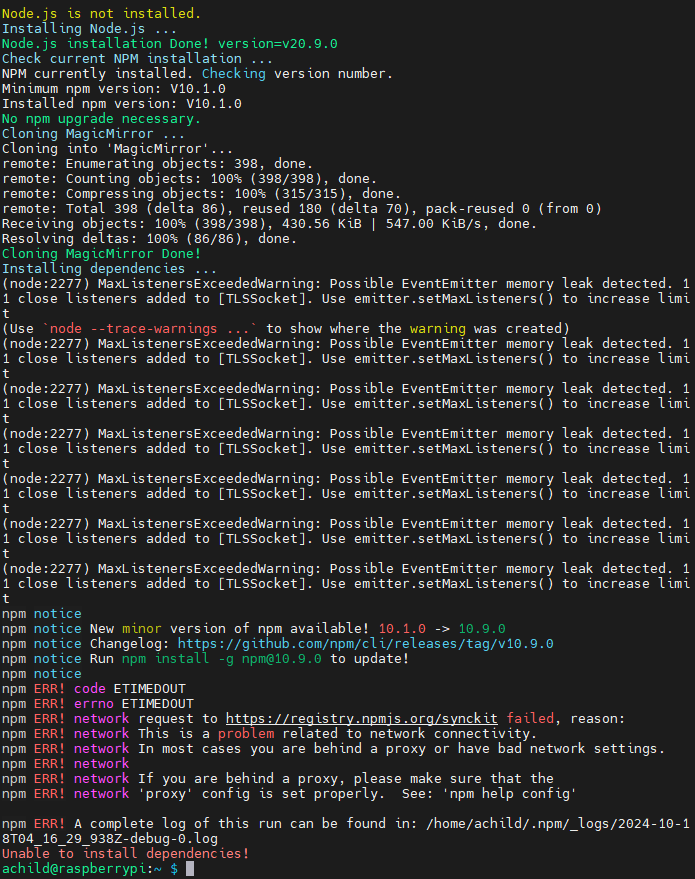
@sdetweil thank you that worked to a point please have a look at the below with the errors I getting:
-
RE: Raspberry Pi Zero W for Magic Mirror
Hello all giving MM a try again on a Rpi zero and have been trying to run the script in this thread but keeping getting the following message
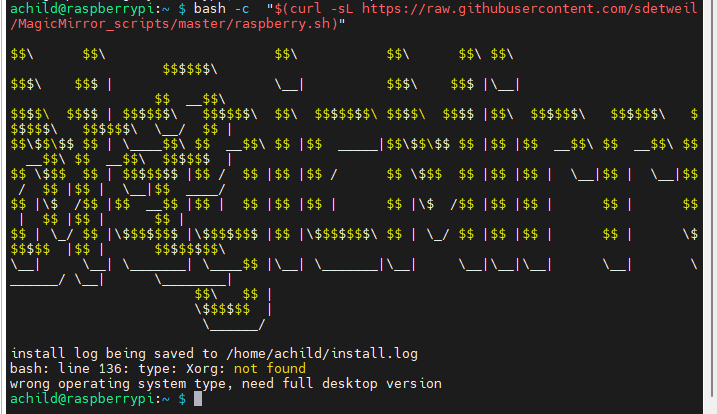
Am I missing something to by pass the Xorg check?
OS
achild@raspberrypi:~ $ cat /etc/os-release
PRETTY_NAME=“Raspbian GNU/Linux 12 (bookworm)”
NAME=“Raspbian GNU/Linux”
VERSION_ID=“12”
VERSION=“12 (bookworm)”
VERSION_CODENAME=bookworm
ID=raspbian
ID_LIKE=debian
HOME_URL=“http://www.raspbian.org/”
SUPPORT_URL=“http://www.raspbian.org/RaspbianForums” -
RE: MMM-voice
Thank you for the link. I’m not sure where I need to add the sudo command. I added it to the dependencies.sh
# exporting paths
echo -e "\e[96m[STEP 4/6] Exporting paths\e[0m"
echo "export LD_LIBRARY_PATH=$LD_LIBRARY_PATH:/usr/local/lib" >> ~/.bashrc
echo "sudo ldconfig"
echo "export PKG_CONFIG_PATH=$PKG_CONFIG_PATH:/usr/local/lib/pkgconfig" >> ~/.bashrc
But I don’t believe that was the correct location. Please advise.
Thank you
-
RE: MMM-voice
@strawberry-3.141
After a reinstall I’m still getting the error. Any additional suggestions? -
RE: MMM-voice
Here is the output from the debug.log:
pocketsphinx_continuous: error while loading shared libraries: libpocketsphinx.so.3: cannot open shared object file: No such file or directoryHere is the output from the error.log:
127127127127127Since it appears that pocketsphinx is having an issue does any have any suggestions on how to correct the problem?
Thank you
-
MMM-voice
Evening everyone,
I just installed MMM-voice and everything appears to have installed correctly. However after starting MM the module shows ERROR next to microphone. Are there logs I can look for or how can I troubleshoot the issue?
Thank you
-
How to display standard calendar
Can anyone enlighten me on how to display a standard 30 day calendar?
-
RE: Recommendations
Sorry for another post can anyone provide example on how to control positioning of the modules? Or is there a module available that can be enabled to show the layouts on screen?
Thanks
-
Recommendations
Hello all,
Looking for help on a good voice module and suggestions on adding the glass/mirror to the frame. Thanks
-
RE: Introduce yourself!
Hello all,
I’m funkdafied a 43 year old newbie to the pi world and found the magic mirror and figured I would give it a try. I’m working on my first one and started with getting the system up, running, and configured the way I want before I build the frame. Looking forward to learning as much as I can.
Regards,
Funkdafied
-
RE: Trying to connect via SSH or VNC
Thanks again I think I might have a good idea what is going on, when I hardwire to the pi I get the correct address and can connect to SSH without any issues (still trying to get VNC working) through mobaXterm. I’m using a LUMA system in the house and I wonder if one of the access points has that as a subnet. To be determined later. Now I can configure remotely thank you everyone for your assistance. Anyone have recommendations on modules to consider and suggestions on two-way mirror or film to use?
-
RE: Trying to connect via SSH or VNC
Thank you everyone. I verified SSH is enabled and running by connecting to localhost. I can also ping my windows machine from the pi but not the other way around. Do I need to add something to my windows machine to access it via SSH? I know I’m missing something simple.
-
RE: Trying to connect via SSH or VNC
Thank you for the link. However I am able to get the system running. I’m hoping to connect via SSH or VNC to configure remotely.
I’ve followed the instructions in this article and still unable to connect.
https://forum.magicmirror.builders/topic/1326/ipwhitelist-howto/2
-
RE: Trying to connect via SSH or VNC
Maybe its a PI issue, I’m getting a 192.168.55.x address from wifi vs a 192.168.0.x address. Did I configure something incorrectly?
-
Trying to connect via SSH or VNC
Hello all,
I’m starting a build and have it setup but have yet to add a case to my build. So I’m trying to play with it and get setup before I start. I’m trying to connect via SSH/VNC but I have not been successful are there any special requirements to get connected?
Thanks in Advance