MagicMirror Forum
    • Recent
    • Tags
    • Unsolved
    • Solved
    • MagicMirror² Repository
    • Documentation
    • 3rd-Party-Modules
    • Donate
    • Discord
    • Register
    • Login
    1. Home
    2. gonzonia
    3. Posts
    A New Chapter for MagicMirror: The Community Takes the Lead
    Read the statement by Michael Teeuw here.
    G Offline
    • Profile
    • Following 0
    • Followers 0
    • Topics 8
    • Posts 138
    • Groups 0

    Posts

    Recent Best Controversial
    • RE: MMM-MealViewer

      @cowboysdude Thanks! I might switch to that. I’ve had to rework it a little because the URL wasn’t getting set except at the first call. I just moved setup for that into the getMenuData and I think it’s all working now. I’ll give it a day to run and see what happens tomorrow before I try messing with it again and update the file on github.

      -updated to fix grammar

      posted in Development
      G
      gonzonia
    • RE: MMM-MealViewer

      @sdetweil Thanks! I’ll make the change and see what happens when it should update mid-day tomorrow.

      posted in Development
      G
      gonzonia
    • RE: MMM-MealViewer

      Okay. I’ve identified the problem. In the code below, everything gets setup in the “start” function. Then it calls getMenuData. That function ends by setting up a timer to call itself but isn’t supplying the object necessary. This means it won’t work. If I add the _this object to pass it causes all sorts of problems.
      I’m not a js expert. I’m sure a way to re-factor this will eventually occur to me, but right now I’m just not seeing it.

      start:  function() {
          Log.log('Starting module: ' + this.name);
      
          // Set up the local values
          var today = moment();
          this.loaded = false;
          this.urls = [];
          this.results = [];
      
          // Uses now are today if before noon and tomorrow as today if after noon
          if (today.hour() >= 12) {
            var todayFormatted = today.add(1, 'day').format('MM-DD-YYYY');
          }
          else {
            var todayFormatted = today.format('MM-DD-YYYY');
          }
      
          // Currently set to only pull one day's data so endDayFormatted = todayFormatted
          //var endDay = today.add(config.showDays, 'days');
          //var endDayFormatted = endDay.format('MM-DD-YYYY');
          var endDayFormatted = todayFormatted;
      
          // Construct the url array for the schools
          for (var i in this.config.schools) {
      			this.urls.push({school: this.config.schools[i], url: 'https://api.mealviewer.com/api/v4/school/' + this.config.schools[i] + '/' + todayFormatted + '/' + endDayFormatted + '/'});
          }
      
          // Trigger the first request
          this.getMenuData(this);
        },
      
        getMenuData: function(_this) {
          // Make the initial request to the helper then set up the timer to perform the updates
          _this.sendSocketNotification('GET-MENU-DATA', _this.urls);
          setTimeout(_this.getMenuData(), _this.config.interval, _this);
        },


      posted in Development
      G
      gonzonia
    • RE: MMM-MealViewer

      The module works great on the initial load. The problem is that it doesn’t seem to be updating. After 12pm it’s supposed to start showing the next days meals but doesn’t. Even the next day it doesn’t update. I’ll try to dig into the core aspects of developing a module and see if I can find out why, but if anyone with more experience has any ideas where I should start looking I’d appreciate it.

      posted in Development
      G
      gonzonia
    • RE: MMM-GooglePhotos

      @Sean I’m starting to think the network error is irrelevant.
      I am seeing the error sometimes not related to googleapis.com. In those cases the CalendarExt2 data isn’t fully loaded, I refresh and all seems good.

      The config below seems to work.

      {
        module: "MMM-GooglePhotos",
        position: "fullscreen_below",
        config: {
          albumId: ["AD8YTEgKjrQhxAA_30358v4J7I7CXoa1_QIgcebrp1qLcFUvsIU5Hql3wPIvUDesZ72DYwbEhxSz"], // your album id(s) from result of `auth_and_test.js`
         refreshInterval: 1000*60,  
          scanInterval: 1000*60*10, // too many scans might cause API quota limit also.
          //note(2018-07-29). It is some weird. API documents said temporal image url would live for 1 hour, but it might be broken shorter. So, per 10 min scanning could prevent dead url.
          sort: "random", //'time', 'reverse', 'random'
          showWidth: "100%", // how large the photo will be shown as. (e.g;'100%' for fullscreen)
          showHeight: "100%",
          originalWidthPx: 1920, // original size of loaded image. (related with image quality)
          originalHeightPx: 1080, // Bigger size gives you better quality, but can give you network burden.
          mode: "hybrid", // "cover" or "contain" (https://www.w3schools.com/cssref/css3_pr_background-size.asp)
          //ADDED. "hybrid" : if you set as "hybrid" it will change "cover" and "contain" automatically by aspect ratio.
        }
        	},
      

      Change to

       position: "top_left",
      showWidth: "800",
      showHeight: "600",
      originalWidthPx: 800,
      originalHeightPx: 600,
      

      and it doesn’t

      posted in Entertainment
      G
      gonzonia
    • RE: MMM-GooglePhotos

      @Sean
      This module is the only one not working. though and you can see in the error I posted earlier it directly references the “photoslibrary.googleapis.com” which is why I suspected this module.

      Currently I’m not running over wifi so it’s not that it’s sleeping.

      I’ll keep trying things and see if I can find something with some consistency. Thanks for checking.

      posted in Entertainment
      G
      gonzonia
    • RE: MMM-GooglePhotos

      @Sean It’s weird. I had it working. I went to adjust the settings (sizing didn’t look good) and then it stopped. Getting the network error consistently.

      This is my latest config. I’ve tried various configurations of showWidth/showHeight and originalWidthPx/originalHeightPx

      {
        module: "MMM-GooglePhotos",
        position: "top_left",
        config: {
          albumId: ["XXX"], // your album id(s) from result of 
         refreshInterval: 1000*60,  
          scanInterval: 1000*60*10, // too many scans might cause API quota limit also.
          //note(2018-07-29). It is some weird. API documents said temporal image url would live for 1 hour, but it might be broken shorter. So, per 10 min scanning could prevent dead url.
          sort: "random", //'time', 'reverse', 'random'
          showWidth: "800", // how large the photo will be shown as. (e.g;'100%' for fullscreen)
          showHeight: "600",
          originalWidthPx: 1920, // original size of loaded image. (related with image quality)
          originalHeightPx: 1080, // Bigger size gives you better quality, but can give you network burden.
          mode: "hybrid", // "cover" or "contain" (https://www.w3schools.com/cssref/css3_pr_background-size.asp)
          //ADDED. "hybrid" : if you set as "hybrid" it will change "cover" and "contain" automatically by aspect ratio.
        }
      
      posted in Entertainment
      G
      gonzonia
    • RE: MMM-MealViewer

      @sdetweil
      Thanks. I actually went in to the code and tweaked it. It was pulling the data fine, I think the issue was that the original developer’s usage only had a single meal (Lunch) available at the school and so it worked as is. Our school has Breakfast and Lunch I added an additional iteration to show all the meals or just what was placed in the config. The header now also reflects that. I’m not sure what that was supposed to do before because I couldn’t figure out where it was expecting the data.header to come from since nothing was loaded.

      My changes can be found here.

      https://github.com/gonzonia/MMM-MealViewer/tree/patch-1
      added shortName to config to replace text based on config option instead of hardcoded
      changed className to menuWrapper to allow for style control without interfering with other modules
      added config option for showing single or multiple meals based on name, default is All

      Still need to add some documentation but it might be a couple of weeks.

      posted in Development
      G
      gonzonia
    • RE: MMM-MealViewer

      @sdetweil Thank you. That’s helpful (I’m still learning the ins and outs of Magic Mirror) but there’s no errors. The “Undefined” is coming up while it’s loading the data. There’s no documentation for the module, I’m thinking there’s something that’s missing in the setup.

      posted in Development
      G
      gonzonia
    • RE: MMM-MealViewer

      Okay. I’ve decided to build a MagicMirror to replace my homegrown and now I’m trying to implement this module. I’ve downloaded the repository for this from GitHub and ran npm install.
      I’ve added some config info to set the school and position. It’s showing breakfast and “Tomorrow’s Undefined”. I’d like it to show lunch. Help?

      posted in Development
      G
      gonzonia
    • RE: MMM-GooglePhotos

      Thanks. Seems to be working now. Like I said, it starts out that way and then eventually loads fine. The album has about 900 photos I’m showing randomly. Trying to decide if I want them fullscreen or not…

      posted in Entertainment
      G
      gonzonia
    • RE: MMM-GooglePhotos

      Sean,
      It seems you make my favorite modules. I’m trying to get the GooglePhotos to work and it does if I leave it long enough. On startup though nothing shows (makes it real hard to configure the appearance). I’m seeing this in the log. Is the album I chose too big? I’m using the config you posted for fullscreen (except I changed to mode: hybrid).

      Error: { Error: Client network socket disconnected before secure TLS connection was established
      at TLSSocket.onConnectEnd (_tls_wrap.js:1092:19)
      at Object.onceWrapper (events.js:273:13)
      at TLSSocket.emit (events.js:187:15)
      at endReadableNT (_stream_readable.js:1090:12)
      at process._tickCallback (internal/process/next_tick.js:63:19)
      code: ‘ECONNRESET’,
      path: null,
      host: ‘photoslibrary.googleapis.com’,
      port: 443,
      localAddress: undefined }

      posted in Entertainment
      G
      gonzonia
    • RE: MMM-CalendarExt2

      Thanks for the quick reply!

      I think it’s much closer to where I want it now. It takes some time for the data to load initially, but it seems to be working. Still some visual tweaks to make.

      I kinda miss the built in styles from CalendarExt. It made it easy to just make each calendar different.

      posted in Utilities
      G
      gonzonia
    • RE: MMM-CalendarExt2

      Okay. This is all amazing. I was starting to configure MMM-CalendarExt when I found a reference to this. It has some features that I like a lot but I’m having some issues.

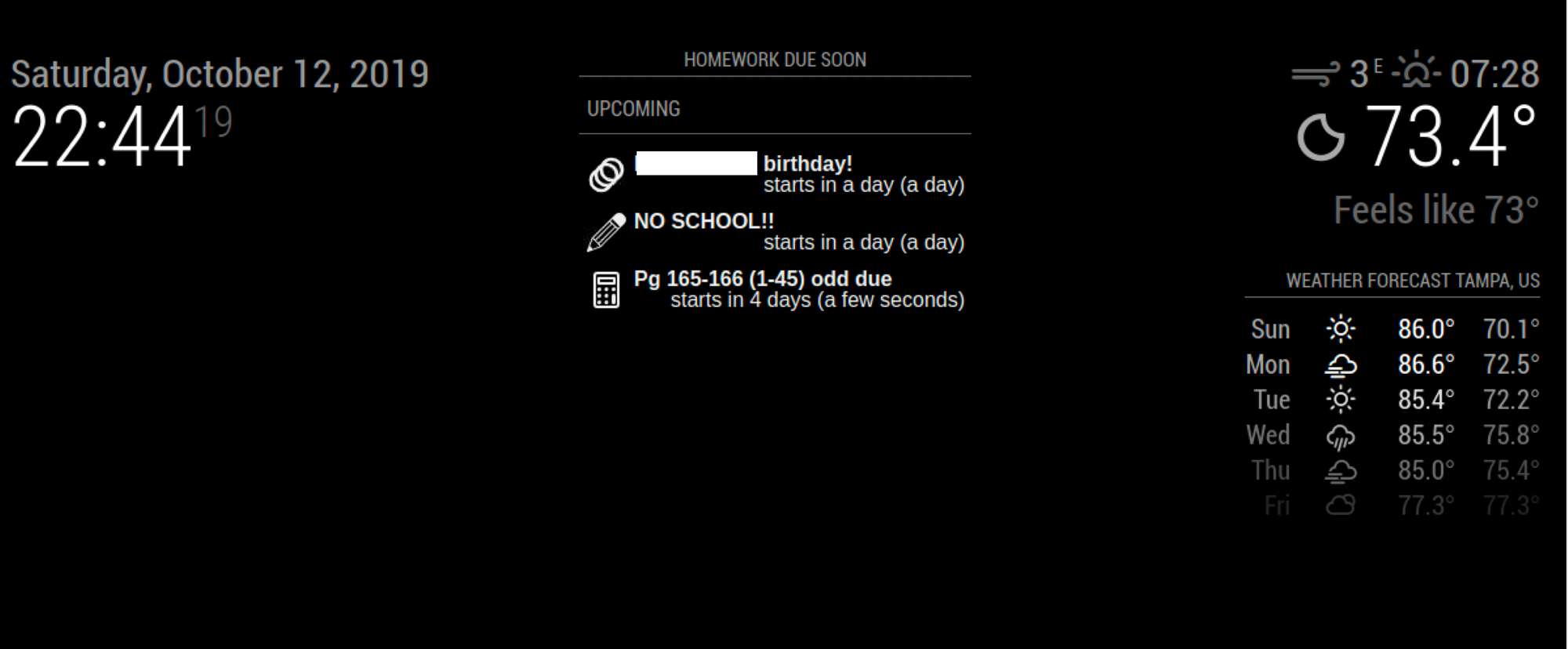
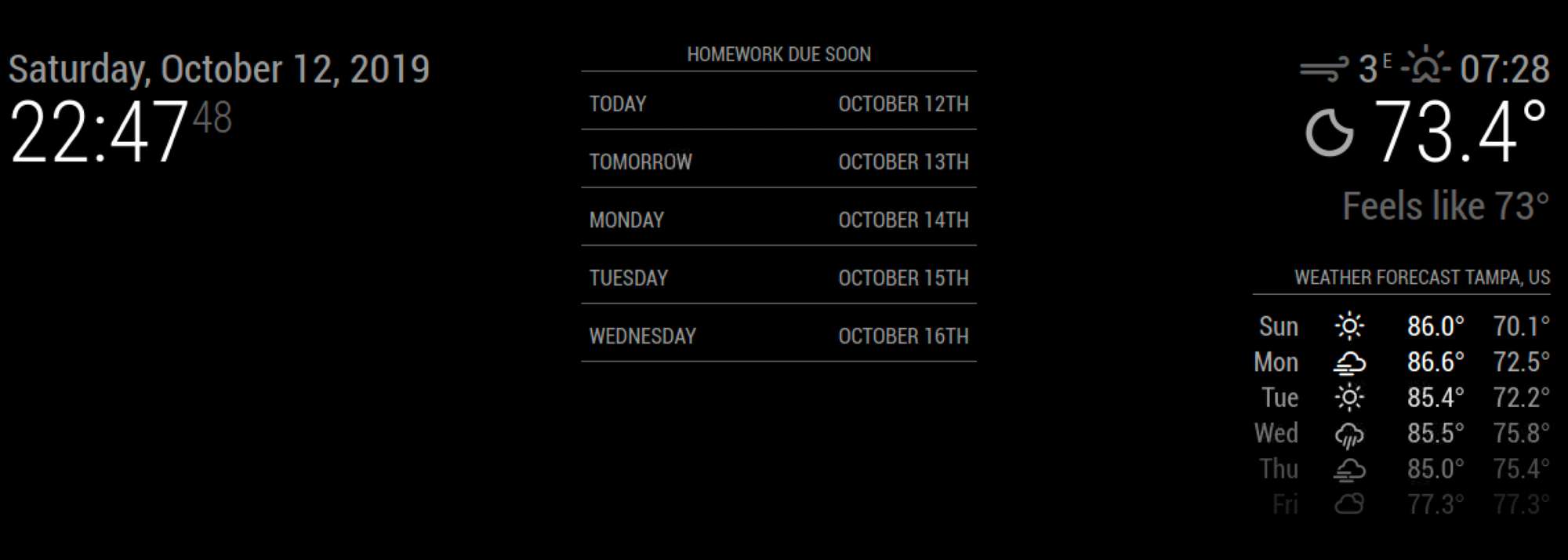
      1. It doesn’t seem to always load the data. Sometimes it works, sometimes it doesn’t. I’ve been trying to narrow this down. I’ve got 6 calendars I’m loading to show my sons homework. I put them in an upcoming and I see some data so I know they are loading (at least 3 of them), but I switch to daily (5 slots) and I get nothing even though some of the data is for the next few days.

      One second view it loads one calendar fine, but the moment I add a second the data disappears. I

      Config for upcoming view -
      {
      name: “Homework”,
      mode: “upcoming”,
      title: “Homework Due Soon”,
      position: “top_center”,
      calendars: [“Algebra”, “Latin”, “Transitions”, “Ceramics”,“English”, “Biology”],
      maxItems: 50,
      maxDays: 5,
      },
      0_1570934894744_Screen Shot 2019-10-12 at 10.44.20 PM.png

      for daily view (not working)-
      {
      name: “Homework”,
      mode: “daily”,
      title: “Homework Due Soon”,
      position: “top_center”,
      calendars: [“Algebra”, “Latin”, “Transitions”, “Ceramics”,“English”, “Biology”],
      slotCount:5,
      hideOverflow: false
      },
      0_1570934908018_Screen Shot 2019-10-12 at 10.47.48 PM.png

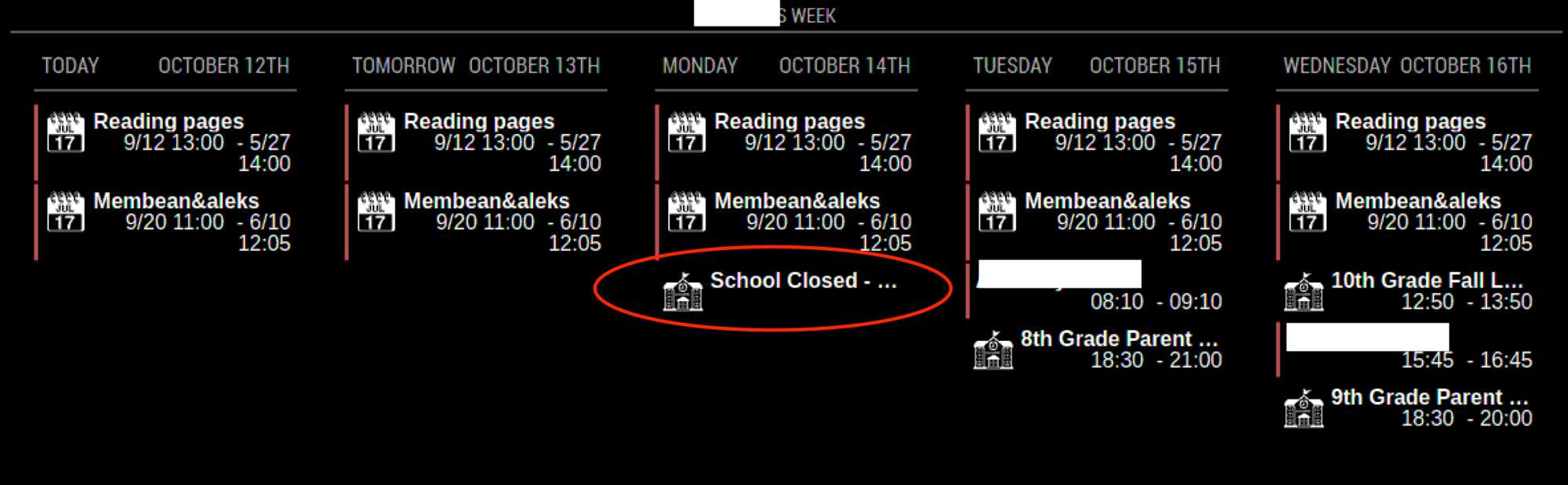
      1. In a daily view when the data is getting cut off because it’s too long for the column width. What do I need to change to remove some of the column spacing or expand the height of each data cell based on the data.
        0_1570935270045_Screen Shot 2019-10-12 at 4.35.19 PM.png

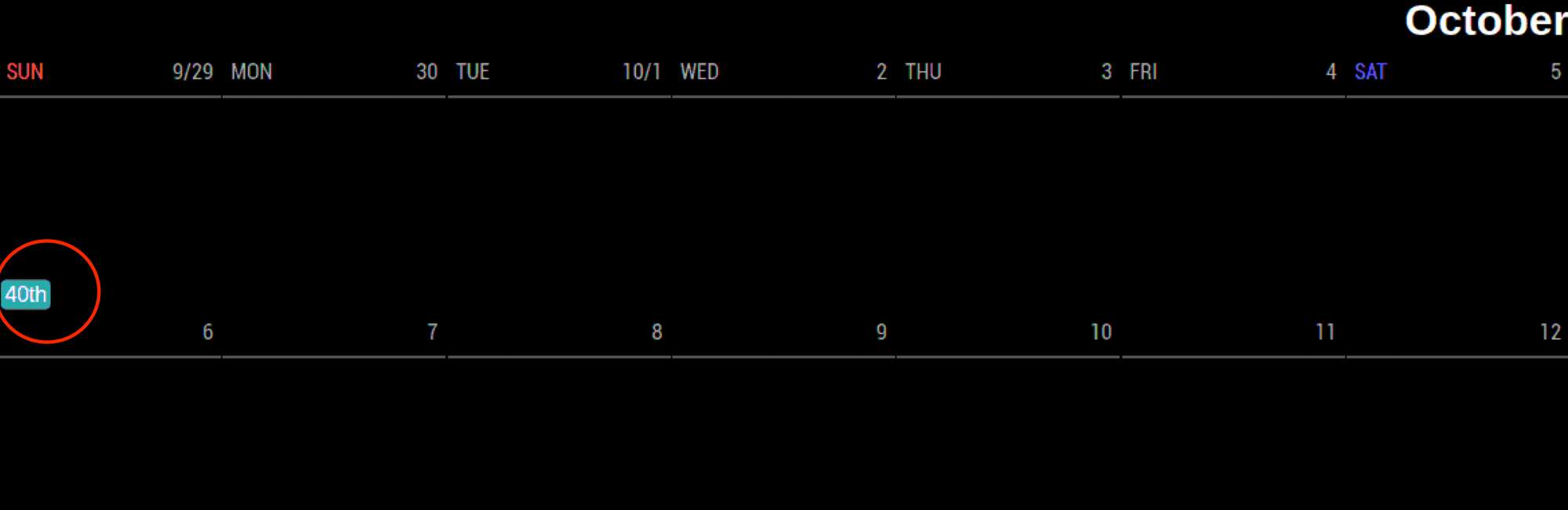
      2. How do I hide the Week count (41st ,42nd, etc) in a monthly view. 0_1570934373594_Screen Shot 2019-10-12 at 4.35.50 PM.png
      posted in Utilities
      G
      gonzonia
    • RE: MMM-MealViewer

      @cowboysdude Thanks. I’m happy to use a JS implementation as well. The family calendar I created is just hitting a wordpress site I’m hosting on a mac mini. PHP was just so that it could load pre-render but the main thing is just to get the meal list populated on the calendar screen instead of having a separate tab open in the browser. I haven’t had a lot of time to try to look into this or switching to MM. I hate to be hijacking a MM thread but this is literally the only discussion I’ve found of anyone accessing the MealViewer data like this.

      posted in Development
      G
      gonzonia
    • RE: MMM-MealViewer

      @kazanjig I know this post is old, but I’m trying to accomplish this in a different way. I was trying to do it with PHP instead and the XML coming back from the Mealviewer API isn’t recognized but when I load it directly in my browser all looks good. Would you be willing to share all the code you’re using to load this? I’m not as familiar with how the MM code works and how you’re plugging this into the whole thing. My implementation is just a shared home calendar view that I rolled myself (I may have to look into implementing MM though now that I’ve stumbled upon all this).

      posted in Development
      G
      gonzonia
    • 1 / 1