@sdetweil Sorry, first time I’ve seen that. Good to know. Thanks.
H
Offline
A New Chapter for MagicMirror: The Community Takes the Lead
Read the statement by Michael Teeuw here.
Read the statement by Michael Teeuw here.
Posts
-
RE: OpenWeather API CAlls
-
RE: OpenWeather API CAlls
@sdetweil said in OpenWeather API CAlls:
what do you have the refresh interval set for
don’t know. don’t see it in the modulewhat is the default if you didn’t set it yourself?
don
t know what the default it.
click the documentation link above
no link. -
OpenWeather API CAlls
Now that OpenWeather needs a credit card for API calls over 1000 per day, I’m curious how many API calls the Weather module makes per day. I’ve got 2 instances of it running.
-
RE: Openweathermap api works for 2 of my modules but not for Hourly
@sdetweil
Thanks for your help, will do. -
RE: Openweathermap api works for 2 of my modules but not for Hourly
@sdetweil possible they changed the plan. I’m using free.
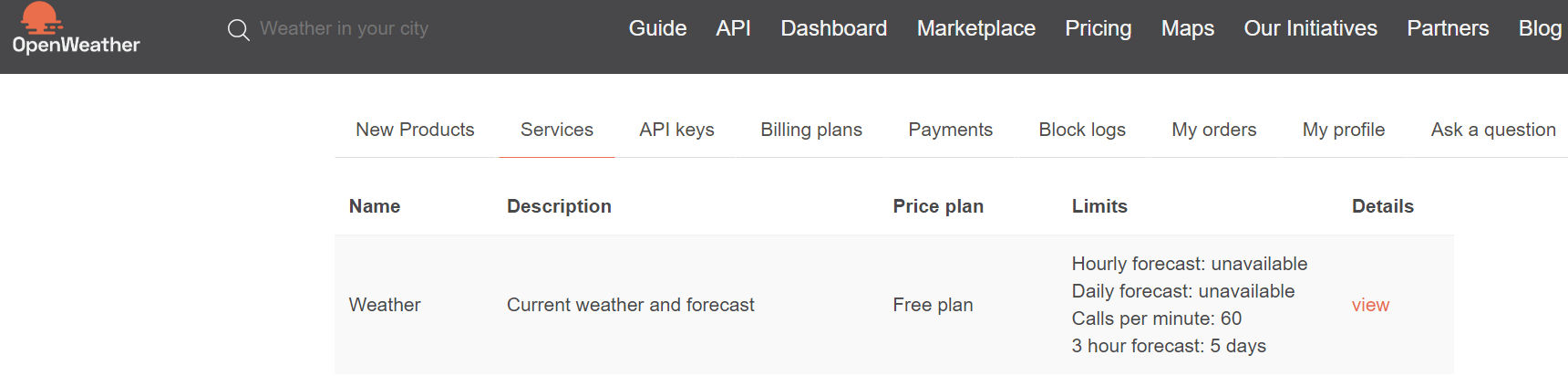
-
RE: Openweathermap api works for 2 of my modules but not for Hourly
@sdetweil Maybe my mistake. I’m using the new ver 3 api. Should I be using the previous version I had running with no issues?
-
RE: Openweathermap api works for 2 of my modules but not for Hourly
I’ve added it here. No luck.
{ module: "weather", position: "top_right", header: "Hourly", config: { weatherProvider: "openweathermap", type: 'hourly', apiVersion :'3.0', apiKey: "new api key", units: "imperial", maxEntries: 10, fadePoint: 0.12, showPrecipationAmount: true, AnimationSpeed: 1000, ignoreToday: true, colored: true, fade: false, timeFormat: 12, showFeelsLike: true, lat: 40.7128, lon: -74.0060, } } -
Openweathermap api works for 2 of my modules but not for Hourly
        module: "weather",
        position: "top_right",
        header: "Hourly",
        config: {
                weatherProvider: "openweathermap",
                type: 'hourly',
                apiKey: "new api key",
                units: "imperial",
                maxEntries: 10,
                fadePoint: 0.12,
	    showPrecipationAmount: true,
	    AnimationSpeed: 1000,
                ignoreToday: true,
                colored: true,
                fade: false,
                timeFormat: 12,
                showFeelsLike: true,
                lat: 40.7128,
                lon: -74.0060,
	}
I’ve got a new api key, just replaced the old one. It was working fine. Any ideas why this might not be working?
-
RE: Touchscreen Family Dashboard
@tjat very impressive. Especially about the ChatGPT aspect.
-
MMM-AQI Not updating
Re: MMM-AQI
It seems to be running. But doesn’t seem to change the value in the aqi index. Any idea why?
-
RE: MMM-Live-Stream-TV Black Screen
@sdetweil There were 3 processes for Live Stream
i@raspberrypi:~/MagicMirror $ ps -ef | grep “Live-Stream”
pi 7037 7014 0 13:52 pts/1 00:00:00 /bin/sh -c ./modules/MMM-Live-Stream-TV/node_modules/@warren-bank/hls-proxy/hls-proxy/bin/hlsd.js --port “8181”
pi 7038 7037 3 13:52 pts/1 00:00:01 node ./modules/MMM-Live-Stream-TV/node_modules/@warren-bank/hls-proxy/hls-proxy/bin/hlsd.js --port 8181
pi 7157 6922 0 13:53 pts/0 00:00:00 grep --color=auto Live-StreamI’ve killed them and then restarted Magi Mirror and again get 3 processes. I tired killing only 2 of the 3, no luck.
-
RE: MMM-Live-Stream-TV Black Screen
@sdetweil > magicmirror@2.21.0 start
DISPLAY=“${DISPLAY:=:0}” ./node_modules/.bin/electron js/electron.js
[23.11.2022 12:20.28.906] [LOG] Starting MagicMirror: v2.21.0
[23.11.2022 12:20.28.919] [LOG] Loading config …
[23.11.2022 12:20.28.933] [LOG] Loading module helpers …
[23.11.2022 12:20.28.937] [LOG] No helper found for module: MMM-pages.
[23.11.2022 12:20.28.941] [LOG] No helper found for module: MMM-page-indicator
.
[23.11.2022 12:20.28.944] [LOG] No helper found for module: clock.
[23.11.2022 12:20.28.955] [LOG] Initializing new module helper …
[23.11.2022 12:20.28.958] [LOG] Module helper loaded: MMM-TouchAlarm
[23.11.2022 12:20.28.963] [LOG] Initializing new module helper …
[23.11.2022 12:20.28.965] [LOG] Module helper loaded: MMM-RAIN-RADAR
[23.11.2022 12:20.28.968] [LOG] No helper found for module: weather.
[23.11.2022 12:20.29.259] [LOG] Initializing new module helper …
[23.11.2022 12:20.29.260] [LOG] Module helper loaded: MMM-MQTT
[23.11.2022 12:20.29.291] [LOG] Initializing new module helper …
[23.11.2022 12:20.29.303] [LOG] Module helper loaded: MMM-Live-Stream-TV
[23.11.2022 12:20.29.304] [LOG] No helper found for module: weatherforecast.
[23.11.2022 12:20.29.305] [LOG] All module helpers loaded.
[23.11.2022 12:20.29.506] [LOG] Starting server on port 8080 …
[23.11.2022 12:20.29.534] [LOG] Server started …
[23.11.2022 12:20.29.536] [LOG] Connecting socket for: MMM-TouchAlarm
[23.11.2022 12:20.29.537] [LOG] Starting module helper: MMM-TouchAlarm
[23.11.2022 12:20.29.538] [LOG] Connecting socket for: MMM-RAIN-RADAR
[23.11.2022 12:20.29.539] [LOG] Starting node helper for: MMM-RAIN-RADAR
[23.11.2022 12:20.29.540] [LOG] Connecting socket for: MMM-MQTT
[23.11.2022 12:20.29.541] [LOG] MMM-MQTT: Starting node helper
[23.11.2022 12:20.29.542] [LOG] Connecting socket for: MMM-Live-Stream-TV
[23.11.2022 12:20.29.577] [LOG] [MMM-Live-Stream-TV]:: Starting node_helper fo
r module [MMM-Live-Stream-TV]
[23.11.2022 12:20.29.578] [LOG] Sockets connected & modules started …
[23.11.2022 12:20.30.200] [LOG] Launching application.
[23.11.2022 12:20.30.884] [ERROR] node subprocess error.message: Command failed:
./modules/MMM-Live-Stream-TV/node_modules/@warren-bank/hls-proxy/hls-proxy/bin/
hlsd.js --port “8181”
node:events:491
throw er; // Unhandled ‘error’ event
^Error: listen EADDRINUSE: address already in use :::8181
at Server.setupListenHandle [as _listen2] (node:net:1463:16)
at listenInCluster (node:net:1511:12)
at Server.listen (node:net:1599:7)
at /home/pi/MagicMirror/modules/MMM-Live-Stream-TV/node_modules/@warren-bank
/hls-proxy/hls-proxy/servers/start_http.js:12:12
Emitted ‘error’ event on Server instance at:
at emitErrorNT (node:net:1490:8)
at processTicksAndRejections (node:internal/process/task_queues:83:21) {
code: ‘EADDRINUSE’,
errno: -98,
syscall: ‘listen’,
address: ‘::’,
port: 8181
}[23.11.2022 12:20.30.886] [ERROR] node subprocess error: Error: Command failed:
./modules/MMM-Live-Stream-TV/node_modules/@warren-bank/hls-proxy/hls-proxy/bin/h
lsd.js --port “8181”
node:events:491
throw er; // Unhandled ‘error’ event
^Error: listen EADDRINUSE: address already in use :::8181
at Server.setupListenHandle [as _listen2] (node:net:1463:16)
at listenInCluster (node:net:1511:12)
at Server.listen (node:net:1599:7)
at /home/pi/MagicMirror/modules/MMM-Live-Stream-TV/node_modules/@warren-bank
/hls-proxy/hls-proxy/servers/start_http.js:12:12
Emitted ‘error’ event on Server instance at:
at emitErrorNT (node:net:1490:8)
at processTicksAndRejections (node:internal/process/task_queues:83:21) {
code: ‘EADDRINUSE’,
errno: -98,
syscall: ‘listen’,
address: ‘::’,
port: 8181
}[1888:1123/122031.156354:ERROR:viz_main_impl.cc(186)] Exiting GPU process due to
errors during initialization
[1929:1123/122031.343024:ERROR:gpu_memory_buffer_support_x11.cc(44)] dri3 extens
ion not supported.
[1893:1123/122031.430701:ERROR:command_buffer_proxy_impl.cc(126)] ContextResult:
:kTransientFailure: Failed to send GpuControl.CreateCommandBuffer.
[23.11.2022 12:20.36.453] [LOG] nodeHelper, socketNotificationReceived MMM-Tou
chAlarm-STARTED {
config: {
minutesStepSize: 5,
snoozeMinutes: 20,
alarmTimeoutMinutes: 1,
alarmSound: true,
alarmSoundFile: ‘Bach.mp3’,
alarmSoundMaxVolume: 1,
alarmSoundFade: true,
alarmSoundFadeSeconds: 1,
debug: false,
defaultHour: 8,
defaultMinutes: 0,
alarmStoreFileName: ‘alarm.json’
},
alarmFile: ‘modules/MMM-TouchAlarm/alarm.json’
}
[23.11.2022 12:20.36.502] [LOG] nodeHelper, socketNotificationReceived MMM-Tou
chAlarm-ALARM-CHANGED { active: false, nextAlarm: null, hour: 8, minutes: 0 }
[23.11.2022 12:20.37.786] [LOG] MMM-MQTT: Starting client for localhost:1883 u
ser user
[23.11.2022 12:20.37.787] [LOG] MMM-MQTT: Connecting to mqtt://localhost:1883
[23.11.2022 12:20.38.039] [LOG] MMM-MQTT connected to mqtt://localhost:1883
[23.11.2022 12:20.38.040] [LOG] MMM-MQTT: subscribing to WillTemp,Main_Floor,B
asement,Basement_Humidity
[23.11.2022 12:20.38.277] [LOG] Shutting down server…
[23.11.2022 12:20.38.278] [LOG] Stopping module helper: MMM-TouchAlarm
[23.11.2022 12:20.38.279] [LOG] Stopping module helper: MMM-RAIN-RADAR
[23.11.2022 12:20.38.279] [LOG] Stopping module helper: MMM-MQTT
[23.11.2022 12:20.38.280] [LOG] Stopping module helper: MMM-Live-Stream-TV -
RE: MMM-Live-Stream-TV Black Screen
@sdetweil Yes I did. I also checked my config and it comes up with no errors.
-
MMM-Live-Stream-TV Black Screen
I’ve installed it, I think correctly. All I get is a black screen. I tried using the exact code in case that was the issue. Also checked the config, it’s good. I do get the text from the example of
Channel 0 Empire StateTrying to use this to stream cnn using the url.
https://tve-live-lln.warnermediacdn.com/hls/live/586495/cnngo/cnn_slate/VIDEO_0_3564000.m3u8?Any help would be appreciated.
-
RE: Fahrenheit to MQTT
The best way for me to do it was to use node-red. Fantastic program for us newbies with little coding experience. Highly recommended. I’m running it on the pi that is sending the values to the MM pi. Works great.
-
Fahrenheit to MQTT
I’ve got a program that converts Celsius to Fahrenheit for the ds18b20 temperature probe on a Pi that I’ll be putting outdoors. I’d like to use MQTT to send the output of this program to another PI with a weather station indoors. I’ve got it all setup except I don’t know how to get the output of the program which prints the converted temperature to MQTT. Any help would be appreciated.
-
RE: Display Fahrenheit using DS18B20 and MQTT from remote Pi
I did find it could be done when a template was available, something like this one for Home Assistant
code_text ```climate: platform: mqtt name: "Master Bedroom" current_temperature_topic: "homeassistant/sensors/flair/puck/Master Bedroom-30f/Temperature" current_temperature_template: "{{(value * 9/5)+32}}" precision: 0.1 -
Display Fahrenheit using DS18B20 and MQTT from remote Pi
I’ve got one Pi with the DS18B20 sensor and am sending the values using MQTT to another Pi running Magic Mirror. Thanks everyone who provide these great modules. I’d really like it to display fahrenheit instead of celsius. Any help would be appreciated. And my coding skills are rudimentary!
-
RE: Autobrightness 7" Touchscreen based on Ambient Light
@hengy
Well it seems to be working. What was missing from the cut and paste I did of the code was#! / Usr / local / bin / pythonSeems /usr/local/bin/python doesn’t exist on my pi. I changed it to usr/bin/python. Also
okunan means read in Turkish. I changed it back to read. I ran this in a terminal and it seems to work. Nice, I now have a screen which changes to ambient light. -
RE: Autobrightness 7" Touchscreen based on Ambient Light
Well I’ve done the wiring. I think it’s correct. I’m wiring directly with the pins on the pi.
I get the error
sudo: unable to execute ./backlight.py: No such file or directoryHere’s the code. Any help would be appreciated.
import RPi.GPIO as GPIO
import time
In gpıo.setmo (GPIO.BOARD)
#ldr reading pisi identification
pin_to_ldr = 7
def rc_time (pin_to_ldr):
	count = 0

	#Output on the pin for
	GPIO.setup (pin_to_ldr, GPIO.OUT)
	GPIO.output (pin_to_ldr, GPIO.LOW)
	time.sleep (0.01)

	#Change the pin back to input
	GPIO.setup (pin_to_ldr, GPIO.IN)
	#Count until the pin goes high
	while (GPIO.input (pin_to_ldr) == GPIO.LOW):
        	count + = 1

	return count

#Catch when script is interrupted, cleanup correctly
try:
	# Main loop
	while True:
		bl = open ('/ sys / class / backlight / rpi_backlight / brightness', 'w'
		read = 0
		read = rc_time (pin_to_ldr)
		if read