MagicMirror Forum
    • Recent
    • Tags
    • Unsolved
    • Solved
    • MagicMirror² Repository
    • Documentation
    • 3rd-Party-Modules
    • Donate
    • Discord
    • Register
    • Login
    • Profile
    • Following 0
    • Followers 0
    • Topics 1
    • Posts 5
    • Groups 0
    J Offline
    1. Home
    2. Jhonte
    3. Posts
    A New Chapter for MagicMirror: The Community Takes the Lead
    Read the statement by Michael Teeuw here.

    Posts

    Recent Best Controversial
    • RE: MMM-ChoresMachine

      MMM-ChoresMachine 1.1.0: chores can now bring something along every few times, like changing the robot vacuum’s bag on every 4th water refill, and the mirror shows it under the chore when it’s that time (“+ Change the bag”). The rest stays out of sight. Update with git pull in the module folder; turn it off with

      showAddons: false
      
      posted in Utilities
      J
      Jhonte
    • MMM-ChoresMachine

      Hi all,

      I made a module for our hallway mirror that shows the household chores due today, from my app Chores Machine.
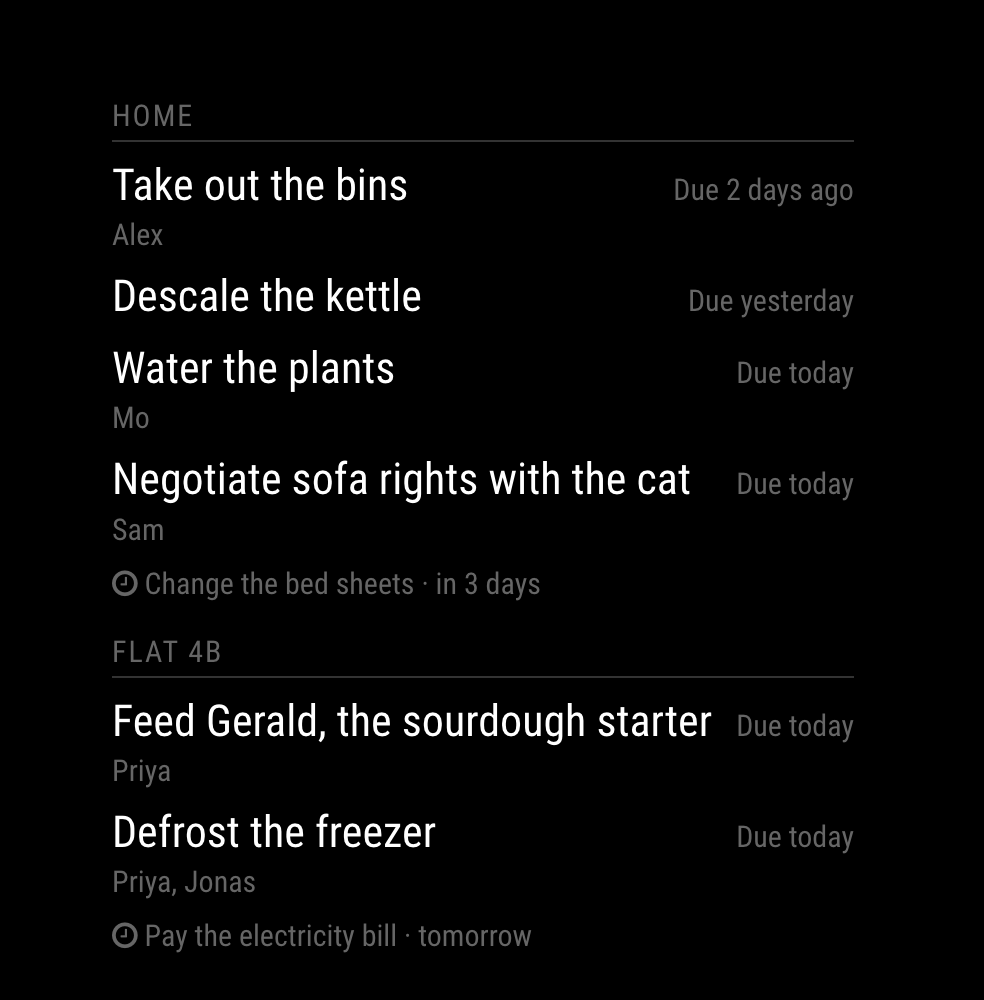
      MMM-ChoresMachine

      What it does

      • Shows only what is due now. Chores stay hidden until their day comes, so the mirror stays calm.
      • One line per chore, with whose turn it is.
      • Several lists (family, flat, plants…) each get their own heading.
      • When nothing is due it says so and stays quiet.
      • English and Swedish included, and every line can be reworded with strings.
      • No dependencies, no npm install. The token stays on the server side (node_helper), never in the browser.

      Good to know before installing: the feed needs Chores Machine Pro (iOS/Android, 7-day free trial). The app itself is free for your own chores. Pro is the sharing part, and the mirror feed comes with it.

      Install
      cd ~/MagicMirror/modules
      git clone https://github.com/Jhonte/MMM-ChoresMachine.git

      Then make a link token in the app (You → API access → Make a link) and add:

      {
        module: "MMM-ChoresMachine",
        position: "top_right",
        header: "Chores",
        config: { token: "cm_…" }
      }
      

      All the options are in the README: https://github.com/Jhonte/MMM-ChoresMachine

      It has been running on my own mirror for a while. Feedback, bugs and translations are very welcome, either here or as GitHub issues.

      posted in Utilities
      J
      Jhonte
    • RE: Motion Detector

      @phoenixrising That is only an override for the defaults? Or am I missing something here. Working the same way with or without the config part.

      posted in Utilities
      J
      Jhonte
    • RE: Motion Detector

      @phoenixrising said in Motion Detector:

      @Jhonte , post your config file.

      /* Magic Mirror Config Sample
       *
       * By Michael Teeuw http://michaelteeuw.nl
       * MIT Licensed.
       */
      
      var config = {
      	port: 8080,
      	ipWhitelist: ["127.0.0.1", "::ffff:127.0.0.1", "::1"],
      
      	language: 'en',
      	timeFormat: 24,
      	units: 'metric',
      
      	modules: [
      		{
      			module: 'motiondetector'
      		}
      	]
      
      };
      
      /*************** DO NOT EDIT THE LINE BELOW ***************/
      if (typeof module !== 'undefined') {module.exports = config;}
      
      posted in Utilities
      J
      Jhonte
    • RE: Motion Detector

      @alexyak I’m using raspberry pi 3 with the camera module. And the motiondetection module.

      Could not initiate the module before I ran sudo modprobe bcm2835-v4l2 but even after I never get any motion “score”.

      I inspected the diffImageData it all contained 0,0,0,255 in series…

      The camera works when using raspistill. Any hints of what I can test to debug the camera output within electro?

      posted in Utilities
      J
      Jhonte
    • 1 / 1